DIM TOOL(s) increase or decrease fonts

Next
 From:  stefano (LIGHTWAVE)
11538.1 

Also see post #4 below, 'new' tool, added 3rd June 2026

__________________________________________________

@Sept 2024:
Just posting a script Michael did me the other day.
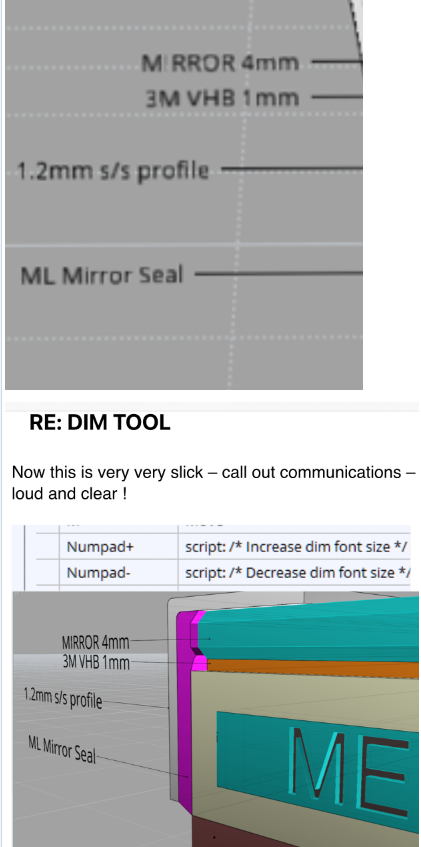
If you use this script or both of them it allows you to zoom into the screen and get dimension sizes looking great

I use these scripts in conjunction with settings > “scaling dimensions by screen size”


Increase font size:

script: /* Increase dim font size */ var dims = moi.geometryDatabase.getObjects().getAnnotations(); for ( var i = 0; i < dims.length; ++i ) { var dim = dims.item(i); if ( dim.fontName == '' ) { dim.fontName = moi.ui.fontName; dim.fontPtSize = moi.ui.fontSize; } dim.fontPtSize += 3.0; }

Decrease font size:

script: /* Decrease dim font size */ var dims = moi.geometryDatabase.getObjects().getAnnotations(); for ( var i = 0; i < dims.length; ++i ) { var dim = dims.item(i); if ( dim.fontName == '' ) { dim.fontName = moi.ui.fontName; dim.fontPtSize = moi.ui.fontSize; } dim.fontPtSize -= 3.0; if ( dim.fontPtSize < 1.0 ) { dim.fontPtSize = 1.0; } }
EDITED: 3 Jun by LIGHTWAVE

  Reply Reply More Options
Post Options
Reply as PM Reply as PM
Print Print
Mark as unread Mark as unread
Relationship Relationship
IP Logged

Previous
Next
 From:  Mik (MIKULAS)
11538.2 In reply to 11538.1 
Excellent scripts, I missed them too :-)
Thanks a lot.
Mik
  Reply Reply More Options
Post Options
Reply as PM Reply as PM
Print Print
Mark as unread Mark as unread
Relationship Relationship
IP Logged

Previous
Next
 From:  Marbleman
11538.3 
Excellent, I've just found these too!
www.jameselliott.co.uk
  Reply Reply More Options
Post Options
Reply as PM Reply as PM
Print Print
Mark as unread Mark as unread
Relationship Relationship
IP Logged

Previous
Next
 From:  stefano (LIGHTWAVE)
11538.4 In reply to 11538.3 
Pleased to attach, a new prototype script / tool and it's seemingly working nicely (*).
Sets or sizes dim text font heights fast, interactively. You can use mouse or keyboard...

Command line word & script name "dimfont"


Run script and then select dim-annotation objects:


OR select objects and run the script....

Allows multi dim-text object selections BEFORE running the script...(not during)


Might be expanded to cover other elements 'another day'...
* feedback/input is welcome.

OTHER: Slider goes upto height "200", if you need bigger overwrite using <height> field,

How to 'install' scripts & 'assign' shortcuts:
Install scripts
Assign shortcut keys via options/shortcuts

EDITED: 3 Jun by LIGHTWAVE


  Reply Reply More Options
Post Options
Reply as PM Reply as PM
Print Print
Mark as unread Mark as unread
Relationship Relationship
IP Logged

Previous
 From:  mk (MARKY)
11538.5 In reply to 11538.4 
Great tool, thank you.

BTW - I guess it's for Michael:

Is there a way to make an Arrow to be screen aligned too?
  Reply Reply More Options
Post Options
Reply as PM Reply as PM
Print Print
Mark as unread Mark as unread
Relationship Relationship
IP Logged
 

Reply to All Reply to All