Show messages:
1-19
20-39
40-51
From: stefano (LIGHTWAVE)
Hi Burrman,
Was just thinking the approach of Michael's is great on single letters or a few letters
...but what about if there is a whole paragraph of text where many of the letters could be
quite small?
Points noted about STL* and I've discounted that route...
so now wondering, could a bitmap>3d route work nice e.g.
max's heightmap?
 .jpg)
Greyscale bitmaps of some "I" files attached. This was sent to me from one of the technical
guys at Cadlink Engravelab/Signlab software. They don't do stl but do can do
bitmaps of toolpaths easy and fast...
As I don't have heightmap installed and had issues knowing where to install it, hoping someone can try...
Cheers
Stefano
*STL thread here if anyone interested:
http://moi3d.com/forum/messages.php?webtag=MOI&msg=8860.1Attachments:
 I1.zip
Image Attachments:
RE Stl 3d chisel text - Message (HTML) .jpg
From: Frenchy Pilou (PILOU)
<< but what about if there is a whole paragraph of text where many of the letters could be
quite small?
Just make one alphabet with your font wished! ;)
So you can write any text at any size!
From: BurrMan
""""""but what about if there is a whole paragraph of text where many of the letters could be
quite small?""""
I think you just need to move into poly apps. Just about ALL of them just do chisel text naturally...
Heightmap route wont give you very crisp results and i believe you would run into the same thing. Parts will be hard to achieve. Just look at a capital N in the times new roman and look at michaels solution against it...
You could make an attempt as frenchy said and take a month to model every charactor of the times new roman uoper and lower case.
But "paragraphs" would still be pretty tedious...
From: stefano (LIGHTWAVE)
Frenchy & Burrman,
Thanks for your feedback. I like some of the workflow here
http://www.rushfx.net/chisel-type-using-spline-fields-in-cinema-4d-from-cineversity/
(Slightly out of budget)
From: Frenchy Pilou (PILOU)
Maybe you can use the free Fusion 360 and export as Step format for MOI? ;)
But alas you must "draw it" first as in Moi! --- maybe with more easy Fillets...not sure in this case... :)
I just made here the beginning :D (then imported as Step in Moi)


From: Barry-H
Hi,
It's possible in Moi using sweep but requires splitting profile into sections and in some cases extending them.
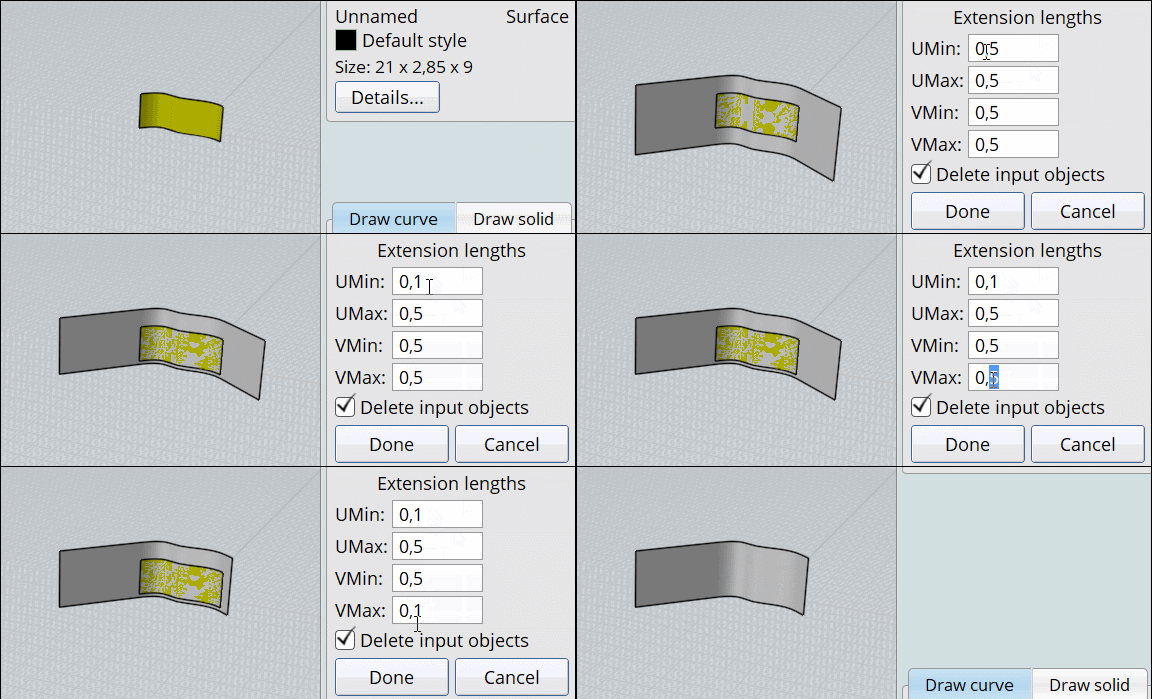
Trimming is tricky but I used Michael's FlowExtendSurf script in places to help with this.
Cheers
Barry
.png)
Image Attachments:
Screenshot (434).png
From: Frenchy Pilou (PILOU)
FlowExtendSurf
https://moi3d.com/forum/index.php?webtag=MOI&msg=9747.7
From: bemfarmer
For MoI serif font Times New Roman, used the sweep technique with two 45 degree lines, for D and R. Manual trimming required. Did C with Merge. The 3d letters look good.
- Brian
From: stefano (LIGHTWAVE)
Cheers chaps will take a look at some of these routes but not likely to dive into fusion at moment.
Unless it's easy to get a finished result...
@Brian- I presume setting the 45degree line at a length greater than the widest 'stroke width'
of the letters should cover most shapes and mean minimum extensions required....
Btw...i also challenged a friend (autocad expert user)
with these but he was not confident he could do any faster.
Work in progress!
From: bemfarmer
Somehow, my custom style colors reverted to default. Colors were easily restored from AppData colors2020...3dm file.
-B
From: Frenchy Pilou (PILOU)
The more speedy will be to found a 3D Font yet existing and with nurbs export 3D format!
From: bemfarmer
https://www.adobepress.com/articles/article.asp?p=1743636&seqNum=2
Only 256 - 33 - 2 characters to do. Times 5?, plus unicode, plus spacing + ? :-)
I wonder if Flow could convert the 3D fonts to italics?
Bold?
- Brian
Only about 306,729 +/- fonts exist today, to search. (per one website:-)
Would the 3D font actually be classified as a font?
Show messages:
1-19
20-39
40-51

