NodeEditor Plus [Unofficial]
 1-18  …  79-98  99-118  119-131

Previous
Next
 From:  Frenchy Pilou (PILOU)
11614.119 
Works as aspected! Sorry in French but...


Pinky curve is planar and has same length than green one!
It's the same for you ?

Curious! https://moiscript.weebly.com/uploads/3/9/3/8/3938813/planar_curves.3dm

EDITED: 15 Jan by PILOU

  Reply Reply More Options
Post Options
Reply as PM Reply as PM
Print Print
Mark as unread Mark as unread
Relationship Relationship
IP Logged

Previous
Next
 From:  Barry-H
11614.120 In reply to 11614.119 
Pilou,
this is why I am not sure if I am using it correctly.
The unwrapped in these cases are 1 x 1 but if scaled looks correct.
In others they are scaled correctly in one direction only.
Cheers
Barry


EDITED: 15 Jan by BARRY-H

Attachments:

  Reply Reply More Options
Post Options
Reply as PM Reply as PM
Print Print
Mark as unread Mark as unread
Relationship Relationship
IP Logged

Previous
Next
 From:  Frenchy Pilou (PILOU)
11614.121 
seems there is an error when i want copy a node...

  Reply Reply More Options
Post Options
Reply as PM Reply as PM
Print Print
Mark as unread Mark as unread
Relationship Relationship
IP Logged

Previous
Next
 From:  Frenchy Pilou (PILOU)
11614.122 
A long time to not use this sort of thing! :)

How to update an object to the node ?
say 3 different cubes are drawn : how to integrated them as 3 different nodes selected ?

EDITED: 23 Sep by PILOU

  Reply Reply More Options
Post Options
Reply as PM Reply as PM
Print Print
Mark as unread Mark as unread
Relationship Relationship
IP Logged

Previous
Next
 From:  Frenchy Pilou (PILOU)
11614.123 
No Video like this for NodeEditor Plus ?

---
Pilou
Is beautiful that please without concept!
My Moi French Site
  Reply Reply More Options
Post Options
Reply as PM Reply as PM
Print Print
Mark as unread Mark as unread
Relationship Relationship
IP Logged

Previous
Next
 From:  MO (MO_TE)
11614.124 In reply to 11614.121 
Hi PILOU,
>> seems there is an error when i want copy a node...

Thanks for reporting the issue.
I couldn't regenerate the error here, but if you're still getting this error, please post the .nod file, so I can take a look.
Could you tell me which method you used to copy the nodes that caused the issue?
1- Right clicking on nodes and copy
2- Pressing Ctrl key and dragging nodes
3- Using shortcut ( Ctrl+C )

>> 3 different cubes are drawn : how to integrated them as 3 different nodes selected ?

You can use the "Concat" node under "General/Concat". ( See attached node )
Right click on the node to add more input slots via"Inputs " menu.
If you need to remove a slot, right click on the last input slot and select "Remove Slot".

>> No Video like this for NodeEditor Plus ?

Unfortunately, There is not much tutorial contents for Node Editor Plus right now.
Here are a few examples. I'll update it if I find more.
https://moi3d.com/forum/messages.php?webtag=MOI&msg=11886.1
https://moi3d.com/forum/messages.php?webtag=MOI&msg=11887.1
Attachments:

Image Attachments:
Size: 9.5 KB, Downloaded: 4 times, Dimensions: 400x400px
  Reply Reply More Options
Post Options
Reply as PM Reply as PM
Print Print
Mark as unread Mark as unread
Relationship Relationship
IP Logged

Previous
Next
 From:  Frenchy Pilou (PILOU)
11614.125 
@ MO_TE
THx for the Infos!

No problem with your previous file .nod! :)


Fortunately, I kept my previous false one! :)

Same error with the 3 methods of copy on any of nodes!

It's a file generated by Ai maybe this explain that! ;)

Just ak you want and the Ai return a file Json format!

Just load it in a "text editor" and save it as a node file format .nod!

That is perfect for "normal people" like me because "Node coding" is not a so easy evident thing!

https://moiscript.weebly.com/uploads/3/9/3/8/3938813/inverse_fillet.nod

But as i don't now how even process with this new Node Editor Plus against the Official old original one by Max Smirnov... that i have quasi all documented... French / English ! ;)
https://moiscript.weebly.com/node.html

I can't help the Ai itself! :)

I am blocked how to select object(s) on the screen for integrate them on the Editor + ! :)
Given by the Ai !


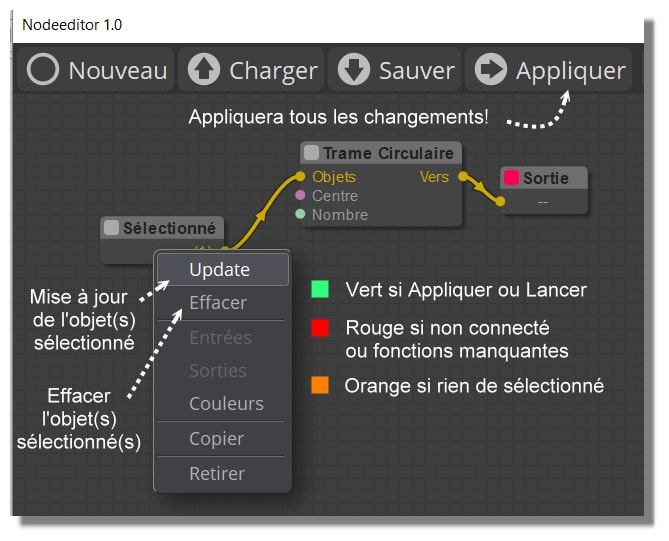
In the Old you made Update! :) (as shown following... Golden Age ! :)


Ps Your Tab Library is a must for have some examples!
Render here with free Gemini


EDITED: 24 Sep by PILOU

  Reply Reply More Options
Post Options
Reply as PM Reply as PM
Print Print
Mark as unread Mark as unread
Relationship Relationship
IP Logged

Previous
Next
 From:  MO (MO_TE)
11614.126 In reply to 11614.125 
Hi PILOU

Thanks for the nod file. I checked your file and Yes, As you've guested, the ai generated nod has some issues.

Node editor expect the links property to be a JSON Object where the keys are the stringified Link IDs. However, the AI model mistakenly generated it as a JSON Array padded with null values.

Here is your file:
code:
"links": [
	null,
	null,
	{"id": 2, "origin_id": 3, "origin_slot": 0, ...}
	...
]

It should be like this:
code:
"links": {
  "2": {"id": 2, "origin_id": 3, "origin_slot": 0, "target_id": 22, "target_slot": 0, "data": null},
  "3": {"id": 3, "origin_id": 45, "origin_slot": 0, "target_id": 22, "target_slot": 1, "data": null},
  "4": {"id": 4, "origin_id": 22, "origin_slot": 0, "target_id": 4, "target_slot": 0, "data": null},
  "30": {"id": 30, "origin_id": 61, "origin_slot": 0, "target_id": 45, "target_slot": 0, "data": null},
  "31": {"id": 31, "origin_id": 51, "origin_slot": 0, "target_id": 45, "target_slot": 1, "data": null},
  "32": {"id": 32, "origin_id": 62, "origin_slot": 0, "target_id": 61, "target_slot": 1, "data": null}
},


Also, there is another issue. Your AI model kind of guessing the node types and class names due to lake of information. This generates some "Missed" nodes (not existing nodes) that results in blocked graph.
In your file, you have "Objects/Get Objects" node, That's not a correct node inside node editor. The correct node type is "Select/Select Scene Objects". That's why you don't get the update. The same happens for the old node editor.

Here is the fixed nod.

  Reply Reply More Options
Post Options
Reply as PM Reply as PM
Print Print
Mark as unread Mark as unread
Relationship Relationship
IP Logged

Previous
Next
 From:  Frenchy Pilou (PILOU)
11614.127 In reply to 11614.126 
So i must put 2 nodes objects Select...
One for the main volume
One for the path ?

Edit : That was that! :) Select...
And cool that is the same process of Update/Clear than the Elephant! :)

All "Copy nodes" methods are working

Another thing why the reduce size of the close window (-) to the task Barre is not working ?

We must close the Node' screen with the red X then recall it with a shortcut... not a big deal but...

Have you something for enable Acis / Solid++ ?

Zoom fit the Screen Editor ?

Clear All Nodes ?

And how to keep the result ? (In fact exit of NodeEditor without lost result)

Perfect!
Now of course i must refine all that but its a return ... i am completely rusted! :)


Forgotten the slider : working too! :)
Don't Know why there no more dash lines ? :)


EDITED: 25 Sep by PILOU

  Reply Reply More Options
Post Options
Reply as PM Reply as PM
Print Print
Mark as unread Mark as unread
Relationship Relationship
IP Logged

Previous
Next
 From:  Frenchy Pilou (PILOU)
11614.128 
So with the free Vizcom! ;) (you can ask 1 k, 2 k , 4 k , 8 k)


If you want the exact original no problem! :) but curious result i must investigate! :) (orientation, perspective...

EDITED: 25 Sep by PILOU

  Reply Reply More Options
Post Options
Reply as PM Reply as PM
Print Print
Mark as unread Mark as unread
Relationship Relationship
IP Logged

Previous
Next
 From:  Frenchy Pilou (PILOU)
11614.129 
Of course now with any object you can make parametric Transform Array ! :)

Will be the next exercice! :) (for the Ai! ;)
But i make a little wait because today there is a new version Nano Banana (2.5) who must be released!
So servers are some perturbated! :)

EDITED: 26 Sep by PILOU

  Reply Reply More Options
Post Options
Reply as PM Reply as PM
Print Print
Mark as unread Mark as unread
Relationship Relationship
IP Logged

Previous
Next
 From:  Frenchy Pilou (PILOU)
11614.130 In reply to 11614.126 
@ MO_TE

Seems you have forgotten to answer to my previous post! :) (with numerous little questions :=)

Here my new, this time without any problem! :)

What is a base and target Frame for this one ?

next will be with a script! :)

Here the Array Grid

Of course didn't draw any knots !!! https://moiscript.weebly.com/elephantia.html

Can be a time saver in numerous cases! :)


EDITED: 28 Sep 8:30 by PILOU

  Reply Reply More Options
Post Options
Reply as PM Reply as PM
Print Print
Mark as unread Mark as unread
Relationship Relationship
IP Logged

Previous
 From:  MO (MO_TE)
11614.131 In reply to 11614.130 
Hi PILOU,

My apologies for the delay; I overlooked your question.
So, here it is, I hope I understand the questions correctly.

To use the objects from the moi viewport, node editor provides 3 nodes:
A: Select/Select Scene Objects
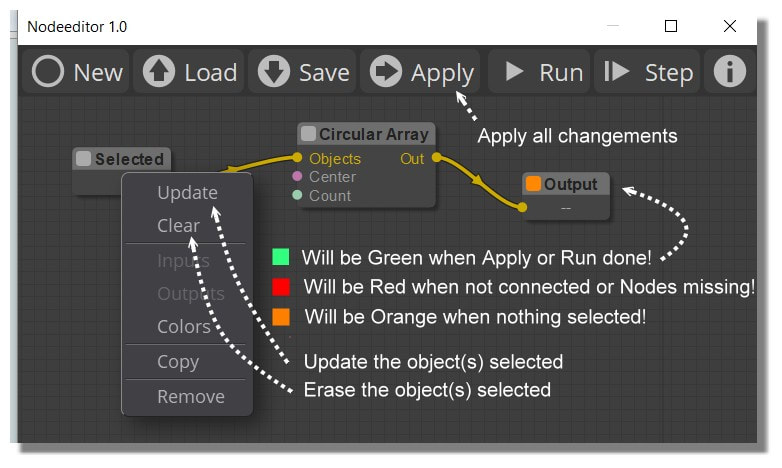
Select the object in the viewport, right click on the node and click on "Update". You can clear the selection by clicking on "Clear".
B: Select/Select By Style
Selecting the node opens a property panel, Choose the desired styled object from "Style" dropdown menu.
C: Select/Select By Name
Selecting the node opens a property panel, Choose the named object from "Name" dropdown menu.

>> why the reduce size of the close window (-) to the task Barre is not working ?
It seems moi disables the dialog's minimize button by default. However, You can resize the window to a smaller size.

>> Have you something for enable Acis / Solid++ ?
I'll add a new "Library" property in the fillet node.

>> Zoom fit the Screen Editor ?
Press the F key to fit the view to the selected nodes or fit to all nodes if nothing is selected.

>> Clear All Nodes ?
Click and hold the "New" button.

>> And how to keep the result ? (In fact exit of NodeEditor without lost result)
Click the "Apply" button to add the geometry to the scene.

>> What is a base and target Frame for this one ? (Array3D node)
This is an older node ported from Max Smirnov's "Array3D" command, so I may be slightly off. However, I believe the Base and Target frames override the Move X, Y, and Z node inputs. This is useful if you need to move or rotate the input object relative to a specific point.
  Reply Reply More Options
Post Options
Reply as PM Reply as PM
Print Print
Mark as unread Mark as unread
Relationship Relationship
IP Logged
 

Reply to All Reply to All


Show messages:  1-18  …  59-78  79-98  99-118  119-131