Show messages:
1-17
18-37
38-39
From: Dymaxion
Great! That's exactly what I was hoping for -- works just fine. I'm using the global-axis version from Petr's page. Petr, if you read this, you might think about making the change -- just change the fixed value of 1.0 on line 17 to "moi.grid.snapSize".
One more question -- I know you haven't had time to write docs for the scripting APIs (and believe me, you've got my sympathy there), but do you have a list of them? I've been pondering messing around with reflection and generating a list, but it seems like a waste of time if you already have one. If so, it'd be great if you could, say, toss it up on the wiki -- I know I'd be happy to at least document things piecemeal as I find my way around.
/Ella
From: Michael Gibson
Hi Ella,
There is a list of all the stuff available to scripts, check out the moi_idl.zip file attached to this post:
http://moi3d.com/forum/index.php?webtag=MOI&msg=1078.13
When you unzip that you will get the moi.idl file which is the definition of all the scripting interfaces for MoI. It's basically a list of all the properties and methods available.
I've been meaning to put up something for this in the wiki for a while, I'll see if I can figure out a good spot to carve out for that tomorrow.
- Michael
From: wheel
Hi, I quite like the idea of changing the nudge distance to whatever the "grid snap" is set to, but am having problems getting it to work. I have tired setting the " var dist = moi.grid.snapSize; " in both Petr and Michaels nudge script versions. Should the hotkey settings be the same for Petrs and Michaels versions , the four arrow keys and page up and down ?
From: Michael Gibson
Hi Wheel,
> but am having problems getting it to work.
Could you please post your modified scripts here as an attachment? That will make it easier to take a look at them and see what is not working in it.
> Should the hotkey settings be the same for Petrs and Michaels
> versions , the four arrow keys and page up and down ?
Yeah, if I remember right I think that the shortcut key settings were the same.
- Michael
From: wheel
Hi, here is the tweaked version of your script . Thanks for looking.
Attachments:
 Nudge.js
From: Michael Gibson
Hi Wheel - your modified script seems to work ok for me over here.
Maybe it's a setup problem?
That Nudge.js file should be copied into the \commands sub-folder underneath MoI's main installation folder (like C:\Program Files\MoI 1.0\commands).
Then under Options / Shortcut keys, you'll need settings like this:
| Key | Command |
|---|
| DownArrow | Nudge Down |
| UpArrow | Nudge Up |
| LeftArrow | Nudge Left |
| RightArrow | Nudge Right |
| PageUp | Nudge ZUp |
| PageDown | Nudge ZDown |
Note one subtle thing here is that the left-side "Key" part does not have a space in it, like DownArrow is all one word with no spaces inside it. While the "Command" part does have a space between Nudge and the second word.
- Michael
From: Frenchy Pilou (PILOU)
sorry what is a "Nudge" and his function?
From: Michael Gibson
Hi Pilou - Nudge means to move by a small amount.
The Nudge command allows you to set up keys such as the arrow keys to move around objects or points by a small amount on every key press.
- Michael
From: Frenchy Pilou (PILOU)
Thx because my dico has given me somthing like that "a knock elbow" :)
From: PaQ
Sorry if it was allready asked, but is it possible to know which viewport the mouse is over, and modify the direction of the nudge according to it.
I mean if:
- the mouse is over the top view, right and left arrow 'nudge' on the x axis, up and down arrow on the z axis
- the mouse is over the front view, right and left arrow 'nudge' on the x axis, up and down arrow on the y axis
- the mouse is over right view, right and left arrow 'nudge' on the z axis, up and down arrow on the y axis
do you see the idea ... looks more natural for me, but maybe I'm alone :P
of course the perspective view require the 6 keys, like it is mapped now (page up page down for y move)
From: Michael Gibson
Hi PaQ,
> but is it possible to know which viewport the mouse is over, and
> modify the direction of the nudge according to it.
I think the version attached to this message should do that:
http://moi3d.com/forum/index.php?webtag=MOI&msg=952.6
- Michael
From: Dymaxion
Oh, great! That's exactly what I was looking for!
Well, maybe not exactly, because IDL isn't quite my favorite thing in the world to read, but yes, thank you -- that'll be quite useful. :-)
/Ella
From: Michael Gibson
Hi Ella, I have also created a wiki page here:
http://moi3d.com/wiki/Scripting which can be used as a central place to record any information, tips, descriptions, etc... about scripting. Please feel free to add stuff there.
- Michael
From: Bravlin
Nudge script have an issue:
01. invoke bevel.
02. use Tab key to change gui focus from "Radius" to "Shape".
03. use RMB or Enter to apply bevel
04. Select object and try to use Up & Down Nudge commands.
Up and Down Nudge doesn't work after this. Until you press Tab key and then Enter.
It happens i guess because gui focus stak somwere on already closed bevel "Shape" gui.
Its interesting that Lef and Right Nudge still works.
It's not a huge problem at all but kinda annoying.
From: Michael Gibson
Hi Bravlin, thanks for reporting this Nudge bug, I was able to repeat it here. It was a bug in the dropdown control where it wasn't getting detached from focus handling in that situation. I've got a fix in place for the next v4 beta.
- Michael
Message 952.33 was deleted
From: 大道刀 (SUIYAN)
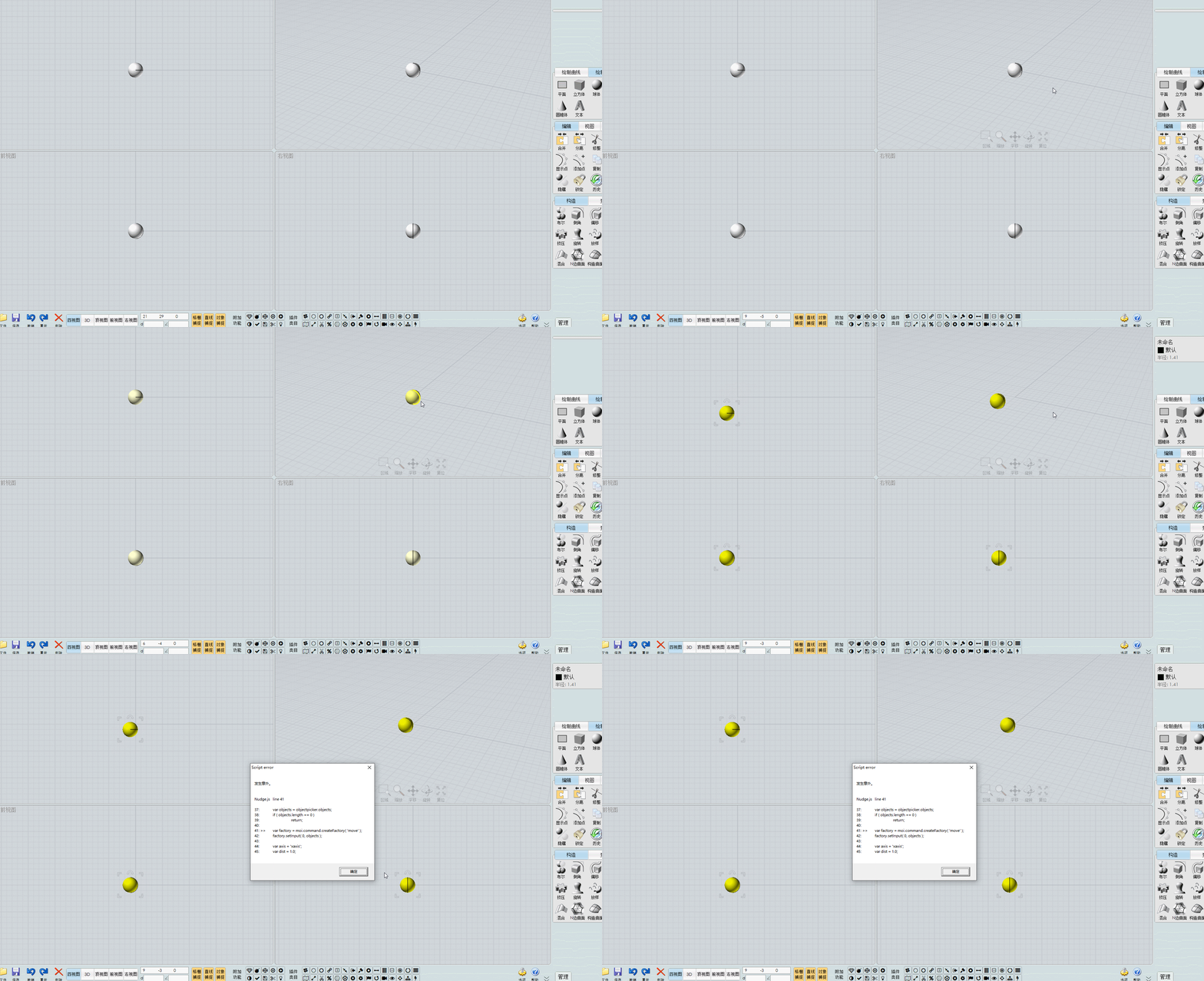
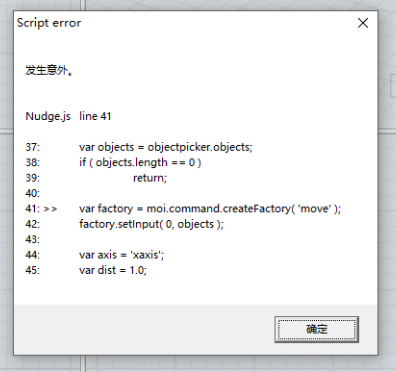
Script error
Nudge.js line 41
37: var objects = objectpicker.objects;
38: if ( objects.length == 0 )
39: return;
40:
41: >> var factory = moi.command.createFactory( 'move' );
42: factory.setInput( 0, objects );
43:
44: var axis = 'xaxis';
45: var dist = 1.0;
快速移动时报错(Error occurs when moving quickly)
From: Michael Gibson
Hi SUIYAN,
re:
> Script error
> Nudge.js line 41
Can you please post your Nudge.js file?
Thanks, - Michael
From: 大道刀 (SUIYAN)
https://moi3d.com/download/scripts/PetrsMoiPage/PetrsMoiPage.htm#Nudge 这个地址的Nudge.zip和 CPlaneNudge.zip。网友报错,我没能复现这个报错。他使用的是自己弄的带有xml,css的运行脚本按钮的v3版本,我想问,是否有可能是因此造成冲突而报错?(The Nudge.zip and CPlaneNudge.zip files at this address. The netizen reported an error, but I was unable to reproduce it. He was using a v3 version of the UI with some XML and CSS running script buttons that he had created himself. I would like to ask if there is a possibility that this caused a conflict and resulted in the error?)
相应图片上传至图床(Upload the corresponding image to the image hosting service):https://i.imgs.ovh/2026/07/01/bda2ff7c46fdceed0df71032c6c0d94a.png
https://i.imgs.ovh/2026/07/01/c2cb3c43e3dd13a2f005f42338643646.gif
https://i.imgs.ovh/2026/07/01/ae9513e393c72c9496be4a4fa9ef121e.png
因为我不懂代码,所以我对MOI界面的修改都是基于原本样式的按钮,添加或删除相应位置的按钮。他怎么改的我并不懂,所以只是问一下可能的原因。(Since I don't understand code, all the modifications I make to the MOI interface are based on the original styled buttons, adding or deleting buttons at corresponding positions. I don't understand how he made the changes, so I'm just asking about the possible reasons.)
我使用了他发给我的UI包,也没复现这个报错。(I used the UI package he sent me, and I didn't reproduce the error.)
From: Michael Gibson
Hi SUIYAN, can you ask them what version of v3 they are using?
It's under Help > "About Moi" :


Thanks,
- Michael
Image Attachments:
AboutMoi1.png
AboutMoi2.png
Show messages:
1-17
18-37
38-39