MoI discussion forum

Full Version: V5 moving holes great - how about resizing?

From: stefano (LIGHTWAVE)
4 May   [#1]
hi all...

https://app.screencast.com/HqJx8To1mhenU/e?theme=dawn

On the release notes post: [V5 beta Sep-17-2025 available now]
Michael's videos shows very easy to move face geometry or holes around a solid - i really like this but...

I then tried to select the same face - as the dialogue. top right also gives its diameter and height...
So is there a way to resize the hole in a single click with V5.

Not interested in deleting and recreating hole. Am interested in changing hole sizes
after already made part of a 'solid'.

Also tried transform "scale", that doesn't work either. Any changes effect the entire solid.

Attachments:
MOI3D_holeinflatbar-canmovebutnotresize.3dm

Image Attachments:
MOI3D_holeinflatbar-canmovebutnotresize.3dm - MoI.jpg 


From: Michael Gibson
4 May   [#2] In reply to [#1]
Hi stefano,

re:
> I then tried to select the same face - as the dialogue. top right also gives its diameter and height...
> So is there a way to resize the hole in a single click with V5.

I'm planning on putting it in the "Edit size" menu that pops up when you click on that Diameter/height line but it isn't hooked up quite yet.

It needs a bit of an overhaul so it can work with multiple selection.

- Michael
From: stefano (LIGHTWAVE)
7 May   [#3] In reply to [#2]
hi michael, look forward to that day and be super-nice if moving holes is linked to instances / clones...

Another approach for now...


https://www.youtube.com/watch?v=iGmvUZWZu3w

Image Attachments:
intersection-tricks.jpg 


From: Frenchy Pilou (PILOU)
8 May   [#4]
Yep the super trick of the Isect !;)


in this one folowing maybe a more elabrative advanced example than little mine above! ;)


From: stefano (LIGHTWAVE)
8 May   [#5] In reply to [#4]
hi pilou yes i remember that well done video but couldnt find it before
- thanks for posting...
From: Frenchy Pilou (PILOU)
8 May   [#6]
He made another one... same trick but with Rotations / Moves for find another forms ! ;)


From: Frenchy Pilou (PILOU)
8 May   [#7]
And of course you can put any number of out side profils ! ;)
Each can be modified! ( together or not )


From: stefano (LIGHTWAVE)
8 May   [#8] In reply to [#7]
not quite got my head around isect yet but
was creating chisel tools by accident with a square and a circle (or 'hole')
- id have problems manufacturing your shape

wheres the Pilou tutorial on super-rapid ai renders - that would be good ;o)
From: Frenchy Pilou (PILOU)
8 May   [#9] In reply to [#8]
@ Stephano No need tutorial! :)

Make a snapshot of your MOi object witout or not gride, whitout edges or not, save it!

Dag & Drop inside Gemini (for me (20 images free / Day) or others

Write a prompt or not (better if one)

Press the button!

Et voilĂ ! :)

https://gemini.google.com/app
From: stefano (LIGHTWAVE)
8 May   [#10] In reply to [#9]
i remember you was using other tools before - simlab etc etc
stopped using it ?
From: Frenchy Pilou (PILOU)
9 May   [#11] In reply to [#10]
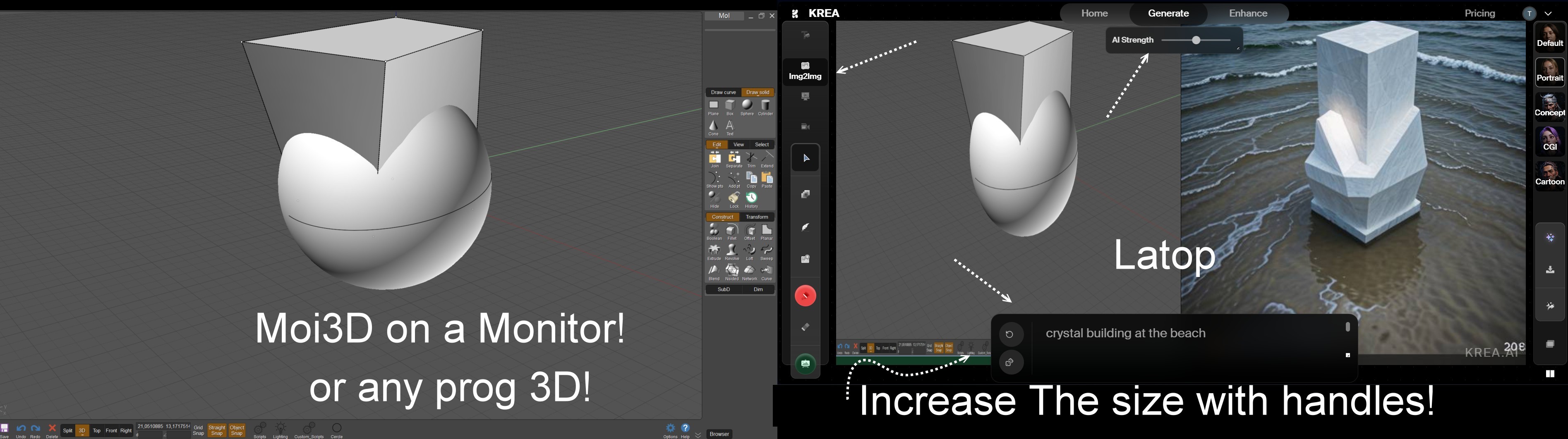
Yep Nano Banana (20 images/ Day), Leonardo (150 images /day), Krea (50 images / day) etc... or other free IA replace all old and not so easy render engines! ;)

And if you overpass the day limite you can always make a snapshot! ;)

Some sufficient for a no pro usage!

Ps and you have so crazy real time render functions!
Of course all that is infinite exploration! :)

https://moiscript.weebly.com/krea.html (some mini tuto ! ;)


Here with Krea


From: BurrMan
9 May   [#12] In reply to [#11]
Just give Gemini you MoI login credentials, then you dont have to do anything!
From: Frenchy Pilou (PILOU)
10 May   [#13] In reply to [#12]
You have to move the mouse! :)