Show messages: All
1-7
8-18
From: Matadem
Good day.
no the array was just as an example ..they are all over the place.
Tnx!
From: Michael Gibson
Hi Matadem, can you please post an example that more closely matches your actual case?
- Michael
From: Michael Gibson
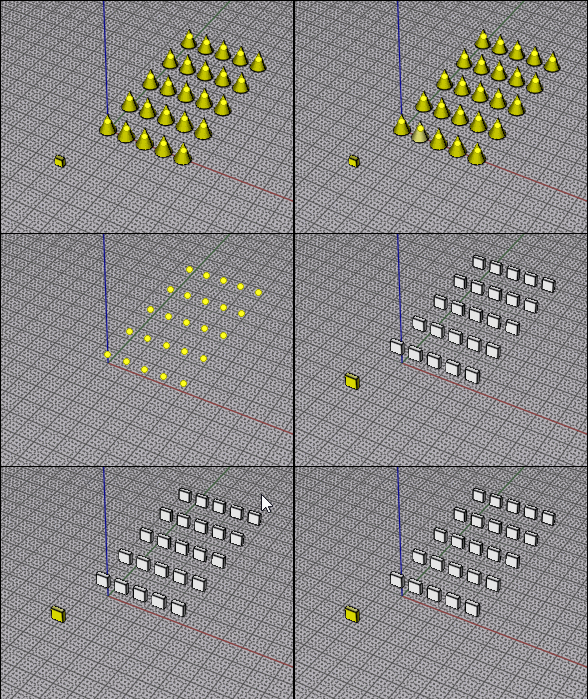
You could use BoundingBoxCenterIndividual from here to place a point at each selected object's center:
https://moi3d.com/forum/index.php?webtag=MOI&msg=10065.2
Then CopyToPoints:
https://moi3d.com/download/scripts/PetrsMoiPage/PetrsMoiPage.htm#CopyToPoints
- Michael
From: Frenchy Pilou (PILOU)
Yep that was that! ;) Made in the past!
From: Matadem
Thanks works great.
Michael please search option for commands and shortcut....without the need to go to option to look it over.
Thanks!
From: stefano (LIGHTWAVE)
I was wondering - if the object is named - and i might be interested to
swap all 'object 1's - Circle" with 'object 2 - Square'
would that be an easy script?

Attachments:
 MOI3D_replace-namedobject1s-withnamedobject-2.3dm
Image Attachments:
MOI3D_replace-namedobject1s-withnamedobject-2.3dm - MoI.jpg
From: stefano (LIGHTWAVE)
i'd want this streamlined where it is not creating a named object to make it work....anyway got the result working fine...
Save below text _____ as: ReplaceByTarget.js.
or use the zip...
SELECT YOUR TARGET SHAPE eg. the square
run: ReplaceByTarget.js
then
SELECT OBJECTS TO REPLACE (eg circles),
RIGHT CLICK DONE.
IF YOU WANT TO REPEAT DELETE OR RENAME THE OBJECT NAME OR RUN THE "CLEAR" SCRIPT IN THE ZIP
THIS IS NOT EXACTLY AS I WANTED IT BUT WORKING FINE FOR PROOF OF CONCEPT....
the read me is "ai" and it seemingly blames itself or "MOI" for not getting this 100% as required...
------------------------------------------------------------------------------------------------------------
// ReplaceByTarget.js
// MoI3D combined one-command version.
//
// This avoids MoI's "pick target during command" selection issue that I could not seem to get working.
//
// Workflow:
// 1. Select the replacement/target object.
// 2. Run ReplaceByTarget.
// -> The command saves that object as the target.
// 3. Select the objects you want to replace.
// 4. Run ReplaceByTarget again.
// -> The command replaces the selected objects with copies of the saved target,
// centered by bounding-box center.
//
// To change the saved target:
// - Select the current saved target object and run ClearReplacementTarget,
// or run ReplaceByTarget_ResetTarget if included.
// - Then select a new target and run ReplaceByTarget again.
var TARGET_NAME = '__ReplaceByTarget_Target__';
function NewObjectList()
{
return moi.geometryDatabase.createObjectList();
}
function GetAllObjects()
{
return moi.geometryDatabase.getObjects();
}
function GetSelectedObjects()
{
return moi.geometryDatabase.getSelectedObjects();
}
function GetCenter( object_list )
{
if ( object_list.getHighAccuracyBoundingBox )
return object_list.getHighAccuracyBoundingBox().center;
return object_list.getBoundingBox().center;
}
function SingleObjectList( obj )
{
var list = NewObjectList();
list.addObject( obj );
return list;
}
function AddListToList( src, dst )
{
for ( var i = 0; i < src.length; ++i )
dst.addObject( src.item(i) );
}
function MoveObjects( objects, from_pt, to_pt )
{
var factory = moi.command.createFactory( 'move' );
factory.setInput( 0, objects );
factory.setInput( 1, from_pt );
factory.setInput( 2, to_pt );
factory.commit();
}
function CloneObjects( objects )
{
var clones = NewObjectList();
for ( var i = 0; i < objects.length; ++i )
{
var clone = objects.item(i).clone();
// Copies should not also become saved targets.
if ( clone.name == TARGET_NAME )
clone.name = '';
clones.addObject( clone );
}
return clones;
}
function FindSavedTargetObjects()
{
var all = GetAllObjects();
var targets = NewObjectList();
for ( var i = 0; i < all.length; ++i )
{
if ( all.item(i).name == TARGET_NAME )
targets.addObject( all.item(i) );
}
return targets;
}
function ClearSavedTargetMarks()
{
var all = GetAllObjects();
for ( var i = 0; i < all.length; ++i )
{
if ( all.item(i).name == TARGET_NAME )
all.item(i).name = '';
}
}
function SaveCurrentSelectionAsTarget()
{
var selected = GetSelectedObjects();
if ( selected.length == 0 )
{
moi.ui.alert( 'Select the replacement/target object first, then run ReplaceByTarget.' );
return;
}
ClearSavedTargetMarks();
selected.setProperty( 'name', TARGET_NAME );
moi.ui.alert( 'Replacement target saved. Now select the objects to replace and run ReplaceByTarget again.' );
}
function ReplaceCurrentSelectionWithSavedTarget( target_objects )
{
var gd = moi.geometryDatabase;
var selected = GetSelectedObjects();
var replace_objects = NewObjectList();
for ( var i = 0; i < selected.length; ++i )
{
// Do not replace the saved target if it is accidentally selected.
if ( selected.item(i).name != TARGET_NAME )
replace_objects.addObject( selected.item(i) );
}
if ( replace_objects.length == 0 )
{
moi.ui.alert( 'Saved target found. Now select the objects to replace and run ReplaceByTarget again.' );
return;
}
var target_center = GetCenter( target_objects );
var new_objects = NewObjectList();
for ( var j = 0; j < replace_objects.length; ++j )
{
var old_list = SingleObjectList( replace_objects.item(j) );
var old_center = GetCenter( old_list );
var clones = CloneObjects( target_objects );
gd.addObjects( clones );
MoveObjects( clones, target_center, old_center );
AddListToList( clones, new_objects );
}
gd.removeObjects( replace_objects );
gd.deselectAll();
new_objects.setProperty( 'selected', true );
moi.ui.alert( 'Done. Replaced ' + replace_objects.length + ' object(s).' );
}
function ReplaceByTarget()
{
var target_objects = FindSavedTargetObjects();
if ( target_objects.length == 0 )
{
// First run: save selected object as target.
SaveCurrentSelectionAsTarget();
}
else
{
// Second run: replace selected objects with saved target.
ReplaceCurrentSelectionWithSavedTarget( target_objects );
}
}
ReplaceByTarget();

Attachments:
MOI3D_replace-namedobject1s-withnamedobject-2_V2.3dm
ReplaceByTarget_combined_ready.zip
Image Attachments:
1 MOI3D_replace-namedobject1s-withnamedobject-2_V2.3dm - MoI.jpg
MOI3D_replace-namedobject1s-withnamedobject-2.3dm - MoI_2.jpg
From: Michael Gibson
Hi stefano,
re:
> I was wondering - if the object is named - and i might be interested to
> swap all 'object 1's - Circle" with 'object 2 - Square'
> would that be an easy script?
Here's a simplified version.
This one does not do anything with selection, you put in 2 names and all objects with name #1 are replaced by objects with name #2
- Michael
Attachments:
ReplaceNamedObject.zip
From: stefano (LIGHTWAVE)
tested this and like its simplicity - thanks Michael...
Please can you let me know, where i change the dialogue box text
to suit my way of thinking...simply put, I'd like it to read:
REPLACE Object(s) Named:
[Circles]
WITH Object Named:
[ Square ]
From: Michael Gibson
Hi stefano, the text for these is in ReplaceNamedObject.htm
> REPLACE Object(s) Named:
That's on line number 15, look for this:
Name to be replaced:
> WITH Object Named:
This one on line number 27, look for:
Name to replace with:
- Michael
From: stefano (LIGHTWAVE)

thanks michael updated...
Image Attachments:
MoI ReplaceNamedObject.jpg
Show messages: All
1-7
8-18

