Show messages:
1-20
21-40
41-51
From: mdesign
1a) practice some manual retopo method (it`s bullet proof but time consuming) :
https://www.youtube.com/watch?v=BEwEWKOH5ws
If you will want sharper edge you should do smaller polygons or add additional edge loops.
1b) use quad remesher in Blender -
https://www.youtube.com/watch?v=p_iLzSWMbP8 or InstantMeshes software.
2) import quad cage as subd to MoI3d. MoI has better subd>nurbs convertion than Rhino (IMHO)
If you will do proper retopo work you will loose mesh errors from scan. Surfaces will be much cleaner.
One additional note: some surfaces made in that way might be too dense and have too many control points to be well thickened or edited in Alibre. I`ve tested few parametric cads on some surfaces made in this way and this is not so simple answer. Best would be old school traditional surface built from low count of CP. Dense CP surface = problems during edition (thicken and offset may fail sometimes).
Please give some tips if you will find is it working for you or not.
From: Michael Gibson
Hi Andy,
re:
> I thought that MoI inhabited the area in between where organic shapes were easily
> created in CAD formats.
That's not too far off but the focus in MoI is on drawing new things from scratch. Generating organic shapes that adhere to scanned triangle mesh data is a different area than that - "reverse engineering". That is not an area that Moi is focused on, it's a big area with specialized tools and workflows and a high learning curve.
It seems that maybe you heard someone mention that you can create organic shapes in MoI using tools like network surface and you are seizing on that word "organic" and expecting that Moi can do anything having to do with any organic shape process at all which is not accurate.
For reverse engineering like you want to do probably Rhino with some of the plugins I linked to above is your best bet. This is a good starting point:
https://wiki.mcneel.com/rhino/reverseengineering
There are automated scan to CAD tools like Geomagic wrap but they're pretty expensive.
The other route that you can go is to do more work in the polygon mesh world like with 3D Coat or ZBrush and either do all the work for preparing your output there or use retopology tools to fit a sub-d mesh to your scan data and then bring over the sub-d surface into the CAD side of things.
MoI may be able to play some part in this process but it is not going to be a tool that does the complete reverse engineering task on its own.
- Michael
From: Frenchy Pilou (PILOU)
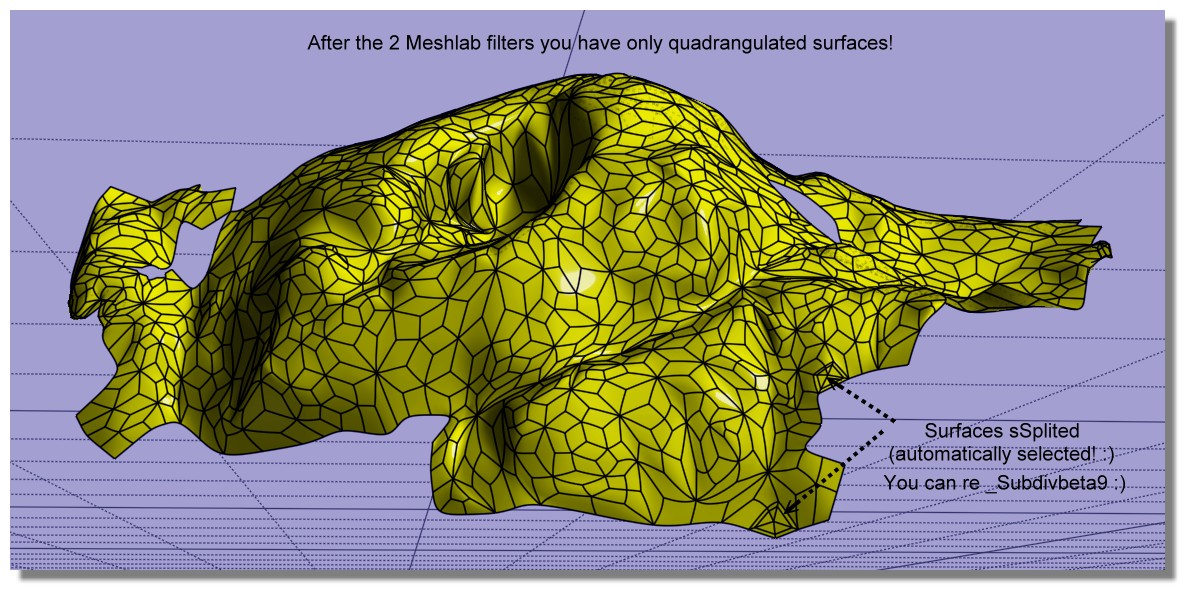
Refining & reduct the process! 7 Steps! :)
- MeshLab
1. Import the file OBJ triangulated
2. Go to Filters -> Remeshing, Simplification and Reconstruction -> Simplification: Quadric Edge Collapse Decimation
3. Enter target of 1000 faces
take the result without exit Meshlab
4 . now again MeshLab : Tri to Quad (4-8 subdivision)
5. Export obj (with enable Convert Triangles to Polygons)
- Moi3D
6. In Moi SUbD / Create from File (because _import obj don't work ! )
7. _subdivBeta9 (only 3 surfaces to sSplit automatically selected! )
you have a perfect voluptuous nurbs surface! :) (facets are not planar! )
From: Michael Gibson
Hi Pilou, although your method there does create quads, they are not in a configuration suitable for sub-d smoothing. You've got a large number of "star points" and no long sequences of edge flows like an actual sub-d control cage should be like.
So I would not recommend that route compared to doing actual sub-d focused retopology.
- Michael
From: Frenchy Pilou (PILOU)
That the default! :)
From: Barry-H
Hi,
have been experimenting with Meshlab and Instant Meshes and got similar results To Burrman.
Maybe of some use.
Cheers
Barry
.png)
.png)
Image Attachments:
 Screenshot (614).png
Screenshot (618).png
Screenshot (614).png
Screenshot (618).png
From: Frenchy Pilou (PILOU)
What is the regulates / Parameters inside Instant Meshes (or Meshlab? ) for have these "Squares triming" ?
From: Barry-H
Hi Pilou,
In Instant Meshes you can adjust the density of the topology.
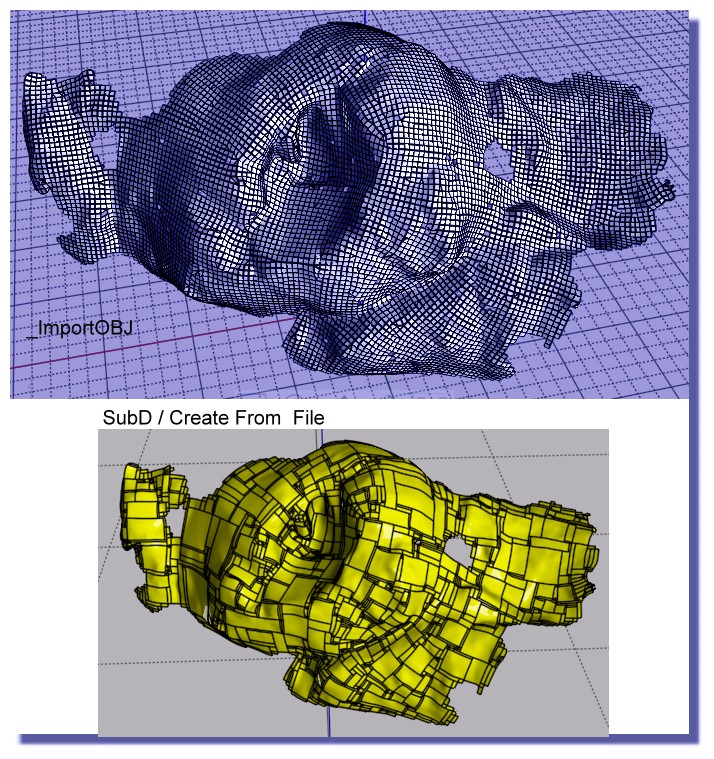
Instant Meshes didn’t load the original mesh properly so
I used Mesh lab to reduce the original mesh with just Quadric Edge Collapse Decimation.
Then took it into Instant Meshes to create the topology mesh that then can be loaded into Moi.
Cheers
Barry
From: Frenchy Pilou (PILOU)
Ok..the Key was your Quadrige decimation only in Meshlab then Instant Meshes! :)
From: Andy (ANDYA)
Barry - how are you cutting off those pieces from the surface? Thanks, Andy
From: Barry-H
Hi Andy,
I offset the surface then trim inner and outer surfaces.
Then selected naked edges of the trimmed surfaces.
Apply join command this creates 2 curves I then rebuild them.
Loft these curves and join to trimmed surfaces thus creating a solid.
If you need more detail let me know.
Cheers
Barry
Show messages:
1-20
21-40
41-51

