Show messages:
1-13
14-33
34-51
From: Andy (ANDYA)
Thanks Michael - I understand that. What I want to do is use the surface as a scaffolding to work on top of to create NURBS shapes. I don't want to change the surface unless I have to because it's the reference.
Is that doable?
Andy
From: Frenchy Pilou (PILOU)
Something you can try
Draw a SOlid plane where you want the Trim
Make a Boolean "Merge"
Then Press Tab and write ExplodeMove
your 2 parts will be well separated
As your file is a lot of very pieces...maybe that take a no reasonable time!
From: Andy (ANDYA)
OK, I have now tried this:
1. object obj in meshlab
2. Go to Filters -> Remeshing, Simplification and Reconstruction -> Simplification: Quadric Edge Collapse Decimation
3. Enter target of 1000 faces
4. Export
5. Use Michael's obj23dm converter, choose closed polygon for each face
6. Load into MoI
OK, looks good. A lot less clutter. But the "surface" is just a collection of triangles (closed curves) and there are no faces.
So what I want to do now (for example) is create a NURBS surface over the top, maybe just part of it, and then extrude that. But how?
Thanks, Andy
Attachments:
 mesh-simplified.3dm
From: Michael Gibson
HI Andy,
> Is that doable?
Not really, at least not very easily. I guess it's technically possible but it's not an area of work that MoI is currently focused on so it's not going to be particularly easy.
If you don't want to change the data then to start with you would not want to use the sub-d importer because that applies a sub-d smoothing process onto the polygon control cage which does modify shapes making a kind of melty smoothed down result. This works fine when the polygon mesh has been set up from the beginning to be used for sub-d smoothing but otherwise not.
- Michael
From: Michael Gibson
Hi Andy,
re:
> So what I want to do now (for example) is create a NURBS surface over the top, maybe
> just part of it, and then extrude that. But how?
That's a process called "reverse engineering" and it's a pretty specialized and advanced type of use for CAD.
MoI is not designed to be a reverse engineering tool so it's not really a good fit to try doing this in MoI.
You might try Rhino, there are some reverse engineering tools made for it some info here:
https://wiki.mcneel.com/rhino/reverseengineering
- Michael
From: Frenchy Pilou (PILOU)
Seems it's only triangles

try to make quadrangles before the importation! ;)
From: Andy (ANDYA)
When you created your obj to 3DM converter what was the intended usage?
I tried creating a surface in Meshlab from the simplified point cloud (surface reconstruction), saved as a new obj, run through your converter, but still no faces. So I guess your converter does not generate faces?
Andy
From: Andy (ANDYA)
I think if I could generate curves from silhouettes of the surface using the CPlane option, then I think that would get me most of the way there. Seems the silhouette feature won't work on my collection of triangles, because it's not an object?
Andy
From: Michael Gibson
Hi Andy,
re:
> When you created your obj to 3DM converter what was the intended usage?
Primarily for cases with structured objects, like boxes and cylinders, stuff like that which is easier to reverse engineering than freeform surfaces.
It's not an area that MoI is primarily focused on, which is why it's a separate tool and not a built in function.
re:
> So I guess your converter does not generate faces?
Correct, the converter generates closed polyline curves, not faces. But you can turn triangles into faces using the Construct > Planar tool in MoI.
However, like I've been describing previously MoI and CAD programs in general are not designed to work on faceted triangle data.
- Michael
From: Phiro
Hi,
If you want to create a nurbs surface with your map, I tested a method months ago.
Use Meshlab
- align your ground to be with a top view
- render with shader depthmap to create a heightmap
- scale the rendered image as you want for the precision (warning every pixel will give you a profile curve later)
- use the heightmap plugin in MOI. I think it's a Max plugin
- You will have a X or Y profiles (use only one if possible)
- Now you have curves to do a lofting (perhaps use loose option to smooth).
This lofting is a nurbs surface and you can use it
and delete curves.
A boolean operation can give you a clean surface which could be extrude or could be merged to have a real solid.
From: Michael Gibson
Hi Andy,
re:
> Seems the silhouette feature won't work on my collection of triangles, because it's not an object?
The silhouette command in MoI works on surfaces or solids, not on curves.
It's not designed to work with faceted data, it's main job is for building silhouette curves on curved surfaces.
- Michael
From: Andy (ANDYA)
"Primarily for cases with structured objects, like boxes and cylinders, stuff like that which is easier to reverse engineering than freeform surfaces."
What are the steps to reverse engineer a structured object?
Andy
From: Andy (ANDYA)
Thanks Phiro - sounds interesting, I will give it a try. Andy
From: Frenchy Pilou (PILOU)
Here the height by Max Smirnov ;)
http://moi3d.com/forum/index.php?webtag=MOI&msg=7547.52
place file(s) inside the moi commands folder
relaunch Moi
Press Tab and write _heightmap
From: Phiro
A problem you could have with your beginning object is the overhangs in the ground and the holes.
The overhangs gives only the higher point and hide lower points in depthmap. Holes give a 0 level, not an hole.
But the result could be like this 2 surfaces.
Yes Michael, you're right...
it's not an orthodox CAD software usage...

Image Attachments:
2021-04-24_01h37_26.png
From: Michael Gibson
Hi Andy,
re:
> What are the steps to reverse engineer a structured object?
Draw lines for planar spots, use Circle or Arc through 3 points snapping on to triangle corners, use the lines and arcs to extrude surfaces.
- Michael
From: Frenchy Pilou (PILOU)
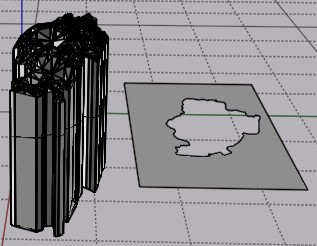
You can have easily some curves of your object
here the horizontal arounding after an extrude :)
make the same on some vertical sections planes on this same object
At the end make network...
From: Michael Gibson
Hi Andy,
re:
> What are the steps to reverse engineer a structured object?
There's an example here:
http://moi3d.com/forum/index.php?webtag=MOI&msg=9208.1
- Michael
From: Andy (ANDYA)
How about this?
1. Create object of precise shape and size
2. Slice object using surface to create the back of the object
3. Offset surface X mm
4. Slice object again with surface to create the front of the object
I.e. splitting the object into three parts and keeping only the middle.
Is that possible?
Andy
From: Frenchy Pilou (PILOU)
Of course yes but it's completly different that you want to make with your "triangulated" object! ;)
If you create directly with "Nurbs" curves, Surfaces etc ... you will not have problem!
Show messages:
1-13
14-33
34-51

