Socket Head Screws
 1-13  14-33  34-43

Previous
Next
 From:  stefano (LIGHTWAVE)
9949.14 In reply to 9949.13 
Can you input fixed values instead of using sliders?
  Reply Reply More Options
Post Options
Reply as PM Reply as PM
Print Print
Mark as unread Mark as unread
Relationship Relationship
IP Logged

Previous
Next
 From:  Frenchy Pilou (PILOU)
9949.15 In reply to 9949.14 
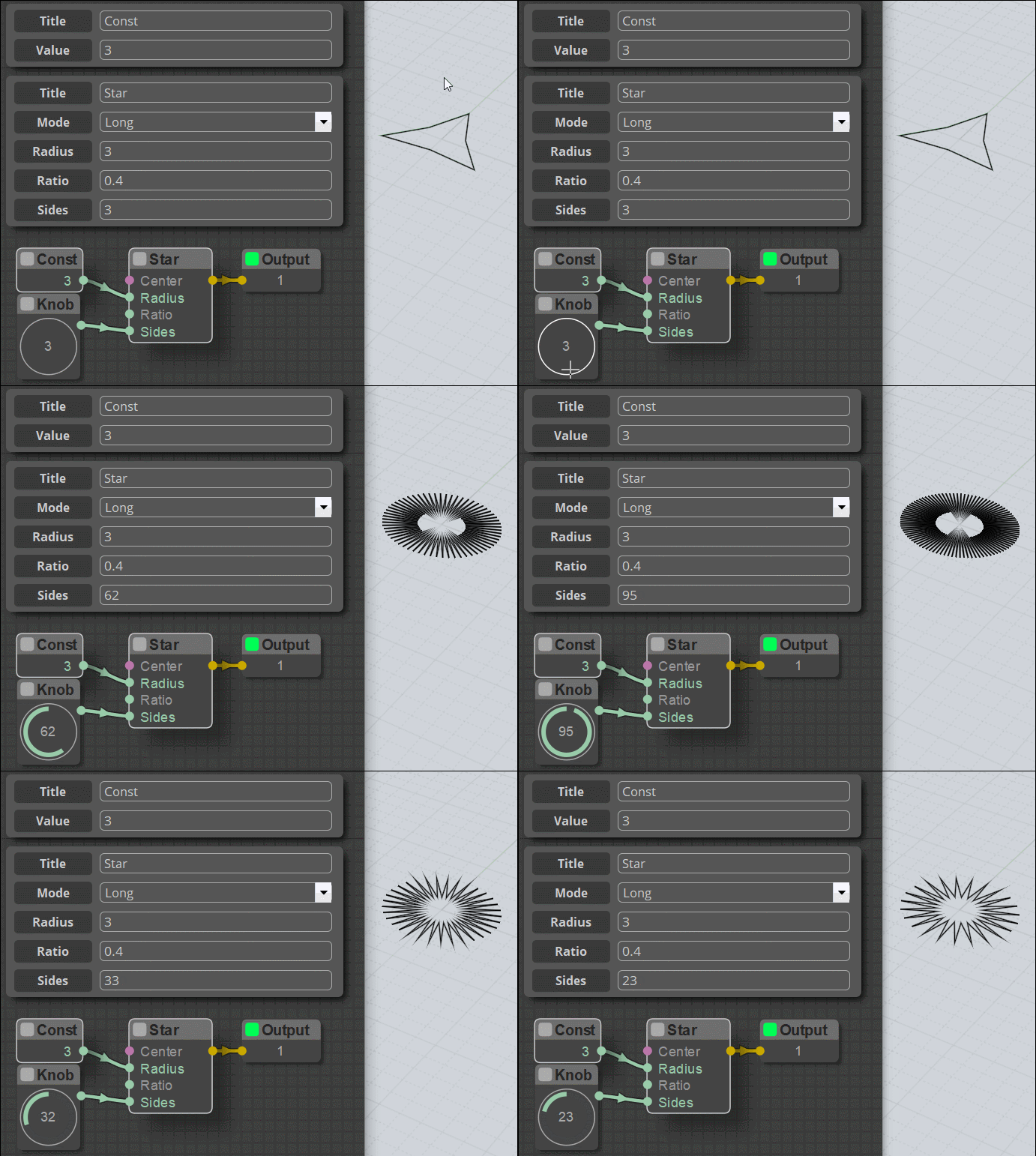
Of course yes but it's many more static and less practical! :)

Here Const 3 for the Radius (Knob can be replaced by a slider of course)

EDITED: 13 Sep 2020 by PILOU

  Reply Reply More Options
Post Options
Reply as PM Reply as PM
Print Print
Mark as unread Mark as unread
Relationship Relationship
IP Logged

Previous
Next
 From:  stefano (LIGHTWAVE)
9949.16 In reply to 9949.15 
Hi Pilou, Already feels like Christmas using moi or understanding
what its native tools can do. I'll have to try the node editor bit further into my exploration
otherwise likely get no other work done :0) Node editor looks flexible!
  Reply Reply More Options
Post Options
Reply as PM Reply as PM
Print Print
Mark as unread Mark as unread
Relationship Relationship
IP Logged

Previous
Next
 From:  Frenchy Pilou (PILOU)
9949.17 In reply to 9949.16 
Sure when you discover a new prog you can't all explore in a glance! :)

Have happy explorations!
---
Pilou
Is beautiful that please without concept!
My Moi French Site My Gallery My MagicaVoxel Gallery
  Reply Reply More Options
Post Options
Reply as PM Reply as PM
Print Print
Mark as unread Mark as unread
Relationship Relationship
IP Logged

Previous
Next
 From:  WN
9949.18 In reply to 9949.7 
Hi, fcwilt.

This indicates that there are no nodes. You can either insert the missing nodes in the node editor system directory, or remove all the red nodes from the macro, the editor will work and the macro will break.
Nodes can be taken for example here: http://moi3d.com/forum/messages.php?webtag=MOI&msg=9358.1
  Reply Reply More Options
Post Options
Reply as PM Reply as PM
Print Print
Mark as unread Mark as unread
Relationship Relationship
IP Logged

Previous
Next
 From:  bemfarmer
9949.19 In reply to 9949.10 
Thank you Barry.

No threads in nuts is fine.

Your scripts are awesome. Must have been a lot of work.

- Brian (Latest Max NE, and maybe some of James work.)
  Reply Reply More Options
Post Options
Reply as PM Reply as PM
Print Print
Mark as unread Mark as unread
Relationship Relationship
IP Logged

Previous
Next
 From:  fcwilt
9949.20 In reply to 9949.12 
Hi Barry,

I installed the node editor you posted here and things now work fine.

I did notice that the version reported is "Node Editor 1.1 jms" - which is the first time I have seen that particular version.

The multiple, incompatible versions of node editor that are available makes things a bit confusing.

I have one question. If I set the overall length to, say, 10 and the thread length to the same value the threaded portion appears to be about half of the overall length. Is that working as expected?

Thanks again.

Frederick

EDITED: 14 Sep 2020 by FCWILT

  Reply Reply More Options
Post Options
Reply as PM Reply as PM
Print Print
Mark as unread Mark as unread
Relationship Relationship
IP Logged

Previous
Next
 From:  Barry-H
9949.21 In reply to 9949.20 
Hi Frederick,
I have corrected the thread length issue and updated the Zip file in first post.
Please be aware that the thread length should always finish short of the screw length
else you will run the thread into the head.
Cap Screws and Button head screws are measure under the head but Countersunk Head Screws
are measured including the head so allowance for that is needed when setting the thread length.
I will look at adding a safeguard if possible.
Cheers
Barry
  Reply Reply More Options
Post Options
Reply as PM Reply as PM
Print Print
Mark as unread Mark as unread
Relationship Relationship
IP Logged

Previous
Next
 From:  wayne hill (WAYNEHILL5202)
9949.22 
Hi Barry,

Changed to "Node Editor 1.1 jms".

Everything is working fine. Great Work!

Wayne

P.S: I am not going to say anything about threads missing in the nuts, because that has already been addressed. But... If I were to 3D print some nuts using this script, it would be another step, before the 3D build. Just thinking ahead....

EDITED: 14 Sep 2020 by WAYNEHILL5202

  Reply Reply More Options
Post Options
Reply as PM Reply as PM
Print Print
Mark as unread Mark as unread
Relationship Relationship
IP Logged

Previous
Next
 From:  BurrMan
9949.23 In reply to 9949.1 
So there are alot of guys doing great stuff with Max's NodeEditor. The unfortunate part is alot of customization for particulars makes it hard to keep a proper, working install of it.

I did a diff of the 2 node editors and there are some significant differences. But if Max updates his, then thats where the break for various users comes in.

I always kept a Perfect "Max" updated install. But this meant that most of these "Voila" nodes that get posted, dont work for me. As we have seen here with others.

Installing the JMS version works, but what about Max's version now (The changes werent just "add-ons, but actual changes to the functions)

Anyway, long story short, I decided to make a second NodeEditor button and folder, so I could just run the 2 side-by-side. (And also run anybody elses stuff that needs a custom setup)


Anyway, just a note that might help others with same consideration...
Attachments:

  Reply Reply More Options
Post Options
Reply as PM Reply as PM
Print Print
Mark as unread Mark as unread
Relationship Relationship
IP Logged

Previous
Next
 From:  Frenchy Pilou (PILOU)
9949.24 In reply to 9949.23 
I understand better now the curious name version v.1.1.2020.07.19.jms :)
  Reply Reply More Options
Post Options
Reply as PM Reply as PM
Print Print
Mark as unread Mark as unread
Relationship Relationship
IP Logged

Previous
Next
 From:  BurrMan
9949.25 In reply to 9949.24 
Hi Frenchy,
I wanted to be sure to correct/clarify my previous post, after re-reading it....

Neither Max's, nor James' NodeEditor is "Broken" as it seemed i implied....

It's just that people are making modifications to the default, Max's files, that then make the same calls incompatible with each other...

Someone could keeps saying, Make a new "Points3, Points4, Points5 file, then implement those, instead of re-writing the default Points.js file, etc....

But really there are only a couple guys that will do this type of coding.

So what's really easier for me, is to just make a nodeeditor install for max, james, kartesen etc....

I can also evaluate the developments of those guys as they go too!!! (Not that I am a huge node guy... Just passing a method out to others that may want to be able to run the nodes that others post at any given time...

I imagine at some point, it will have to get wrangled in, or it will just be left as is. I didnt get that Max was "starting a business", so it's just a free for all at the moment...
  Reply Reply More Options
Post Options
Reply as PM Reply as PM
Print Print
Mark as unread Mark as unread
Relationship Relationship
IP Logged

Previous
Next
 From:  Frenchy Pilou (PILOU)
9949.26 In reply to 9949.25 
Fully understandable : it's for that i preconise for each New node to send all the nodeeditor package :)
No very ecologic but avoid a lot of headaches!
---
Pilou
Is beautiful that please without concept!
My Moi French Site My Gallery My MagicaVoxel Gallery
  Reply Reply More Options
Post Options
Reply as PM Reply as PM
Print Print
Mark as unread Mark as unread
Relationship Relationship
IP Logged

Previous
Next
 From:  Barry-H
9949.27 
Hi,
attached a version that as a limit on the thread length thus stopping it accidently running into the head.
I have set the limit at 1.5 x pitch of thread from the head.
So any input that is to big will automatically be corrected.

Wayne,
>>P.S: I am not going to say anything about threads missing in the nuts, because that has already been addressed. But... If I were to 3D print some nuts using this script, it would be another step, before the 3D build. Just thinking ahead....

If you wanted to 3D print a Screw & nut a thread cutter node for the nut could be done with an adjustable clearance by offsetting the thread profile.
I will have a look at adding that option.

Cheers
Barry

  Reply Reply More Options
Post Options
Reply as PM Reply as PM
Print Print
Mark as unread Mark as unread
Relationship Relationship
IP Logged

Previous
Next
 From:  wayne hill (WAYNEHILL5202)
9949.28 In reply to 9949.27 
Hi Barry,

Thank you! This sample 3D printed screw and nut has been sitting on my desk for many years as an inspiration for this type of project sometime or another.
I was having trouble with the nut thread as detailed here:

http://moi3d.com/forum/index.php?webtag=MOI&msg=9685.8

Pilou has a solution by rotating the nut to allow the curve intersection to offset.

Thank you,

Wayne


EDITED: 17 Jan 2021 by WAYNEHILL5202

  Reply Reply More Options
Post Options
Reply as PM Reply as PM
Print Print
Mark as unread Mark as unread
Relationship Relationship
IP Logged

Previous
Next
 From:  Frenchy Pilou (PILOU)
9949.29 In reply to 9949.28 
Funny material! :)
---
Pilou
Is beautiful that please without concept!
My Moi French Site My Gallery My MagicaVoxel Gallery
  Reply Reply More Options
Post Options
Reply as PM Reply as PM
Print Print
Mark as unread Mark as unread
Relationship Relationship
IP Logged

Previous
Next
 From:  Barry-H
9949.30 In reply to 9949.28 
Hi Wayne,
the picture shows a M16 x 2pitch example with a 0.1mm clearance which I created manually using an offset of the form.
Not sure if its this method is best option yet.
Also with the thread form being 60 degrees printing without supports may be an issue.
Anyway i will see if the manual method I used can be transferred to a node.
Cheers
Barry


Attachments:

  Reply Reply More Options
Post Options
Reply as PM Reply as PM
Print Print
Mark as unread Mark as unread
Relationship Relationship
IP Logged

Previous
Next
 From:  BurrMan
9949.31 In reply to 9949.30 
Hi Barry,
What you are refering to is what the machining industry calls the "H Limit" or the "L Limit"....

You'll find it as a number system for taps and dies like, H1-H7 or L1-L7 etc......

They reference a tolerance value... So aerospace needs high tolerances. Home depot stuff wiggles around on each other before it's tightend...

It's basically/simply achieved by the depth of the thread cutting tool..

so to make workable nuts and bolts, you will need a "3rd object generated" which will be the tap or the die, to boolean the threads, to work with the current "M12 Bolt" etc....

I dont know enough to be able to just give you the numbers... A Machinsts Handbook can, or asking in a CNC forum also...
  Reply Reply More Options
Post Options
Reply as PM Reply as PM
Print Print
Mark as unread Mark as unread
Relationship Relationship
IP Logged

Previous
Next
 From:  BurrMan
9949.32 In reply to 9949.31 
An image to be explanatory...

If the red form was the thread, the upper and lower forms would be various H and L Limits...

Attachments:

  Reply Reply More Options
Post Options
Reply as PM Reply as PM
Print Print
Mark as unread Mark as unread
Relationship Relationship
IP Logged

Previous
Next
 From:  Barry-H
9949.33 In reply to 9949.32 
Hi Burr,
thanks I was thinking of offsetting the form to give a constant clearance for 3D printing.
Your method will make it easier the only thing is that to give say 0.05 clearance due to the 60 degree thread form
the former moves 0.1mm but that's no problem.
Many thanks
Barry


Attachments:

  Reply Reply More Options
Post Options
Reply as PM Reply as PM
Print Print
Mark as unread Mark as unread
Relationship Relationship
IP Logged
 

Reply to All Reply to All


Show messages:  1-13  14-33  34-43