Just discovered Node Editor
 1-11  12-31  32-39

Previous
Next
 From:  Frenchy Pilou (PILOU)
9845.32 In reply to 9845.31 
Better to post your "file .nod" & "file.3dm"

From your second image you have nothing in Selected Objects Nodes ! (0)
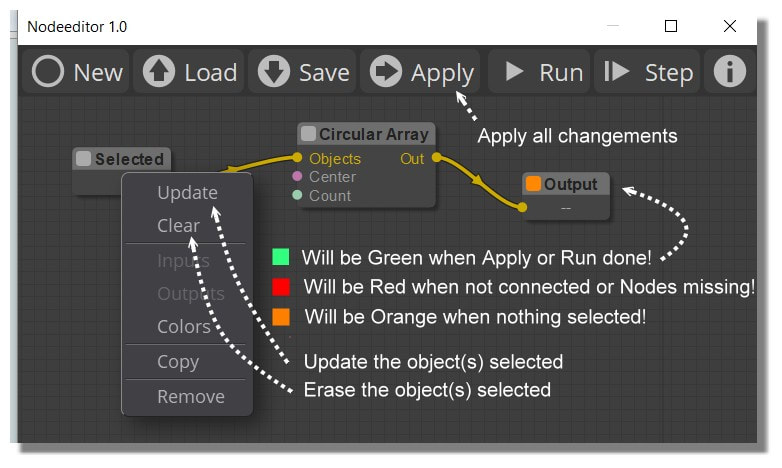
Red = Not connected or Node missing

Look at this copious page! :)
https://moiscript.weebly.com/node.html

For Selected something for a Node
Selected that you want on the Moi's screen then Right Click on the Node Selected / Update
(repeat on each node if necessary)

Then Run

EDITED: 26 Jul 2020 by PILOU

  Reply Reply More Options
Post Options
Reply as PM Reply as PM
Print Print
Mark as unread Mark as unread
Relationship Relationship
IP Logged

Previous
Next
 From:  redraw (MAYSKY)
9845.33 In reply to 9845.32 
Hi Pilou,
And thank you, I did not know how the select object worked.

So I selected the object and target did but the macro remains red and I am not given an option of saving the m”myfile.nod”
so ill repost the “ProjectMP”. It might me broke? Its main nodes are red.
Attachments:

Image Attachments:
Size: 53 KB, Downloaded: 10 times, Dimensions: 765x536px
  Reply Reply More Options
Post Options
Reply as PM Reply as PM
Print Print
Mark as unread Mark as unread
Relationship Relationship
IP Logged

Previous
Next
 From:  redraw (MAYSKY)
9845.34 
Hi Brian, Pilou Karsten and Michael G,
Thanks for all your help
I had a play with Barry’s VaribleHelix.nod and could not get it to run.

I read Brian’s pdf on his Variable Pitch Helix script. And had a play with the scripts in MoI.
They work beautifully.
I am trying to get my head around the Maths to possibly adjust Karsten’s Helix2Helix.nod.(if ok with Karsten)
Adjustment 1: The major helix to have a variable radius.( Looking at Helix2Helix, I cannot work out where the Second radius needs to be inserted)
Adjustment 2: The minor helix to have variable pitch and radius. (Replace the standard Helix-node with a Variable-Pitch-Helix-node-bundle from within Karsten’s macro )
Adjustment 3: Major and Minor Helix to be independently Left and Right handed. (swapping Sine and Cosine. But I am lost, truly :(

Comparing the Script Maths and the Node Maths I did notice the similarity:

x(t) = (R1 + R2*t) * sin(360*Num_turns*t)
y(t) = (R1 + R2*t) * cos(360*Num_turns*t)
z(t) = N * (p1 * t + p2 * t * t)

from Brian’s script and:

c*cos(PI/a*b)
c*sin(PI/a*b)
from Karsten’s node which, I think, uses a Progression node as the z(t) equivalent

So that’s where I’m at...
Any help would be greatly appreciated.
  Reply Reply More Options
Post Options
Reply as PM Reply as PM
Print Print
Mark as unread Mark as unread
Relationship Relationship
IP Logged

Previous
Next
 From:  Frenchy Pilou (PILOU)
9845.35 In reply to 9845.33 
Your Macro makes nothing
And I am not sure that is a good idea to put the selected objects inside...
that oblige to go inside for input the objects!

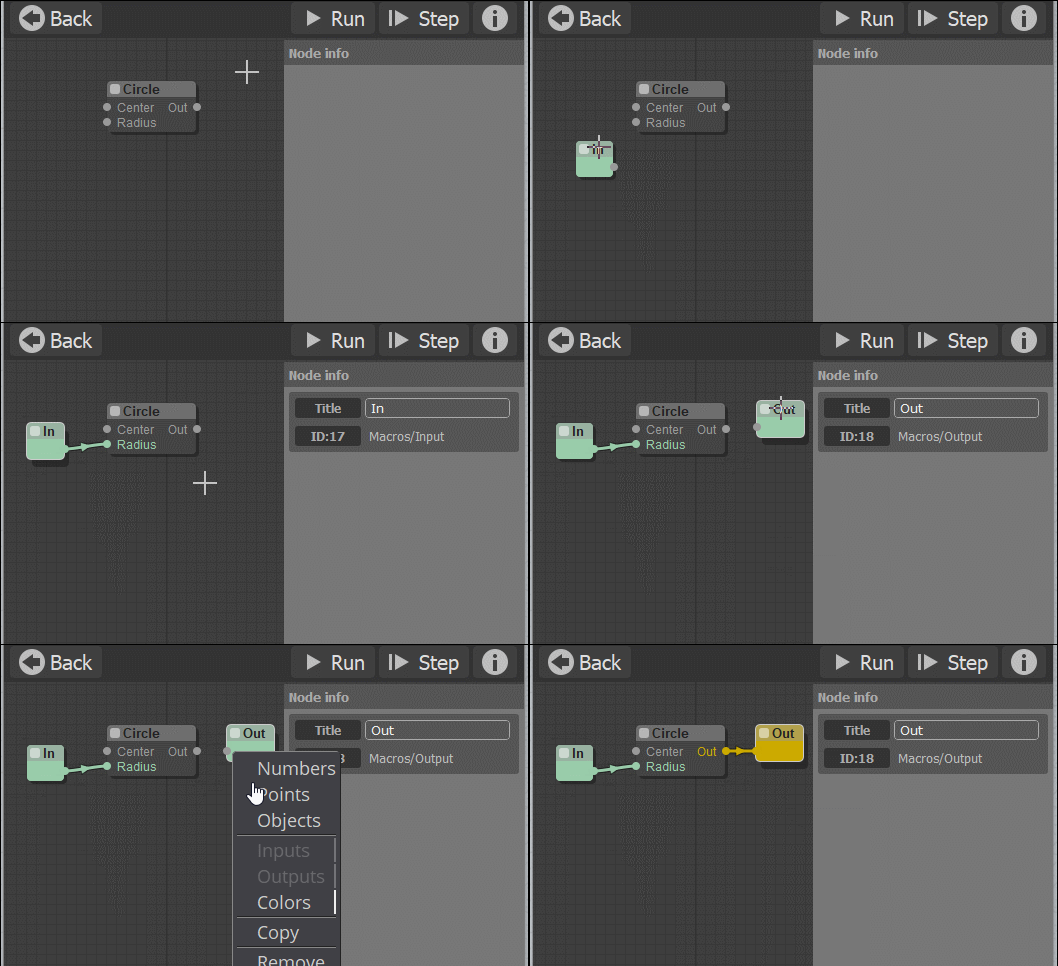
And are you sure to give the good Nature of Output (inside the Macro) ? ( Numbers, Points, Objects)
( Choice given by Right Click on the OutPut )

---
Pilou
Is beautiful that please without concept!
My Moi French Site My Gallery My MagicaVoxel Gallery
  Reply Reply More Options
Post Options
Reply as PM Reply as PM
Print Print
Mark as unread Mark as unread
Relationship Relationship
IP Logged

Previous
Next
 From:  bemfarmer
9845.36 In reply to 9845.34 
In addition to Pilou's excellent documentation:

There is a wiki section on the NodeEditor in the MoI Home Resources section of the forum.
This includes some documentation of Macros: http://moi3d.com/forum/index.php?webtag=MOI&msg=9189.1

- Brian
  Reply Reply More Options
Post Options
Reply as PM Reply as PM
Print Print
Mark as unread Mark as unread
Relationship Relationship
IP Logged

Previous
Next
 From:  redraw (MAYSKY)
9845.37 
Is there a node(s) that can plot cylindrical/polar coordinates using: Radius(t), Angle(t) and z(t), instead of the Point-node which maps Cartesian x(t), y(t), z(t) coordinates?

I managed to create a Variable Pitch - Variable Radius (vP-vR) Helix NE macro attached here
Thanks to Brian’s instruction pdf and his VarPitchHelixExtremes.js script.

Having difficulties Flowing a custom Helix over another custom Helix.
(Red line is the minor helix)

Can only Flow the MoI Factory Helix-Node onto another Helix.
(Red line is the minor helix

I am hoping that using cylindrical coordinates to describe the Minor vP-vR Helix will make it easier to ‘Flow’ it over another Helix? As there would be a centre reference for the axis to follow.

Any other suggestions are welcome.

  Reply Reply More Options
Post Options
Reply as PM Reply as PM
Print Print
Mark as unread Mark as unread
Relationship Relationship
IP Logged

Previous
Next
 From:  bemfarmer
9845.38 In reply to 9845.37 
After a very brief peek, the FLOW Base for your first .nod appears to be very short, 10.4 units, versus 200 for the second node.

- Brian
  Reply Reply More Options
Post Options
Reply as PM Reply as PM
Print Print
Mark as unread Mark as unread
Relationship Relationship
IP Logged

Previous
 From:  redraw (MAYSKY)
9845.39 In reply to 9845.38 
Hi Brian,
Thanks for your help and patiens. I think I’m finally getting the hang.
Could not have done it without your scripts, documentation and answering my stupid questions.
Just one more, if ok with you.
How did you work out what to do with the [t=i(numPoins-1)] and [R2 = UserEnteredValue – R1]?
Without me following your Scripts, I would never have worked that out.
  Reply Reply More Options
Post Options
Reply as PM Reply as PM
Print Print
Mark as unread Mark as unread
Relationship Relationship
IP Logged
 

Reply to All Reply to All


Show messages:  1-11  12-31  32-39