Just discovered Node Editor
 1-15  16-35  36-39

Previous
Next
 From:  Frenchy Pilou (PILOU)
9845.16 In reply to 9845.15 
if you load this one by James
http://moi3d.com/forum/index.php?webtag=MOI&msg=9358.1

it must be have the last version of the Node Editor (even I suppose it's written 1.0 (?) )
Wait the answer of James for confirmation
In any case with it the Helix function works fine exactly like that you found here
https://moiscript.weebly.com/curves2.html#helix

For the Macros takes a look here
https://moiscript.weebly.com/macro-e.html

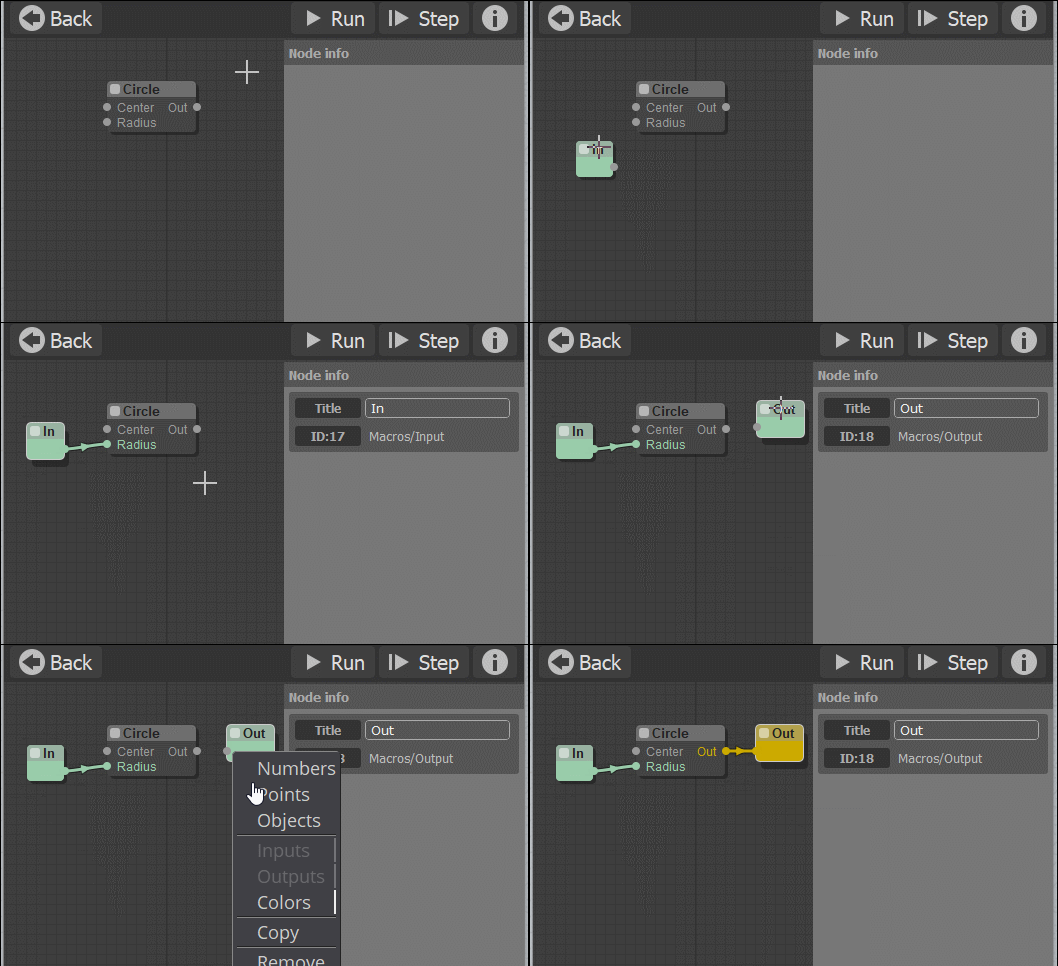
Needs an entrance (In) and an exit (Out)!
(given by Right clicking on the empty screen of the Macro!!! )
And then Right Click on the News In & End for give the good nature (color) of Number, Point, Object

EDITED: 24 Jul 2020 by PILOU

  Reply Reply More Options
Post Options
Reply as PM Reply as PM
Print Print
Mark as unread Mark as unread
Relationship Relationship
IP Logged

Previous
Next
 From:  redraw (MAYSKY)
9845.17 In reply to 9845.16 
Thank you for your reply PILOU.
I downloaded the NodeEditor directly from [http://moi.maxsm.net/nodeeditor/].
Downdoaded an extensions.zip file which had in it the “curves2” and "SubDiv" and others.
Unzipped this file into [C:\...\AppData\Roaming\Moi\nodeeditor\nodes\extensions]
But I do not know how to access these functions (I am using moi V4beta)
  Reply Reply More Options
Post Options
Reply as PM Reply as PM
Print Print
Mark as unread Mark as unread
Relationship Relationship
IP Logged

Previous
Next
 From:  wayne hill (WAYNEHILL5202)
9845.18 In reply to 9845.17 
Hi redraw,

Did you setup the shortcut in the MoI shortcut keys menu?

I use F6 to start the node editor. There could also be a icon on the bottom menu to startup the node editor.

moi.ui.createDialog( 'moi://appdata/nodeeditor/index.html', 'resizeable,defaultWidth:680,defaultHeight:420', moi.ui.mainWindow );

After it starts up, right click on the desktop to access the node menus. On the new version there is an icon in the left most corner with three horizontal lines that will display the node menus.


Wayne
  Reply Reply More Options
Post Options
Reply as PM Reply as PM
Print Print
Mark as unread Mark as unread
Relationship Relationship
IP Logged

Previous
Next
 From:  Frenchy Pilou (PILOU)
9845.19 In reply to 9845.17 
You must have something like this...(these windows are windows of my 2D prog drawing :)

  Reply Reply More Options
Post Options
Reply as PM Reply as PM
Print Print
Mark as unread Mark as unread
Relationship Relationship
IP Logged

Previous
Next
 From:  redraw (MAYSKY)
9845.20 In reply to 9845.19 
Thanks heaps guys
I will go over your posts tomorrow. My brain is jelly at this moment.
  Reply Reply More Options
Post Options
Reply as PM Reply as PM
Print Print
Mark as unread Mark as unread
Relationship Relationship
IP Logged

Previous
Next
 From:  redraw (MAYSKY)
9845.21 In reply to 9845.19 
Thank you PILOU,
I think all in now good.
Ready tio play.

Just One question

In the Helix, is it possible to have variable Pitch?
Or is this hard coded

I had a play with BASIC - RANDOM
and some other functions but the Pitch remains constant along the length of the Helix.

EDITED: 24 Jul 2020 by MAYSKY

  Reply Reply More Options
Post Options
Reply as PM Reply as PM
Print Print
Mark as unread Mark as unread
Relationship Relationship
IP Logged

Previous
Next
 From:  Michael Gibson
9845.22 In reply to 9845.21 
Hi Maysky, re: .DS_Store - that's a file used on the Mac OS to store folder settings: https://en.wikipedia.org/wiki/.DS_Store .

You can just ignore it.

- Michael
  Reply Reply More Options
Post Options
Reply as PM Reply as PM
Print Print
Mark as unread Mark as unread
Relationship Relationship
IP Logged

Previous
Next
 From:  redraw (MAYSKY)
9845.23 In reply to 9845.22 
Thank you Michael,

I just had a quick play with the Helix

A new question.
Is it possible to have a variable Pitch for the Helix
The length of the helix to increase as the helix plopogates?

Tried a Random Node but the whole lenght of the helix has the same pitch.
  Reply Reply More Options
Post Options
Reply as PM Reply as PM
Print Print
Mark as unread Mark as unread
Relationship Relationship
IP Logged

Previous
Next
 From:  bemfarmer
9845.24 In reply to 9845.23 
I did a variable pitch script a few years ago.
It was not made into a node.

- Brian
  Reply Reply More Options
Post Options
Reply as PM Reply as PM
Print Print
Mark as unread Mark as unread
Relationship Relationship
IP Logged

Previous
Next
 From:  redraw (MAYSKY)
9845.25 In reply to 9845.24 
Thank you Brian,
I will have a look.
Is there anything I should be aware of?
  Reply Reply More Options
Post Options
Reply as PM Reply as PM
Print Print
Mark as unread Mark as unread
Relationship Relationship
IP Logged

Previous
Next
 From:  bemfarmer
9845.26 In reply to 9845.25 
Hi MAYSKY,

Link to the 3 versions that I did, 3 to 6 whole years ago. I have not reviewed the notes from back then,
but there is a difference between instantaneous initial and terminal pitch, and the pitches for the first and last turns.

https://moi3d.com/forum/index.php?webtag=MOI&msg=6697.11

Maybe I'll try to do a node. Due to being busy, no work has been done for the last 4 months :-(

- Brian

EDITED: 24 Jul 2020 by BEMFARMER

  Reply Reply More Options
Post Options
Reply as PM Reply as PM
Print Print
Mark as unread Mark as unread
Relationship Relationship
IP Logged

Previous
Next
 From:  redraw (MAYSKY)
9845.27 In reply to 9845.26 
Thank you Brian,
I hava found and downloaded Two; “_VarPitchHelixExtremes” and “_VarPitchHelixVerbose”. Poking around I discovered what may be node! ... VarPitchHelix.nod it was by Barry-H in a post to you. (7777.374 In reply to 7777.373 ) form May2017.
I have not had a chance to play with anything yet.

I would truly love to be able to have a node or script that can construct a variable pitch helix that can follow a curved path as its main axis. Ideally the curved path is in the form a variable pitch helix. Like a macro in a macro or some such analogy.
Algorithmically speaking, do you think it’s possible?
  Reply Reply More Options
Post Options
Reply as PM Reply as PM
Print Print
Mark as unread Mark as unread
Relationship Relationship
IP Logged

Previous
Next
 From:  Karsten (KMRQUS)
9845.28 In reply to 9845.27 
Hello Maysky,

here is an example how you can create such things without a special node. The point is that you can create special things by yourself;-)

Have a nice day
Karsten
Attachments:

  Reply Reply More Options
Post Options
Reply as PM Reply as PM
Print Print
Mark as unread Mark as unread
Relationship Relationship
IP Logged

Previous
Next
 From:  bemfarmer
9845.29 In reply to 9845.27 
Kudos to Barry, Karsten, and Flow.
-♤♡◇♧ Brian
(Discovered extra symbols on Tablet)
  Reply Reply More Options
Post Options
Reply as PM Reply as PM
Print Print
Mark as unread Mark as unread
Relationship Relationship
IP Logged

Previous
Next
 From:  redraw (MAYSKY)
9845.30 In reply to 9845.28 
wow!!!
Thanks heaps Karsten.
Will need some time to understand. but WOW!
  Reply Reply More Options
Post Options
Reply as PM Reply as PM
Print Print
Mark as unread Mark as unread
Relationship Relationship
IP Logged

Previous
Next
 From:  redraw (MAYSKY)
9845.31 In reply to 9845.28 
I am trying to get a grip on NE by following some (basic) projects in the Elephant Repository
(9 Oct 2019  (301 of 441) 9476.301  ) using “ProjecMP.nod” from Karsten
I have tried to recreate a post from Pilou:
But it seems I have missed some basics!
Nothing I have tried In and Out Progenitors and setting up a blank Macro to house the ProjectPM node is giving me any result. I cannot even save the setup. See attached images

On the other hand “Helix2Helix.nod” also from Karsten macro runs no problem with no In Out progenitors.
Image Attachments:
Size: 157.4 KB, Downloaded: 19 times, Dimensions: 686x721px
Size: 214 KB, Downloaded: 13 times, Dimensions: 800x866px
  Reply Reply More Options
Post Options
Reply as PM Reply as PM
Print Print
Mark as unread Mark as unread
Relationship Relationship
IP Logged

Previous
Next
 From:  Frenchy Pilou (PILOU)
9845.32 In reply to 9845.31 
Better to post your "file .nod" & "file.3dm"

From your second image you have nothing in Selected Objects Nodes ! (0)
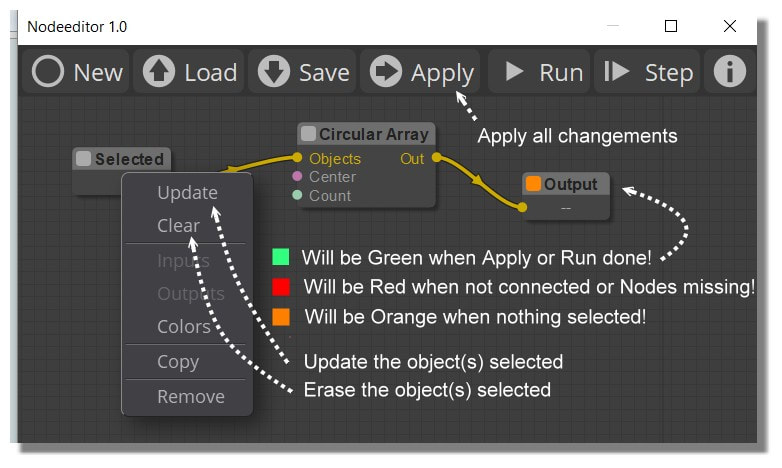
Red = Not connected or Node missing

Look at this copious page! :)
https://moiscript.weebly.com/node.html

For Selected something for a Node
Selected that you want on the Moi's screen then Right Click on the Node Selected / Update
(repeat on each node if necessary)

Then Run

EDITED: 26 Jul 2020 by PILOU

  Reply Reply More Options
Post Options
Reply as PM Reply as PM
Print Print
Mark as unread Mark as unread
Relationship Relationship
IP Logged

Previous
Next
 From:  redraw (MAYSKY)
9845.33 In reply to 9845.32 
Hi Pilou,
And thank you, I did not know how the select object worked.

So I selected the object and target did but the macro remains red and I am not given an option of saving the m”myfile.nod”
so ill repost the “ProjectMP”. It might me broke? Its main nodes are red.
Attachments:

Image Attachments:
Size: 53 KB, Downloaded: 10 times, Dimensions: 765x536px
  Reply Reply More Options
Post Options
Reply as PM Reply as PM
Print Print
Mark as unread Mark as unread
Relationship Relationship
IP Logged

Previous
Next
 From:  redraw (MAYSKY)
9845.34 
Hi Brian, Pilou Karsten and Michael G,
Thanks for all your help
I had a play with Barry’s VaribleHelix.nod and could not get it to run.

I read Brian’s pdf on his Variable Pitch Helix script. And had a play with the scripts in MoI.
They work beautifully.
I am trying to get my head around the Maths to possibly adjust Karsten’s Helix2Helix.nod.(if ok with Karsten)
Adjustment 1: The major helix to have a variable radius.( Looking at Helix2Helix, I cannot work out where the Second radius needs to be inserted)
Adjustment 2: The minor helix to have variable pitch and radius. (Replace the standard Helix-node with a Variable-Pitch-Helix-node-bundle from within Karsten’s macro )
Adjustment 3: Major and Minor Helix to be independently Left and Right handed. (swapping Sine and Cosine. But I am lost, truly :(

Comparing the Script Maths and the Node Maths I did notice the similarity:

x(t) = (R1 + R2*t) * sin(360*Num_turns*t)
y(t) = (R1 + R2*t) * cos(360*Num_turns*t)
z(t) = N * (p1 * t + p2 * t * t)

from Brian’s script and:

c*cos(PI/a*b)
c*sin(PI/a*b)
from Karsten’s node which, I think, uses a Progression node as the z(t) equivalent

So that’s where I’m at...
Any help would be greatly appreciated.
  Reply Reply More Options
Post Options
Reply as PM Reply as PM
Print Print
Mark as unread Mark as unread
Relationship Relationship
IP Logged

Previous
Next
 From:  Frenchy Pilou (PILOU)
9845.35 In reply to 9845.33 
Your Macro makes nothing
And I am not sure that is a good idea to put the selected objects inside...
that oblige to go inside for input the objects!

And are you sure to give the good Nature of Output (inside the Macro) ? ( Numbers, Points, Objects)
( Choice given by Right Click on the OutPut )

---
Pilou
Is beautiful that please without concept!
My Moi French Site My Gallery My MagicaVoxel Gallery
  Reply Reply More Options
Post Options
Reply as PM Reply as PM
Print Print
Mark as unread Mark as unread
Relationship Relationship
IP Logged
 

Reply to All Reply to All


Show messages:  1-15  16-35  36-39