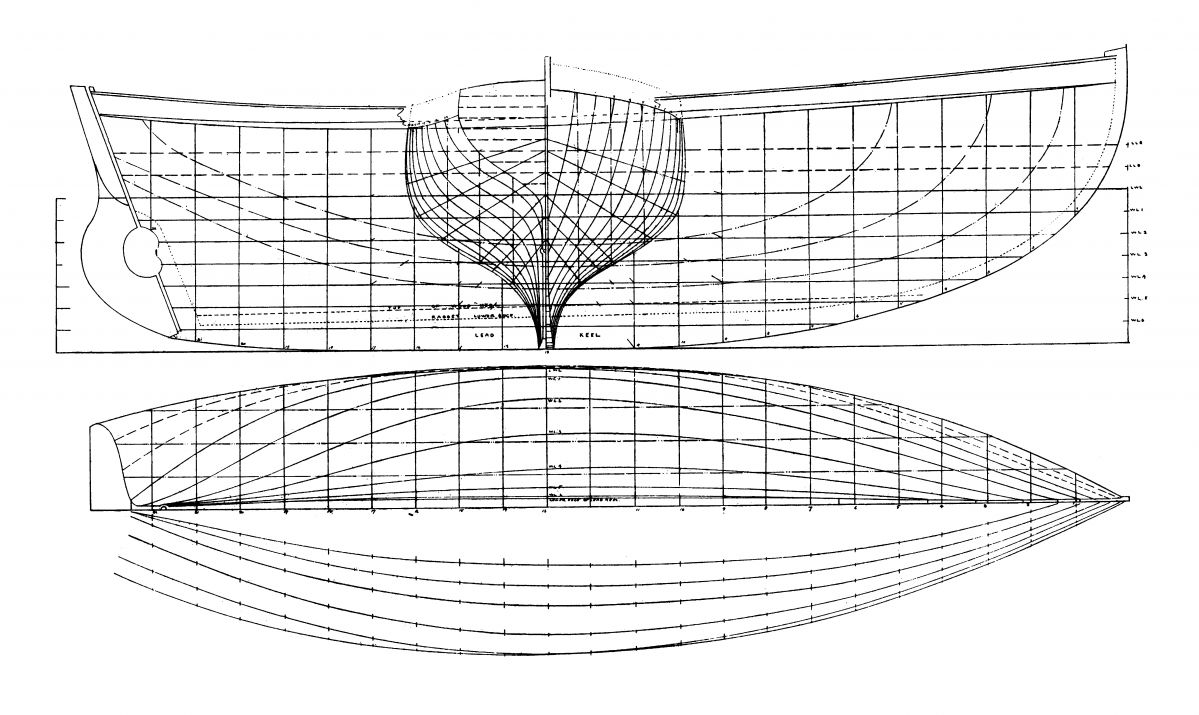
Ship hull tutorials
 1-8  …  29-48  49-68  69-88  89-108  109-128  129

Previous
Next
 From:  corchet
9819.69 


adding profiles for a round top
adding profiles with scales to loft the internal hull ( yellow )

EDITED: 9 Sep 2020 by CORCHET

  Reply Reply More Options
Post Options
Reply as PM Reply as PM
Print Print
Mark as unread Mark as unread
Relationship Relationship
IP Logged

Previous
Next
 From:  Gord (NEOMEGA)
9819.70 
Thanks guys - finally did it somehow!
Image Attachments:
Size: 425.8 KB, Downloaded: 38 times, Dimensions: 1958x688px
Size: 1.1 MB, Downloaded: 34 times, Dimensions: 1414x1358px
Size: 1.8 MB, Downloaded: 37 times, Dimensions: 2012x1406px
  Reply Reply More Options
Post Options
Reply as PM Reply as PM
Print Print
Mark as unread Mark as unread
Relationship Relationship
IP Logged

Previous
Next
 From:  Michael Gibson
9819.71 In reply to 9819.70 
That's great Gord!

- Michael
  Reply Reply More Options
Post Options
Reply as PM Reply as PM
Print Print
Mark as unread Mark as unread
Relationship Relationship
IP Logged

Previous
Next
 From:  Frenchy Pilou (PILOU)
9819.72 
@ Corchet What a diversity of variable floating conception! :)

@ Gord Cool result!
---
Pilou
Is beautiful that please without concept!
My Moi French Site My Gallery My MagicaVoxel Gallery
  Reply Reply More Options
Post Options
Reply as PM Reply as PM
Print Print
Mark as unread Mark as unread
Relationship Relationship
IP Logged

Previous
Next
 From:  Frenchy Pilou (PILOU)
9819.73 
Else...;)

---
Pilou
Is beautiful that please without concept!
My Moi French Site My Gallery My MagicaVoxel Gallery
  Reply Reply More Options
Post Options
Reply as PM Reply as PM
Print Print
Mark as unread Mark as unread
Relationship Relationship
IP Logged

Previous
Next
 From:  Gord (NEOMEGA)
9819.74 In reply to 9819.73 
Thanks! Really interesting!

G
  Reply Reply More Options
Post Options
Reply as PM Reply as PM
Print Print
Mark as unread Mark as unread
Relationship Relationship
IP Logged

Previous
Next
 From:  Gord (NEOMEGA)
9819.75 In reply to 9819.73 
OK, another issue on my next project. I'm doing a Clyde Puffer. I have the hull done and in solids. Yes, I know it could be fairer, but whatever, the master model can be sanded slightly, and these things had lumps everywhere!

I have 3 solids, but try as I might, I cannot get the two stern ones to boolean into the others. I tried Diff and Union, but no result. Why won't it do this. I can cut a line through the sterns, but I can't use this technique to trim off the ends to be flush for some reason. Nothing works again!

Thanks!

Gord.

EDITED: 26 Jun 2020 by NEOMEGA

Image Attachments:
Size: 1.8 MB, Downloaded: 36 times, Dimensions: 2038x1536px
  Reply Reply More Options
Post Options
Reply as PM Reply as PM
Print Print
Mark as unread Mark as unread
Relationship Relationship
IP Logged

Previous
Next
 From:  Michael Gibson
9819.76 In reply to 9819.75 
Hi Gord, it's the bottom curved surface of the stern pieces. There are damaged trimming boundaries in these spots:


And there's a kind of mutated micro shelf in this area:


How did you create this piece, was it a result of a Shell operation? It kind of looks like the sort of stuff that Shell messes up on.

It's also possible that this very thin area here could be considered an area of self intersection:


It's not generally good to have opposite sides of a solid squish down to such a thin area.

If you have any earlier stages of these pieces if you can post them I might be able to tell you where things started to go wrong with them.

- Michael

  Reply Reply More Options
Post Options
Reply as PM Reply as PM
Print Print
Mark as unread Mark as unread
Relationship Relationship
IP Logged

Previous
Next
 From:  Frenchy Pilou (PILOU)
9819.77 In reply to 9819.74 
Yep this serial of videos is very instructive how is made a wood boat! !
(i am on 20/73...; )

And Albert Strange a cool artist and Yacht designer!
https://en.wikipedia.org/wiki/Albert_Strange

Hull Plan of Tally Ho from another cool site : https://davestallyhomodel.blogspot.com/2019/02/the-first-steps.html


Amazing stuff!

EDITED: 9 Jun 2020 by PILOU

  Reply Reply More Options
Post Options
Reply as PM Reply as PM
Print Print
Mark as unread Mark as unread
Relationship Relationship
IP Logged

Previous
Next
 From:  Gord (NEOMEGA)
9819.78 In reply to 9819.76 
Thanks. Yes, it was network surface then boolean joined. It's not repairable then? I know I'm doing a difficult shame again as one part has to go down to basically nothing, whilst the other upper part has to be 90 deg. to it. Not sure what to do now. It is OK on loft, but it doesn't follow the plan shape too accurately though.

EDITED: 26 Jun 2020 by NEOMEGA

Image Attachments:
Size: 1.3 MB, Downloaded: 27 times, Dimensions: 1788x996px
  Reply Reply More Options
Post Options
Reply as PM Reply as PM
Print Print
Mark as unread Mark as unread
Relationship Relationship
IP Logged

Previous
Next
 From:  Frenchy Pilou (PILOU)
9819.79 In reply to 9819.78 
Maybe you can see the videos about hulls about this site (and free prog ;)
(not so easy than moi! ;)
http://www.polycad.co.uk
---
Pilou
Is beautiful that please without concept!
My Moi French Site My Gallery My MagicaVoxel Gallery
  Reply Reply More Options
Post Options
Reply as PM Reply as PM
Print Print
Mark as unread Mark as unread
Relationship Relationship
IP Logged

Previous
Next
 From:  Michael Gibson
9819.80 In reply to 9819.78 
Hi Gord,

re:
> Yes, it was network surface then boolean joined.

It looks like there are just a couple of spots where the endpoints don't touch. It would probably be a good idea after you construct one of these networks that you want to join to other straight parts, to edit surface control points and ensure the end control points are all trued up to be flat so the ends will be planar.

It's probably things waving around just a little bit out of being planar that is causing enough misalignment to be problematic.


> It's not repairable then?

It might be, I'll take a crack at it.

- Michael
  Reply Reply More Options
Post Options
Reply as PM Reply as PM
Print Print
Mark as unread Mark as unread
Relationship Relationship
IP Logged

Previous
Next
 From:  Gord (NEOMEGA)
9819.81 In reply to 9819.80 
Appreciate it, thanks!

Is there a scrip I can run to allow me to see these problem areas highlighted larger? I use N, but it only shows the whole edge.

G
  Reply Reply More Options
Post Options
Reply as PM Reply as PM
Print Print
Mark as unread Mark as unread
Relationship Relationship
IP Logged

Previous
Next
 From:  Michael Gibson
9819.82 In reply to 9819.81 
Hi Gord, there isn't any script for that, you just zoom in closely especially on corner areas where things join up. You can use the "Zoom area" tool to zoom in centered on a specific spot.

- Michael
  Reply Reply More Options
Post Options
Reply as PM Reply as PM
Print Print
Mark as unread Mark as unread
Relationship Relationship
IP Logged

Previous
Next
 From:  Michael Gibson
9819.83 In reply to 9819.81 
Hi Gord, here is a stern piece which should be all trued up. I think this could use it here too though:


- Michael

  Reply Reply More Options
Post Options
Reply as PM Reply as PM
Print Print
Mark as unread Mark as unread
Relationship Relationship
IP Logged

Previous
Next
 From:  Michael Gibson
9819.84 In reply to 9819.81 
Hi Gord, I guess I planarized a little bit too much, I guess I should not have pulled this one up to be planar:


I was kind of thinking the upper surface wanted to be a simple straight extrusion.

- Michael
Attachments:

  Reply Reply More Options
Post Options
Reply as PM Reply as PM
Print Print
Mark as unread Mark as unread
Relationship Relationship
IP Logged

Previous
Next
 From:  Colin
9819.85 
Hi Gord,

Your constant issues with lines not meeting or touching makes me wonder whether you have "Object Snap" switched "ON"..?
If not, then may be that could help to explain a lot of your issues?

HTH, Colin
  Reply Reply More Options
Post Options
Reply as PM Reply as PM
Print Print
Mark as unread Mark as unread
Relationship Relationship
IP Logged

Previous
Next
 From:  Gord (NEOMEGA)
9819.86 In reply to 9819.85 
Hi.

Thanks, I thought I did do - see the screenshot. Must I alter numbers somewhere?

Gord
Image Attachments:
Size: 448.6 KB, Downloaded: 33 times, Dimensions: 1396x1086px
  Reply Reply More Options
Post Options
Reply as PM Reply as PM
Print Print
Mark as unread Mark as unread
Relationship Relationship
IP Logged

Previous
Next
 From:  Frenchy Pilou (PILOU)
9819.87 In reply to 9819.86 
Funny! Never used even don't remember that is existing! :)

Maybe because i don't use millimeter as unities
Seems all is enabled!

  Reply Reply More Options
Post Options
Reply as PM Reply as PM
Print Print
Mark as unread Mark as unread
Relationship Relationship
IP Logged

Previous
Next
 From:  corchet
9819.88 In reply to 9819.86 


gaps and a huge amount of points on curves ... don' t forget to rebuild

the central part have issues ... lonely faces .... better to contruct this as an extrusion + boolean hole

and 2 half hulls ... union give the baby solid

i add a round piece ... à l'avant qui fend les flots ;) ( 3dm joined )

ps i can't reproduce the exact shape of your hull ... cause you post the result of the network and not the curves needed to built it ;)

EDITED: 9 Sep 2020 by CORCHET

  Reply Reply More Options
Post Options
Reply as PM Reply as PM
Print Print
Mark as unread Mark as unread
Relationship Relationship
IP Logged
 

Reply to All Reply to All


Show messages:  1-8  9-28  29-48  49-68  69-88  89-108  109-128  129