Ship hull tutorials
 1-13  14-33  34-53  54-73  74-93  94-113  114-129

Previous
Next
 From:  Gord (NEOMEGA)
9819.54 In reply to 9819.48 
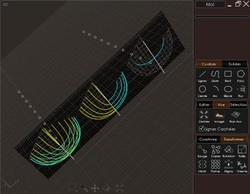
Frames as requested Michael. It was network. They seem to become distorted for some reason.

Thanks

G

EDITED: 11 Jun 2020 by NEOMEGA

  Reply Reply More Options
Post Options
Reply as PM Reply as PM
Print Print
Mark as unread Mark as unread
Relationship Relationship
IP Logged

Previous
Next
 From:  corchet
9819.55 In reply to 9819.52 
@ Pilou ;)


la nouvelle " croisière ne s'amuse plus ! " ... 3 rangs de rameurs pour faire avancer la barquasse ! ;)

seules les 1ères classes peuvent faire du toboggan sur le pont ...

EDITED: 9 Sep 2020 by CORCHET

  Reply Reply More Options
Post Options
Reply as PM Reply as PM
Print Print
Mark as unread Mark as unread
Relationship Relationship
IP Logged

Previous
Next
 From:  Frenchy Pilou (PILOU)
9819.56 
@Corchet! Excellent! :)

@ Gord

Make a shortCut with that!

script: /* Naked edges */ var gd = moi.geometryDatabase; gd.deselectAll(); var breps =gd.getObjects().getBreps(); for ( var i = 0; i < breps.length; ++i ) breps.item(i).getNakedEdges().setProperty( 'selected', true );

As long as you have enleighted something there is something wrong and you will not have a Solid!!!

I believe you must redraw over your existing curves as base! So lock existing !
Draw only one curve on each side of "quad" (no need to draw a second new curve on commun "edges" )

Make a Network one by one "quad" or Loft or Sweep depending of curves

Generally it's more speedy than repear to infinite!

EDITED: 3 Jun 2020 by PILOU

  Reply Reply More Options
Post Options
Reply as PM Reply as PM
Print Print
Mark as unread Mark as unread
Relationship Relationship
IP Logged

Previous
Next
 From:  corchet
9819.57 
9819.53 In reply to 9819.47
So nearly there! But is it possible to 'glue' the crack in the stern somehow? Or patch it over? This part gets removed when it is made a solid. Or can the panels be closed somehow?

Thanks for all your help guys!

G
Attachments:
AttachmentBrede 2 3rd try.3dm

i look at your model

same problem


zoom closer as possible you'll see a gap
when i select the 2 parts of the curve and click Join ... it should be glue the 2 parts and make only 1 curve

try to fix that first
and post the result
to glue that you need to select Object snap

second problem you have an incredible number of points on your curves


select the curves
press Tab
and write Rebuild where the screen becomes blue
at the right of the screen you'll see a panel with Refit and a number click done and

and post the result here

EDITED: 9 Sep 2020 by CORCHET

  Reply Reply More Options
Post Options
Reply as PM Reply as PM
Print Print
Mark as unread Mark as unread
Relationship Relationship
IP Logged

Previous
Next
 From:  corchet
9819.58 In reply to 9819.57 
when you fix that you should see

one curve ( joined ) with few points

that's what you need to reach


EDITED: 9 Sep 2020 by CORCHET

  Reply Reply More Options
Post Options
Reply as PM Reply as PM
Print Print
Mark as unread Mark as unread
Relationship Relationship
IP Logged

Previous
Next
 From:  Gord (NEOMEGA)
9819.59 In reply to 9819.58 
Thanks! I think I cured that gap by manipulating the surface points slightly. Nothing shows when Naked Edges is run. However, try as I might, I still cannot get it to mirror and boolean together as a solid. I planared the top face, it joined OK, but still won't boolean together for some reason.

I think this will be the last boat I'm doing...

EDITED: 11 Jun 2020 by NEOMEGA

  Reply Reply More Options
Post Options
Reply as PM Reply as PM
Print Print
Mark as unread Mark as unread
Relationship Relationship
IP Logged

Previous
Next
 From:  Michael Gibson
9819.60 In reply to 9819.54 
Hi Gord,

re:
> Frames as requested Michael. It was network. They seem to become distorted for some reason.

Thanks for posting the curves!

So the first thing I see is that various curves do not have their endpoints touching on to the curve going in the other direction.

The first spot I checked was here:


And zooming in you can see the section's endpoint does not touch the rail curve going in the other direction:


Similarly here and in most other places:


So that's a big reason why your surface wobbles around a bit instead of being planar at its end. It would be good to tighten up the accuracy of your curves before you generate surfaces.

It is possible to true up the surface afterwards too though. To do that turn on surface control points, select the last row or column of points and use Transform > Align to get them all in a straight line in a side view. Do that before trying to construct additional pieces that should join to this surface.

- Michael


- Michael

  Reply Reply More Options
Post Options
Reply as PM Reply as PM
Print Print
Mark as unread Mark as unread
Relationship Relationship
IP Logged

Previous
Next
 From:  Michael Gibson
9819.61 In reply to 9819.59 
Hi Gord,

re:
> Thanks! I think I cured that gap by manipulating the surface points slightly. Nothing shows
> when Naked Edges is run. However, try as I might, I still cannot get it to mirror and boolean
> together as a solid. I planared the top face, it joined OK, but still won't boolean together for
> some reason.

There's a problem in this area:


That corresponds to this little curve fragment in your curves setup:


- Michael

  Reply Reply More Options
Post Options
Reply as PM Reply as PM
Print Print
Mark as unread Mark as unread
Relationship Relationship
IP Logged

Previous
Next
 From:  Michael Gibson
9819.62 In reply to 9819.59 
Another problem is an area where this curve folds back over on top of itself:


That's going to interfere with making an offset surface, the offset surface will go crazy trying to track along a rapidly flipping surface normal like that.

- Michael

  Reply Reply More Options
Post Options
Reply as PM Reply as PM
Print Print
Mark as unread Mark as unread
Relationship Relationship
IP Logged

Previous
Next
 From:  Michael Gibson
9819.63 In reply to 9819.59 
Hi Gord, some other areas that will be problematic for surface offsetting are a sudden bend in a small area here:


And the top area has a bend in it making a lip in a very small area:


That lip is probably caused by the stations meandering around some to the inside and some to the outside of the top rail rather than being right on it.

- Michael

  Reply Reply More Options
Post Options
Reply as PM Reply as PM
Print Print
Mark as unread Mark as unread
Relationship Relationship
IP Logged

Previous
Next
 From:  corchet
9819.64 


a small gap on your last try posted in 3dm


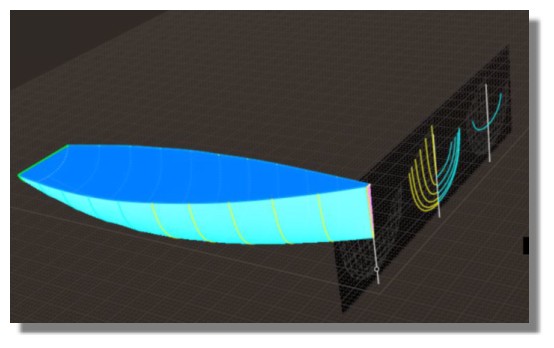
here another way ... easy to do ... loft between curves

with cap end ... the result is solid

you can easily build a second piece and boolean diff to obtain a hull with various width

( the yellow line is a guide to align the profiles ... not necessary in the Loft command )

and as usual .. better results with profiles cleaned with Rebuild ;)

model joined ... à toutes fins utiles

EDITED: 9 Sep 2020 by CORCHET

  Reply Reply More Options
Post Options
Reply as PM Reply as PM
Print Print
Mark as unread Mark as unread
Relationship Relationship
IP Logged

Previous
Next
 From:  Frenchy Pilou (PILOU)
9819.65 
@ Corchet : Les gondoles à Venise! Excellentissismo! :)

And always the tricky function MoveSliceToPoint by Michael from an existing document
where you redraw the curves! The best and easy way!
http://moi3d.com/forum/messages.php?webtag=MOI&msg=2749.36


else!

EDITED: 4 Jun 2020 by PILOU

  Reply Reply More Options
Post Options
Reply as PM Reply as PM
Print Print
Mark as unread Mark as unread
Relationship Relationship
IP Logged

Previous
Next
 From:  corchet
9819.66 In reply to 9819.65 
yes ;)
  Reply Reply More Options
Post Options
Reply as PM Reply as PM
Print Print
Mark as unread Mark as unread
Relationship Relationship
IP Logged

Previous
Next
 From:  corchet
9819.67 


something easy to modify to change the general shape of the " noix de coco " ;) mixture of 2 lofts and 2 networks

1 - 4 lines to loft on each side give only 2 pieces

2 - select the 2 pieces and copy paste

3 - 4 - in the top view draw a line as closest as possible of the middle of the hull ( to prevent join problem ... it's better to do that )

4 - boolean diff to cut the half hull

5 - mirror to obtain 2 perfectly joined pieces

6 - draw a line as show on the pict

7 - before apply network to cap the hull ... join to verify it is closed curved - separate and rejoin the neccessary parts of the border - be sure to have the 3 parts ( in yellow )

8 ' select the four pieces ( 2 caps and 2 hull ) and join ... it's a solid

9 - with only small modfications of the curves in top or left axis ... it's easy to change the general shape of the boat

and possible to add other curves on Z axe to refine the shape for various borders etc ...

EDITED: 9 Sep 2020 by CORCHET

  Reply Reply More Options
Post Options
Reply as PM Reply as PM
Print Print
Mark as unread Mark as unread
Relationship Relationship
IP Logged

Previous
Next
 From:  corchet
9819.68 


et qqs booleans plus tard

EDITED: 9 Sep 2020 by CORCHET

  Reply Reply More Options
Post Options
Reply as PM Reply as PM
Print Print
Mark as unread Mark as unread
Relationship Relationship
IP Logged

Previous
Next
 From:  corchet
9819.69 


adding profiles for a round top
adding profiles with scales to loft the internal hull ( yellow )

EDITED: 9 Sep 2020 by CORCHET

  Reply Reply More Options
Post Options
Reply as PM Reply as PM
Print Print
Mark as unread Mark as unread
Relationship Relationship
IP Logged

Previous
Next
 From:  Gord (NEOMEGA)
9819.70 
Thanks guys - finally did it somehow!
Image Attachments:
Size: 425.8 KB, Downloaded: 38 times, Dimensions: 1958x688px
Size: 1.1 MB, Downloaded: 34 times, Dimensions: 1414x1358px
Size: 1.8 MB, Downloaded: 37 times, Dimensions: 2012x1406px
  Reply Reply More Options
Post Options
Reply as PM Reply as PM
Print Print
Mark as unread Mark as unread
Relationship Relationship
IP Logged

Previous
Next
 From:  Michael Gibson
9819.71 In reply to 9819.70 
That's great Gord!

- Michael
  Reply Reply More Options
Post Options
Reply as PM Reply as PM
Print Print
Mark as unread Mark as unread
Relationship Relationship
IP Logged

Previous
Next
 From:  Frenchy Pilou (PILOU)
9819.72 
@ Corchet What a diversity of variable floating conception! :)

@ Gord Cool result!
---
Pilou
Is beautiful that please without concept!
My Moi French Site My Gallery My MagicaVoxel Gallery
  Reply Reply More Options
Post Options
Reply as PM Reply as PM
Print Print
Mark as unread Mark as unread
Relationship Relationship
IP Logged

Previous
Next
 From:  Frenchy Pilou (PILOU)
9819.73 
Else...;)

---
Pilou
Is beautiful that please without concept!
My Moi French Site My Gallery My MagicaVoxel Gallery
  Reply Reply More Options
Post Options
Reply as PM Reply as PM
Print Print
Mark as unread Mark as unread
Relationship Relationship
IP Logged
 

Reply to All Reply to All


Show messages:  1-13  14-33  34-53  54-73  74-93  94-113  114-129