Ship hull tutorials
 1-10  …  71-90  91-110  111-129

Previous
Next
 From:  Michael Gibson
9819.111 In reply to 9819.110 
Hi Gord, re:

> Except when I try to join, it won't have anything, but when I try to boolean it on,
> it simply disappears leaving the profiles and rails

So to use Join you can't join something in the middle of another surface, you can only use Join to glue an unattached edge to another unattached edge. So you would need to cut a hole in the hull surface in order to get it set up for Join.

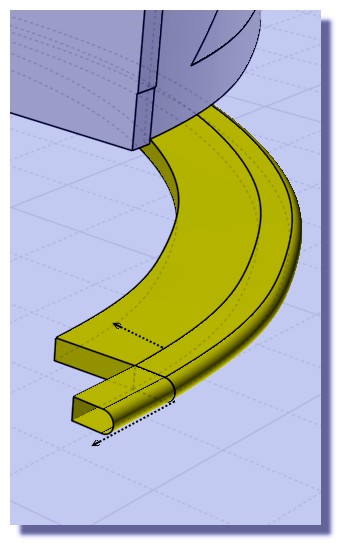
The sweep actually didn't go too well, it's not a solid, it's got a kind of twist in it:


Also that's not a good setup for doing a boolean, back in this previous post (http://moi3d.com/forum/index.php?webtag=MOI&msg=9819.102) I wrote:

   "Yup, that should be possible. But one thing to watch out for is when you make the sweep make the sweep push halfway through or at least a little ways through the hull. Don't make something that has a flat edge that just barely skims right along the same surface area of the hull because such things can be difficult to intersect with booleans."

Your case here is a good example of what I was trying to describe not to do - to set up something that will boolean well, don't make your sweep have a flat edge that is going to make a surface that skims along the hull surface:


That's inside flat piece is close to the hull surface, but it is not going to be exactly the same shape as the hull. It's going to kind of dip in and out of the hull by small amounts and that makes for a really complicated intersection between those surfaces. You need to make the sweep sink in a ways past the hull surface, not have a piece of it that skims right along its surface area.

I think the twist problem with your sweep probably comes from having 2 sweep profiles that have a different number of segments in them. Can you post the curves you used for the sweep so I can check those out?

- Michael

  Reply Reply More Options
Post Options
Reply as PM Reply as PM
Print Print
Mark as unread Mark as unread
Relationship Relationship
IP Logged

Previous
Next
 From:  corchet
9819.112 In reply to 9819.110 


1 draw lines straight ... polyline with large fillet ... curves etc ... rebuild them

project on the surface and trim ( boat + lines ) and copy paste the 3 lines

2 draw profile for the sweep ... scale it

3 rotate and adjust carefully the position of the profile ( not inside the hull ;)

save before sweep

sweep one on one

4 the third line is not trimmed it turn around the hull so the swwep produce a crap

cut the third line ... mirror it along the boat axe

when you have 2 sweep ... build a round piece with loft and boolean union

each sweeped piece is solid and can be boolean diff with cut line ( the end of the second sweep is bad ... need a cut with an arc placed on top view for example )

I can't replace the third piece on the hull ( scaling manipulation error ... doomdoom )

file joined

( il faut vraiment que j'achete un dico anglais ;) comment avoir plus de 200 mots de vocable dans le parlé de Shak'spire ;)

EDITED: 9 Sep 2020 by CORCHET

  Reply Reply More Options
Post Options
Reply as PM Reply as PM
Print Print
Mark as unread Mark as unread
Relationship Relationship
IP Logged

Previous
Next
 From:  corchet
9819.113 In reply to 9819.112 
ensuite ... les chaines ... l'ancre ... et un vieux filet qui pendouille ... ;)

EDITED: 11 Jun 2020 by CORCHET

  Reply Reply More Options
Post Options
Reply as PM Reply as PM
Print Print
Mark as unread Mark as unread
Relationship Relationship
IP Logged

Previous
Next
 From:  corchet
9819.114 In reply to 9819.113 


excellent script chainmaker by bemfarmer

http://moi3d.com/forum/messages.php?webtag=MOI&msg=6087.61

rigid or torsion .. size .. angle.. all is customizable

when done ... the chain has separate parts easy to group and move rotate duplicate etc ...

edit point allow to change the shape of each curve ... copy paste for more complex group of chains

and if you want more personnalized chain ... create a shape ... Array along curve does the job

EDITED: 9 Sep 2020 by CORCHET

  Reply Reply More Options
Post Options
Reply as PM Reply as PM
Print Print
Mark as unread Mark as unread
Relationship Relationship
IP Logged

Previous
Next
 From:  Frenchy Pilou (PILOU)
9819.115 
@ Corchet Capitaine Hadock ;)
Pas besoin d'acheter des dicos!
Pour le tout venant d'un site en langage châtié : https://www.deepl.com/translator
Le plus complet comme dico : https://www.wordreference.com/fr/

Belles châines déchaînées!
  Reply Reply More Options
Post Options
Reply as PM Reply as PM
Print Print
Mark as unread Mark as unread
Relationship Relationship
IP Logged

Previous
Next
 From:  Gord (NEOMEGA)
9819.116 In reply to 9819.114 
Looks interesting!
  Reply Reply More Options
Post Options
Reply as PM Reply as PM
Print Print
Mark as unread Mark as unread
Relationship Relationship
IP Logged

Previous
Next
 From:  Gord (NEOMEGA)
9819.117 In reply to 9819.111 
That totally works! Thanks!
  Reply Reply More Options
Post Options
Reply as PM Reply as PM
Print Print
Mark as unread Mark as unread
Relationship Relationship
IP Logged

Previous
Next
 From:  kevjon
9819.118 
This thread reminds me of all the problems I had creating Fuselages for Aircraft with nurbs.

Gord
If you haven't already explored this option its worth trying using the loft, loose, exact method. See Andrei's video about 10 minutes in https://youtu.be/WBVUsr-eYdw
The trick with this technique is that all your hull cross section shapes must have the same number of points on them.

After you've lofted the hull shape, you can go back and tweak the points of you splines to create a nice smooth surface that matches your reference images & photos (as closely as possible).
Lofting also allows sharp changing of direction with nurbs without the artifacts and distortion that often occurs when using networks and sweeps.

~Kevin~
  Reply Reply More Options
Post Options
Reply as PM Reply as PM
Print Print
Mark as unread Mark as unread
Relationship Relationship
IP Logged

Previous
Next
 From:  Gord (NEOMEGA)
9819.119 In reply to 9819.111 
Thanks!

Sometimes though, swept rails just won't boolean into another solid surface, whereas others had no problem. See the two rails on his one. And why, when you boolean does the object sometimes disappear?

EDITED: 26 Jun 2020 by NEOMEGA

  Reply Reply More Options
Post Options
Reply as PM Reply as PM
Print Print
Mark as unread Mark as unread
Relationship Relationship
IP Logged

Previous
Next
 From:  Frenchy Pilou (PILOU)
9819.120 In reply to 9819.118 
the "Lofter" as i said in my previous post! ;)
https://moi3d.com/forum/index.php?webtag=MOI&msg=9819.109
  Reply Reply More Options
Post Options
Reply as PM Reply as PM
Print Print
Mark as unread Mark as unread
Relationship Relationship
IP Logged

Previous
Next
 From:  Frenchy Pilou (PILOU)
9819.121 In reply to 9819.119 
Don't hesitate to "inflate" your object before the Booleans operations!

  Reply Reply More Options
Post Options
Reply as PM Reply as PM
Print Print
Mark as unread Mark as unread
Relationship Relationship
IP Logged

Previous
Next
 From:  Michael Gibson
9819.122 In reply to 9819.119 
Hi Gord,

> Sometimes though, swept rails just won't boolean into another solid surface, whereas others had
> no problem. See the two rails on his one.

Similar to how it is difficult to intersect a surface that skims right along another surface area it can also be difficult to have skimming edges like you've got here:


Another problem is in this area where you're trying to boolean there are some microstructures:


It will probably be difficult to do a boolean cut that has to try and intersect through that messy area.


> And why, when you boolean does the object sometimes disappear?

Part of the sequence of doing a boolean is it intersects the 2 objects and then needs to gather well formed closed intersection curve results which it then uses to partition objects into different pieces. If it was not able to get a good closed intersection then it can get confused about how to divide pieces up. The pieces that disappear were being classified as being in the volume that is to be discarded. If there are a lot of little tiny fragments in the area that is being intersected they can get partially glommed together and that can impede getting a well formed close intersection.

So it's not good to do repeated booleans of pieces that are kind of close to being aligned but just a little bit off, that can make those little slivery pieces.

- Michael

  Reply Reply More Options
Post Options
Reply as PM Reply as PM
Print Print
Mark as unread Mark as unread
Relationship Relationship
IP Logged

Previous
Next
 From:  Michael Gibson
9819.123 In reply to 9819.119 
That's basically a problem area to work with since these original hull surfaces didn't align very precisely here like I was talking about earlier above:


This area at the top of that juncture now has problems with edges not meeting up with each other very closely and that kind of loose tolerances will tend to increase "glomming together" in intersections through those spots.


If you're going to be doing more stuff along those joining areas then it's good to get them aligned cleanly from earlier on, it helps to avoid problems further down the road.

- Michael

  Reply Reply More Options
Post Options
Reply as PM Reply as PM
Print Print
Mark as unread Mark as unread
Relationship Relationship
IP Logged

Previous
Next
 From:  Gord (NEOMEGA)
9819.124 In reply to 9819.123 
OK, thanks. I moved it away from the little parts as it worked. However, on another part, when I boolean, it suddenly deletes the structure for some reason! What happened?

I slowly learn!

G
  Reply Reply More Options
Post Options
Reply as PM Reply as PM
Print Print
Mark as unread Mark as unread
Relationship Relationship
IP Logged

Previous
Next
 From:  Michael Gibson
9819.125 In reply to 9819.124 
Hi Gord,

> However, on another part, when I boolean, it suddenly deletes the structure
> for some reason! What happened?

If you post the model I can take a look. It's hard to guess what might be going on without the model.

But it's probably related to those problem spots with micro faces and edges that don't connect to each other very accurately like I was talking about above.

- Michael
  Reply Reply More Options
Post Options
Reply as PM Reply as PM
Print Print
Mark as unread Mark as unread
Relationship Relationship
IP Logged

Previous
Next
 From:  Gord (NEOMEGA)
9819.126 In reply to 9819.125 
Could be that, if that happens. I've redesigned that bit now and put the rails on if a slightly different place. All a solid!

G
  Reply Reply More Options
Post Options
Reply as PM Reply as PM
Print Print
Mark as unread Mark as unread
Relationship Relationship
IP Logged

Previous
Next
 From:  Frenchy Pilou (PILOU)
9819.127 
Minutes 14.00 and following..


Minutes 2.30 and following


Minutes 7 and following

EDITED: 13 Jun 2020 by PILOU

  Reply Reply More Options
Post Options
Reply as PM Reply as PM
Print Print
Mark as unread Mark as unread
Relationship Relationship
IP Logged

Previous
Next
 From:  Frenchy Pilou (PILOU)
9819.128 
Polycad if free! ;)
http://www.polycad.co.uk/ Import Export IGES so entierely Moi3D compatible! ;)
https://moiscript.weebly.com/polycad.html French version of the site ;)

Just a part of an huge prog!


  Reply Reply More Options
Post Options
Reply as PM Reply as PM
Print Print
Mark as unread Mark as unread
Relationship Relationship
IP Logged

Previous
 From:  Frenchy Pilou (PILOU)
9819.129 
They are progressing!

---
Pilou
Is beautiful that please without concept!
My Moi French Site My Gallery My MagicaVoxel Gallery
  Reply Reply More Options
Post Options
Reply as PM Reply as PM
Print Print
Mark as unread Mark as unread
Relationship Relationship
IP Logged
 

Reply to All Reply to All


Show messages:  1-10  …  51-70  71-90  91-110  111-129