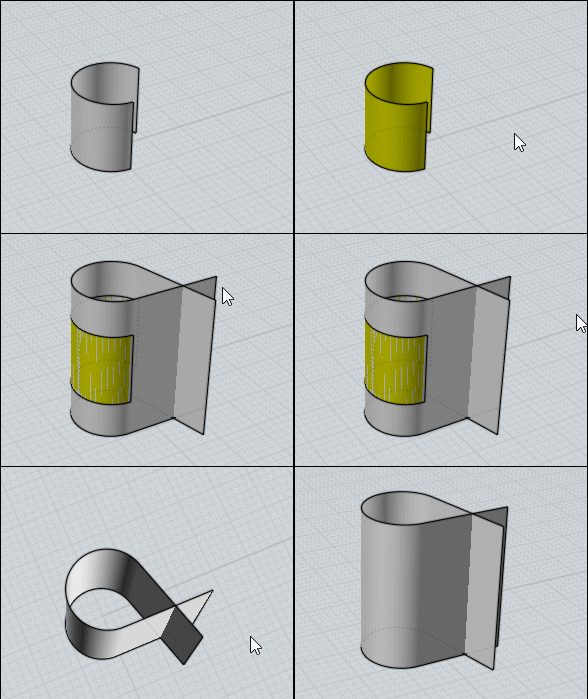
can we do this at some point?
 1-8  9-26

Previous
Next
 From:  Frenchy Pilou (PILOU)
9747.9 
So can be considered as an parametric Offset Surface ?

EDITED: 3 Apr 2020 by PILOU

  Reply Reply More Options
Post Options
Reply as PM Reply as PM
Print Print
Mark as unread Mark as unread
Relationship Relationship
IP Logged

Previous
Next
 From:  Michael Gibson
9747.10 In reply to 9747.8 
Hi Brian, yes that code will both clear out the factories array while also calling .cancel() on each factory. There's a separate factory for each selected surface and when a UI control has changed that is clearing out any previously displayed result before making new ones.

The JavaScript array object has a .pop() method on it which removes the last element in the array but also passes it back as the return value from pop() so it can be used in this way. This type of construct is called "function chaining" or "method chaining": https://en.wikipedia.org/wiki/Method_chaining .

Another way to write it would be:

while ( factories.length != 0 )
{
    var factory = factories.pop();
    factory.cancel();
}

or something like:

for ( var i = 0; i < factories.length; ++i )
{
    var factory = factories[i];
    factory.cancel();
}

factory.length = 0;


All of those would do the same thing, the pop method with chaining is just kind of nice since it's so compact.

- Michael
  Reply Reply More Options
Post Options
Reply as PM Reply as PM
Print Print
Mark as unread Mark as unread
Relationship Relationship
IP Logged

Previous
Next
 From:  Frenchy Pilou (PILOU)
9747.11 
Extend Surf : French Version somewhere on the page! ;)

http://moiscript.weebly.com/trucs-astuces.html
  Reply Reply More Options
Post Options
Reply as PM Reply as PM
Print Print
Mark as unread Mark as unread
Relationship Relationship
IP Logged

Previous
Next
 From:  Michael Gibson
9747.12 In reply to 9747.9 
Hi Pilou,

re:
> So can be considered as an parametric Offset Surface ?

Yes, sort of - but usually in CAD that name "Offset Surface" means making a result that is displaced by traveling along the surface normal.

This one instead goes in the UV directions of the surface. You can also put in negative values.

- Michael
  Reply Reply More Options
Post Options
Reply as PM Reply as PM
Print Print
Mark as unread Mark as unread
Relationship Relationship
IP Logged

Previous
Next
 From:  Frenchy Pilou (PILOU)
9747.13 In reply to 9747.12 
"negative values" : never thougth of that! Very Cool!
---
Pilou
Is beautiful that please without concept!
My Moi French Site My Gallery My MagicaVoxel Gallery
  Reply Reply More Options
Post Options
Reply as PM Reply as PM
Print Print
Mark as unread Mark as unread
Relationship Relationship
IP Logged

Previous
Next
 From:  BurrMan
9747.14 In reply to 9747.7 
yup, that'll do it!!!

Thanks Michael. No need to wait....

Really appreciate the work....
  Reply Reply More Options
Post Options
Reply as PM Reply as PM
Print Print
Mark as unread Mark as unread
Relationship Relationship
IP Logged

Previous
Next
 From:  Frenchy Pilou (PILOU)
9747.15 
Seems this automatic extend don't works for the V3 !
Does this normal ?
---
Pilou
Is beautiful that please without concept!
My Moi French Site My Gallery My MagicaVoxel Gallery
  Reply Reply More Options
Post Options
Reply as PM Reply as PM
Print Print
Mark as unread Mark as unread
Relationship Relationship
IP Logged

Previous
Next
 From:  Michael Gibson
9747.16 In reply to 9747.15 
Hi Pilou, it is possible to modify it to work with v3 - v3 needs to have temporary objects like the planes that are created to be added to the geometry database for async factories (like Flow) to be able to use them. V4 does not require that anymore, in v4 async factories can use "loose" objects (objects not in the geometry database) for input into async factories.

If you replace the Update() function with this below code then it should work on v3 too:

code:
function Update( objects, factories )
{
	while ( factories.length != 0 )
		factories.pop().cancel();

	var base_plane = CreatePlane( 0, 0, 1, 1 ).item(0).getFaces().item(0);

	for ( var i = 0; i < objects.length; ++i )
	{
		var obj = objects.item(i);

		var umin = moi.ui.commandUI.umin.value;
		var umax = moi.ui.commandUI.umax.value;
		var vmin = moi.ui.commandUI.vmin.value;
		var vmax = moi.ui.commandUI.vmax.value;

		var extended_plane = CreatePlane( -umin, -vmin, 1 + umin + umax, 1 + vmin + vmax );

		moi.geometryDatabase.addObject( base_plane.getParentBRep() );
		moi.geometryDatabase.addObjects( extended_plane );

		var factory = moi.command.createFactory( 'flow' );
		factory.setInput( 0, extended_plane ); // objects to deform
		factory.setInput( 1, base_plane );     // base object
		factory.setInput( 2, obj );			   // target object
		factory.setInput( 3, false );           // delete inputs
		factory.setInput( 7, false );          // swap uv
		factory.setInput( 8, false );          // Flip U
		factory.setInput( 9, false );          // Flip V
		factory.setInput( 10, false );         // Flip normal
		factory.setInput( 11, false );         // Projective
		factory.setInput( 12, false );         // Straight for projective

		factory.update();
		factories.push( factory );
		
		moi.geometryDatabase.removeObject( base_plane.getParentBRep() );
		moi.geometryDatabase.removeObjects( extended_plane );
	}
}


- Michael
  Reply Reply More Options
Post Options
Reply as PM Reply as PM
Print Print
Mark as unread Mark as unread
Relationship Relationship
IP Logged

Previous
Next
 From:  Frenchy Pilou (PILOU)
9747.17 In reply to 9747.16 
Cool! But in what path file is this UpDate function? (for be sure)

EDITED: 5 Apr 2020 by PILOU

  Reply Reply More Options
Post Options
Reply as PM Reply as PM
Print Print
Mark as unread Mark as unread
Relationship Relationship
IP Logged

Previous
Next
 From:  bemfarmer
9747.18 In reply to 9747.17 
I replaced the UpDate function in the FlowExtendSrf.js file. (or thought I did...)

Edit: Deleted this faulty post.

- Brian

EDITED: 5 Apr 2020 by BEMFARMER

  Reply Reply More Options
Post Options
Reply as PM Reply as PM
Print Print
Mark as unread Mark as unread
Relationship Relationship
IP Logged

Previous
Next
 From:  Frenchy Pilou (PILOU)
9747.19 In reply to 9747.18 
<< BUT, running the modified script in MoI3 resulted in (endless?) calculating process.

That was the same with the original for the V 3!

And the same with this update, (infinite calculus) there is surely a little bug somewhere...

EDITED: 5 Apr 2020 by PILOU

  Reply Reply More Options
Post Options
Reply as PM Reply as PM
Print Print
Mark as unread Mark as unread
Relationship Relationship
IP Logged

Previous
Next
 From:  Michael Gibson
9747.20 In reply to 9747.17 
Hi Pilou,

> Cool! But in what path file is this UpDate function? (for be sure)

Well the plugin only has 2 files for it, FlowExtendSrf.js and FlowExtendSrf.htm, and only one of those has an Update() function - FlowExtendSrf.js . That's the one that needs the new code.

- Michael
  Reply Reply More Options
Post Options
Reply as PM Reply as PM
Print Print
Mark as unread Mark as unread
Relationship Relationship
IP Logged

Previous
Next
 From:  Michael Gibson
9747.21 In reply to 9747.18 
Hi Brian,

re:
> I replaced the UpDate function in the FlowExtendSrf.js file.

It looks like the files in your FlowExtendSrfMoI3.zip are the original versions not the updated ones?

Here's the updated file attached.

- Michael
Attachments:

  Reply Reply More Options
Post Options
Reply as PM Reply as PM
Print Print
Mark as unread Mark as unread
Relationship Relationship
IP Logged

Previous
Next
 From:  Frenchy Pilou (PILOU)
9747.22 In reply to 9747.21 
Cool! I have missed the new version :)

Works even inside the Infinite Trial version 3 without save!

  Reply Reply More Options
Post Options
Reply as PM Reply as PM
Print Print
Mark as unread Mark as unread
Relationship Relationship
IP Logged

Previous
Next
 From:  bemfarmer
9747.23 In reply to 9747.21 
Thank you Michael.

I made the changes, but somehow the changes went sideways.
This is not the first time I have had trouble with Notepad++ when reusing and modifying copies of files.
I'll have to be more diligent :-)

- Brian
  Reply Reply More Options
Post Options
Reply as PM Reply as PM
Print Print
Mark as unread Mark as unread
Relationship Relationship
IP Logged

Previous
Next
 From:  Michael Gibson
9747.24 In reply to 9747.23 
No problem Brian! You might have gotten bit by a permissions issue. Files inside the c:\Program Files (x86) folder are restricted to be read only at the standard privilege level. If you right-click Notepad++ and use "Run as administrator", it will run at an elevated privilege which is then allowed to make changes to files in c:\ Program Files (x86)

Thanks
- Michael
  Reply Reply More Options
Post Options
Reply as PM Reply as PM
Print Print
Mark as unread Mark as unread
Relationship Relationship
IP Logged

Previous
Next
 From:  bemfarmer
9747.25 In reply to 9747.24 
Yes :-)
- Brian
  Reply Reply More Options
Post Options
Reply as PM Reply as PM
Print Print
Mark as unread Mark as unread
Relationship Relationship
IP Logged

Previous
 From:  Finema
9747.26 
Thanks a lot Michael for the plug-in ! It's great.
  Reply Reply More Options
Post Options
Reply as PM Reply as PM
Print Print
Mark as unread Mark as unread
Relationship Relationship
IP Logged
 

Reply to All Reply to All


Show messages:  1-8  9-26