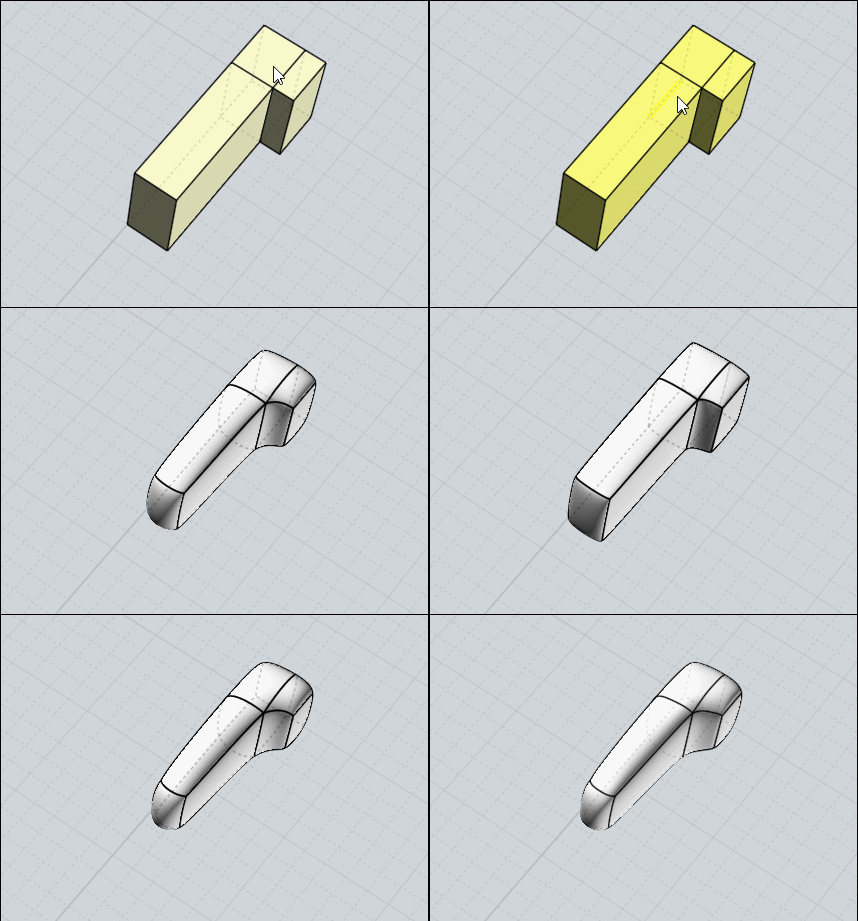
Surfaces not tangent or separated
 1-8  9-28  29-43

Previous
Next
 From:  Pwd
9732.9 In reply to 9732.4 
Michael,

thanks for this explanation... I suppose, so, that I've to use a base form to have a rough form and then work on it to refine to the final model!
From what I can see, a command to extend surfaces is missing, am I right?

Thanks
  Reply Reply More Options
Post Options
Reply as PM Reply as PM
Print Print
Mark as unread Mark as unread
Relationship Relationship
IP Logged

Previous
Next
 From:  Frenchy Pilou (PILOU)
9732.10 In reply to 9732.8 
<< SUBD can help in this situation?
No in optic "already know where you want to go" for have a precision wanted...
as it's always a surprise when you press the SUubDivide button ! ;)

Maybe trim volums Fillets then boolean ... a workflow is to find...
  Reply Reply More Options
Post Options
Reply as PM Reply as PM
Print Print
Mark as unread Mark as unread
Relationship Relationship
IP Logged

Previous
Next
 From:  Pwd
9732.11 In reply to 9732.10 
Really?
I'll try my right workflow!

Thanks
Marco
  Reply Reply More Options
Post Options
Reply as PM Reply as PM
Print Print
Mark as unread Mark as unread
Relationship Relationship
IP Logged

Previous
Next
 From:  Michael Gibson
9732.12 In reply to 9732.9 
Hi Marco,

> From what I can see, a command to extend surfaces is missing, am I right?

It is but the method using Flow that I showed above can be used to accomplish it.

- Michael
  Reply Reply More Options
Post Options
Reply as PM Reply as PM
Print Print
Mark as unread Mark as unread
Relationship Relationship
IP Logged

Previous
Next
 From:  Frenchy Pilou (PILOU)
9732.13 In reply to 9732.11 
Personal workflow when you find it is always the best for you! :)
---
Pilou
Is beautiful that please without concept!
My Moi French Site My Gallery My MagicaVoxel Gallery
  Reply Reply More Options
Post Options
Reply as PM Reply as PM
Print Print
Mark as unread Mark as unread
Relationship Relationship
IP Logged

Previous
Next
 From:  Pwd
9732.14 In reply to 9732.12 
Ok, Michael...

Good!
  Reply Reply More Options
Post Options
Reply as PM Reply as PM
Print Print
Mark as unread Mark as unread
Relationship Relationship
IP Logged

Previous
Next
 From:  Pwd
9732.15 In reply to 9732.13 
Hope so!
I've to learn tons of commands and their uses.

Bye
  Reply Reply More Options
Post Options
Reply as PM Reply as PM
Print Print
Mark as unread Mark as unread
Relationship Relationship
IP Logged

Previous
Next
 From:  Frenchy Pilou (PILOU)
9732.16 In reply to 9732.15 
Subdiv is maybe not for your case ;)
But can be useful for imagine creative forms!
there are for the moment only 5 principal functions ;)
Native Extrude + special SBridge, SsPlit,Sscale, Subdive
as you see fillet is special ;) And you can't made fillet on the "edges" of a volume subdivided!

EDITED: 22 Mar 2020 by PILOU

  Reply Reply More Options
Post Options
Reply as PM Reply as PM
Print Print
Mark as unread Mark as unread
Relationship Relationship
IP Logged

Previous
Next
 From:  Pwd
9732.17 In reply to 9732.16 
Yes, exactly what I mean!
Usually, in Rhino, I draw a circle with the given diameter and then create a form; moving some points I try to achieve the model I need and use the circle as reference. So I try to be nearest to the circle, it doesn't matter of the precision, because when the ring is casted and polished it change its dimensions.
The important things are the setting for the stone that must be precise... but I can use nurbs with standard commands.
So, yes... it's good as you wrote!
I think that, starting from a cube, I can add faces following the guide circle to form a ring... right?

Thanks
Marco
  Reply Reply More Options
Post Options
Reply as PM Reply as PM
Print Print
Mark as unread Mark as unread
Relationship Relationship
IP Logged

Previous
Next
 From:  Ken (OKURO)
9732.18 In reply to 9732.16 
Hi Pilou, first af all big thanks for your fantastic input, much appreciated !
One question: what do you mean by "special SBridge", is this different from
this version:http://moi.maxsm.net/files/scripts/sBridge.v.0.71.2015.03.26.zip
???
Thanks again + best wishes !
  Reply Reply More Options
Post Options
Reply as PM Reply as PM
Print Print
Mark as unread Mark as unread
Relationship Relationship
IP Logged

Previous
Next
 From:  Frenchy Pilou (PILOU)
9732.19 In reply to 9732.18 
sBridge (plugin) is "special" function for Subdivision against "native" Extrude who can be used in certains faces for subdivision! ;)

Yes it's the Max Smirnov one! ;)
  Reply Reply More Options
Post Options
Reply as PM Reply as PM
Print Print
Mark as unread Mark as unread
Relationship Relationship
IP Logged

Previous
Next
 From:  Ken (OKURO)
9732.20 In reply to 9732.19 
Many Thanks !
  Reply Reply More Options
Post Options
Reply as PM Reply as PM
Print Print
Mark as unread Mark as unread
Relationship Relationship
IP Logged

Previous
Next
 From:  Barry-H
9732.21 In reply to 9732.1 
Hi Marco,
not sure if this is the result your looking for but this was produced by using half of the helix (outer diameter of ring).
I extruding it to max depth then trimmed as Michael as shown.
I then shelled it and filleted.
It was necessary to trim the solid where it was going to join in the middle as this was not flat due to the shelling.
I then copied the half revolved it 180 and joined.
Hope this helps.
Barry


Attachments:

  Reply Reply More Options
Post Options
Reply as PM Reply as PM
Print Print
Mark as unread Mark as unread
Relationship Relationship
IP Logged

Previous
Next
 From:  Pwd
9732.22 In reply to 9732.21 
Barry!!!
That is exactly what I expected to achieve!!!!!!

Thanks a lot
  Reply Reply More Options
Post Options
Reply as PM Reply as PM
Print Print
Mark as unread Mark as unread
Relationship Relationship
IP Logged

Previous
Next
 From:  Pwd
9732.23 In reply to 9732.22 
Barry,

I follow Michael advises and yours, but... how did you solve the issue in the point where it has to be join?
Mhhh...
In all this job, a profile is missing I think!

Thanks a lot!
Marco

EDITED: 24 Mar 2020 by PWD

Image Attachments:
Size: 154.4 KB, Downloaded: 24 times, Dimensions: 511x638px
  Reply Reply More Options
Post Options
Reply as PM Reply as PM
Print Print
Mark as unread Mark as unread
Relationship Relationship
IP Logged

Previous
Next
 From:  Barry-H
9732.24 In reply to 9732.23 
Hi Marco,
did you use the shell command (see photo's).
There is no need for a profile.
Make sure to do the filleting on just the half as I had problem trying to fillet after joining.
Cheers
Barry


  Reply Reply More Options
Post Options
Reply as PM Reply as PM
Print Print
Mark as unread Mark as unread
Relationship Relationship
IP Logged

Previous
Next
 From:  Pwd
9732.25 In reply to 9732.24 
Yes,

exactly Barry... that face is not squared and it's rotated, so when I copy-rotate the solid, the result is what I've attahced to my post before...
I can't figure out how to solve...
I followed the same yours steps!

Thanks
Marco
  Reply Reply More Options
Post Options
Reply as PM Reply as PM
Print Print
Mark as unread Mark as unread
Relationship Relationship
IP Logged

Previous
Next
 From:  Barry-H
9732.26 In reply to 9732.25 
Hi Marco,
it looks like you have extruded the half helix square to the angle of the helix and it should be square to the axis.
If this isn't the case please send me your file.
Cheers
Barry


Attachments:

  Reply Reply More Options
Post Options
Reply as PM Reply as PM
Print Print
Mark as unread Mark as unread
Relationship Relationship
IP Logged

Previous
Next
 From:  Pwd
9732.27 In reply to 9732.26 
Ok understood...
Thanks.
What about the fillets, now?
I've cutted and reconstructed the surfaces to avoid crossing points and then launched the fillet... but you can see the results... any idea on how to apply correctly it to the model?

Thanks a lot.
Marco
Attachments:

  Reply Reply More Options
Post Options
Reply as PM Reply as PM
Print Print
Mark as unread Mark as unread
Relationship Relationship
IP Logged

Previous
Next
 From:  Frenchy Pilou (PILOU)
9732.28 In reply to 9732.27 
Post your file before fillets!

Normallly you must have the same fillet along all the volume (don't accept the fillet if you want the following possibility)
then free to you after to make any new "variable fillets" during the same session of fillet on some edges!

EDITED: 25 Mar 2020 by PILOU

  Reply Reply More Options
Post Options
Reply as PM Reply as PM
Print Print
Mark as unread Mark as unread
Relationship Relationship
IP Logged
 

Reply to All Reply to All


Show messages:  1-8  9-28  29-43