Rotate Array?
All  1-15  16-20

Previous
Next
 From:  Mindset (IGNITER)
9710.16 In reply to 9710.15 
Hello Michael and everyone,
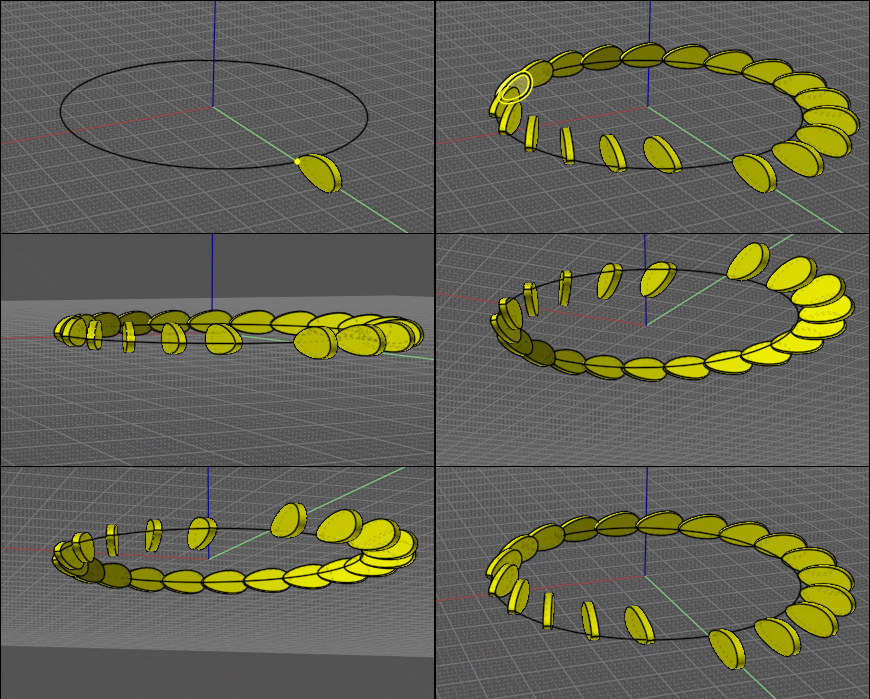
Although it’s been months and months, I thank you for RotateArray.js! It did, definitely, allow me to get results that I could previously have only imagined. It looks amazing. Maybe I’ll be able to post it someday.

I used it in conjunction with:

1. Assigning a style to a face so that I could select them all from the array result
2. Run RotateArray to position the elements of the resulting array
3. Implement BoundingBoxMultiple on the faces selected per step one
4. Use SavePointFile to capture the resulting points
5. Convert them via ImportPointFile into a ‘Through points’ Freeform curve
6. Use offset - both sides, & Loft between them
7. Then implement ArrayGem to distribute and align a closed-curve profile, collectively utilized, along with the result of step four, to implement a Sweep.

This produced a perfectly fitting “cam” that the original RotateArray results “follow”!

What would make this even ever so much better is to be able to array some multiple groups of objects, some containing at least one single-segment line, designated at runtime by their user defined name. Such line(s) would serve as an axis with which subsequent calls to an enhanced RotateArray could operate “Rotate Axis” upon subsets of the original array of groups. This in effect, could operate as a hinge between at least two groups of objects, allowing for articulated arrays. I believe many advanced artistic effects may become possible this way.

Additionally, it would be great if the array command could optionally apply a sequentially numbered Name or User-Data to resulting groups of objects. That way, subsequent the progressive incrementing or decrementing value parameters could be controlled over some explicit range within the numbered Names - rather than some predetermined fraction of the total. This might also forgo the paired ordering of objects and points in the graphic database; at times, an incapacitating requirement as I will discuss next.

Apparently, this thread had given instructions about how to use ScaleArray and RotateArray more than once. The images are missing from that post and I’ve not been able to do so. Please advise.

Moi Bueno
MindSet
  Reply Reply More Options
Post Options
Reply as PM Reply as PM
Print Print
Mark as unread Mark as unread
Relationship Relationship
IP Logged

Previous
Next
 From:  Frenchy Pilou (PILOU)
9710.17 In reply to 9710.16 
here a little video (in French but... sound is broken at middle video for any reason...
The Script array
https://moiscript.weebly.com/scriptarray.html

An another one ;) The Scale Array
https://piloumaison.weebly.com/le-scale-array.html

The Rotate Array itself
An object + a Point for any Array /curve : make the Array / Curve
Then select all except the curve : Rotate Array with your parameters!
Here 180°

EDITED: 17 Jun 2024 by PILOU

  Reply Reply More Options
Post Options
Reply as PM Reply as PM
Print Print
Mark as unread Mark as unread
Relationship Relationship
IP Logged

Previous
Next
 From:  Michael Gibson
9710.18 In reply to 9710.16 
Hi MindSet,

re:
> Apparently, this thread had given instructions about how to use ScaleArray and RotateArray
> more than once. The images are missing from that post and I’ve not been able to do so.
> Please advise.

It looks like images are intact on this one:
http://moi3d.com/forum/index.php?webtag=MOI&msg=9710.5

and the instructions for ScaleArray are here:
http://moi3d.com/forum/index.php?webtag=MOI&msg=275.109

- Michael
  Reply Reply More Options
Post Options
Reply as PM Reply as PM
Print Print
Mark as unread Mark as unread
Relationship Relationship
IP Logged

Previous
Next
 From:  Mindset (IGNITER)
9710.19 In reply to 9710.18 
Thank you Pilou & Michael, et. al.

I need to be able to run RotateArray more than once upon the same array, so that I can do so from more than one viewport.
I still don't know how to do that.
I can't finish what I need without it.

Please help!

Moi Bueno
MindSet

  Reply Reply More Options
Post Options
Reply as PM Reply as PM
Print Print
Mark as unread Mark as unread
Relationship Relationship
IP Logged

Previous
 From:  Michael Gibson
9710.20 In reply to 9710.19 
Hi MindSet,

re:
> I need to be able to run RotateArray more than once upon the same array, so that I
> can do so from more than one viewport.

The result generated by RotateArray can be used in a 2nd run just by running the command again.

Just move your mouse over the other viewport that you want to use for the second application.

Make sure to include a point object with the array, that will be used as the center of rotation.

So for example here's an array prepared for RotateArray:


Select the arrayed objects:


Run RotateArray:


Move mouse over the other viewport, for example here I moved over the "Front" viewport:


Run RotateArray again, this one will rotate in the Front view:


- Michael

  Reply Reply More Options
Post Options
Reply as PM Reply as PM
Print Print
Mark as unread Mark as unread
Relationship Relationship
IP Logged
 

Reply to All Reply to All


Show messages: All  1-15  16-20