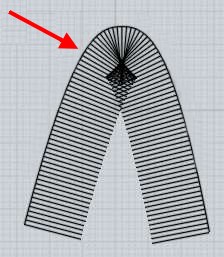
Multi profile sweep

Next
 From:  Andre
9706.1 
I want to sweep (loft?) from one of those two profiles to the other, following the yellow rail:


If I select the two profiles, choose "Sweep" and then select the rail, I get this:


which isn't really what I want.

  Reply Reply More Options
Post Options
Reply as PM Reply as PM
Print Print
Mark as unread Mark as unread
Relationship Relationship
IP Logged

Previous
Next
 From:  amur (STEFAN)
9706.2 
Hi Andre,

maybe you could try to select the three curves and then run the Network command.

Regards
Stefan
Signal: +4915172173279 https://keybase.io/stefan_claas
  Reply Reply More Options
Post Options
Reply as PM Reply as PM
Print Print
Mark as unread Mark as unread
Relationship Relationship
IP Logged

Previous
Next
 From:  amur (STEFAN)
9706.3 
... and when I do a sweep it works for me under beta4 (Windows).

Regards
Stefan
Signal: +4915172173279 https://keybase.io/stefan_claas
  Reply Reply More Options
Post Options
Reply as PM Reply as PM
Print Print
Mark as unread Mark as unread
Relationship Relationship
IP Logged

Previous
Next
 From:  corchet
9706.4 


network 3 curves

loft 3 curves

EDITED: 28 May 2020 by CORCHET

  Reply Reply More Options
Post Options
Reply as PM Reply as PM
Print Print
Mark as unread Mark as unread
Relationship Relationship
IP Logged

Previous
Next
 From:  corchet
9706.5 In reply to 9706.4 
loft 2 curves sorry ;)
  Reply Reply More Options
Post Options
Reply as PM Reply as PM
Print Print
Mark as unread Mark as unread
Relationship Relationship
IP Logged

Previous
Next
 From:  Barry-H
9706.6 In reply to 9706.1 
Hi,
try this method.
Cheers
Barry


Attachments:

  Reply Reply More Options
Post Options
Reply as PM Reply as PM
Print Print
Mark as unread Mark as unread
Relationship Relationship
IP Logged

Previous
Next
 From:  Phiro
9706.7 
Hi Andre,

I don't know what you want to do, but, you have some other possibilities to do near what you want.

A revolve with rail revolve


A network


As I wrote, this simple methods don't give exact results but it depends if you want an exact sweep equivalent or a general result.

  Reply Reply More Options
Post Options
Reply as PM Reply as PM
Print Print
Mark as unread Mark as unread
Relationship Relationship
IP Logged

Previous
Next
 From:  Phiro
9706.8 
You can also sweep on your rail only the part where your curves don't have a common axe and then add a plan with edges to close the surface.


  Reply Reply More Options
Post Options
Reply as PM Reply as PM
Print Print
Mark as unread Mark as unread
Relationship Relationship
IP Logged

Previous
Next
 From:  Andre
9706.9 
Hmm, I'll see if I can make one of those methods work.

This seems to have nothing to do with the two profiles touching each other, the same happens if I pull them apart:


  Reply Reply More Options
Post Options
Reply as PM Reply as PM
Print Print
Mark as unread Mark as unread
Relationship Relationship
IP Logged

Previous
Next
 From:  Michael Gibson
9706.10 In reply to 9706.1 
Hi Andre,

re:
> If I select the two profiles, choose "Sweep" and then select the rail, I get this:
> <....>
> which isn't really what I want.

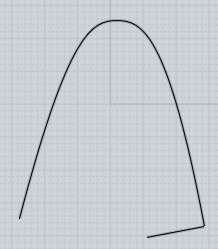
The reason you get that result is that Sweep functions by moving the profiles along the rail and also rotating them at each rail position so they are perpendicular to the rail curve.

Because your curve has a smaller radius of curvature than the length of the profiles, the profiles are going to bunch up on top of each other as they traverse the bend.

You can get an idea of what's happening if you use Transform > Array > Curve to duplicate a profile the curve, it uses a similar mechanism:


Or also here's a simpler view of the same kind of situation:


In the future I would like to make a variant of sweep that works by a pivoting method that would pivot profiles around a single rotation axis and just having it touch the rail instead of placing profiles perpendicular to the rail. But currently there is only the latter method for sweep.

There are a variety of different things you can use currently though.

If you remove one section of the profiles, the one that is the furthest away from the rail then there is barely enough room to sweep those pieces:


Then form the top and other areas by Construct > Planar rather than trying to use Sweep to form the top area:


And also use Construct > Planar to form the other sides as well:


Also some approaches using other tools instead of sweep have been described by others above.

- Michael

  Reply Reply More Options
Post Options
Reply as PM Reply as PM
Print Print
Mark as unread Mark as unread
Relationship Relationship
IP Logged

Previous
Next
 From:  Michael Gibson
9706.11 In reply to 9706.9 
Hi Andre, also here is another illustration of how the profiles will be rotated as they travel along the rail curve, if this helps to explain why you are getting that bunched up result:


So if a profile sticks out too large of a distance away from the rail it's going to make the profiles criss-cross over each other:


In order to avoid bunching up the profiles need to extend no further than something like this length away from your rail curve:


- Michael

  Reply Reply More Options
Post Options
Reply as PM Reply as PM
Print Print
Mark as unread Mark as unread
Relationship Relationship
IP Logged

Previous
 From:  Andre
9706.12 
Yeah, I figured something like that. I got a better idea of how the sweep works, by moving around the profiles and editing the rail points, both of which will update the sweep in real time. This gives a good impression of what is happening. I was able to use yours and Phiro's method to get a good result now.
  Reply Reply More Options
Post Options
Reply as PM Reply as PM
Print Print
Mark as unread Mark as unread
Relationship Relationship
IP Logged
 

Reply to All Reply to All