About SubDivide in nurbs :)
 1-20  …  61-80  81-100  101-120

Previous
Next
 From:  Psygorn (DRILLBIT)
9689.101 
Hello guys,

Could you please explain to me How I can properly use this Creat under SubD tab? Why it seems as if it works in strange ways?

Explanation: I have models made by Blender (Obj files) when I import them into Moi using the Create button I showed. it seems that they are converted to NURBS and scaled-down! but when I perform SubD on an imported Obj file (using ImpObj) and export it as an Obj from Moi and then import it again using Create button under the SubD tab it seems it does nothing!


Edit: I think I figured it by now! if the Weld vertex box is not checked during the exportation process then "Create button" only imports an object and it doesn't turn it into NURBS.

EDITED: 18 Apr 2022 by DRILLBIT

  Reply Reply More Options
Post Options
Reply as PM Reply as PM
Print Print
Mark as unread Mark as unread
Relationship Relationship
IP Logged

Previous
Next
 From:  Michael Gibson
9689.102 In reply to 9689.101 
HI Psygorn,

re:
> Could you please explain to me How I can properly use this Creat under SubD tab?
> Why it seems as if it works in strange ways?

It's meant to convert a polygon mesh file that has been structured for sub-d smoothing.

If you get strange results it probably means the model you are trying to convert has not been modeled as a sub-d control cage.

You should see the same strange results if you imported the same file into a poly modeling program and then applied sub-d smoothing on it.

- Michael
  Reply Reply More Options
Post Options
Reply as PM Reply as PM
Print Print
Mark as unread Mark as unread
Relationship Relationship
IP Logged

Previous
Next
 From:  Frenchy Pilou (PILOU)
9689.103 In reply to 9689.101 
Your OBJ file from Blender must be "Quadrangulated" for best result in SubD!
---
Pilou
Is beautiful that please without concept!
My Moi French Site My Gallery My MagicaVoxel Gallery
  Reply Reply More Options
Post Options
Reply as PM Reply as PM
Print Print
Mark as unread Mark as unread
Relationship Relationship
IP Logged

Previous
Next
 From:  Psygorn (DRILLBIT)
9689.104 In reply to 9689.103 
Thanks PILOU :-)
  Reply Reply More Options
Post Options
Reply as PM Reply as PM
Print Print
Mark as unread Mark as unread
Relationship Relationship
IP Logged

Previous
Next
 From:  Andy (ANDYT)
9689.105 
I have been trawling through the various chats about SubD and importing an OBJ file. (I also have a STL file version)
Trying to import a 3D scanned object file in .OBJ format (with a .png graphics file & a .mtl file) I have tried just importing the.obj file only but it does not work
The 3D scan is not closed, the base of the scanned object did not scan in - could this be the problem ? How could I close this as not a mesh user
I have tried using meshlab to reduce the mesh count but again no luck, or it could be its 3 sided rather than a 4 sided mesh ?
I only need a low res version to build a Nurbes version from, effectively tracing over in 3D
Any thoughts or ideas would be most welcome or other routes to import the file
I am not that techy
  Reply Reply More Options
Post Options
Reply as PM Reply as PM
Print Print
Mark as unread Mark as unread
Relationship Relationship
IP Logged

Previous
Next
 From:  Michael Gibson
9689.106 In reply to 9689.105 
Hi Andy, the data created from a scan is very different than the data created by someone modeling a mesh made for sub-d smoothing.

Scan data is made up of dense triangle meshes, that type of data is not suitable for use directly as a sub-d control cage. That also means it is not suitable for import directly into Moi using a sub-d conversion method.

There is a process called "retopology" which involves tracing out a simplified sub-d control cage over top of a dense mesh. That's something that can be done in a polygon mesh editing program, MoI does not have any tools for that type of process.

It's a fairly complex process which will take some time to learn about.

If you do a search on that term "retopology" you can find more information about it like here:
https://conceptartempire.com/retopology/
https://docs.blender.org/manual/en/latest/modeling/meshes/retopology.html

In general scanned mesh data like you have is not directly nor easily brought into a CAD program like MoI. CAD programs are meant to work with larger structured surfaces like with a sphere for example being a single sphere surface, not several thousand little triangles like how the scan data is formed.

There is another type of process called "Reverse engineering" which is similar to retopology but meant to generate CAD surfaces as the output instead of sub-d meshes. It's also a difficult process with a high learning curve as well. There are some links to some programs in previous discussions here:
http://moi3d.com/forum/index.php?webtag=MOI&msg=10284.18
http://moi3d.com/forum/index.php?webtag=MOI&msg=4013.4
http://moi3d.com/forum/index.php?webtag=MOI&msg=2469.3

MoI itself is not designed to be used itself for doing retopology or reverse engineering type work, it does not have the toolset for those areas of work. That's why you're having difficulty trying to use that scan data directly with MoI.


One kind of crude method that you could try though would be to use the OBJ to 3DM wireframe converter which is available at:
https://moi3d.com/wiki/Resources#Obj23dmWireframe_converter

That converter can take an .obj file and convert the polygons in it into wireframe line segments in a 3DM file which can then be loaded into MoI. Then you can use the wireframe line structure as a guide.

- Michael
  Reply Reply More Options
Post Options
Reply as PM Reply as PM
Print Print
Mark as unread Mark as unread
Relationship Relationship
IP Logged

Previous
Next
 From:  Andy (ANDYT)
9689.107 In reply to 9689.106 
Thank you as ever for your time and in depth prompt reply, much appreciated
I will have a look at the options suggested
Andy
  Reply Reply More Options
Post Options
Reply as PM Reply as PM
Print Print
Mark as unread Mark as unread
Relationship Relationship
IP Logged

Previous
Next
 From:  Andy (ANDYT)
9689.108 In reply to 9689.107 
I have had some success importing a scanned 3D mesh .obj file into Moi using SubD in V4
Method:
I loaded the original high mesh count file into Meshlab (free) and reduced the mesh size -options to select = Filter / remeshing, simplification and reconstruction / simplification: quadric edge collapse decimation
Then typed in the new mesh count of 8000
Converted the mesh to - Filter / Polygonal & Quad Mesh / subdivision surfaces: Catmull-clark = giving 4 sided meshs
then exported the result as a .obj file
then in MOI clicked on SubD / from file and selected the above .obj file and after a few seconds it opened ok
This is fine for me, its not very detailed, but for tracing over it gives the volumes required for me to refine and tweak :-)
Andy
  Reply Reply More Options
Post Options
Reply as PM Reply as PM
Print Print
Mark as unread Mark as unread
Relationship Relationship
IP Logged

Previous
Next
 From:  Frenchy Pilou (PILOU)
9689.109 In reply to 9689.108 
Not some examples images ? ;)
  Reply Reply More Options
Post Options
Reply as PM Reply as PM
Print Print
Mark as unread Mark as unread
Relationship Relationship
IP Logged

Previous
Next
 From:  Andy (ANDYT)
9689.110 In reply to 9689.109 
Ah my apologies see below
I have deleted every 4th facet to make the surface slightly see through and reduce the amount of data + deleted the one side for now so I only have to trace one half then mirror
Image Attachments:
Size: 1.2 MB, Downloaded: 196 times, Dimensions: 987x1112px
  Reply Reply More Options
Post Options
Reply as PM Reply as PM
Print Print
Mark as unread Mark as unread
Relationship Relationship
IP Logged

Previous
Next
 From:  Frenchy Pilou (PILOU)
9689.111 In reply to 9689.110 
@Andy
If you use _SubdivBeta9 you will have the same Poly OBJ- free to you to subdivise 0 - 100 ;)
  Reply Reply More Options
Post Options
Reply as PM Reply as PM
Print Print
Mark as unread Mark as unread
Relationship Relationship
IP Logged

Previous
Next
 From:  Frenchy Pilou (PILOU)
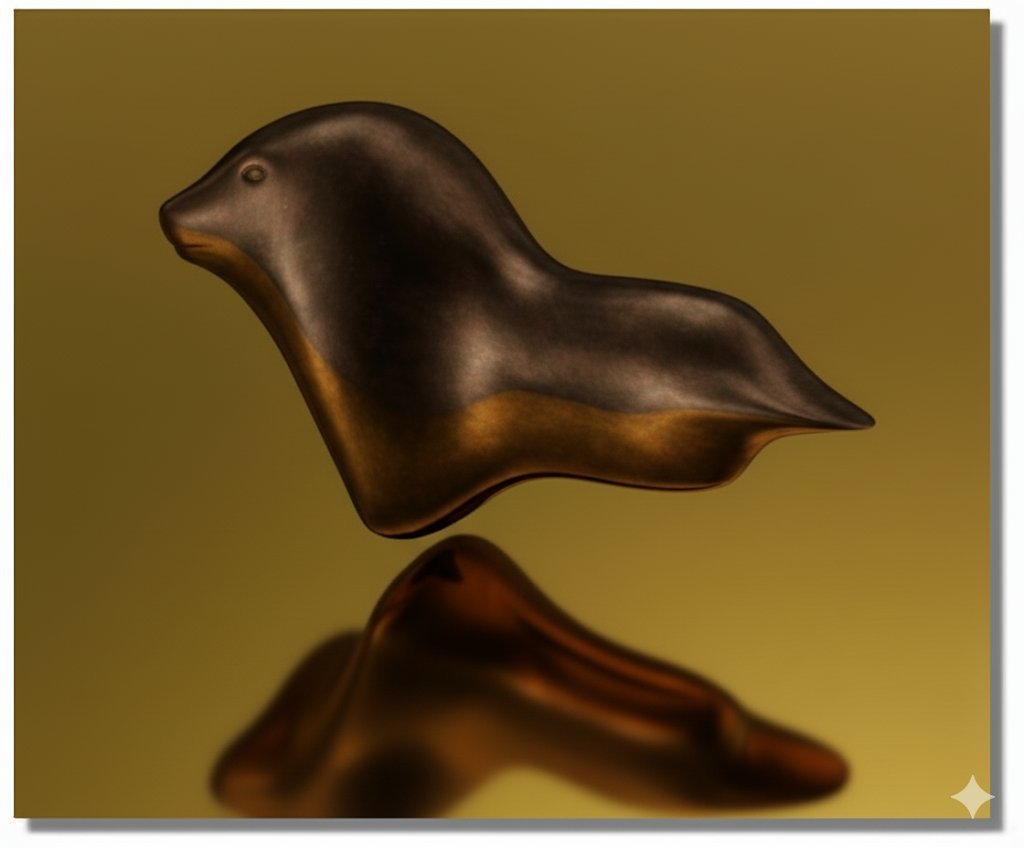
9689.112 
Do you remember that ? :)

http://moi3d.com/forum/index.php?webtag=MOI&msg=9689.58


Many years after Nano Banana is a poet! :)

EDITED: 11 Sep 2025 by PILOU

  Reply Reply More Options
Post Options
Reply as PM Reply as PM
Print Print
Mark as unread Mark as unread
Relationship Relationship
IP Logged

Previous
Next
 From:  Metin (METIN_SEVEN)
9689.113 
I've just created a simple cube with an extruded part, but SubD > Create doesn't seem to work. Does it maybe only work for importing an external file, and Max Smirnov's plugin needs to be installed for SubD to work right inside of MoI?

─ Metin

visualizer • illustrator • 3D designer — metinseven.nl

EDITED: 22 Sep 2025 by METIN_SEVEN

  Reply Reply More Options
Post Options
Reply as PM Reply as PM
Print Print
Mark as unread Mark as unread
Relationship Relationship
IP Logged

Previous
Next
 From:  Frenchy Pilou (PILOU)
9689.114 In reply to 9689.113 
You must have installed all 5 "Plugins" first of course! ;)
https://moiscript.weebly.com/la-subdivision.html
(SubDivide, SSplit, SBridge, Sscale)
https://moi3d.com/wiki/MaxScriptArchive

EDITED: 22 Sep 2025 by PILOU

  Reply Reply More Options
Post Options
Reply as PM Reply as PM
Print Print
Mark as unread Mark as unread
Relationship Relationship
IP Logged

Previous
Next
 From:  Metin (METIN_SEVEN)
9689.115 In reply to 9689.114 
Ah, thanks. Because of the included SubD section and button, I thought subdivision had been natively implemented in MoI in the mean time. :-)

─ Metin

visualizer • illustrator • 3D designer — metinseven.nl
  Reply Reply More Options
Post Options
Reply as PM Reply as PM
Print Print
Mark as unread Mark as unread
Relationship Relationship
IP Logged

Previous
Next
 From:  Frenchy Pilou (PILOU)
9689.116 In reply to 9689.115 
Yes this internal Subdiv is made for an object yet made somewhere as a file! (OBJ or FBX)

But not use as real subdiv from zero! :)
And you can't continue the subD modeling (or with many big difficulties) with the imported volume from a file! :)

EDITED: 22 Sep 2025 by PILOU

  Reply Reply More Options
Post Options
Reply as PM Reply as PM
Print Print
Mark as unread Mark as unread
Relationship Relationship
IP Logged

Previous
Next
 From:  Metin (METIN_SEVEN)
9689.117 In reply to 9689.116 
Got it, thanks Pilou!

Fiddling around a bit. It actually works quite well, reasonably comparable to poly subdivision modeling in Blender. Nice!


It also works pretty nicely together with the new MoI V5 beta ACIS functions to move and rotate faces in a solid.

─ Metin

visualizer • illustrator • 3D designer — metinseven.nl

  Reply Reply More Options
Post Options
Reply as PM Reply as PM
Print Print
Mark as unread Mark as unread
Relationship Relationship
IP Logged

Previous
Next
 From:  Metin (METIN_SEVEN)
9689.118 
I made a short MoI subdivision modeling recap…

Command downloads:
https://moi3d.com/wiki/MaxScriptArchive

! Quad or triangle faces are necessary !

1. Use _SubdivClassic to subdivide a solid, such as a box. You can choose between Catmull-Clark and Planar (Simple in Blender).
2. If you select an edge, then use _sSplit, you can interactively add an edge loop. Alternatively, use Trim to cut edges into a solid. Make sure the faces remain quadrangular or triangular.
3. Select a face and use _sSplit to inset faces in the proper quad way (MoI's Inset produces an n-gon).
4. Show points, and use _sScale to scale a selection of points.
5. Use Extrude to extrude faces. You can use Extrude SetDirection to immediately activate Extrude's Set Direction mode.
6. Use _sBridge to bridge two faces.
7. Make a copy and use _Subdiv_beta9 to create the final subdivided solid.

● If your model is fully symmetrical, work on one half and mirror it, then join into a solid before using _Subdiv_beta9.

● Select faces, separate them, then select everything and run _Subdiv_beta9 to subdivide into a solid with sharp creases where the surfaces were separated. Make sure the Preserve Corners option is deactivated, or the corners will not be rounded, and the result will still be two patches instead of a solid.

● You can apply _SubdivClassic multiple times to smooth out the overall shape.

● You can convert a solid that has been rounded by _Subdiv_beta9 back to a quad-face cage using _SubdivClassic, although the shape will be a bit rounder because of the _Subdiv_beta9 subdivision.

─ Metin

visualizer • illustrator • 3D designer — metinseven.nl

EDITED: 22 Sep 2025 by METIN_SEVEN

  Reply Reply More Options
Post Options
Reply as PM Reply as PM
Print Print
Mark as unread Mark as unread
Relationship Relationship
IP Logged

Previous
Next
 From:  Frenchy Pilou (PILOU)
9689.119 In reply to 9689.117 
Cool recap!

Yep it's some rustic but sufficient for any little things... and if you use after something like free Nano Banana or free Vizcom no need render engine and take care of any export polygons problems! :)

Of course with Metin image above! ;)


  Reply Reply More Options
Post Options
Reply as PM Reply as PM
Print Print
Mark as unread Mark as unread
Relationship Relationship
IP Logged

Previous
 From:  Metin (METIN_SEVEN)
9689.120 In reply to 9689.119 
Hahahaha, you're the AI wizard, Pilou! :-D

─ Metin

visualizer • illustrator • 3D designer — metinseven.nl
  Reply Reply More Options
Post Options
Reply as PM Reply as PM
Print Print
Mark as unread Mark as unread
Relationship Relationship
IP Logged
 

Reply to All Reply to All


Show messages:  1-20  …  41-60  61-80  81-100  101-120