Control Point Clean Up
All  1-5  6-12

Previous
Next
 From:  Frenchy Pilou (PILOU)
9614.6 In reply to 9614.5 
Seems not working...
All dialogs work but no result at the end...
Show Points must be enable ? (enabled)

What must be the result ? Enlighted points or merge them ?

EDITED: 11 Dec 2019 by PILOU

  Reply Reply More Options
Post Options
Reply as PM Reply as PM
Print Print
Mark as unread Mark as unread
Relationship Relationship
IP Logged

Previous
Next
 From:  Michael Gibson
9614.7 In reply to 9614.6 
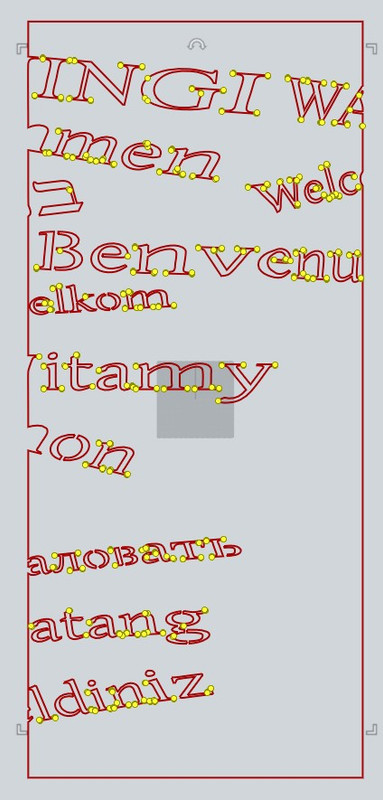
Hi Pilou, the way it works is you select curves, then run the command and enter in a distance value. Any curve control points that are within that distance of their neighboring points will be marked with a point object.

If there are no such points then it is normal that you would not get any output.

For a demo, load the .3dm file attached to the first message of this thread, select the curves and run the command and put in a distance value of 1. There will be points marking areas that have curve control points that are 1mm or closer to their neighbors. Those are areas that would be good to investigate for problems.

- Michael
  Reply Reply More Options
Post Options
Reply as PM Reply as PM
Print Print
Mark as unread Mark as unread
Relationship Relationship
IP Logged

Previous
Next
 From:  Frenchy Pilou (PILOU)
9614.8 In reply to 9614.7 
Perfect!
Will be added to my French repository script! ;)

Done but not yet translated! :)
http://moiscript.weebly.com/pts-dune-courbe.html

EDITED: 11 Dec 2019 by PILOU

  Reply Reply More Options
Post Options
Reply as PM Reply as PM
Print Print
Mark as unread Mark as unread
Relationship Relationship
IP Logged

Previous
Next
 From:  AlexPolo
9614.9 
WOW - Michael that is a great tool - a common workflow is taking art out of Illustrator and getting it ready for Laser Cutting the DXF module in illustrator is about 25 years old and should be made illegal it does a terrible job in export for bigger industrial laser cutters which still only take DXF files for cutting.

I usually take the file into Rhino or MOI for export to DXF and the files always need a clean up prior to export this really helps in identifying point clusters and deleting any excess point out of the curves for problem free cutting.

Amazing backup service.

All the best
Alex.
  Reply Reply More Options
Post Options
Reply as PM Reply as PM
Print Print
Mark as unread Mark as unread
Relationship Relationship
IP Logged

Previous
Next
 From:  amur (STEFAN)
9614.10 
Interesting thread and thanks for the script Michael!

I am wondering about the following, regarding those dense control points
in the letters. Because MoI does not use Bezier curves like Illustrator what
would happen for example if one loads those Bezier curves for example into
ViaCAD (which I no longer have) and then change in there the Curve type
to what MoI likes and then export and import into MoI.

Would that get rid of the many control points?

Regards
Stefan
  Reply Reply More Options
Post Options
Reply as PM Reply as PM
Print Print
Mark as unread Mark as unread
Relationship Relationship
IP Logged

Previous
Next
 From:  Michael Gibson
9614.11 In reply to 9614.10 
Hi Stefan,

re:
> I am wondering about the following, regarding those dense control points
> in the letters. Because MoI does not use Bezier curves like Illustrator what
> would happen for example if one loads those Bezier curves for example into
> ViaCAD (which I no longer have) and then change in there the Curve type
> to what MoI likes and then export and import into MoI.

Beziers are a subset of NURBS, so MoI can import a Bezier curve drawing from 2D illustration programs exactly.

Going the reverse direction can be more problematic - it is possible to break a NURBS curve into a chain of Bezier curves with the exact same shape, but if the NURBS curve uses rational control points (which will be the case for conics like circles, ellipses, ...) then you get a chain of rational beziers while the illustration formats only support non-rational beziers. So in that case there has to be a rebuilt curve exported instead of the exact curve.

But on the other direction there isn't any refitting, if there are a lot of points then that's just what was in the file.


> Would that get rid of the many control points?

If it did it would involve changing the shape by some amount.

- Michael
  Reply Reply More Options
Post Options
Reply as PM Reply as PM
Print Print
Mark as unread Mark as unread
Relationship Relationship
IP Logged

Previous
 From:  AlexPolo
9614.12 
I send files for Cutting to an industrial laser and they run JETCAM and PEP Technology on their machines. Prior to creating a cutting path NC file both programs will highlight problem areas they put a circle highlighting flipped or duplicate points on a curve. They are both high end applications each seat costing thousands of dollars a year - So this solution offers the same result in a very elegant manor. I havent seen any auto repair tools out there as the coding to work out the scenarios for the errors would be highly complex. But once again MOI offers a simple solution to a common problem. Instead chasing countless points highlighting dense areas is usually a good starting point to a problem leaving the user to decide the best manor for clean up.

Thanks again.
  Reply Reply More Options
Post Options
Reply as PM Reply as PM
Print Print
Mark as unread Mark as unread
Relationship Relationship
IP Logged
 

Reply to All Reply to All


Show messages: All  1-5  6-12