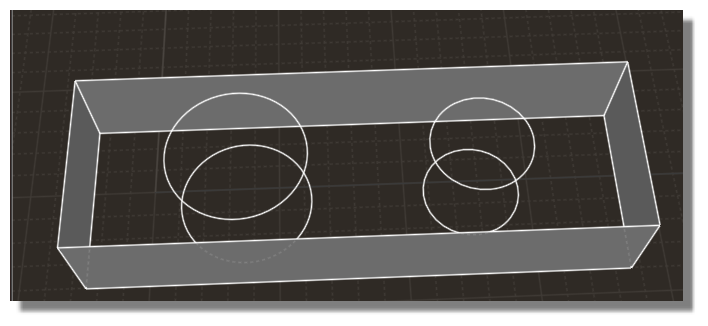
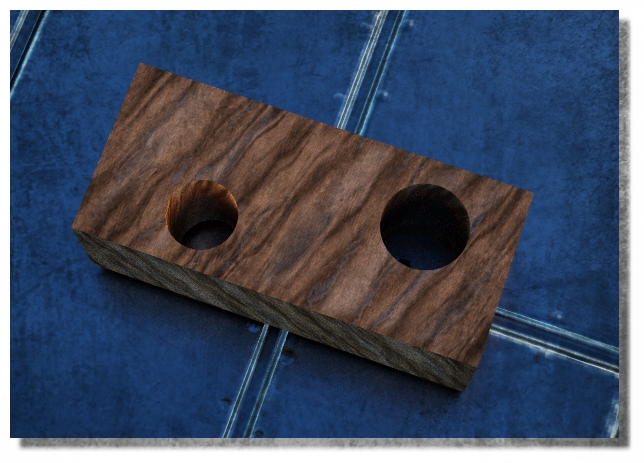
Automatical cylinder ?
All  1-8  9-18

Previous
Next
 From:  r2d3
9546.9 In reply to 9546.1 
Hi Pilou,

this is something what my STLimport script can do...
After importing a STL it has some functions to clean faces, polygone lines, curves and circles.

Select the object -> start the script and choose "Only clean"
It will ask you to "clean flat surfaces? click "no"
Then it asks: Redraw polylines? click "yes"
Select all polylines from the hole -> click "Done"
It shows you the first Polyline and ask you what it shoud be -> choose "Circle"
The same with the next one.

It delets all corespondending faces and lets you alone to rebuild it...

Have fun


Ralf:)
looking for moments of inspiration...

  Reply Reply More Options
Post Options
Reply as PM Reply as PM
Print Print
Mark as unread Mark as unread
Relationship Relationship
IP Logged

Previous
Next
 From:  Frenchy Pilou (PILOU)
9546.10 In reply to 9546.9 
Seems cool but not yet test for STL object but seems not works for pure nurbs Moi object with polygonal holes ... :)
  Reply Reply More Options
Post Options
Reply as PM Reply as PM
Print Print
Mark as unread Mark as unread
Relationship Relationship
IP Logged

Previous
Next
 From:  Frenchy Pilou (PILOU)
9546.11 
PS That works also for the Pure Nurbs object but top/bottom face are erased!


Tried with STL file
I must have missed something! :)
(not sure of what exactly must be selected...the vertical between polygons ? or only the polygons "curvated", both or something else... )
Circles are fine but the rest... are missing!
or it's to me to "and lets you alone to rebuild it". :)

EDITED: 1 Nov 2019 by PILOU

  Reply Reply More Options
Post Options
Reply as PM Reply as PM
Print Print
Mark as unread Mark as unread
Relationship Relationship
IP Logged

Previous
Next
 From:  Frenchy Pilou (PILOU)
9546.12 
OK that works but i must make some reconstructions: Loft between Circles, Planar Top Bottom faces, Union or Join all for remake the solid...
Is that normal ?

Ps I don't understand why you said : It will ask you to "clean flat surfaces? click "no"
"Yes" will be more easy for select something! Because there are a lot of parasitic lines!

EDITED: 1 Nov 2019 by PILOU

  Reply Reply More Options
Post Options
Reply as PM Reply as PM
Print Print
Mark as unread Mark as unread
Relationship Relationship
IP Logged

Previous
Next
 From:  r2d3
9546.13 In reply to 9546.12 
This script was actually intendet to make it easier for reconstrukting parts where you only have a stl file.

This is the normal workflow:

After importing a (simple) stl it looks like this:


If the conversion to a solid was successful you can "clean flat surfaces" and it looks like this:


Select all polylines which should be redraw as nurbs:


After clicking "done" it presents you every polyline and you choose "Circle or Curve" to redraw it.( "Line" would make a straight line with only 2 points if it had more points before):


Than it looks like this:


After some lofting and connecting you get a solid


Cut out the holes, and VOILA:


Bigger STLs can crash MOI or need a long time...


Ralf:)
looking for moments of inspiration...

  Reply Reply More Options
Post Options
Reply as PM Reply as PM
Print Print
Mark as unread Mark as unread
Relationship Relationship
IP Logged

Previous
Next
 From:  Frenchy Pilou (PILOU)
9546.14 In reply to 9546.13 
Ok many thanks all is now clear...it's quasi that all i made! :)
And I was right for the "yes" ;)

And will be the same with pure nurbs moi polygonal objects!
  Reply Reply More Options
Post Options
Reply as PM Reply as PM
Print Print
Mark as unread Mark as unread
Relationship Relationship
IP Logged

Previous
Next
 From:  Stargazer
9546.15 In reply to 9546.14 
Hi Ralf,

This is very useful, thanks for sharing your scripts!

Before this, I did it all manually with the help of Reconstruct Curve, 3point Circle and other MoI tools. Now it's a lot easier :)
  Reply Reply More Options
Post Options
Reply as PM Reply as PM
Print Print
Mark as unread Mark as unread
Relationship Relationship
IP Logged

Previous
Next
 From:  Frenchy Pilou (PILOU)
9546.16 
Here the French Version! ;)

http://moiscript.weebly.com/r2d3.html
---
Pilou
Is beautiful that please without concept!
My Moi French Site My Gallery My MagicaVoxel Gallery
  Reply Reply More Options
Post Options
Reply as PM Reply as PM
Print Print
Mark as unread Mark as unread
Relationship Relationship
IP Logged

Previous
Next
 From:  mk (MARKY)
9546.17 
Hello,

How to make this STL import to work?

- I put both files in commands folder - it didn't work,
then
- I put the _STLimport.js file in scripts folder, it didn't work either
then I removed above file from the script folder and in Shortcuts window changed the shortcut name for _STLimport.
And it worked but after picking the STL file the error message appears, as the attached.

Any chance to fix it?
Image Attachments:
Size: 200.4 KB, Downloaded: 118 times, Dimensions: 1359x436px
  Reply Reply More Options
Post Options
Reply as PM Reply as PM
Print Print
Mark as unread Mark as unread
Relationship Relationship
IP Logged

Previous
 From:  Michael Gibson
9546.18 In reply to 9546.17 
Hi mk, there are 2 different kinds of STL files, there is a text file version and a binary version. I think the STL import plugin only supports the text version type so make sure you have that kind of STL and not a binary one.

Note that in general it's not very workable to import STL geometry into MoI because STL files only contain faceted triangle mesh data while MoI is designed to work with CAD surfaces and solids and isn't a polygon modeler.

- Michael
  Reply Reply More Options
Post Options
Reply as PM Reply as PM
Print Print
Mark as unread Mark as unread
Relationship Relationship
IP Logged
 

Reply to All Reply to All


Show messages: All  1-8  9-18