Please Help Me with My Occasional Questions
 1-8  9-28  29-48  49

Previous
Next
 From:  Michael Gibson
9521.9 In reply to 9521.7 
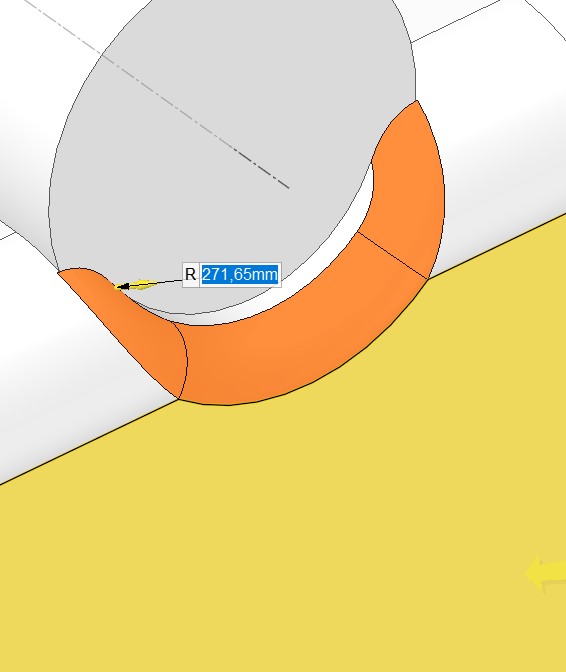
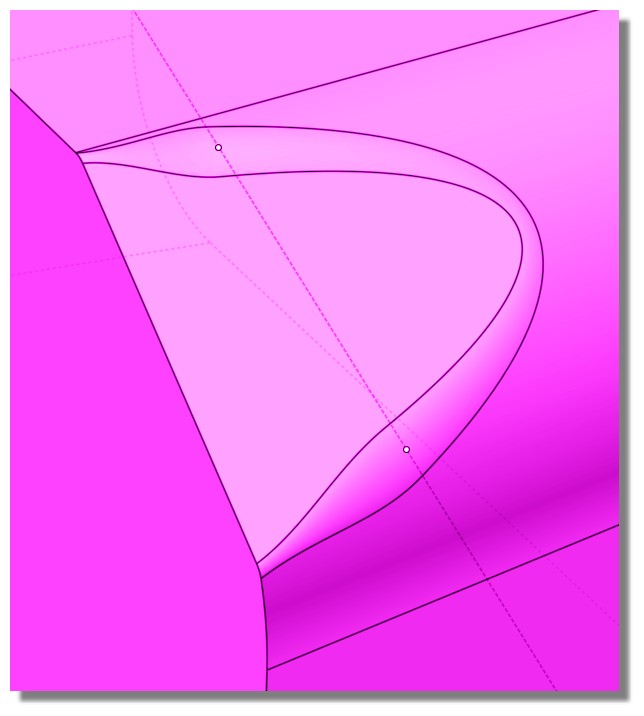
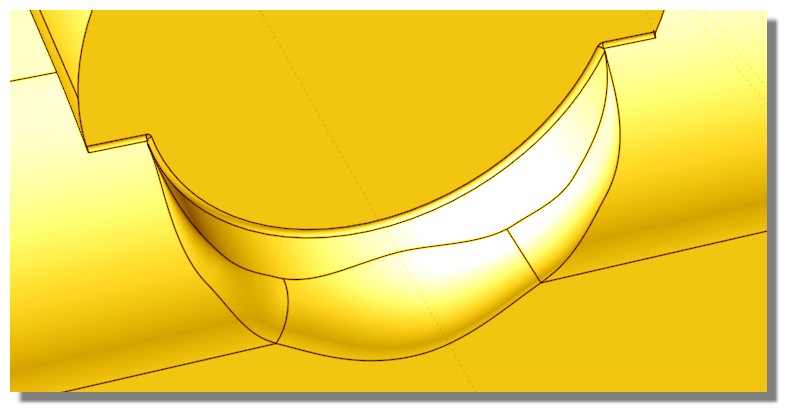
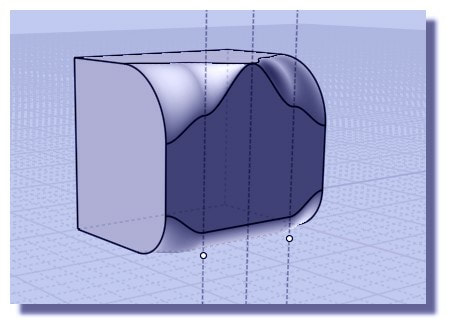
Hi friend, yes filleting is complicated. For your case there I don't think there is sufficient space to fit a natural fillet in the corner spots much larger than about 1 unit or so before it starts to bunch up on itself:


There is some stuff that tries to deal with some kinds of fillets where there isn't enough space for them to fit but it's harder for that mechanism to work when the bunched up area is pretty small. That's why you're able to get some larger radius values in there.

In general it's better to avoid trying to place a fillet in a spot where there is not enough room for it to exist without bunching up on itself.

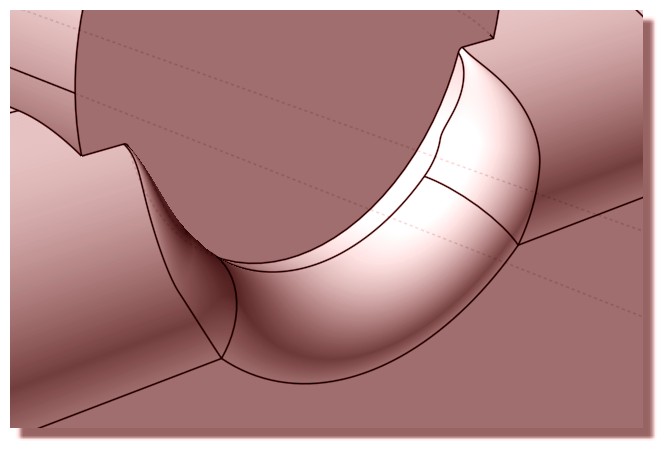
For your model here the way you would do that would be to not put in the rounded corners in your lofted object and instead have them sharp and round all that off in one single fillet like this:


That way these areas become corner juncture patches generated between fillet surfaces:


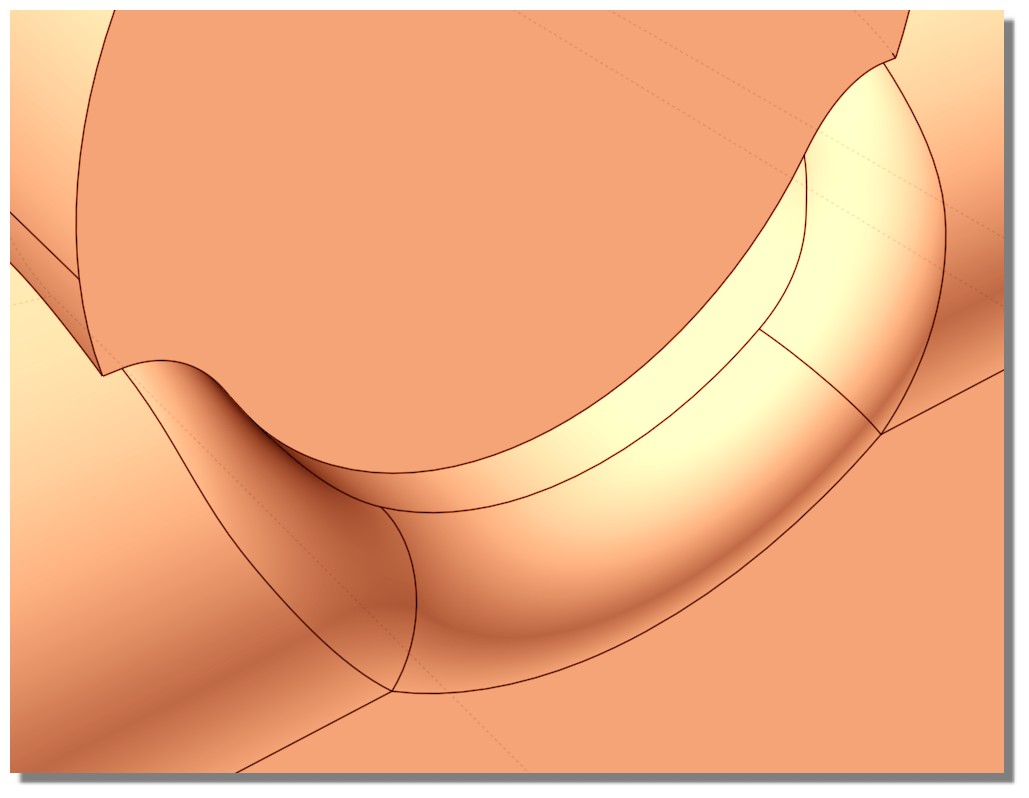
In yours instead of the filleter constructing a corner juncture patch it's trying to build a fillet surface between these pieces:


If you start with the sharp cornered shape here you should see a smooth progression of fillets for increasing radius values until they get large enough to run into each other much larger than radius=4:


- Michael

  Reply Reply More Options
Post Options
Reply as PM Reply as PM
Print Print
Mark as unread Mark as unread
Relationship Relationship
IP Logged

Previous
Next
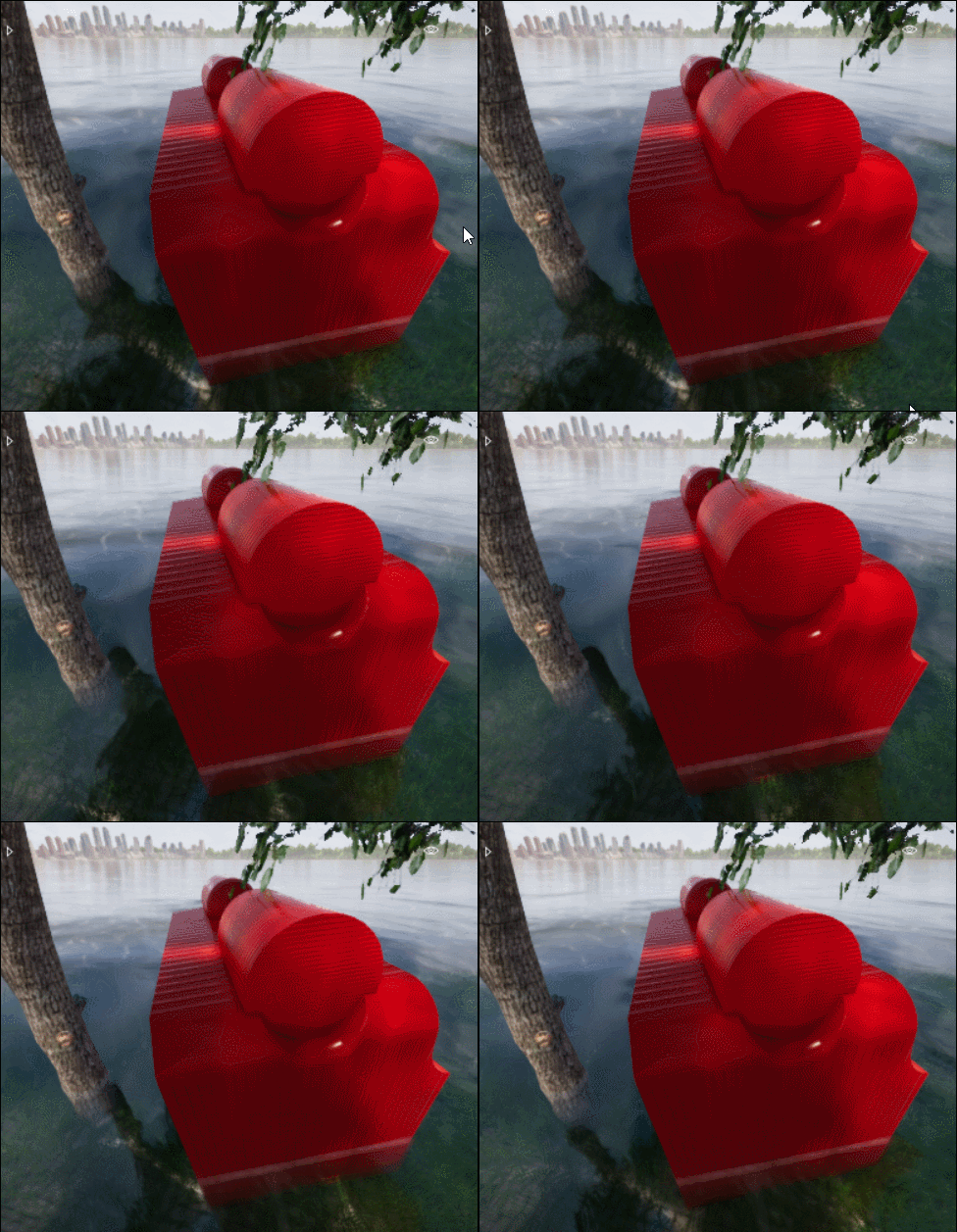
 From:  Stargazer
9521.10 
Hi Pilou,

"123D Design but i believe that it's not more downloadable"


123D is discontinued but it's last version is still available for download. I downloaded it recently (not sure from which website). It has a robust fillet and mesh manipulation tools and the good thing about it is that it's free and offline.

https://www.download-3d.com/123d-design

https://softfamous.com/autodesk-123d-design/
  Reply Reply More Options
Post Options
Reply as PM Reply as PM
Print Print
Mark as unread Mark as unread
Relationship Relationship
IP Logged

Previous
Next
 From:  Frenchy Pilou (PILOU)
9521.11 In reply to 9521.10 
Cool for the users! :)
It's of course not the sites of the creators! ;)
  Reply Reply More Options
Post Options
Reply as PM Reply as PM
Print Print
Mark as unread Mark as unread
Relationship Relationship
IP Logged

Previous
Next
 From:  Finema
9521.12 In reply to 9521.11 
Hi
Onshape is free.
2 minutes to import the 3dm Moi file and apply Fillet and export it
  Reply Reply More Options
Post Options
Reply as PM Reply as PM
Print Print
Mark as unread Mark as unread
Relationship Relationship
IP Logged

Previous
Next
 From:  Frenchy Pilou (PILOU)
9521.13 In reply to 9521.12 
Ah cool! I have missed this new thing! :)
It has not more the 5 projects maxi ?

https://www.onshape.com/products/free

EDITED: 8 Oct 2019 by PILOU

  Reply Reply More Options
Post Options
Reply as PM Reply as PM
Print Print
Mark as unread Mark as unread
Relationship Relationship
IP Logged

Previous
Next
 From:  bemfarmer
9521.14 In reply to 9521.13 
Just watched a video about OnShape free version, effective last year, 2018.
All of your OnShape work is in the public domain,
and use is not permitted for "commercial" work.
For casual use, paid versions are extremely expensive IMHO.

- Brian
  Reply Reply More Options
Post Options
Reply as PM Reply as PM
Print Print
Mark as unread Mark as unread
Relationship Relationship
IP Logged

Previous
Next
 From:  Frenchy Pilou (PILOU)
9521.15 In reply to 9521.14 
Yes that's the free conditions! :)
---
Pilou
Is beautiful that please without concept!
My Moi French Site My Gallery My MagicaVoxel Gallery
  Reply Reply More Options
Post Options
Reply as PM Reply as PM
Print Print
Mark as unread Mark as unread
Relationship Relationship
IP Logged

Previous
Next
 From:  friend (HELLO_MOI_FRIENDS)
9521.16 
Hello, thank you for all of the information.

Frenchy Pilou, I don't quite understand the first point you made but it seems you were offering a way to make the fillet work somehow? As for the animated gif file you basically cut the model in half and had a higher fillet on the right object using variable fillet? But you can't make the entire object with that same larger fillet?

Michael, so it's best to not fillet the construction curves and instead boolean first and then fillet the solids? Is there any situation when you should fillet the curves first?


Here I have made a simple curve using Polyline.


However when I extrude with Tapered active I get this Joined Surface and not a solid.


  Reply Reply More Options
Post Options
Reply as PM Reply as PM
Print Print
Mark as unread Mark as unread
Relationship Relationship
IP Logged

Previous
Next
 From:  Michael Gibson
9521.17 In reply to 9521.16 
Hi friend, can you please post a .3dm file with your polyline in it so I can take a look at your tapered extrusion?

It helps a lot if you can post a model file instead of only a screenshot. That makes it possible to examine your geometry and test things out.

My best guess from looking at the screenshot is that probably the polyline segments here that look like they are simple lines are probably actually made up of 2 colinear line segments (like one line cut in half) instead of just single lines. That's a good example of something that's hard to determine from looking at a screenshot instead of the actual geometry:


> Michael, so it's best to not fillet the construction curves and instead boolean first and then fillet the solids?

Well it can depend on the particular situation.

> Is there any situation when you should fillet the curves first?

If the solid is going to be difficult to fillet it can sometimes be helpful to fillet the curves first so the fillet is incorporated directly into the sweep or loft or whatever.

But if you are going to be putting additional fillets in which are going to collide with the already present ones that's usually better to put in all at once or you can put them in stages if you do larger radius ones first.

- Michael

  Reply Reply More Options
Post Options
Reply as PM Reply as PM
Print Print
Mark as unread Mark as unread
Relationship Relationship
IP Logged

Previous
Next
 From:  Frenchy Pilou (PILOU)
9521.18 In reply to 9521.16 
<< I don't quite understand the first point you made but it seems you were offering a way to make the fillet work somehow?
Fillet admissible : fillet maxi that Moi can do with a perimeter path or curves selection


<< As for the animated gif file you basically cut the model in half and had a higher fillet on the right object using variable fillet?
Yes absolutly


<< But you can't make the entire object with that same larger fillet?
Yes absolutly : Till now Moi's Fillet don't manage that (i tested with Onshape, DesignSparkMechanical, Fusion 360...it's the same)

And if you don't make this trick (maybe other existing) you can't make any "bigger" fillet on your object, only the admissible "maxi" so above 0.5
With the trick maybe 3 on some parts... i have not more the original object...

EDITED: 10 Oct 2019 by PILOU

  Reply Reply More Options
Post Options
Reply as PM Reply as PM
Print Print
Mark as unread Mark as unread
Relationship Relationship
IP Logged

Previous
Next
 From:  friend (HELLO_MOI_FRIENDS)
9521.19 
Michael, I attached the file which gives me problems with tapered extrude as "extrude tapered problem".


<<Yes absolutly : Till now Moi's Fillet don't manage that (i tested with Onshape, DesignSparkMechanical, Fusion 360...it's the same)

Do you mean that the fillet systems of those programs also can't do a higher fillet or that they can? I understand that some shapes can give MoI's fillet a hard time, like the example I started this thread with but what about this?


I think the construction line is preventing the fillet from being larger. What I want to know is: can other programs solve this fillet or is this a universal NURBS fillet problem?

I understand that there is a natural limit to fillets because the trim curves intersect each other:


But is there a way to solve a fillet when there is a construction curve in the way? I also uploaded the file for the fillet issue.

  Reply Reply More Options
Post Options
Reply as PM Reply as PM
Print Print
Mark as unread Mark as unread
Relationship Relationship
IP Logged

Previous
Next
 From:  Frenchy Pilou (PILOU)
9521.20 In reply to 9521.19 
Yes they block at the same value!

Designspark block at this form for your last send!

There is no more material ! it's a slope at 90° :)

EDITED: 10 Oct 2019 by PILOU

  Reply Reply More Options
Post Options
Reply as PM Reply as PM
Print Print
Mark as unread Mark as unread
Relationship Relationship
IP Logged

Previous
Next
 From:  Michael Gibson
9521.21 In reply to 9521.19 
Hi friend, thanks for posting the extrude taper problem file.

So yes that is caused by your polyline being fragmented into multiple segments. If you use Edit > Separate on it you should see that some of the areas that look like lines are actually 2 individual collinear line segments instead of just one single line:


I've attached a .3dm file where I've fixed those up to be single lines and if you do a tapered extrude on this one you shouldn't see that problem anymore.

I'll see about your fillet questions a little later on.

- Michael

  Reply Reply More Options
Post Options
Reply as PM Reply as PM
Print Print
Mark as unread Mark as unread
Relationship Relationship
IP Logged

Previous
Next
 From:  Michael Gibson
9521.22 In reply to 9521.19 
Hi friend,

re:
> I think the construction line is preventing the fillet from being larger.

Yes, that's correct that is a limitation in the fillet engine in the geometry library used by MoI.


> What I want to know is: can other programs solve this fillet or is
> this a universal NURBS fillet problem?

It's a pretty common limitation in fillet code that hasn't had say something like a minimum of 50 man years invested in developing it.

The sort of "top shelf" ones like ACIS and Parasolid can handle that one though. But they can also be more finicky about wanting quite precise geometry as well though.

- Michael
  Reply Reply More Options
Post Options
Reply as PM Reply as PM
Print Print
Mark as unread Mark as unread
Relationship Relationship
IP Logged

Previous
Next
 From:  Frenchy Pilou (PILOU)
9521.23 
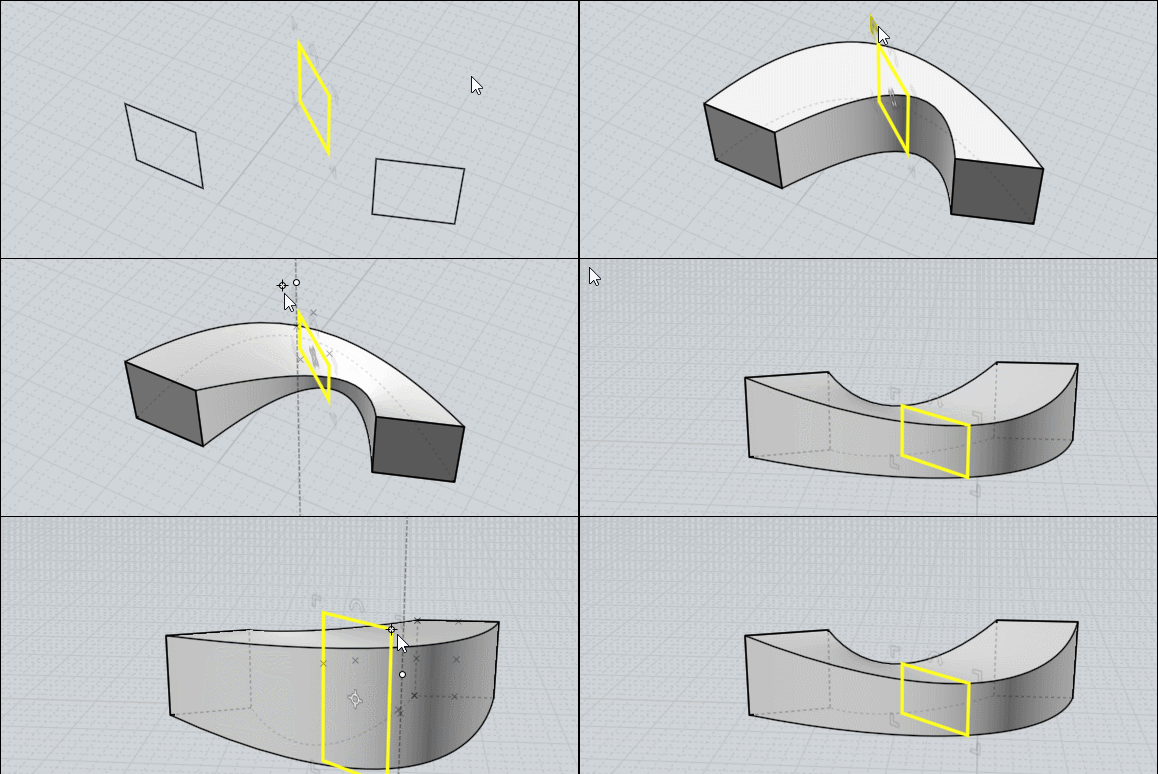
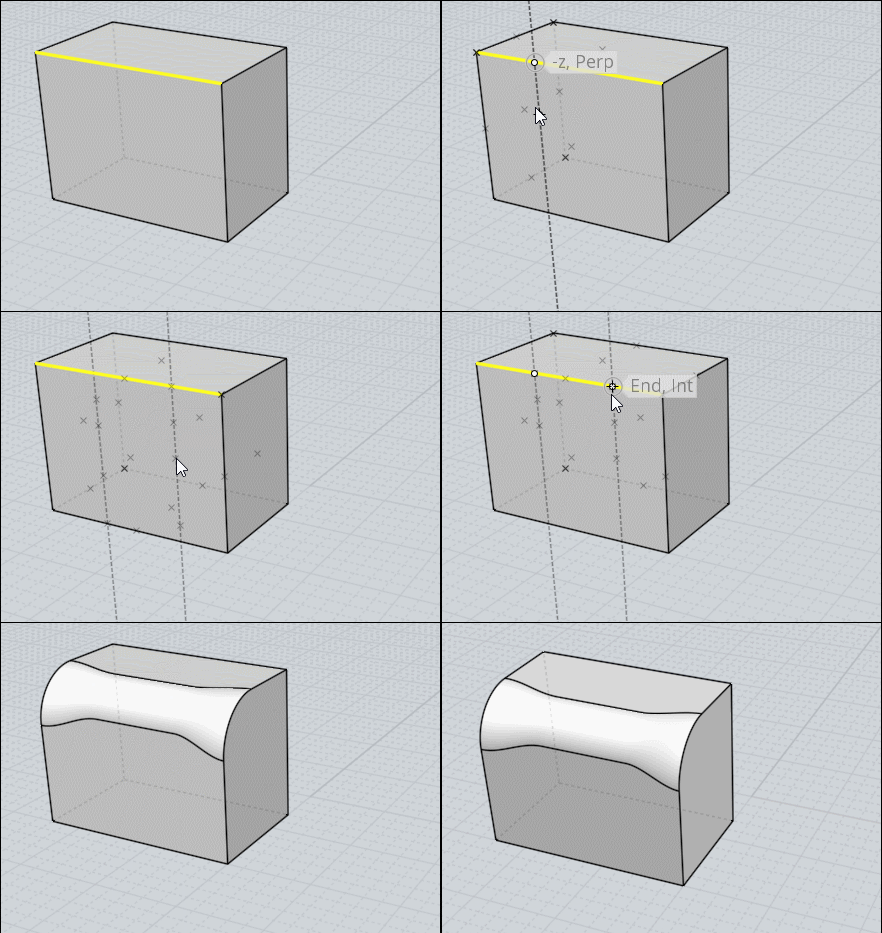
You can make the same in Moi ;)

Just make first avery little fillet like 0.02 as you don't know yet what is working...
Then a Variable fillet 0.2 where you want for test
et voilĂ  !


Seems 0.25 a maximum for a uniform fillet


You can Draw an Helper line(s) during the Variable fillet before the first click for have symetrical things!


Forgotten the top fillet!
In 2 passes : first the top second... new one only the front face...surrely several possibilities...

EDITED: 11 Oct 2019 by PILOU

  Reply Reply More Options
Post Options
Reply as PM Reply as PM
Print Print
Mark as unread Mark as unread
Relationship Relationship
IP Logged

Previous
Next
 From:  Frenchy Pilou (PILOU)
9521.24 In reply to 9521.23 
---
Pilou
Is beautiful that please without concept!
My Moi French Site My Gallery My MagicaVoxel Gallery
  Reply Reply More Options
Post Options
Reply as PM Reply as PM
Print Print
Mark as unread Mark as unread
Relationship Relationship
IP Logged

Previous
Next
 From:  friend (HELLO_MOI_FRIENDS)
9521.25 
>I've attached a .3dm file where I've fixed those up to be single lines and if you do a tapered extrude on this one you shouldn't see that problem anymore.

Hello Michael, what is the procedure you used to fix it?


Frenchy, I have tried to do a variable fillet as you showed but the construction line still gets in the way. Why is the construction line not interfering in your MoI? Do you have some special plugin or did you fix it somehow?


Also, is this the correct link for the Design Spark software you showed?
https://www.rs-online.com/designspark/mechanical-software
Attachments:

  Reply Reply More Options
Post Options
Reply as PM Reply as PM
Print Print
Mark as unread Mark as unread
Relationship Relationship
IP Logged

Previous
Next
 From:  Michael Gibson
9521.26 In reply to 9521.25 
Hi friend,

re:
> Hello Michael, what is the procedure you used to fix it?

The process goes like this - select the polyline, then run Edit > Separate to break its segments into individually selectable separate curves. Select the pieces made up of 2 lines and delete them. Then use the Draw curve > Line command to draw in new lines, then use Edit > Join to glue it back together into one curve. You can skip the last join step if you want, the Extrude command will automatically join pieces together.

- Michael
  Reply Reply More Options
Post Options
Reply as PM Reply as PM
Print Print
Mark as unread Mark as unread
Relationship Relationship
IP Logged

Previous
Next
 From:  Frenchy Pilou (PILOU)
9521.27 In reply to 9521.25 
Yes it's this one! ;)

https://www.rs-online.com/designspark/mechanical-software and scroll to the bottom page for donwload it ;)

It's of course a new prog to learn... ;) Not so easy than moi but also fun!
You can find some tricks about it here in English (62 pages :)
https://moi3d.com/forum/index.php?webtag=MOI&msg=6186.1

or here in French in my site (maybe more speedy for a speed view )
http://moiscript.weebly.com/designspark.html 2 pages French)
http://moiscript.weebly.com/video-designspark.html 2 pages of videos... English


We can of course make the same with moi more speedy! ;)


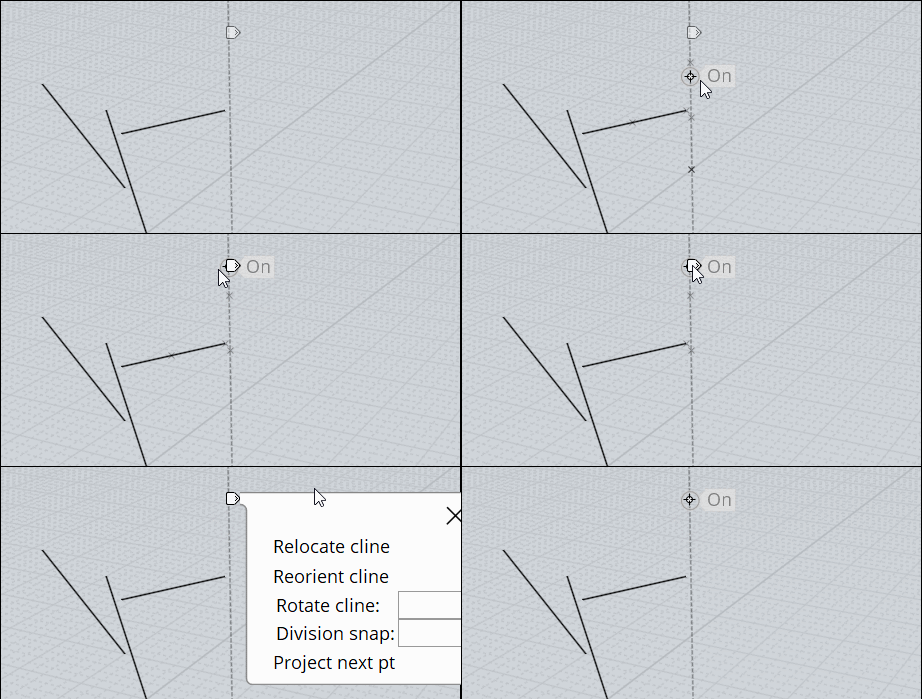
The helpers lines are just persistant during the use of the complete Fillet function as inside any other function

Rules for the Helper Lines in any function


Call any function
Press Left Click Mouse Button without release ...Move...release (=draw first Point)
Click Left Mouse Button without release ...Move...release (=draw second Point)
the helper line is drawn
etc...

This can be made BEFORE First click of the function, AFTER First click of the function, BEFORE Last click of the function!
As soon as you exit the function they disapears
(you have plugins for keep them but...http://kyticka.webzdarma.cz/3d/moi/#KeepCLine

As soon as an Helper Line is drawn you can see a little "white Tab"
go over it and press it with Left or Right Mouse Button 1 second for access to some functions for modify the helper Lines!

EDITED: 12 Oct 2019 by PILOU

  Reply Reply More Options
Post Options
Reply as PM Reply as PM
Print Print
Mark as unread Mark as unread
Relationship Relationship
IP Logged

Previous
Next
 From:  friend (HELLO_MOI_FRIENDS)
9521.28 
Hello, is there a way to have a tapered extrusion of a curved surfaces? If not, is there an easier and faster way to loft the edges of two curved surfaces than one at a time?

I created a sphere, a curve which I then filleted. I copied and pasted the sphere and used Trim on the copy and selected the curve and got a cut surface. I then made a copy of the surface and scaled it smaller and now I want to loft them together to make a solid and Boolean Difference the sphere.


  Reply Reply More Options
Post Options
Reply as PM Reply as PM
Print Print
Mark as unread Mark as unread
Relationship Relationship
IP Logged
 

Reply to All Reply to All


Show messages:  1-8  9-28  29-48  49