Script help?
 1  2-21  22-39

Previous
Next
 From:  wheel
952.22 
Hi, here is the tweaked version of your script . Thanks for looking.
Attachments:

  Reply Reply More Options
Post Options
Reply as PM Reply as PM
Print Print
Mark as unread Mark as unread
Relationship Relationship
IP Logged

Previous
Next
 From:  Michael Gibson
952.23 In reply to 952.22 
Hi Wheel - your modified script seems to work ok for me over here.

Maybe it's a setup problem?

That Nudge.js file should be copied into the \commands sub-folder underneath MoI's main installation folder (like C:\Program Files\MoI 1.0\commands).

Then under Options / Shortcut keys, you'll need settings like this:


KeyCommand
DownArrow  Nudge Down
UpArrowNudge Up
LeftArrowNudge Left
RightArrowNudge Right
PageUpNudge ZUp
PageDownNudge ZDown


Note one subtle thing here is that the left-side "Key" part does not have a space in it, like DownArrow is all one word with no spaces inside it. While the "Command" part does have a space between Nudge and the second word.

- Michael
  Reply Reply More Options
Post Options
Reply as PM Reply as PM
Print Print
Mark as unread Mark as unread
Relationship Relationship
IP Logged

Previous
Next
 From:  Frenchy Pilou (PILOU)
952.24 In reply to 952.23 
sorry what is a "Nudge" and his function?
---
Pilou
Is beautiful that please without concept!
My Gallery
  Reply Reply More Options
Post Options
Reply as PM Reply as PM
Print Print
Mark as unread Mark as unread
Relationship Relationship
IP Logged

Previous
Next
 From:  Michael Gibson
952.25 In reply to 952.24 
Hi Pilou - Nudge means to move by a small amount.

The Nudge command allows you to set up keys such as the arrow keys to move around objects or points by a small amount on every key press.

- Michael
  Reply Reply More Options
Post Options
Reply as PM Reply as PM
Print Print
Mark as unread Mark as unread
Relationship Relationship
IP Logged

Previous
Next
 From:  Frenchy Pilou (PILOU)
952.26 In reply to 952.25 
Thx because my dico has given me somthing like that "a knock elbow" :)
  Reply Reply More Options
Post Options
Reply as PM Reply as PM
Print Print
Mark as unread Mark as unread
Relationship Relationship
IP Logged

Previous
Next
 From:  PaQ
952.27 
Sorry if it was allready asked, but is it possible to know which viewport the mouse is over, and modify the direction of the nudge according to it.
I mean if:

- the mouse is over the top view, right and left arrow 'nudge' on the x axis, up and down arrow on the z axis
- the mouse is over the front view, right and left arrow 'nudge' on the x axis, up and down arrow on the y axis
- the mouse is over right view, right and left arrow 'nudge' on the z axis, up and down arrow on the y axis

do you see the idea ... looks more natural for me, but maybe I'm alone :P

of course the perspective view require the 6 keys, like it is mapped now (page up page down for y move)
  Reply Reply More Options
Post Options
Reply as PM Reply as PM
Print Print
Mark as unread Mark as unread
Relationship Relationship
IP Logged

Previous
Next
 From:  Michael Gibson
952.28 In reply to 952.27 
Hi PaQ,

> but is it possible to know which viewport the mouse is over, and
> modify the direction of the nudge according to it.

I think the version attached to this message should do that:
http://moi3d.com/forum/index.php?webtag=MOI&msg=952.6

- Michael
  Reply Reply More Options
Post Options
Reply as PM Reply as PM
Print Print
Mark as unread Mark as unread
Relationship Relationship
IP Logged

Previous
Next
 From:  Dymaxion
952.29 In reply to 952.19 
Oh, great! That's exactly what I was looking for!

Well, maybe not exactly, because IDL isn't quite my favorite thing in the world to read, but yes, thank you -- that'll be quite useful. :-)

/Ella
  Reply Reply More Options
Post Options
Reply as PM Reply as PM
Print Print
Mark as unread Mark as unread
Relationship Relationship
IP Logged

Previous
Next
 From:  Michael Gibson
952.30 In reply to 952.29 
Hi Ella, I have also created a wiki page here: http://moi3d.com/wiki/Scripting which can be used as a central place to record any information, tips, descriptions, etc... about scripting. Please feel free to add stuff there.

- Michael
  Reply Reply More Options
Post Options
Reply as PM Reply as PM
Print Print
Mark as unread Mark as unread
Relationship Relationship
IP Logged

Previous
Next
 From:  Bravlin
952.31 
Nudge script have an issue:
01. invoke bevel.
02. use Tab key to change gui focus from "Radius" to "Shape".
03. use RMB or Enter to apply bevel
04. Select object and try to use Up & Down Nudge commands.

Up and Down Nudge doesn't work after this. Until you press Tab key and then Enter.
It happens i guess because gui focus stak somwere on already closed bevel "Shape" gui.
Its interesting that Lef and Right Nudge still works.

It's not a huge problem at all but kinda annoying.
  Reply Reply More Options
Post Options
Reply as PM Reply as PM
Print Print
Mark as unread Mark as unread
Relationship Relationship
IP Logged

Previous
Next
 From:  Michael Gibson
952.32 In reply to 952.31 
Hi Bravlin, thanks for reporting this Nudge bug, I was able to repeat it here. It was a bug in the dropdown control where it wasn't getting detached from focus handling in that situation. I've got a fix in place for the next v4 beta.

- Michael
  Reply Reply More Options
Post Options
Reply as PM Reply as PM
Print Print
Mark as unread Mark as unread
Relationship Relationship
IP Logged

Message 952.33 deleted 30 Jun by SUIYAN

Previous
Next
 From:  大道刀 (SUIYAN)
952.34 
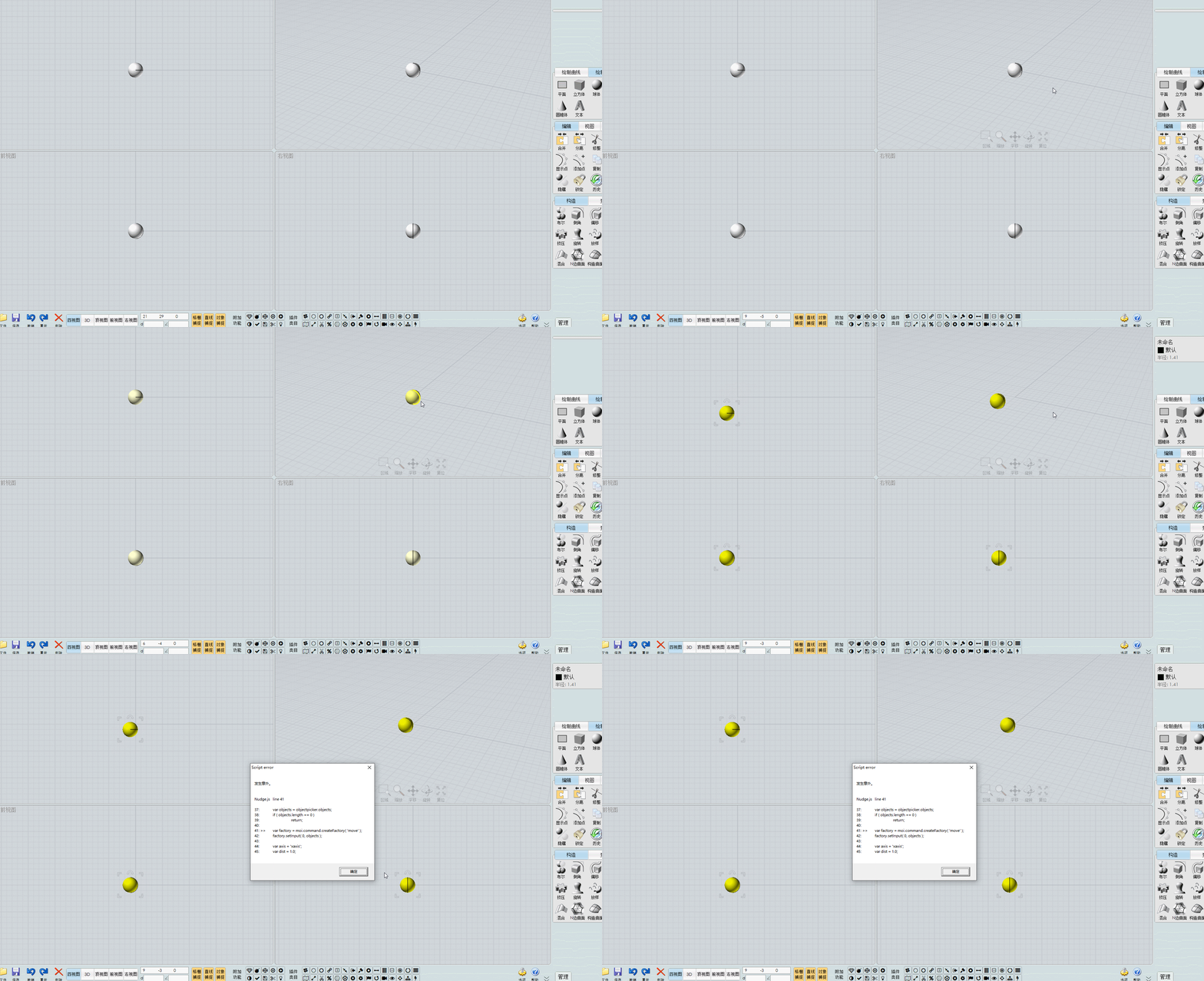
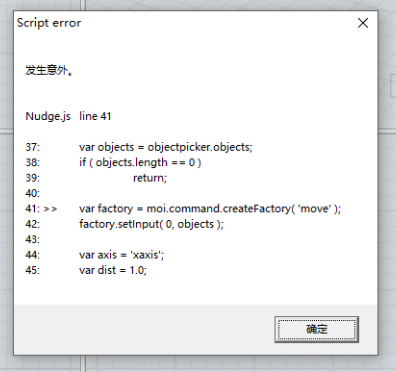
Script error
Nudge.js line 41
37: var objects = objectpicker.objects;
38: if ( objects.length == 0 )
39: return;
40:
41: >> var factory = moi.command.createFactory( 'move' );
42: factory.setInput( 0, objects );
43:
44: var axis = 'xaxis';
45: var dist = 1.0;
快速移动时报错(Error occurs when moving quickly)
  Reply Reply More Options
Post Options
Reply as PM Reply as PM
Print Print
Mark as unread Mark as unread
Relationship Relationship
IP Logged

Previous
Next
 From:  Michael Gibson
952.35 In reply to 952.34 
Hi SUIYAN,

re:
> Script error
> Nudge.js line 41

Can you please post your Nudge.js file?

Thanks, - Michael
  Reply Reply More Options
Post Options
Reply as PM Reply as PM
Print Print
Mark as unread Mark as unread
Relationship Relationship
IP Logged

Previous
Next
 From:  大道刀 (SUIYAN)
952.36 In reply to 952.35 
https://moi3d.com/download/scripts/PetrsMoiPage/PetrsMoiPage.htm#Nudge 这个地址的Nudge.zip和 CPlaneNudge.zip。网友报错,我没能复现这个报错。他使用的是自己弄的带有xml,css的运行脚本按钮的v3版本,我想问,是否有可能是因此造成冲突而报错?(The Nudge.zip and CPlaneNudge.zip files at this address. The netizen reported an error, but I was unable to reproduce it. He was using a v3 version of the UI with some XML and CSS running script buttons that he had created himself. I would like to ask if there is a possibility that this caused a conflict and resulted in the error?)

相应图片上传至图床(Upload the corresponding image to the image hosting service):https://i.imgs.ovh/2026/07/01/bda2ff7c46fdceed0df71032c6c0d94a.png
https://i.imgs.ovh/2026/07/01/c2cb3c43e3dd13a2f005f42338643646.gif
https://i.imgs.ovh/2026/07/01/ae9513e393c72c9496be4a4fa9ef121e.png

因为我不懂代码,所以我对MOI界面的修改都是基于原本样式的按钮,添加或删除相应位置的按钮。他怎么改的我并不懂,所以只是问一下可能的原因。(Since I don't understand code, all the modifications I make to the MOI interface are based on the original styled buttons, adding or deleting buttons at corresponding positions. I don't understand how he made the changes, so I'm just asking about the possible reasons.)

我使用了他发给我的UI包,也没复现这个报错。(I used the UI package he sent me, and I didn't reproduce the error.)

EDITED: 30 Jun by SUIYAN

  Reply Reply More Options
Post Options
Reply as PM Reply as PM
Print Print
Mark as unread Mark as unread
Relationship Relationship
IP Logged

Previous
Next
 From:  Michael Gibson
952.37 In reply to 952.36 
Hi SUIYAN, can you ask them what version of v3 they are using?

It's under Help > "About Moi" :


Thanks,
- Michael

  Reply Reply More Options
Post Options
Reply as PM Reply as PM
Print Print
Mark as unread Mark as unread
Relationship Relationship
IP Logged

Previous
Next
 From:  大道刀 (SUIYAN)
952.38 In reply to 952.37 
Version 3.0 Sep-18-2014。
  Reply Reply More Options
Post Options
Reply as PM Reply as PM
Print Print
Mark as unread Mark as unread
Relationship Relationship
IP Logged

Previous
 From:  Michael Gibson
952.39 In reply to 952.38 
Hi SUIYAN, is that your version of v3 or the one that is getting the script error?

I think that error could be from a bug in an old beta version of v3 that was fixed in the final release.

So please tell them to make sure they don't have pieces of old v3 beta versions in there.

If they have an unmodified v3, can they test with it and see if they get the script error only in their customized version and not in the standard version?

Thanks, - Michael
  Reply Reply More Options
Post Options
Reply as PM Reply as PM
Print Print
Mark as unread Mark as unread
Relationship Relationship
IP Logged
 

Reply to All Reply to All


Show messages:  1  2-21  22-39