MoI tutorials
 1-20  21-26

Previous
Next
 From:  Frenchy Pilou (PILOU)
9508.21 
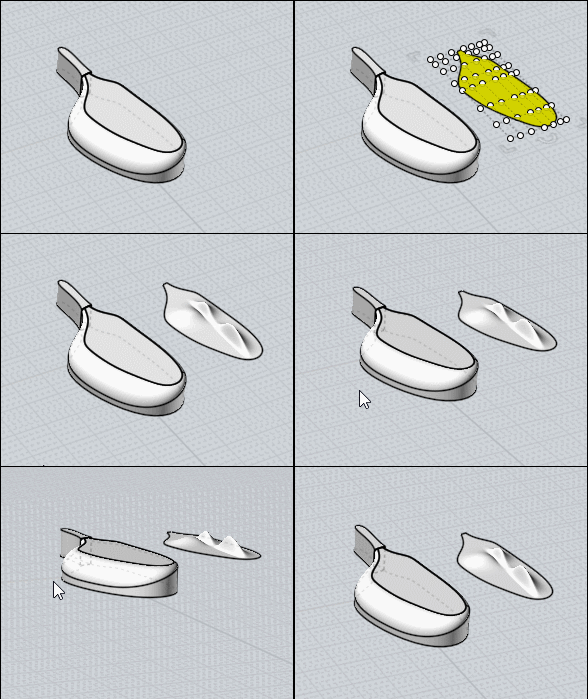
FallOff again : a little tricky but easy ! ;)

Separate your surface (then move it (not obliged) or inverse selection more easy for see something)
Use the ShrinkTrimmedSrf hidden function for restric the aera of control point to your rectangle surface
(Michael will explain that some better than me:)

For use it make a simple shortcut with ShrinkTrimmedSrf on the second column or Press tab and copy/past this curious words from anywhere you want :)


Add Control Points (any as you want)
Move them as you want

Boolean Union to the original (not made follow but easy ;)

Et voilĂ ! :)


and don't forget: Control Points in Nurbs are absolutly not the same than Points in Polygon Modeler than Modo or other!
They can be overlapped to a curve when you make a Rebuild for example but as soon as you modify something they are not more on it! :)

There surrely in the futur a deformation box but...only Michael can be more precise :)

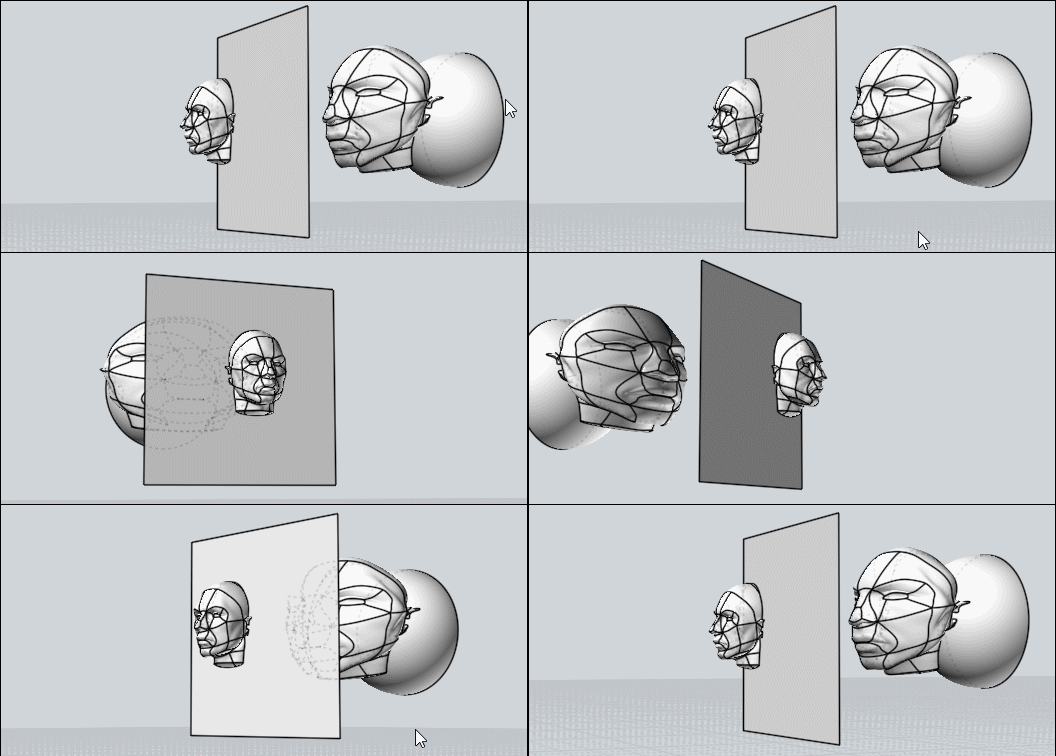
You can also deform your nurbs volume by the native Flow Function!
= Deform volume by another volume!

say this one
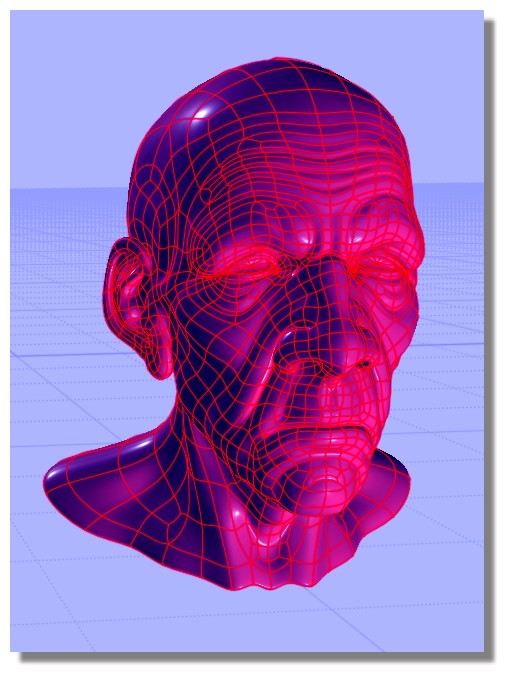

no problem for deform it by any volume! :)
not refound the old man but it will be the same!
EDITED: 1 Oct 2019 by PILOU

  Reply Reply More Options
Post Options
Reply as PM Reply as PM
Print Print
Mark as unread Mark as unread
Relationship Relationship
IP Logged

Previous
Next
 From:  Michael Gibson
9508.22 In reply to 9508.14 
Hi Bartosh,

re:
> @Micheal: You`ve replied in some forum thread that ViaCAD has got better filleting engine. Should I understood
> it that I should buy this soft ass addition for MoI and I won`t be forced to fixed jagged line like this? Do you still
> hold your statement about quality of ViaCAD fillet engine?

Definitely ViaCAD's fillet engine is much better than MoI's but it is not likely to be able to fillet a messy object like that either. Filleting in CAD is just too complex of an operation and it is more designed around having accurate geometry to work with not messy geometry.

I tested your particular file in the old version of ViaCAD I have here and it gives this error:


re:
> Is this same with blending?

I don't think ViaCAD has a surface blend function like MoI's.

- Michael

  Reply Reply More Options
Post Options
Reply as PM Reply as PM
Print Print
Mark as unread Mark as unread
Relationship Relationship
IP Logged

Previous
Next
 From:  Michael Gibson
9508.23 In reply to 9508.16 
Hi Bartosh,

re:
> Is it possible to do some deformation gradually in MoI like Modo ones with linear falloffs?

Not really, no - if you need that kind of deformation you would probably want to use a polygon modeler for that project rather than a CAD program.


> Is it possible in MoI to align curve points linear to get straight line without deleting points?

You can use the Transform > Align command to make a set of points lined up in a vertical or horizontal line. But if you want to work by editing points of a 3D shape, that's something you would be better off doing in a polygon modeling program instead of a CAD program too.

- Michael
  Reply Reply More Options
Post Options
Reply as PM Reply as PM
Print Print
Mark as unread Mark as unread
Relationship Relationship
IP Logged

Previous
Next
 From:  mdesign
9508.24 
Thanks Pilou and Michael for your tips.
  Reply Reply More Options
Post Options
Reply as PM Reply as PM
Print Print
Mark as unread Mark as unread
Relationship Relationship
IP Logged

Previous
Next
 From:  Dooki (ALANO)
9508.25 In reply to 9508.3 
Hi Frenchy,

"Falloff" in Modo has to do the amount of influence you have when you push/pull polygons. Example, look at this image. The bottom bump has a greater "falloff."
Image Attachments:
Size: 570.2 KB, Downloaded: 22 times, Dimensions: 566x230px
  Reply Reply More Options
Post Options
Reply as PM Reply as PM
Print Print
Mark as unread Mark as unread
Relationship Relationship
IP Logged

Previous
 From:  Frenchy Pilou (PILOU)
9508.26 In reply to 9508.25 
Ah ok a sort of area of influence ! :)
---
Pilou
Is beautiful that please without concept!
My Moi French Site My Gallery My MagicaVoxel Gallery
  Reply Reply More Options
Post Options
Reply as PM Reply as PM
Print Print
Mark as unread Mark as unread
Relationship Relationship
IP Logged
 

Reply to All Reply to All


Show messages:  1-20  21-26