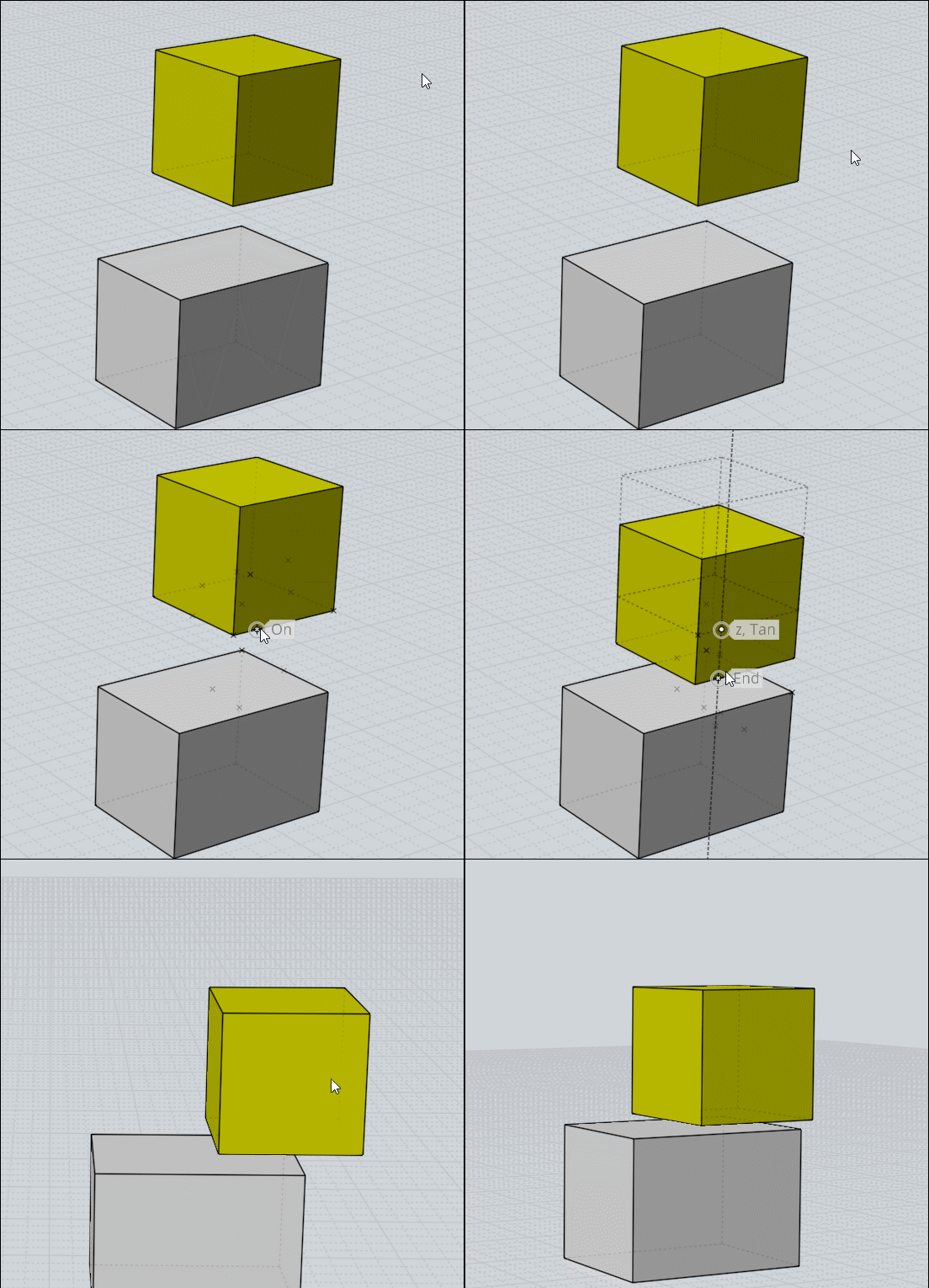
Drop at level 0
All  1-7  8-16

Previous
Next
 From:  moujiik
9411.8 In reply to 9411.7 
Hi Pilou, the script move the object only on z axis
Image Attachments:
Size: 233.4 KB, Downloaded: 51 times, Dimensions: 900x648px
  Reply Reply More Options
Post Options
Reply as PM Reply as PM
Print Print
Mark as unread Mark as unread
Relationship Relationship
IP Logged

Previous
Next
 From:  Frenchy Pilou (PILOU)
9411.9 In reply to 9411.8 
Not more powerful with Move + Helpers Lines ?

---
Pilou
Is beautiful that please without concept!
My Moi French Site My Gallery My MagicaVoxel Gallery
  Reply Reply More Options
Post Options
Reply as PM Reply as PM
Print Print
Mark as unread Mark as unread
Relationship Relationship
IP Logged

Previous
Next
 From:  Michael Gibson
9411.10 In reply to 9411.9 
@Pilou - yes it is possible to use Move + Construction lines to do this type of task currently. This is just a convenient way to do it with fewer steps if you need to do it often.

@moujiik - in the future when I get a chance to do some drawing improvements in MoI I'd like to incorporate some stuff regarding z level in the regular UI. Stuff like show the current selection's z level and maybe set a z level for drawing.

- Michael
  Reply Reply More Options
Post Options
Reply as PM Reply as PM
Print Print
Mark as unread Mark as unread
Relationship Relationship
IP Logged

Previous
Next
 From:  Frenchy Pilou (PILOU)
9411.11 In reply to 9411.10 
Effectively it's a little more practical! :)

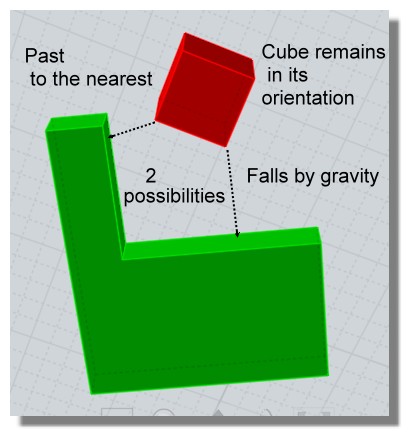
There was not yet something for snap to the nearest ?

Else Line / Line without scaling can make also some miraculous things! ;)

EDITED: 27 Jun 2019 by PILOU

  Reply Reply More Options
Post Options
Reply as PM Reply as PM
Print Print
Mark as unread Mark as unread
Relationship Relationship
IP Logged

Previous
Next
 From:  Michael Gibson
9411.12 In reply to 9411.11 
Hi Pilou,

> There was not yet something for snap to the nearest ?

Could you please describe this a little more?

- Michael
  Reply Reply More Options
Post Options
Reply as PM Reply as PM
Print Print
Mark as unread Mark as unread
Relationship Relationship
IP Logged

Previous
Next
 From:  Frenchy Pilou (PILOU)
9411.13 In reply to 9411.12 
Maybe something like that (not vital) ;)
A sort of collision...like your last one but in any direction or to the nearest...

EDITED: 27 Jun 2019 by PILOU

  Reply Reply More Options
Post Options
Reply as PM Reply as PM
Print Print
Mark as unread Mark as unread
Relationship Relationship
IP Logged

Previous
Next
 From:  Michael Gibson
9411.14 In reply to 9411.13 
Hi Pilou, sorry no there isn't anything set up for that currently.

- Michael
  Reply Reply More Options
Post Options
Reply as PM Reply as PM
Print Print
Mark as unread Mark as unread
Relationship Relationship
IP Logged

Previous
Next
 From:  Frenchy Pilou (PILOU)
9411.15 In reply to 9411.14 
No problem !:)
---
Pilou
Is beautiful that please without concept!
My Moi French Site My Gallery My MagicaVoxel Gallery
  Reply Reply More Options
Post Options
Reply as PM Reply as PM
Print Print
Mark as unread Mark as unread
Relationship Relationship
IP Logged

Previous
 From:  moujiik
9411.16 
Hi Michael, and Pilou. The script has already save me a lot of time. With a very intricate project, where some objects are deeply hidden and there are a lot of snapping points to chose from, it's very convenient to chose a reference Z point.
I often come up with lines that don't join because of different z level. It happens when drawing from top view, and flatten the whole thing often brings the curve to an unwanted z level. Then the script is usefull to bring the curve to the place we want to make an extrusion.
So, some stuff regarding z level like you describe will probably be a nice adition to the UI.
This being said, the UI is already extremely friendly, and a joy to use. Even with hours of continuous work.
Moujiik
  Reply Reply More Options
Post Options
Reply as PM Reply as PM
Print Print
Mark as unread Mark as unread
Relationship Relationship
IP Logged
 

Reply to All Reply to All


Show messages: All  1-7  8-16