New Beta
 1-11  12-27

Previous
Next
 From:  trc (TERRYC)
9397.12 
That sound perfect.
  Reply Reply More Options
Post Options
Reply as PM Reply as PM
Print Print
Mark as unread Mark as unread
Relationship Relationship
IP Logged

Previous
Next
 From:  Frenchy Pilou (PILOU)
9397.13 
12345
Text
TextBlock

Can we center that all group ? (don't shown on your images)
  Reply Reply More Options
Post Options
Reply as PM Reply as PM
Print Print
Mark as unread Mark as unread
Relationship Relationship
IP Logged

Previous
Next
 From:  Michael Gibson
9397.14 In reply to 9397.13 
Hi Pilou, yes on multi-line text there is going to be an option for alignment: left, center, right, or justified.

Here's what it looks like with center alignment:


- Michael

  Reply Reply More Options
Post Options
Reply as PM Reply as PM
Print Print
Mark as unread Mark as unread
Relationship Relationship
IP Logged

Previous
Next
 From:  Stargazer
9397.15 
Cool stuff!
  Reply Reply More Options
Post Options
Reply as PM Reply as PM
Print Print
Mark as unread Mark as unread
Relationship Relationship
IP Logged

Previous
Next
 From:  Frenchy Pilou (PILOU)
9397.16 
Perfect!
---
Pilou
Is beautiful that please without concept!
My Moi French Site My Gallery My MagicaVoxel Gallery
  Reply Reply More Options
Post Options
Reply as PM Reply as PM
Print Print
Mark as unread Mark as unread
Relationship Relationship
IP Logged

Previous
Next
 From:  Finema
9397.17 In reply to 9397.16 
Really good stuff Michael !
  Reply Reply More Options
Post Options
Reply as PM Reply as PM
Print Print
Mark as unread Mark as unread
Relationship Relationship
IP Logged

Previous
Next
 From:  Mik (MIKULAS)
9397.18 In reply to 9397.17 
Hi Michael,

I would ask you only, if it is possible to align the dimension description/text above the line like in technical drawings ( https://en.wikipedia.org/wiki/Technical_drawing#/media/File:DIN_69893_hsk_63a_drawing.png ) ?

Thank you,
Mik
  Reply Reply More Options
Post Options
Reply as PM Reply as PM
Print Print
Mark as unread Mark as unread
Relationship Relationship
IP Logged

Previous
Next
 From:  Marc (TELLIER)
9397.19 
Wow, that's great news!

Blocks of text will be very useful.

Marc
  Reply Reply More Options
Post Options
Reply as PM Reply as PM
Print Print
Mark as unread Mark as unread
Relationship Relationship
IP Logged

Previous
Next
 From:  nameless
9397.20 
Really cool stuff! Thanks for all the hard work Michael!
  Reply Reply More Options
Post Options
Reply as PM Reply as PM
Print Print
Mark as unread Mark as unread
Relationship Relationship
IP Logged

Previous
Next
 From:  Michael Gibson
9397.21 In reply to 9397.18 
Hi Mik,

re:
> I would ask you only, if it is possible to align the dimension description/text
> above the line like in technical drawings

I don't have that one set up quite yet to show off but it is planned.

- Michael
  Reply Reply More Options
Post Options
Reply as PM Reply as PM
Print Print
Mark as unread Mark as unread
Relationship Relationship
IP Logged

Previous
Next
 From:  Mik (MIKULAS)
9397.22 In reply to 9397.21 
Thank you, Michael, it would be great.
Mik
  Reply Reply More Options
Post Options
Reply as PM Reply as PM
Print Print
Mark as unread Mark as unread
Relationship Relationship
IP Logged

Previous
Next
 From:  Frenchy Pilou (PILOU)
9397.23 
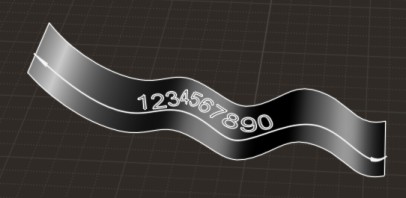
Something like that is possible ?

  Reply Reply More Options
Post Options
Reply as PM Reply as PM
Print Print
Mark as unread Mark as unread
Relationship Relationship
IP Logged

Previous
Next
 From:  Michael Gibson
9397.24 In reply to 9397.23 
Hi Pilou, no the new annotations won't be for doing something like that, you would need to use other drawing tools (like Draw Solid > Text and Transform > Deform > Flow) to make that type of thing.

Do you have any examples of technical drawings that have a wiggly shape like that?

- Michael
  Reply Reply More Options
Post Options
Reply as PM Reply as PM
Print Print
Mark as unread Mark as unread
Relationship Relationship
IP Logged

Previous
Next
 From:  Frenchy Pilou (PILOU)
9397.25 In reply to 9397.24 
For more versatility...
It was more purpose for graphic design objects image!
for take advantage of the possibility to draw anything in 3D or 2D! ;)

Of course Flow function can supply of that...but if it's will be in native that will give a little unic speed feature to the prog! ;)

As you draw a straight curve (?) for dimension I could believe that will be automatic to draw a sinuous one :)

EDITED: 5 Jul 2019 by PILOU

  Reply Reply More Options
Post Options
Reply as PM Reply as PM
Print Print
Mark as unread Mark as unread
Relationship Relationship
IP Logged

Previous
Next
 From:  Michael Gibson
9397.26 In reply to 9397.25 
Hi Pilou,

> As you draw a straight curve (?) for dimension I could believe that will be automatic to draw a sinuous one :)

Unfortunately no - it would take a lot of additional work to make dimensions able to do that it is very far from being automatic.

- Michael
  Reply Reply More Options
Post Options
Reply as PM Reply as PM
Print Print
Mark as unread Mark as unread
Relationship Relationship
IP Logged

Previous
 From:  Frenchy Pilou (PILOU)
9397.27 In reply to 9397.26 
No problem the "Flow" will make the trick! :)
---
Pilou
Is beautiful that please without concept!
My Moi French Site My Gallery My MagicaVoxel Gallery
  Reply Reply More Options
Post Options
Reply as PM Reply as PM
Print Print
Mark as unread Mark as unread
Relationship Relationship
IP Logged
 

Reply to All Reply to All


Show messages:  1-11  12-27