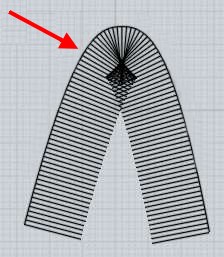
Newb: help with Arm and belly contours for solid body guitars
 1-2  3-22  23-42  43-62  63-82  83-99

Previous
Next
 From:  mkdm
8938.43 In reply to 8938.42 
You're welcome VEGASGUITARS.

- Marco (mkdm)
  Reply Reply More Options
Post Options
Reply as PM Reply as PM
Print Print
Mark as unread Mark as unread
Relationship Relationship
IP Logged

Previous
Next
 From:  VG (VEGASGUITARS)
8938.44 
Here's a new routing scheme for the "Ione" model - this one has three single coil pickup slots and a tremolo cavity . . . working on the pickguard.

EDITED: 24 Jul 2018 by VEGASGUITARS

Image Attachments:
Size: 132.5 KB, Downloaded: 35 times, Dimensions: 950x623px
Size: 101 KB, Downloaded: 31 times, Dimensions: 950x650px
Size: 79.6 KB, Downloaded: 32 times, Dimensions: 950x662px
  Reply Reply More Options
Post Options
Reply as PM Reply as PM
Print Print
Mark as unread Mark as unread
Relationship Relationship
IP Logged

Previous
Next
 From:  VG (VEGASGUITARS)
8938.45 In reply to 8938.44 
Here's the Ione model with humbuckers and two volume two tone control spaces. The hope is to mill the three designs in several scale lengths and send them to Premier magazine.

EDITED: 24 Jul 2018 by VEGASGUITARS

Image Attachments:
Size: 93.9 KB, Downloaded: 44 times, Dimensions: 950x699px
Size: 106.6 KB, Downloaded: 33 times, Dimensions: 1000x627px
Size: 56.7 KB, Downloaded: 45 times, Dimensions: 950x668px
  Reply Reply More Options
Post Options
Reply as PM Reply as PM
Print Print
Mark as unread Mark as unread
Relationship Relationship
IP Logged

Previous
Next
 From:  mkdm
8938.46 In reply to 8938.45 
Very high quality model!! Congrats!!

- Marco (mkdm)
My Procreate portfolio
  Reply Reply More Options
Post Options
Reply as PM Reply as PM
Print Print
Mark as unread Mark as unread
Relationship Relationship
IP Logged

Previous
Next
 From:  VG (VEGASGUITARS)
8938.47 In reply to 8938.46 
Thanks Marco!
  Reply Reply More Options
Post Options
Reply as PM Reply as PM
Print Print
Mark as unread Mark as unread
Relationship Relationship
IP Logged

Previous
Next
 From:  VG (VEGASGUITARS)
8938.48 
Having trouble filleting the back of this model - any suggestions? The top is fine. Thanks for the help.

EDITED: 21 Feb 2021 by VEGASGUITARS

Image Attachments:
Size: 82.8 KB, Downloaded: 41 times, Dimensions: 1093x863px
Size: 107.9 KB, Downloaded: 30 times, Dimensions: 1269x941px
Size: 102 KB, Downloaded: 49 times, Dimensions: 1596x956px
  Reply Reply More Options
Post Options
Reply as PM Reply as PM
Print Print
Mark as unread Mark as unread
Relationship Relationship
IP Logged

Previous
Next
 From:  Michael Gibson
8938.49 In reply to 8938.48 
Hi Neil, what fillet radius are you trying to use?

There are some pretty tight bends in your back outline here:


It's problematic for filleting to have a tight bend in the outline that is smaller than the fillet radius. It means the fillet will have to try and bunch up on itself like this:
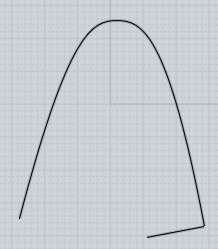

That type of situation can cause filleting to fail. So if you know you want to fillet that back you'd probably want to keep those tight bends out of the model until later on.

When doing a fillet of radius 0.05 it gives a partial result, with those areas missing:


That definitely makes me think those tight bend areas are the problem.

One way to make progress would be to slice out those areas for now something like this:


Now without those bends in the outline you can go ahead and fillet the back:


And hopefully you now have a smaller area to work on fixing rather than the whole back.

Hope that makes sense.

- Michael

  Reply Reply More Options
Post Options
Reply as PM Reply as PM
Print Print
Mark as unread Mark as unread
Relationship Relationship
IP Logged

Previous
Next
 From:  Michael Gibson
8938.50 In reply to 8938.48 
Hi Neil, also over here a fillet radius up to around 0.04 looks like it works ok but not much larger than that with those tight bends in the outline.

If you remove the tight bends as shown above you can then go larger.

If you know you want to put a fillet on some area you kind of need to keep tight bends out of there until later on.

- Michael
  Reply Reply More Options
Post Options
Reply as PM Reply as PM
Print Print
Mark as unread Mark as unread
Relationship Relationship
IP Logged

Previous
Next
 From:  VG (VEGASGUITARS)
8938.51 In reply to 8938.50 
Thanks Michael - Excellent - thank you for the educational/detailed reply - that solves the problem. Will do!
  Reply Reply More Options
Post Options
Reply as PM Reply as PM
Print Print
Mark as unread Mark as unread
Relationship Relationship
IP Logged

Previous
Next
 From:  VG (VEGASGUITARS)
8938.52 In reply to 8938.51 
Thanks again to Michael for the help. This this is pretty good - would've liked the fillet to be .625 but .25 will have to do. - can always use a 3/8" roundover bit on it. :)
Image Attachments:
Size: 86.5 KB, Downloaded: 25 times, Dimensions: 950x735px
Size: 102.3 KB, Downloaded: 20 times, Dimensions: 950x615px
Size: 77.2 KB, Downloaded: 32 times, Dimensions: 950x598px
Size: 111.5 KB, Downloaded: 37 times, Dimensions: 950x670px
  Reply Reply More Options
Post Options
Reply as PM Reply as PM
Print Print
Mark as unread Mark as unread
Relationship Relationship
IP Logged

Previous
Next
 From:  Barry-H
8938.53 In reply to 8938.52 
Hi Neil,
try these reworked curves to get the larger fillet.
Barry


  Reply Reply More Options
Post Options
Reply as PM Reply as PM
Print Print
Mark as unread Mark as unread
Relationship Relationship
IP Logged

Previous
Next
 From:  VG (VEGASGUITARS)
8938.54 In reply to 8938.53 
Thanks Barry - what exactly did you do? The shape looked about the same. Was able to get this one to .4 roundover which is pretty close.

EDITED: 26 Apr 2019 by VEGASGUITARS

Image Attachments:
Size: 63.1 KB, Downloaded: 27 times, Dimensions: 859x505px
Size: 43.4 KB, Downloaded: 31 times, Dimensions: 855x500px
Size: 97.2 KB, Downloaded: 19 times, Dimensions: 950x595px
  Reply Reply More Options
Post Options
Reply as PM Reply as PM
Print Print
Mark as unread Mark as unread
Relationship Relationship
IP Logged

Previous
Next
 From:  Barry-H
8938.55 In reply to 8938.54 
Hi Neil,
I reworked the areas shown in the photo.
I moved your arm cut over slightly as the thickness from front to back was to thin for a 0.25 fillet top and 0.625 fillet back.
Also the neck cut out curve had a sharp corner where it should have blended and gave a strange result when Boolean difference was applied.
This was the order I filleted.
1) Fillet back 0.625 but not the top edge.
2) Fillet top 0.25 again not top edge.
3) Boolean difference neck cut out.
4) Fillet top edge 0.2
Attached is the result.
Hope this helps
Barry


  Reply Reply More Options
Post Options
Reply as PM Reply as PM
Print Print
Mark as unread Mark as unread
Relationship Relationship
IP Logged

Previous
Next
 From:  VG (VEGASGUITARS)
8938.56 In reply to 8938.55 
Thanks Barry!
  Reply Reply More Options
Post Options
Reply as PM Reply as PM
Print Print
Mark as unread Mark as unread
Relationship Relationship
IP Logged

Previous
Next
 From:  VG (VEGASGUITARS)
8938.57 In reply to 8938.56 
Where am I going wrong on this - can't fillet any more than .125" - what is the trick? I'd like to do between .25" and .375"

Thanks for the help!
Attachments:

  Reply Reply More Options
Post Options
Reply as PM Reply as PM
Print Print
Mark as unread Mark as unread
Relationship Relationship
IP Logged

Previous
Next
 From:  Michael Gibson
8938.58 In reply to 8938.57 
Hi Neil, what edges are you trying to fillet ?

- Michael
  Reply Reply More Options
Post Options
Reply as PM Reply as PM
Print Print
Mark as unread Mark as unread
Relationship Relationship
IP Logged

Previous
Next
 From:  Barry-H
8938.59 In reply to 8938.57 
Hi Neil,
your model will fillet at .25/.30 if you do the fillets before you Boolean the neck pocket.
The neck pocket as it is causes a slight sliver so by slightly moving or adjusting width will improve it.
Barry


Attachments:

  Reply Reply More Options
Post Options
Reply as PM Reply as PM
Print Print
Mark as unread Mark as unread
Relationship Relationship
IP Logged

Previous
Next
 From:  VG (VEGASGUITARS)
8938.60 In reply to 8938.59 
Why can't I do that? Hmm. Well you always save the day Barry - thanks! Can you help with this body as well? I'm having the same problem with it. I can' get the fillet anymore than .1" before or after the pockets and contours.

  Reply Reply More Options
Post Options
Reply as PM Reply as PM
Print Print
Mark as unread Mark as unread
Relationship Relationship
IP Logged

Previous
Next
 From:  Barry-H
8938.61 In reply to 8938.60 
Hi Neil,
Just tried your last post and it fillets 0.2 on the top any bigger and it runs into a pocket.
Did exactly the same as my previous post separated the solid, untrimmed the top and side to remove neck pocket.
Re trimmed side with belly cut out and joined to form a solid, applied fillets top and bottom and to finish Boolean the neck pocket.
Hope this helps.
Barry
Ps: your body profile right side neck curve isn't smooth?
  Reply Reply More Options
Post Options
Reply as PM Reply as PM
Print Print
Mark as unread Mark as unread
Relationship Relationship
IP Logged

Previous
Next
 From:  VG (VEGASGUITARS)
8938.62 In reply to 8938.61 
Thanks Barry! - hmm that must be a previous version thought I smoothed that curve out - thanks for pointing it out and for the help - much appreciated! Will be making that arch top very soon - thank you again for your help with that.
  Reply Reply More Options
Post Options
Reply as PM Reply as PM
Print Print
Mark as unread Mark as unread
Relationship Relationship
IP Logged
 

Reply to All Reply to All


Show messages:  1-2  3-22  23-42  43-62  63-82  83-99