Removing Trim/holes
 1-5  6-25

Previous
Next
 From:  Lewis3D
8827.6 
Hi Michael,

I've tried with re-trimming but as soon as i delete edges on that power button shape i get complete mess of surfaces so even after flatten/re-trim it's nothing usable.
This happens when I delete edges.

As for Sweping, i tried that also but i get visible Seam in middle of one line when i try to export that to polygons (2nd attachment).

EDITED: 15 Feb 2018 by LEWIS3D

Image Attachments:
Size: 275.1 KB, Downloaded: 17 times, Dimensions: 2107x1496px
Size: 229.1 KB, Downloaded: 18 times, Dimensions: 2103x1483px
  Reply Reply More Options
Post Options
Reply as PM Reply as PM
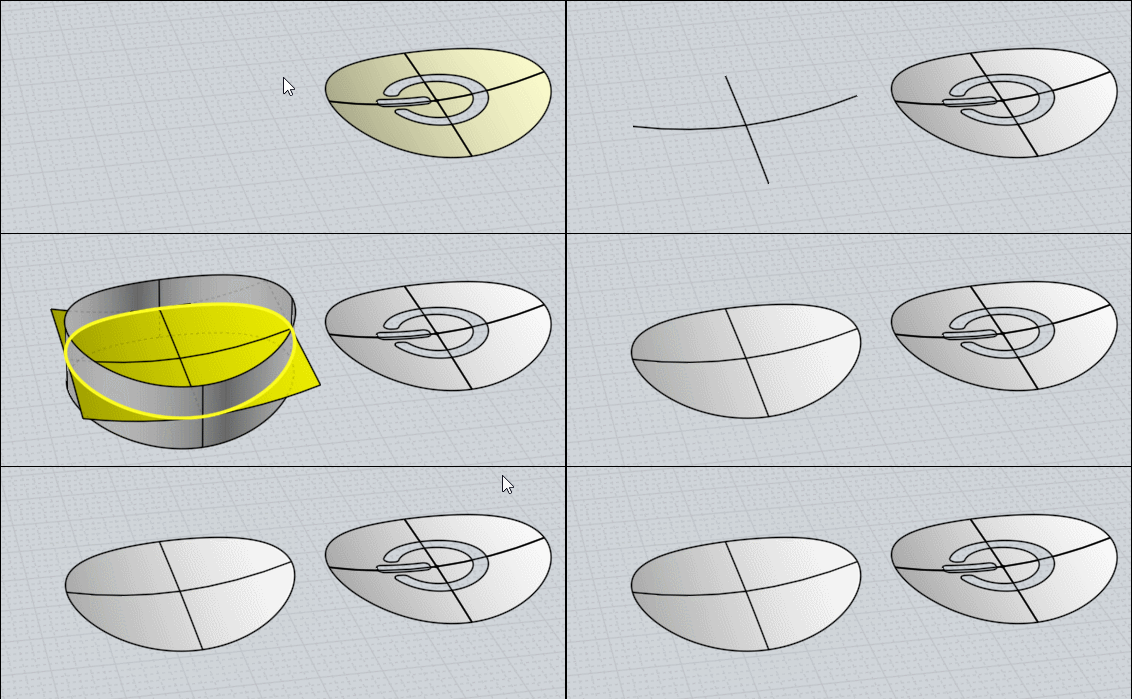
Print Print
Mark as unread Mark as unread
Relationship Relationship
IP Logged

Previous
Next
 From:  mkdm
8827.7 In reply to 8827.6 
Hi Lewis3D.

..I see...

But I've got a trick that worked for me.

Some minutes and I will post a new tutorial.

Stay tuned.

- Marco (mkdm)
  Reply Reply More Options
Post Options
Reply as PM Reply as PM
Print Print
Mark as unread Mark as unread
Relationship Relationship
IP Logged

Previous
Next
 From:  mkdm
8827.8 In reply to 8827.6 
Check this one.

Video tut : http://take.ms/pgaSX

3DM file : http://take.ms/mlW8T


Ciao!

- Marco (mkdm)
  Reply Reply More Options
Post Options
Reply as PM Reply as PM
Print Print
Mark as unread Mark as unread
Relationship Relationship
IP Logged

Previous
Next
 From:  Frenchy Pilou (PILOU)
8827.9 
Maybe Just redraw the 2 perpendicular curves by the Known points
Sweep
Trim :)

---
Pilou
Is beautiful that please without concept!
My Moi French Site My Gallery
  Reply Reply More Options
Post Options
Reply as PM Reply as PM
Print Print
Mark as unread Mark as unread
Relationship Relationship
IP Logged

Previous
Next
 From:  Michael Gibson
8827.10 In reply to 8827.6 
Hi Lewis,

> I've tried with re-trimming but as soon as i delete edges on that power button shape i get complete
> mess of surfaces so even after flatten/re-trim it's nothing usable.
> This happens when I delete edges.

Yes, those are just the 5 surfaces that were underneath the faces. Why are they unusable for you? If it's confusing that they are overlapping, then try untrimming and retrimming just one at a time and hide the other ones while you work on each individual one.


> As for Sweping, i tried that also but i get visible Seam in middle of one line when i try to export
> that to polygons (2nd attachment).

It looks like one of the curves you are using for the sweep is not smooth. If either the rail or the profile curve isn't smooth then the sweep will also not be smooth. A quick way to smooth out a curve made of 2 pieces is to turn on control points and delete the middle point. Or also select the center point and the 2 adjacent points and make sure they are all in a straight line, using either flat snap or Transform > Align.

If you still have any problems with the sweep please post the 3DM model file with the curves you're using.

- Michael
  Reply Reply More Options
Post Options
Reply as PM Reply as PM
Print Print
Mark as unread Mark as unread
Relationship Relationship
IP Logged

Previous
Next
 From:  Lewis3D
8827.11 In reply to 8827.9 
Hi PILOU,

Thanks for trying.

I've tried that several times and i always get visible seams or even holes after i try to export that to polys. Not even join or Boolean union helped to solve that.
Have you tried to check your version for OBJ exporting ?

Lewis
www.ram-studio.hr
Skype - lewis3d

Image Attachments:
Size: 208 KB, Downloaded: 10 times, Dimensions: 2098x1489px
  Reply Reply More Options
Post Options
Reply as PM Reply as PM
Print Print
Mark as unread Mark as unread
Relationship Relationship
IP Logged

Previous
Next
 From:  Lewis3D
8827.12 In reply to 8827.11 
Guys thanks for all the help, amazing forum :).

Marco, i managed to do it with that new technique you showed and it's clean one export. I guess Curve Rebuild was key part here so that after sweeping tool all is seamless now.

Great, thanks one more time.

Lewis
www.ram-studio.hr
Skype - lewis3d

  Reply Reply More Options
Post Options
Reply as PM Reply as PM
Print Print
Mark as unread Mark as unread
Relationship Relationship
IP Logged

Previous
Next
 From:  Michael Gibson
8827.13 In reply to 8827.6 
Hi Lewis, I've attached the result of using the untrim/retrim technique as I described above. The surfaces that you get after untrimming are perfectly usable, they just extend over top of each other so it's easier to manage them by only untrimming and retrimming one at a time, that's all.

This version should have the 100% exact same surface shape as your original file since it actually uses the same surfaces.

If you want help with making a new surface using Sweep please post the curves you are using, it looks like they need to be edited to be smooth instead of having a kink in the middle of the curve.

- Michael
Attachments:

  Reply Reply More Options
Post Options
Reply as PM Reply as PM
Print Print
Mark as unread Mark as unread
Relationship Relationship
IP Logged

Message 8827.14 deleted 15 Feb 2018 by MKDM

Previous
Next
 From:  mkdm
8827.15 In reply to 8827.12 
Hi Lewis3D.

You're welcome.

Ciao!

- Marco (mkdm)
  Reply Reply More Options
Post Options
Reply as PM Reply as PM
Print Print
Mark as unread Mark as unread
Relationship Relationship
IP Logged

Previous
Next
 From:  Lewis3D
8827.16 In reply to 8827.13 
Thanks Michael, yes your file works fine, as for me not managed to do it by trimming, it is exactly what you say, many surfaces overlap each other so i hardly see/understand which part i'm trimming in that mess, i've tried by hiding all but one and then trim one by one by one but i can't say i got great result 'coz even after i trimmed all with outside circle and deleted outside excess areas i still have many overlapping surfaces with corners bending upwards so i've not known how to weld/merge them into that single flat nice surface you got (my screen-grab showing how surfaces are bending upwards=.

Luckily Marcos's solution worked so i managed to fix it with that technique.
Image Attachments:
Size: 203.1 KB, Downloaded: 12 times, Dimensions: 1944x1197px
  Reply Reply More Options
Post Options
Reply as PM Reply as PM
Print Print
Mark as unread Mark as unread
Relationship Relationship
IP Logged

Previous
Next
 From:  Michael Gibson
8827.17 In reply to 8827.16 
Hi Lewis,

re:
> (my screen-grab showing how surfaces are bending upwards=.

Those bending upwards areas are some additional areas that also need to be trimmed off - if you check out the file I posted I also drew in 2 crossing lines here:


Then you trim the surface and remove these areas:


Leaving this part:


- Michael

  Reply Reply More Options
Post Options
Reply as PM Reply as PM
Print Print
Mark as unread Mark as unread
Relationship Relationship
IP Logged

Previous
Next
 From:  Frenchy Pilou (PILOU)
8827.18 
<< and i always get visible seams or even holes after i try to export that to polys. Not even join or Boolean union helped to solve that.
<< Have you tried to check your version for OBJ exporting ?

Yes and Seems not seams! :)
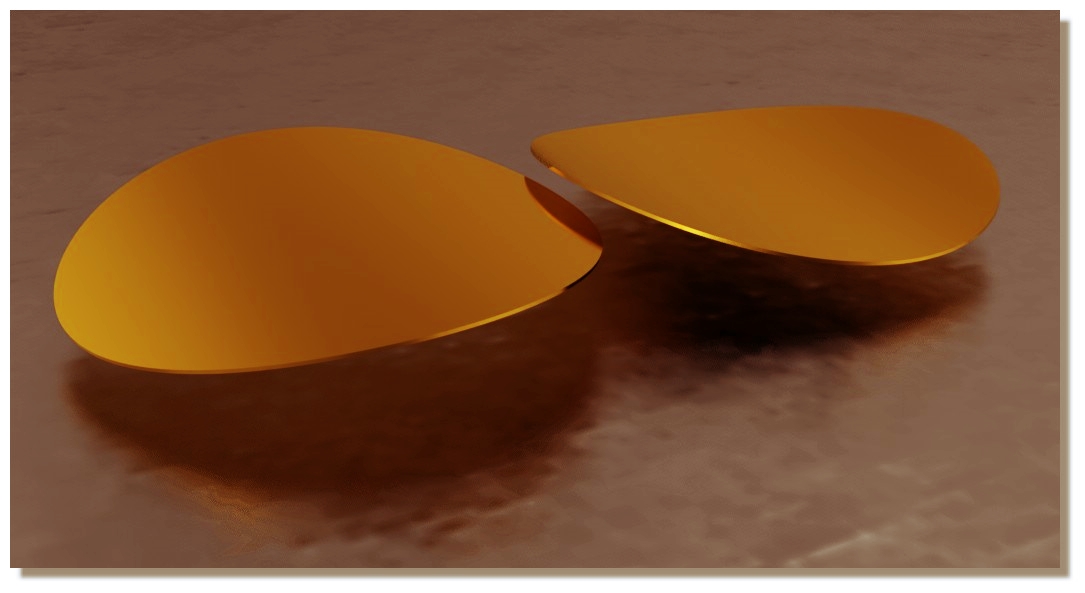
I made a little thickness because render don't love only simple face! :)
Always free real time SimLab Composer Lite (max 1920 * 1080)

EDITED: 15 Feb 2018 by PILOU

  Reply Reply More Options
Post Options
Reply as PM Reply as PM
Print Print
Mark as unread Mark as unread
Relationship Relationship
IP Logged

Previous
Next
 From:  Lewis3D
8827.19 
Aha, i get it now how you did it Michael, you basically made 4 pizza slices and then it worked 'coz bending parts are removed. I forgot tot do that cross section trim so that's why i still had messy results.

PILOU - thanks for render test

cheers and thank you both for extra effort.

Lewis
www.ram-studio.hr
Skype - lewis3d

  Reply Reply More Options
Post Options
Reply as PM Reply as PM
Print Print
Mark as unread Mark as unread
Relationship Relationship
IP Logged

Previous
Next
 From:  mkdm
8827.20 In reply to 8827.18 
Beatiful!

Tks.

- Marco (mkdm)
  Reply Reply More Options
Post Options
Reply as PM Reply as PM
Print Print
Mark as unread Mark as unread
Relationship Relationship
IP Logged

Previous
Next
 From:  eddi
8827.21 In reply to 8827.1 
Hi Lewis,
>>I've tried recreating that surface with network
Attachment with layout for NetworkSrf (This eliminates polar uv layout)

-EDDI

  Reply Reply More Options
Post Options
Reply as PM Reply as PM
Print Print
Mark as unread Mark as unread
Relationship Relationship
IP Logged

Previous
Next
 From:  Lewis3D
8827.22 
Interesting approach EDDI, does it look same from side in quad view ?

And how did you split edges/curves at exact position, by trimming or there is faster way to split curve/edge ?

Lewis
www.ram-studio.hr
Skype - lewis3d

  Reply Reply More Options
Post Options
Reply as PM Reply as PM
Print Print
Mark as unread Mark as unread
Relationship Relationship
IP Logged

Previous
Next
 From:  eddi
8827.23 In reply to 8827.22 
>> And how did you split edges/curves at exact position
SplitHelper created with Multiiso script
http://moi3d.com/forum/index.php?webtag=MOI&msg=6841.3


Outer edge with > STRG + C > STRG + V > Join > Trim with AddTrimPoints at SplitHelper position and option keep.
Middle lines drawn with curve through points.

Result Old uv layout and new.

-EDDI

  Reply Reply More Options
Post Options
Reply as PM Reply as PM
Print Print
Mark as unread Mark as unread
Relationship Relationship
IP Logged

Previous
Next
 From:  Lewis3D
8827.24 In reply to 8827.23 
Good, that now has lot more sense and I understand how you did it :).

Thanks

Lewis
www.ram-studio.hr
Skype - lewis3d

  Reply Reply More Options
Post Options
Reply as PM Reply as PM
Print Print
Mark as unread Mark as unread
Relationship Relationship
IP Logged

Previous
 From:  eddi
8827.25 In reply to 8827.24 
Wink
-EDDI
  Reply Reply More Options
Post Options
Reply as PM Reply as PM
Print Print
Mark as unread Mark as unread
Relationship Relationship
IP Logged
 

Reply to All Reply to All


Show messages:  1-5  6-25