Drawing a shape, but how?
 1-10  11-30  31-50  51-70  71-81

Previous
Next
 From:  amur (STEFAN)
8815.31 
Hi Pilou,

like i said before you have to carefully read Chris posting (click the link)... There you will find at the first posting at the bottom a login and download link.

Hope this helps.

Regards
Stefan
  Reply Reply More Options
Post Options
Reply as PM Reply as PM
Print Print
Mark as unread Mark as unread
Relationship Relationship
IP Logged

Previous
Next
 From:  Barry-H
8815.32 In reply to 8815.1 
Hi Franz,
this technic may give you what you want.
I joined your curves and ran the rebuild command on them.
Networked the top face. Extruded the base shape with no caps.
Blended the top to the bottom with a 1.2 bulge.
Blend corner blend to blend not base.
Joined all and ran planar to cap bottom.
Hope this helps.
Barry


Attachments:

  Reply Reply More Options
Post Options
Reply as PM Reply as PM
Print Print
Mark as unread Mark as unread
Relationship Relationship
IP Logged

Previous
Next
 From:  Frenchy Pilou (PILOU)
8815.33 
I am connected on the forum (as shown by the little guy right to the white ring bell)
but when i click the Blue button of download with white Arrow the same page is back again!

Same result on these 2 pages! So what is your secret ? :)


EDITED: 13 Feb 2018 by PILOU

  Reply Reply More Options
Post Options
Reply as PM Reply as PM
Print Print
Mark as unread Mark as unread
Relationship Relationship
IP Logged

Previous
Next
 From:  Franz
8815.34 In reply to 8815.33 
Hallo Pilou!

I think I have done on the first one. May be I choosed the text with ArtForm3.5, dont know exactly.
But at the moment I can't make a login myself, because I don't know about the security question.
I dont remeber to give any security answer while I registered.

Unfortunately you can't copy the text, so I tried it with a text recognition program from the image.
But unfortunately no success, because I don't know my security question, I am sorry.

http://www.i2ocr.com/free-online-chinese-simplified-ocr


Attachments:

  Reply Reply More Options
Post Options
Reply as PM Reply as PM
Print Print
Mark as unread Mark as unread
Relationship Relationship
IP Logged

Previous
Next
 From:  amur (STEFAN)
8815.35 
Hi Franz and Pilou,

sorry that i cant be of assistance. I downloaded it long time ago and it seems that the procedure
may have changed a bit. At least i never had security questions, only the Captcha thing with the
two chinese characters in the past, but this might have changed too?

Regards
Stefan
  Reply Reply More Options
Post Options
Reply as PM Reply as PM
Print Print
Mark as unread Mark as unread
Relationship Relationship
IP Logged

Previous
Next
 From:  Frenchy Pilou (PILOU)
8815.36 
Seems the security question is optionnal because that don't block your login to the forum !
---
Pilou
Is beautiful that please without concept!
My Moi French Site My Gallery
  Reply Reply More Options
Post Options
Reply as PM Reply as PM
Print Print
Mark as unread Mark as unread
Relationship Relationship
IP Logged

Previous
Next
 From:  Franz
8815.37 In reply to 8815.35 
Thanks Stefan, it's just the weird letters...

Well, if you've managed to be in the forum,
then press the text JDsoftArtForum 3.5 under the download button.

Then you get to the download page, just scroll down to the bottom and download....

Here some screeshots:


  Reply Reply More Options
Post Options
Reply as PM Reply as PM
Print Print
Mark as unread Mark as unread
Relationship Relationship
IP Logged

Previous
Next
 From:  Frenchy Pilou (PILOU)
8815.38 In reply to 8815.37 
A long run race! :)
Wishing now that the 2 parts unzip well :)

Of course there was a last trap!
be carreful!!!
The install program don't build a name folder so all folders / files go directly in the Programms file folder
so a new mess! :)

EDITED: 13 Feb 2018 by PILOU

  Reply Reply More Options
Post Options
Reply as PM Reply as PM
Print Print
Mark as unread Mark as unread
Relationship Relationship
IP Logged

Previous
Next
 From:  Frenchy Pilou (PILOU)
8815.39 In reply to 8815.38 
Launching the prog i have that! :)

Seems my tribulations are not finished! :)

Edit : That Work : input User Name / Password of the Forum register! ;)


My first chiness thing! :)


and now new headache for export that! :)

EDITED: 13 Feb 2018 by PILOU

  Reply Reply More Options
Post Options
Reply as PM Reply as PM
Print Print
Mark as unread Mark as unread
Relationship Relationship
IP Logged

Previous
Next
 From:  Franz
8815.40 In reply to 8815.39 
Hi Pilou!

Look at this:
8815.23

and the answer of stefan.
Have fun!

... now I also have found the correct entry of login ...

EDITED: 13 Feb 2018 by FRANZ

Image Attachments:
Size: 93.4 KB, Downloaded: 51 times, Dimensions: 1244x700px
  Reply Reply More Options
Post Options
Reply as PM Reply as PM
Print Print
Mark as unread Mark as unread
Relationship Relationship
IP Logged

Previous
Next
 From:  Frenchy Pilou (PILOU)
8815.41 In reply to 8815.40 
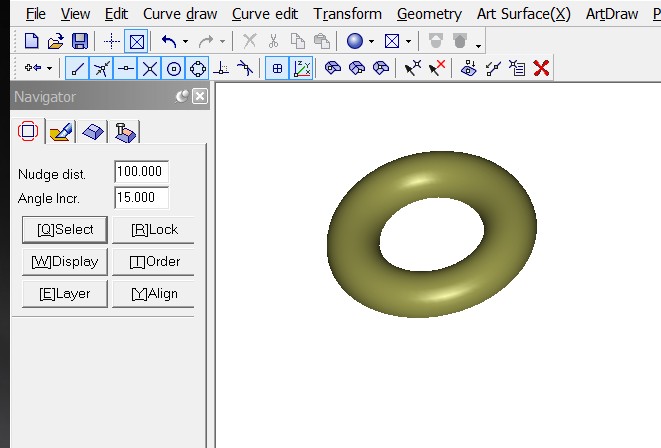
Yes I found the trick in the previous minutes! :)

Now the hunting convert files 3D is open! :)

Seems all is built on a plan ?
So a tore is an half tore! (?)

Seems vs3d format is the best way! :)

EDITED: 13 Feb 2018 by PILOU

  Reply Reply More Options
Post Options
Reply as PM Reply as PM
Print Print
Mark as unread Mark as unread
Relationship Relationship
IP Logged

Previous
Next
 From:  amur (STEFAN)
8815.42 
Hi Pilou,

ArtForm Pro has four modules (or rooms) you can work in.

You are currently in the first. If you go to the third module/room
you have access to ArtForm's Surface NURBS modeler were you can
import .3dm files from MoI or export from there as .iges.

The other modules are used for drawing, like in Illustrator or
for sculpting 2.5D reliefs. The fourth module is for setting up
paths for CNC machining etc.

If you want to learn sculpting 2.5D reliefs i suggest you look
at Youtube videos about JDPaint. ArtForm is the successor
of JDPaint and is compatible.

Regards
Stefan
  Reply Reply More Options
Post Options
Reply as PM Reply as PM
Print Print
Mark as unread Mark as unread
Relationship Relationship
IP Logged

Previous
Next
 From:  Frenchy Pilou (PILOU)
8815.43 In reply to 8815.42 
Seeing speedy the video this morning i have believed that was separated progs! :)

Cool that all is inside! :)

So no problem of export to Moi or import! :)

EDITED: 13 Feb 2018 by PILOU

  Reply Reply More Options
Post Options
Reply as PM Reply as PM
Print Print
Mark as unread Mark as unread
Relationship Relationship
IP Logged

Previous
Next
 From:  Franz
8815.44 In reply to 8815.32 
Hi Barry!

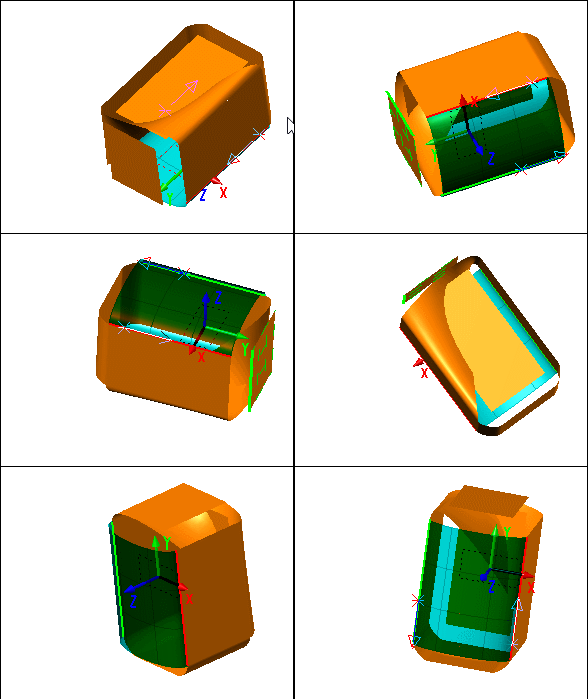
Now I have really reached a satisfactory point, and all this in Moi!
The model was almost unchanged and still a seamless shape.
To get a body, I deleted the yellow surface afterwards and made a network (evenly) with the edges.
Then a solid connection could be made.
Thank you for your support!
Franz


  Reply Reply More Options
Post Options
Reply as PM Reply as PM
Print Print
Mark as unread Mark as unread
Relationship Relationship
IP Logged

Previous
Next
 From:  Franz
8815.45 In reply to 8815.42 
Thank You Stefan, for the tipp with the chinese innovation.
May be also interresting to prefaere drawings for working on CNC machines.

And now have a little more carnival experience....

Franz,
with best regards to all
  Reply Reply More Options
Post Options
Reply as PM Reply as PM
Print Print
Mark as unread Mark as unread
Relationship Relationship
IP Logged

Previous
Next
 From:  OSTexo
8815.46 
Hello,

Loft and Blend is one method. I should have some time for a video if needed.
  Reply Reply More Options
Post Options
Reply as PM Reply as PM
Print Print
Mark as unread Mark as unread
Relationship Relationship
IP Logged

Previous
Next
 From:  Frenchy Pilou (PILOU)
8815.47 
Does Artform has some notions of History ?
---
Pilou
Is beautiful that please without concept!
My Moi French Site My Gallery
  Reply Reply More Options
Post Options
Reply as PM Reply as PM
Print Print
Mark as unread Mark as unread
Relationship Relationship
IP Logged

Previous
Next
 From:  amur (STEFAN)
8815.48 
Hi Pilou,

it has a standard UNDO history, but it is not like a parametric modeler,
were you can go back and change values on the fly.

Regards
Stefan
  Reply Reply More Options
Post Options
Reply as PM Reply as PM
Print Print
Mark as unread Mark as unread
Relationship Relationship
IP Logged

Previous
Next
 From:  Frenchy Pilou (PILOU)
8815.49 In reply to 8815.48 
Thanks for the precision!

And its fillets can help Moi in complex objects ?

Seems very powerful! :)

Curious not so many video tutorials ?

My first step for control the beast of the rising sun! :D

EDITED: 14 Feb 2018 by PILOU

  Reply Reply More Options
Post Options
Reply as PM Reply as PM
Print Print
Mark as unread Mark as unread
Relationship Relationship
IP Logged

Previous
Next
 From:  amur (STEFAN)
8815.50 
Hi Pilou cool!

I have not much yet explored the NURBS module, so i don't know much about their filleter.

I am more interested to learn their 2.5D sculpting module.

About tutorials, you must look for the many JDPaint tutorials, but i have not seen
much about their NURBS modeling only about drawing/sculpting.

Regards
Stefan
  Reply Reply More Options
Post Options
Reply as PM Reply as PM
Print Print
Mark as unread Mark as unread
Relationship Relationship
IP Logged
 

Reply to All Reply to All


Show messages:  1-10  11-30  31-50  51-70  71-81