BOM script
 1-7  8-27  28-41

Previous
Next
 From:  Frenchy Pilou (PILOU)
7759.28 In reply to 7759.27 
  Reply Reply More Options
Post Options
Reply as PM Reply as PM
Print Print
Mark as unread Mark as unread
Relationship Relationship
IP Logged

Previous
Next
 From:  Michael Gibson
7759.29 In reply to 7759.28 
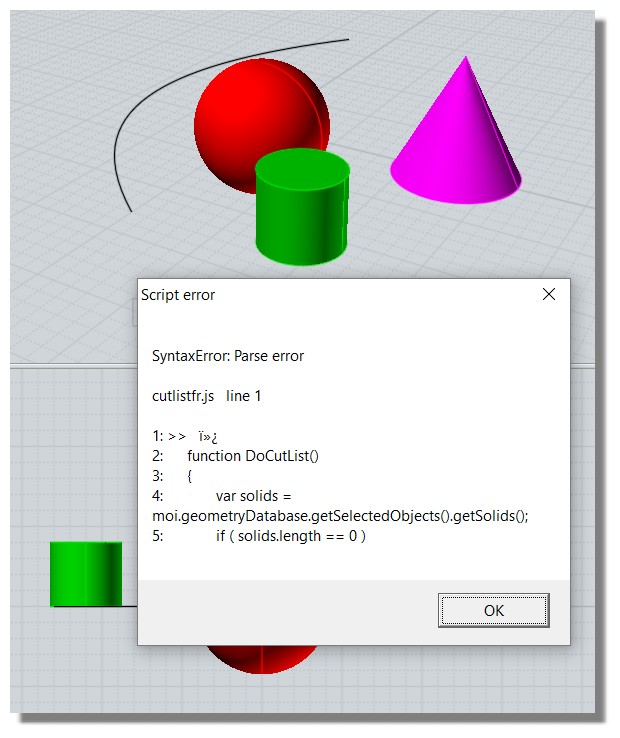
Hi Pilou, for .js files to contain unicode in MoI v3 only UTF-16 with byte order mark is currently supported. This will be tuned up in v4 so that UTF-8 is supported too.

- Michael
  Reply Reply More Options
Post Options
Reply as PM Reply as PM
Print Print
Mark as unread Mark as unread
Relationship Relationship
IP Logged

Previous
Next
 From:  Frenchy Pilou (PILOU)
7759.30 In reply to 7759.29 
So I will try with Notepad ++ :)

so NotePad ++ codes as UTf16 LE (what is LE / BE ?)
So Js for Moi works!

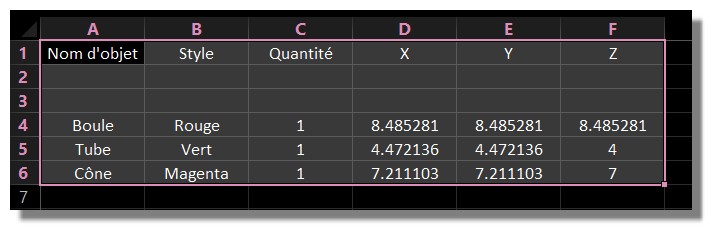
then Notepad export csv as UTF 8 !:)
So accents will all taken in count for Excel (because accents UTF 16 don't works with excel! )
What a gymnastic! :)

Accents are a calamity! :)

Now success!


Version Vf
http://moiscript.weebly.com/cutlist.html

EDITED: 2 May 2017 by PILOU

  Reply Reply More Options
Post Options
Reply as PM Reply as PM
Print Print
Mark as unread Mark as unread
Relationship Relationship
IP Logged

Previous
Next
 From:  Michael Gibson
7759.31 In reply to 7759.30 
Hi Pilou,

re:
> (what is LE / BE ?)

That stands for "Little Endian" or "Big Endian", which are ways that different computers order bytes within longer integer values: https://en.wikipedia.org/wiki/Endianness . You want the "Little Endian" one.

For MoI v4 I can add in an option for script text file creation to write the Byte Order Mark at the start of the .csv file so you wouldn't have to do the extra step there. You can also probably use the Data > From text file option in Excel which will let you tell it that it's a comma delimited UTF-8 file without having to send it through Notepad++ .

- Michael
  Reply Reply More Options
Post Options
Reply as PM Reply as PM
Print Print
Mark as unread Mark as unread
Relationship Relationship
IP Logged

Previous
Next
 From:  Frenchy Pilou (PILOU)
7759.32 In reply to 7759.31 
THx for the infos!
Amazing complexity!
  Reply Reply More Options
Post Options
Reply as PM Reply as PM
Print Print
Mark as unread Mark as unread
Relationship Relationship
IP Logged

Previous
Next
 From:  MarK
7759.33 
Hi Michael, this is more than I expected... Do you think the script could also assemble the parts according to dimensions (regardless of the orientation in the model) and round the dimensions to integers as I describe in the attached image?
Image Attachments:
Size: 717.2 KB, Downloaded: 40 times, Dimensions: 1908x1448px
  Reply Reply More Options
Post Options
Reply as PM Reply as PM
Print Print
Mark as unread Mark as unread
Relationship Relationship
IP Logged

Previous
Next
 From:  Frenchy Pilou (PILOU)
7759.34 In reply to 7759.33 
When you have even an image of your results! (like the above)

I believe you can ask anything you want to any Ai...

This free one is very cool for this sort of thing...just give it the good question(s) ! :)

That avoid some coding! :)


https://gemini.google.com/app

EDITED: 9 Feb by PILOU

  Reply Reply More Options
Post Options
Reply as PM Reply as PM
Print Print
Mark as unread Mark as unread
Relationship Relationship
IP Logged

Previous
Next
 From:  MarK
7759.35 In reply to 7759.34 
Yesterday I spent 4 hours testing her "final, absolutely perfect versions". :-) Then I gave up and wrote this post... :-(
  Reply Reply More Options
Post Options
Reply as PM Reply as PM
Print Print
Mark as unread Mark as unread
Relationship Relationship
IP Logged

Previous
Next
 From:  Michael Gibson
7759.36 In reply to 7759.33 
Hi MarK,

re:
> Do you think the script could also assemble the parts according to dimensions (regardless of the
> orientation in the model) and round the dimensions to integers as I describe in the attached image?

It would help me understand better if you could make an example file with a small number of parts set up as you describe and an example of the desired output from that.

- Michael
  Reply Reply More Options
Post Options
Reply as PM Reply as PM
Print Print
Mark as unread Mark as unread
Relationship Relationship
IP Logged

Previous
Next
 From:  MarK
7759.37 In reply to 7759.36 
Sending... Thank you very much. Marek
Attachments:

  Reply Reply More Options
Post Options
Reply as PM Reply as PM
Print Print
Mark as unread Mark as unread
Relationship Relationship
IP Logged

Previous
Next
 From:  Michael Gibson
7759.38 In reply to 7759.37 
Hi Marek, thanks for the example files. Can you please give the english translation of these column names in the .csv :

Dílec;materiál;množství;tl.;šíøka;délka

- Michael
  Reply Reply More Options
Post Options
Reply as PM Reply as PM
Print Print
Mark as unread Mark as unread
Relationship Relationship
IP Logged

Previous
Next
 From:  MarK
7759.39 In reply to 7759.38 
OK, I'd probably rather use Moi terminology:
Dílec - Objects
Material - Styles
Množství - Quantity
Tloušťka - Thickness
šířka - Width
délka - Length
  Reply Reply More Options
Post Options
Reply as PM Reply as PM
Print Print
Mark as unread Mark as unread
Relationship Relationship
IP Logged

Previous
Next
 From:  Michael Gibson
7759.40 In reply to 7759.33 
Hi Marek, please try the attached version. It should list the dimensions from smallest to largest and round to whole numbers.

- Michael
Attachments:

  Reply Reply More Options
Post Options
Reply as PM Reply as PM
Print Print
Mark as unread Mark as unread
Relationship Relationship
IP Logged

Previous
 From:  MarK
7759.41 In reply to 7759.40 
Thank you very much! I will test it and let you know. Mark
  Reply Reply More Options
Post Options
Reply as PM Reply as PM
Print Print
Mark as unread Mark as unread
Relationship Relationship
IP Logged
 

Reply to All Reply to All


Show messages:  1-7  8-27  28-41