Splitting an object into two
All  1-5  6-8

Previous
Next
 From:  Frenchy Pilou (PILOU)
12046.6 In reply to 12046.5 
Press "Keep object" if you want 2 objects! ;)
---
Pilou
Is beautiful that please without concept!
My Moi French Site
  Reply Reply More Options
Post Options
Reply as PM Reply as PM
Print Print
Mark as unread Mark as unread
Relationship Relationship
IP Logged

Previous
Next
 From:  BurrMan
12046.7 In reply to 12046.3 
""""""""""but would you be a little more specific on how best to use the boolean tool here for solids?""""""""""

This should have the little nugget you were looking for!

  Reply Reply More Options
Post Options
Reply as PM Reply as PM
Print Print
Mark as unread Mark as unread
Relationship Relationship
IP Logged

Previous
 From:  Frenchy Pilou (PILOU)
12046.8 
A cool function can be the Native ExplodeMove after a multiple Boolean (Merge here) ! ;)

Voronoi for the perpendicular faces!
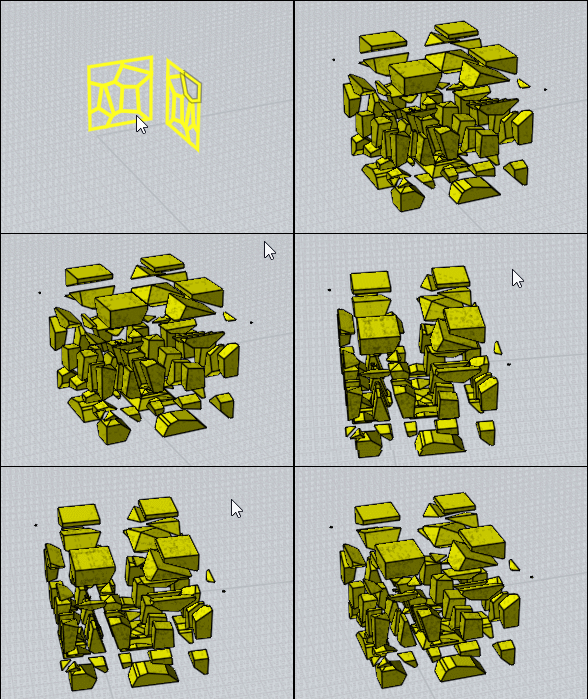


Boolean Merge the 2 perpendicular planar curves
then ExplodeMove as shortCut or Press Tab and write ExplodeMove


Of course ExplodeMove will work also with some Boolean Diff! ;)

EDITED: 21 Jul 19:58 by PILOU

  Reply Reply More Options
Post Options
Reply as PM Reply as PM
Print Print
Mark as unread Mark as unread
Relationship Relationship
IP Logged
 

Reply to All Reply to All


Show messages: All  1-5  6-8