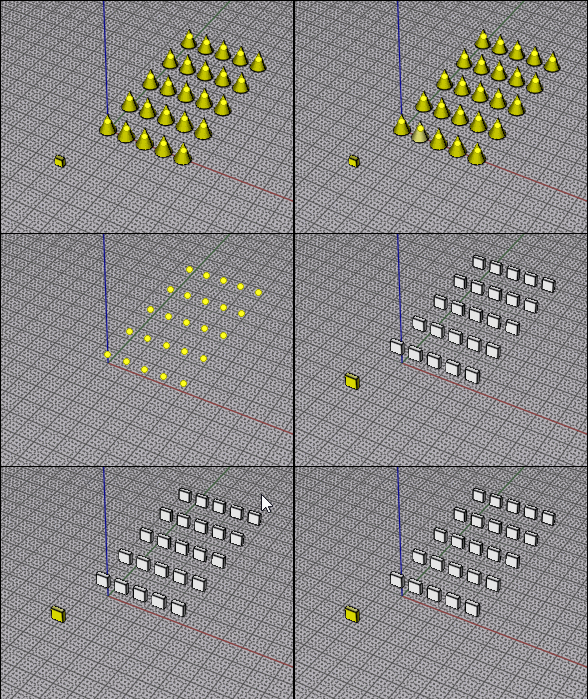
i'd want this streamlined where it is not creating a named object to make it work....anyway got the result working fine...
Save below text _____ as: ReplaceByTarget.js.
or use the zip...
SELECT YOUR TARGET SHAPE eg. the square
run: ReplaceByTarget.js
then
SELECT OBJECTS TO REPLACE (eg circles),
RIGHT CLICK DONE.
IF YOU WANT TO REPEAT DELETE OR RENAME THE OBJECT NAME OR RUN THE "CLEAR" SCRIPT IN THE ZIP
THIS IS NOT EXACTLY AS I WANTED IT BUT WORKING FINE FOR PROOF OF CONCEPT....
the read me is "ai" and it seemingly blames itself or "MOI" for not getting this 100% as required...
------------------------------------------------------------------------------------------------------------
// ReplaceByTarget.js
// MoI3D combined one-command version.
//
// This avoids MoI's "pick target during command" selection issue that I could not seem to get working.
//
// Workflow:
// 1. Select the replacement/target object.
// 2. Run ReplaceByTarget.
// -> The command saves that object as the target.
// 3. Select the objects you want to replace.
// 4. Run ReplaceByTarget again.
// -> The command replaces the selected objects with copies of the saved target,
// centered by bounding-box center.
//
// To change the saved target:
// - Select the current saved target object and run ClearReplacementTarget,
// or run ReplaceByTarget_ResetTarget if included.
// - Then select a new target and run ReplaceByTarget again.
var TARGET_NAME = '__ReplaceByTarget_Target__';
function NewObjectList()
{
return moi.geometryDatabase.createObjectList();
}
function GetAllObjects()
{
return moi.geometryDatabase.getObjects();
}
function GetSelectedObjects()
{
return moi.geometryDatabase.getSelectedObjects();
}
function GetCenter( object_list )
{
if ( object_list.getHighAccuracyBoundingBox )
return object_list.getHighAccuracyBoundingBox().center;
return object_list.getBoundingBox().center;
}
function SingleObjectList( obj )
{
var list = NewObjectList();
list.addObject( obj );
return list;
}
function AddListToList( src, dst )
{
for ( var i = 0; i < src.length; ++i )
dst.addObject( src.item(i) );
}
function MoveObjects( objects, from_pt, to_pt )
{
var factory = moi.command.createFactory( 'move' );
factory.setInput( 0, objects );
factory.setInput( 1, from_pt );
factory.setInput( 2, to_pt );
factory.commit();
}
function CloneObjects( objects )
{
var clones = NewObjectList();
for ( var i = 0; i < objects.length; ++i )
{
var clone = objects.item(i).clone();
// Copies should not also become saved targets.
if ( clone.name == TARGET_NAME )
clone.name = '';
clones.addObject( clone );
}
return clones;
}
function FindSavedTargetObjects()
{
var all = GetAllObjects();
var targets = NewObjectList();
for ( var i = 0; i < all.length; ++i )
{
if ( all.item(i).name == TARGET_NAME )
targets.addObject( all.item(i) );
}
return targets;
}
function ClearSavedTargetMarks()
{
var all = GetAllObjects();
for ( var i = 0; i < all.length; ++i )
{
if ( all.item(i).name == TARGET_NAME )
all.item(i).name = '';
}
}
function SaveCurrentSelectionAsTarget()
{
var selected = GetSelectedObjects();
if ( selected.length == 0 )
{
moi.ui.alert( 'Select the replacement/target object first, then run ReplaceByTarget.' );
return;
}
ClearSavedTargetMarks();
selected.setProperty( 'name', TARGET_NAME );
moi.ui.alert( 'Replacement target saved. Now select the objects to replace and run ReplaceByTarget again.' );
}
function ReplaceCurrentSelectionWithSavedTarget( target_objects )
{
var gd = moi.geometryDatabase;
var selected = GetSelectedObjects();
var replace_objects = NewObjectList();
for ( var i = 0; i < selected.length; ++i )
{
// Do not replace the saved target if it is accidentally selected.
if ( selected.item(i).name != TARGET_NAME )
replace_objects.addObject( selected.item(i) );
}
if ( replace_objects.length == 0 )
{
moi.ui.alert( 'Saved target found. Now select the objects to replace and run ReplaceByTarget again.' );
return;
}
var target_center = GetCenter( target_objects );
var new_objects = NewObjectList();
for ( var j = 0; j < replace_objects.length; ++j )
{
var old_list = SingleObjectList( replace_objects.item(j) );
var old_center = GetCenter( old_list );
var clones = CloneObjects( target_objects );
gd.addObjects( clones );
MoveObjects( clones, target_center, old_center );
AddListToList( clones, new_objects );
}
gd.removeObjects( replace_objects );
gd.deselectAll();
new_objects.setProperty( 'selected', true );
moi.ui.alert( 'Done. Replaced ' + replace_objects.length + ' object(s).' );
}
function ReplaceByTarget()
{
var target_objects = FindSavedTargetObjects();
if ( target_objects.length == 0 )
{
// First run: save selected object as target.
SaveCurrentSelectionAsTarget();
}
else
{
// Second run: replace selected objects with saved target.
ReplaceCurrentSelectionWithSavedTarget( target_objects );
}
}
ReplaceByTarget();