Boolean
All  1-5  6-12

Previous
Next
 From:  Michael Gibson
11808.6 In reply to 11808.4 
Hi Booleano,

re:
> How can I convert the route curve to its equivalent straight line length, in order to do the Flow

You don't need to match exact lengths, instead use the "Stretch" checkbox option in the Flow command, that will match the full length of the base curve onto the full length of the target curve.

But if you still want to make a line to match the length of an existing curve you can get the curve's length by selecting it, then click "Details..." and then Curve properties > Length. Then draw a line and paste in the length to activate distance constraint.

There is also a plugin called UnwrapCurve that you can install that will generate a line of the selected curve's length for you:
https://moi3d.com/forum/index.php?webtag=MOI&msg=5136.1

- Michael
  Reply Reply More Options
Post Options
Reply as PM Reply as PM
Print Print
Mark as unread Mark as unread
Relationship Relationship
IP Logged

Previous
Next
 From:  blowlamp
11808.7 In reply to 11808.4 
Select the route curve, click on its Details... in the top right corner of the screen and click the Calc button to find the length. Then draw a straight line of similar length. Flow can accommodate a variation in length if need be.

You might try a different (simpler) way of making the hose, because I don't think it will be a trivial thing to join all those pieces into one item, although I haven't tried to do it myself.

Martin.
  Reply Reply More Options
Post Options
Reply as PM Reply as PM
Print Print
Mark as unread Mark as unread
Relationship Relationship
IP Logged

Previous
Next
 From:  Frenchy Pilou (PILOU)
11808.8 
I had not open your file! :)
Now i have seen it! :)
So my solution was maybe not adapted! :)
But you can keep this function for another thing! :)

You can also use another tricky function : my favorite for this sort of thing! :)
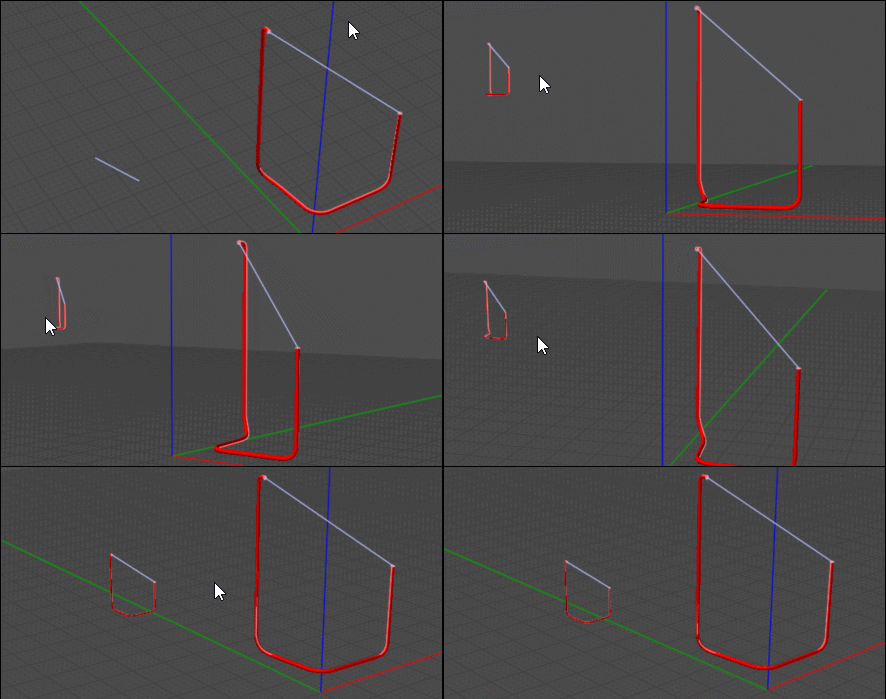
The Transform /Orient / Line-Line
Say you know some line's length of the original object
Here line from Center diameter of each extremities of your object
Draw your final length wished

You have direct result Line - line / Uniform with 4 clicks :)
EDITED: 27 Sep 2025 by PILOU

  Reply Reply More Options
Post Options
Reply as PM Reply as PM
Print Print
Mark as unread Mark as unread
Relationship Relationship
IP Logged

Previous
Next
 From:  Booleano
11808.9 In reply to 11808.2 
Hi Martin

They're now joined, and I can use MoI's Flow tool to adjust that surface to the curve.
I'm attaching the file.
Thank you.

Thanks.
Attachments:

  Reply Reply More Options
Post Options
Reply as PM Reply as PM
Print Print
Mark as unread Mark as unread
Relationship Relationship
IP Logged

Previous
Next
 From:  Frenchy Pilou (PILOU)
11808.10 In reply to 11808.9 
Why use Flow ?
Array / Curve is not sufficient ?


PS Your curve is not clean there is angle inside!
Control points are not well aligned...so any operations will be mismatched...

EDITED: 28 Sep 2025 by PILOU

  Reply Reply More Options
Post Options
Reply as PM Reply as PM
Print Print
Mark as unread Mark as unread
Relationship Relationship
IP Logged

Previous
Next
 From:  Booleano
11808.11 In reply to 11808.10 
Hi Pilou

This is how I have it done, but I thought that instead of 450 (the base ring is just the outline) rings, putting it all together would have very little weight in memory.

How do you know how much memory it consumes?

Thanks again for your help
  Reply Reply More Options
Post Options
Reply as PM Reply as PM
Print Print
Mark as unread Mark as unread
Relationship Relationship
IP Logged

Previous
 From:  Frenchy Pilou (PILOU)
11808.12 In reply to 11808.11 
I don't know but the Flow was for me too long...i don't see the result in reasonable time for my old computer ...the Array curve is instant! :)
  Reply Reply More Options
Post Options
Reply as PM Reply as PM
Print Print
Mark as unread Mark as unread
Relationship Relationship
IP Logged
 

Reply to All Reply to All


Show messages: All  1-5  6-12