Bending objects / surfaces
All  1-3  4-11

Previous
Next
 From:  gunter511
11447.4 In reply to 11447.2 
Pilou, fantastic, thank you for the quick solution! Although I wasn't looking for the stretched version, I now know how to do it - I just unticked 'stretch'!
  Reply Reply More Options
Post Options
Reply as PM Reply as PM
Print Print
Mark as unread Mark as unread
Relationship Relationship
IP Logged

Previous
Next
 From:  gunter511
11447.5 In reply to 11447.3 
Phiro, thank you for the clarification, that's very helpful!
  Reply Reply More Options
Post Options
Reply as PM Reply as PM
Print Print
Mark as unread Mark as unread
Relationship Relationship
IP Logged

Previous
Next
 From:  gunter511
11447.6 
Hey All,

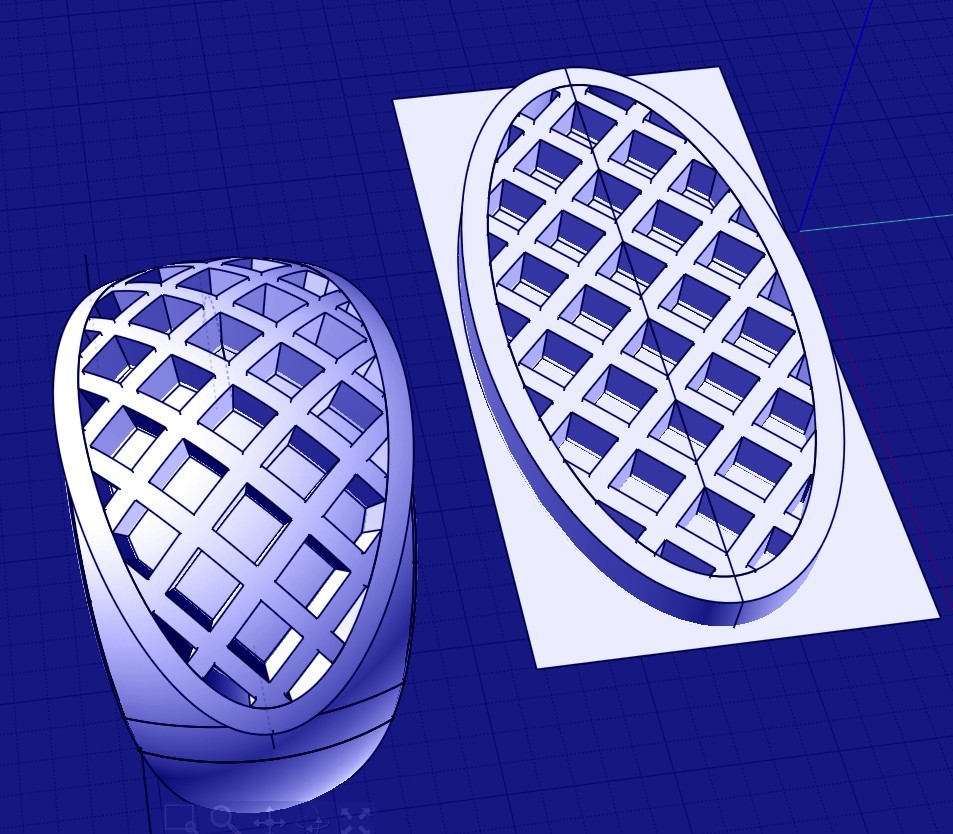
Thanks to all of your help, I managed to dome the lattice work on the ring as under:


As you can see, the lattice work is stretched and the so the diamond shapes are stretched too.

How would I go about making the curvature length the same but keeping the lattice unstretched?

Would it be make more sense to flow the perimeter of the lattice on the ring first and only then create the lattice from scratch? Or, should I make the perimeter on the curvature of the ring from scratch and not use the flow command?

I tried flow but with projection on curved surface but I'm getting aberrations - pls see attached screenshot.

I'm trying yet another way by building a profile of the top latticed section but am not getting very far- see attached screenshot.


Many thanks All!

EDITED: 15 Jul 2024 by GUNTER511


  Reply Reply More Options
Post Options
Reply as PM Reply as PM
Print Print
Mark as unread Mark as unread
Relationship Relationship
IP Logged

Previous
Next
 From:  Frenchy Pilou (PILOU)
11447.7 In reply to 11447.6 
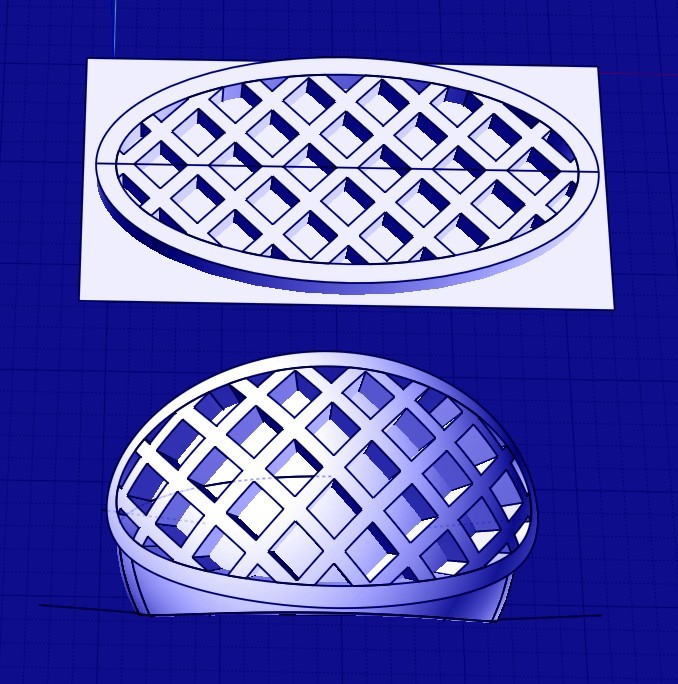
I have this result with your file!
And exactly same result if i take as start surface the Botton Ellipse / Rectangle
Surface / Surface
I have not your dramatic streching result!


is that result wanted ?

EDITED: 30 Jun 2024 by PILOU

  Reply Reply More Options
Post Options
Reply as PM Reply as PM
Print Print
Mark as unread Mark as unread
Relationship Relationship
IP Logged

Previous
Next
 From:  Michael Gibson
11447.8 In reply to 11447.6 
Hi gunter,

re:
> I tried flow but with projection on curved surface but I'm getting aberrations - pls see attached screenshot.

Projective flow will send out rays along the surface normals of your base plane and try to intersect the rays with the target object.

If some of these rays do not intersect with the target object you can get the kind of aberrations you show there.

To use projective flow mode you would need to make your target object extend to be wider so that every point on the base plane will hit the target object.

- Michael
  Reply Reply More Options
Post Options
Reply as PM Reply as PM
Print Print
Mark as unread Mark as unread
Relationship Relationship
IP Logged

Previous
Next
 From:  Michael Gibson
11447.9 In reply to 11447.6 
Hi gunter,

re:
> As you can see, the lattice work is stretched and the so the diamond shapes are stretched too.
>
> How would I go about making the curvature length the same but keeping the lattice unstretched?

You've got to be careful about where you click with the mouse on both the base surface and the target surface.

The stretched result is due to having this short edge:


Being mapped tot his long edge:


Instead you want the flow to match the short edge on the base to the short edge on the target:


The matching is determined by the pick point on each surface when you select it. You need to pick the point along each edge but a little ways in from the corner point. Don't pick right at the corner because it will take the closest edge to your pick and right on the corner does not control which edge is closest very well.

But also don't click right in the middle of the edge either because the closest end of the edge to your pick is also significant for matching the start or end of the edge to each other.

So you want to pick like this, on the edge, not too far away from the corner but not right at the corner:


And on the target surface like this:


- Michael

  Reply Reply More Options
Post Options
Reply as PM Reply as PM
Print Print
Mark as unread Mark as unread
Relationship Relationship
IP Logged

Previous
Next
 From:  大道刀 (SUIYAN)
11447.10 In reply to 11447.6 
HI gunter

可以更简单些,像这样。(It can be simpler, like this.)


使用宝石的边缘通过PLANER生成完美贴合的平面,并指定颜色,以便在流动中作为源头平面去选中它。流动没有什么秘密,就是源对象和源曲面完全贴合,那么流动后就跟目标曲面贴合。剩下的只需要确定目标曲面在整个戒指圈曲面中占比多少。(Use the edges of the gemstone to generate a perfectly fitted plane through PLANER, and specify the color to select it as the source plane in the flow. There is no secret to flow, it is that the source object and the source surface fit together, so after flowing, it will fit with the target surface. The rest only needs to determine the proportion of the target surface in the entire ring surface.)
Attachments:

  Reply Reply More Options
Post Options
Reply as PM Reply as PM
Print Print
Mark as unread Mark as unread
Relationship Relationship
IP Logged

Previous
 From:  gunter511
11447.11 
Thank you so much for all your input, that too on a Sunday! I'm happy to report that it works great!
  Reply Reply More Options
Post Options
Reply as PM Reply as PM
Print Print
Mark as unread Mark as unread
Relationship Relationship
IP Logged
 

Reply to All Reply to All


Show messages: All  1-3  4-11