MOI Script Pipe2Thickness evolve into TUBE TOOLKIT
 1-12  13-32  33-52  53-72  73-92  93

Previous
Next
 From:  WN
11314.33 In reply to 11314.32 
Hi Psygorn.

It can be thrown out and switched manually, it will work the same way.
  Reply Reply More Options
Post Options
Reply as PM Reply as PM
Print Print
Mark as unread Mark as unread
Relationship Relationship
IP Logged

Previous
Next
 From:  Barry-H
11314.34 In reply to 11314.32 
Hi Drillbit,
a link to where the Switchrevers is in my previous post.
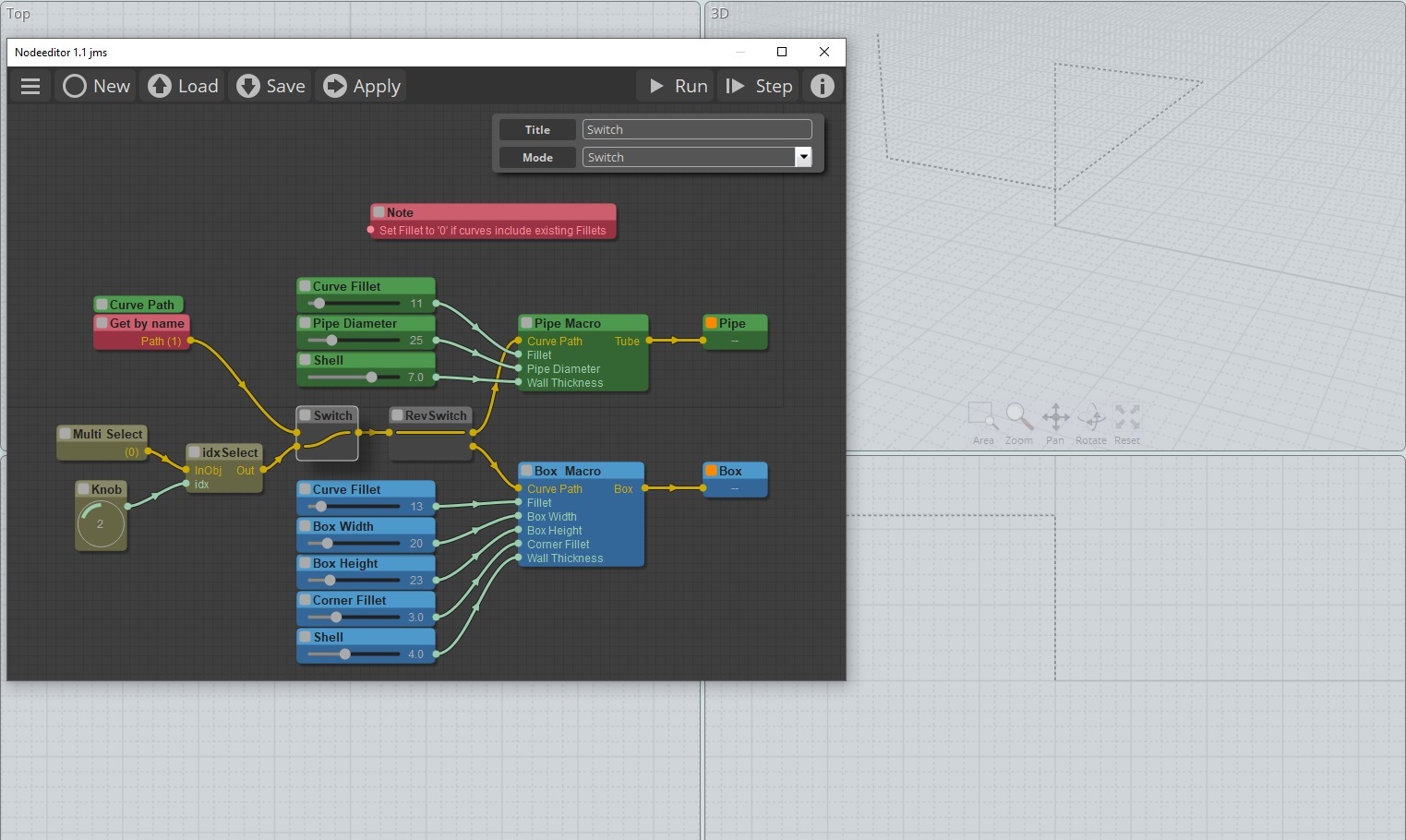
It allows the ability to switch path curve to pipe or box.
I think this way only the required part is calculated.
Anyway give it a try.
Cheers
Barry


Attachments:

  Reply Reply More Options
Post Options
Reply as PM Reply as PM
Print Print
Mark as unread Mark as unread
Relationship Relationship
IP Logged

Previous
Next
 From:  bemfarmer
11314.35 In reply to 11314.8 
Barry-H,
Thank you for posting the updated nodeeditor zip.

I have been missing the Updated Display node for many months, due to having an old r2d3.js file in the node > extensions folder, (with nodes showing up in nodeeditor canvas under infos.)
The "newer" r2d3.js file shows a date of 3/9/23, and has 736 code lines.
This r2d3js file creates a new menu entry in nodeeditor canvas, (r2d3), with 9 node entries (currently).

- Brian

EDITED: 24 Jan 2024 by BEMFARMER

  Reply Reply More Options
Post Options
Reply as PM Reply as PM
Print Print
Mark as unread Mark as unread
Relationship Relationship
IP Logged

Previous
Next
 From:  Psygorn (DRILLBIT)
11314.36 In reply to 11314.20 
Hi Barry,

Yes, Pipe Macro & Box Macro both look fine to me!

RevSwitch on the other hand, does nothing (even when I double click it)

-Psygorn
  Reply Reply More Options
Post Options
Reply as PM Reply as PM
Print Print
Mark as unread Mark as unread
Relationship Relationship
IP Logged

Previous
Next
 From:  Barry-H
11314.37 In reply to 11314.36 
Hi Drillbit,
Switchrevers node diverts the path to pipe or box whichever one you want to produce.
Did you download it from the link I posted ?
Cheers
Barry
  Reply Reply More Options
Post Options
Reply as PM Reply as PM
Print Print
Mark as unread Mark as unread
Relationship Relationship
IP Logged

Previous
Next
 From:  AlexPolo
11314.38 
Hi Barry,

Many thanks for posting your NODE Pack - all working great really powerful node - what is the process of selecting multiple control paths to form the group of multiple selection?

Regards
Alex.
  Reply Reply More Options
Post Options
Reply as PM Reply as PM
Print Print
Mark as unread Mark as unread
Relationship Relationship
IP Logged

Previous
Next
 From:  Barry-H
11314.39 In reply to 11314.38 
Hi Alex,
I just select all paths then index through them with the knob selecting pipe or box with the switch and applying.
When trying to do the Boolean operation on all of them at same time caused problems.
Cheers
Barry
Update;
you can try bypassing the index select and plugin directly into the RevSwitch.
Just tried with 100 curves and it took 20 sec for pipe and 30 sec for box.
Any problems you can revert to index select.

EDITED: 27 Jan 2024 by BARRY-H

  Reply Reply More Options
Post Options
Reply as PM Reply as PM
Print Print
Mark as unread Mark as unread
Relationship Relationship
IP Logged

Previous
Next
 From:  Psygorn (DRILLBIT)
11314.40 In reply to 11314.37 
Hi Barry,

>>Did you download it from the link I posted ?

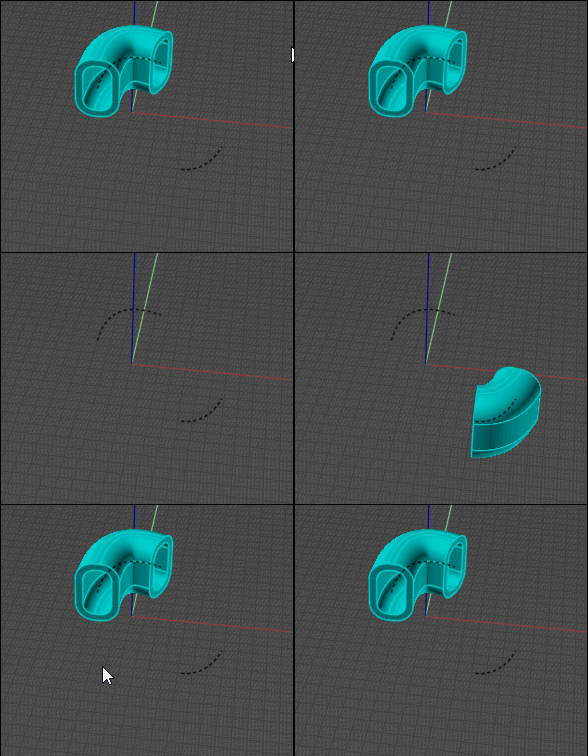
I believe I did (if I did not mess anything up!) However, it still doesn't work! you can see my path (Dashed curve) It has a name "Path" and I did not select it before opening Nodeeditor.

  Reply Reply More Options
Post Options
Reply as PM Reply as PM
Print Print
Mark as unread Mark as unread
Relationship Relationship
IP Logged

Previous
Next
 From:  Barry-H
11314.41 In reply to 11314.40 
Hi Drillbit,
From your photo the switch is set to multi paths so you will get nothing as you have selected get by name.
Make sure your pipe size is not to big for your path.
If your still having trouble post your path and I will have a look.
Cheers
Barry
  Reply Reply More Options
Post Options
Reply as PM Reply as PM
Print Print
Mark as unread Mark as unread
Relationship Relationship
IP Logged

Previous
Next
 From:  Psygorn (DRILLBIT)
11314.42 In reply to 11314.41 
Hi Barry,

Everything works fine now :-)

Tanx!
  Reply Reply More Options
Post Options
Reply as PM Reply as PM
Print Print
Mark as unread Mark as unread
Relationship Relationship
IP Logged

Previous
Next
 From:  Frenchy Pilou (PILOU)
11314.43 
Hello
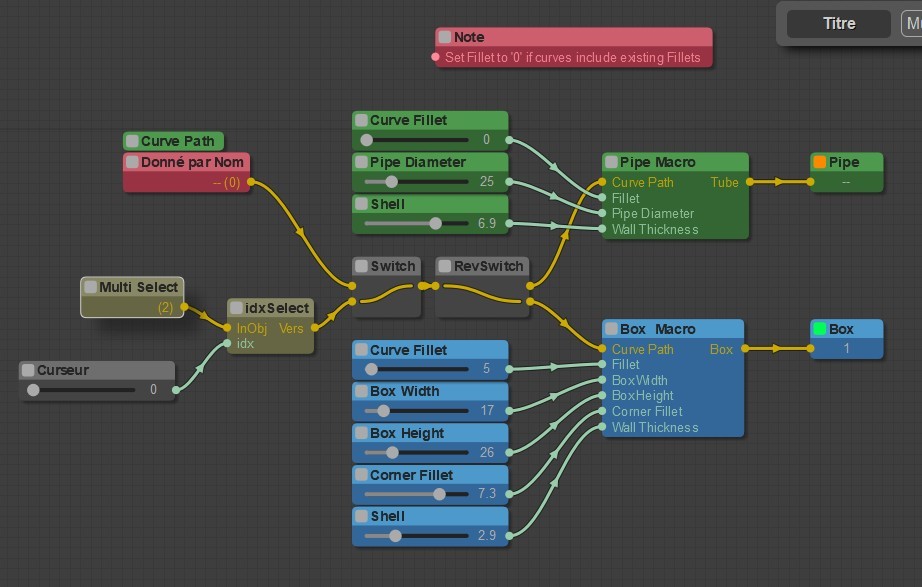
I have 2 curves selected (multi select node) ...works fine but seems i can't keep both of them in the same time?
What i miss ?
i used this Barry node http://moi3d.com/forum/index.php?webtag=MOI&msg=11314.30


EDITED: 28 Jan 2024 by PILOU

  Reply Reply More Options
Post Options
Reply as PM Reply as PM
Print Print
Mark as unread Mark as unread
Relationship Relationship
IP Logged

Previous
Next
 From:  Frenchy Pilou (PILOU)
11314.44 
Another thing :)
At the end of a node session I must use this script for select objects generated existing on the screen!

script: var objs = moi.geometryDatabase.getObjects(); for ( var i = 0; i < objs.length; ++i ) { var obj = objs.item(i); obj.setHitTest( true ); }

is that the same for you ?

I have maybe not the last version of nodeeditor!
Nodeeditor 1.1 jms
  Reply Reply More Options
Post Options
Reply as PM Reply as PM
Print Print
Mark as unread Mark as unread
Relationship Relationship
IP Logged

Message 11314.45 deleted 28 Jan 2024 by WN

Previous
Next
 From:  Frenchy Pilou (PILOU)
11314.46 In reply to 11314.45 
so only the multi select to Swicht or other thing ?

Because i have only one object result but 2 curves selected..

EDITED: 28 Jan 2024 by PILOU

  Reply Reply More Options
Post Options
Reply as PM Reply as PM
Print Print
Mark as unread Mark as unread
Relationship Relationship
IP Logged

Previous
Next
 From:  Barry-H
11314.47 In reply to 11314.46 
Hi Pilou,
The multi select indexes thro your selections one at a time so you need to apply your selection before moving to the next selection.
This allows you to choose between pipe or box.
If your selections are all the same (pipe or box) give them the same name and select by get by name.
Hope that’s clear.
Cheers
Barry
  Reply Reply More Options
Post Options
Reply as PM Reply as PM
Print Print
Mark as unread Mark as unread
Relationship Relationship
IP Logged

Previous
Next
 From:  Frenchy Pilou (PILOU)
11314.48 In reply to 11314.47 
Very "sportive" nodes! :)
here select the 2 rectangles in the same time !
  Reply Reply More Options
Post Options
Reply as PM Reply as PM
Print Print
Mark as unread Mark as unread
Relationship Relationship
IP Logged

Previous
Next
 From:  Barry-H
11314.49 In reply to 11314.48 
Hi Pilou,
The small rectangle looks to small for the pipe size you have used thus the problem.
Can you post your shapes and settings so I can check.
Cheers.
Barry
  Reply Reply More Options
Post Options
Reply as PM Reply as PM
Print Print
Mark as unread Mark as unread
Relationship Relationship
IP Logged

Previous
Next
 From:  Frenchy Pilou (PILOU)
11314.50 In reply to 11314.49 
here the file!
https://moiscript.weebly.com/uploads/3/9/3/8/3938813/for_barry.3dm

But it not really a problem because it's a solid! :) auto-intersected! :)

EDITED: 29 Jan 2024 by PILOU

  Reply Reply More Options
Post Options
Reply as PM Reply as PM
Print Print
Mark as unread Mark as unread
Relationship Relationship
IP Logged

Previous
Next
 From:  Barry-H
11314.51 In reply to 11314.50 
Hi Pilou,
the nod file will not calculate multi different shapes at one time.( it will if all shapes are the same)
I have modified the nod file to take multiple paths but you will need to index thro them one at a time choosing
Pipe or Box fillets or no fillet etc.
The nod file includes the use of MO (M0_TE) new fillet curve & note nodes so I have included my latest Nodeditor.
Also included is my test file.
Please let me know of any issues.
Cheers
Barry

Edit 30/01/24
Correction thanks to WN the node will now do multiply paths at same time.
Have updated nod file.
Another bug fix so latest version Pipe Tool 300134

Bug fix 02/02/24 version Pipe Tool 010224

EDITED: 2 Feb 2024 by BARRY-H


  Reply Reply More Options
Post Options
Reply as PM Reply as PM
Print Print
Mark as unread Mark as unread
Relationship Relationship
IP Logged

Previous
Next
 From:  Frenchy Pilou (PILOU)
11314.52 In reply to 11314.51 
OK i will test that!
I replace the knob by a cursor with no decimal number
For me a knob is not practical...
---
Pilou
Is beautiful that please without concept!
My Moi French Site My Gallery My MagicaVoxel Gallery
  Reply Reply More Options
Post Options
Reply as PM Reply as PM
Print Print
Mark as unread Mark as unread
Relationship Relationship
IP Logged
 

Reply to All Reply to All


Show messages:  1-12  13-32  33-52  53-72  73-92  93