MOI Script Pipe2Thickness evolve into TUBE TOOLKIT
 1-14  15-34  35-54  55-74  75-93

Previous
Next
 From:  Psygorn (DRILLBIT)
11314.15 In reply to 11314.13 
Hi WN,

The Run button is not active yet!

Note: maybe I am doing something wrong so, could u please describe how properly I should use the node? I mean I should draw a curve as path (and if it doesn't have sharp corners I can leave Fillet at 0) then I select the curve and update)

am I doing it right?

Maybe with a basic tutorial my issue would be resolved!

- Psygorn
  Reply Reply More Options
Post Options
Reply as PM Reply as PM
Print Print
Mark as unread Mark as unread
Relationship Relationship
IP Logged

Previous
Next
 From:  WN
11314.16 In reply to 11314.15 
Hi Psygorn.
My screenshot shows how the non-working node is displayed. In the title bar of the window, the node name and the small square are red.
There is no such node or it has been changed. Therefore, you need to find out which nodes are not working.
Image Attachments:
Size: 281.8 KB, Downloaded: 53 times, Dimensions: 1358x722px
  Reply Reply More Options
Post Options
Reply as PM Reply as PM
Print Print
Mark as unread Mark as unread
Relationship Relationship
IP Logged

Previous
Next
 From:  Frenchy Pilou (PILOU)
11314.17 In reply to 11314.16 
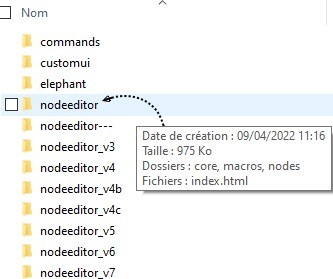
For avoid all that it's a good thing that the creator of any node gives its entiere NodeEditor folder !
It's something like one mega so not a big deal!
You have just to rename before your curent one as you want as temporary folder! :)

There is maybe only less 20 creators of nodes so... ;)

EDITED: 23 Jan 2024 by PILOU

  Reply Reply More Options
Post Options
Reply as PM Reply as PM
Print Print
Mark as unread Mark as unread
Relationship Relationship
IP Logged

Previous
Next
 From:  Barry-H
11314.18 In reply to 11314.15 
Hi Drillbit,
are you using the nodeditor I have posted ?
Post a screenshot of the open macro this would help.
Cheers
Barry

Method added see gif below.

EDITED: 23 Jan 2024 by BARRY-H

Image Attachments:
Size: 137.4 KB, Downloaded: 49 times, Dimensions: 800x533px
  Reply Reply More Options
Post Options
Reply as PM Reply as PM
Print Print
Mark as unread Mark as unread
Relationship Relationship
IP Logged

Previous
Next
 From:  Psygorn (DRILLBIT)
11314.19 In reply to 11314.18 
Hi Barry-H,

No, I am using my own tuned nodeeditor. If I can find out what is missing in my nodeeditor I can add that and I guess things will be fine!

And, thanks for the attached image, but I believe I did the very same thing yet no results! (the run button is not active!)

Here is the insde of the Macro


-Psygorn

EDITED: 23 Jan 2024 by DRILLBIT

  Reply Reply More Options
Post Options
Reply as PM Reply as PM
Print Print
Mark as unread Mark as unread
Relationship Relationship
IP Logged

Previous
Next
 From:  Barry-H
11314.20 In reply to 11314.19 
Hi Drillbit,
have you opened the macro yet ?
Barry
  Reply Reply More Options
Post Options
Reply as PM Reply as PM
Print Print
Mark as unread Mark as unread
Relationship Relationship
IP Logged

Previous
Next
 From:  Psygorn (DRILLBIT)
11314.21 In reply to 11314.20 
Hi,

Yes, I edited my previous post! Please take a look.
  Reply Reply More Options
Post Options
Reply as PM Reply as PM
Print Print
Mark as unread Mark as unread
Relationship Relationship
IP Logged

Previous
Next
 From:  Barry-H
11314.22 In reply to 11314.20 
Hi Drillbit,
it's as I thought its the display node.(In between Fillet to compare)
Just wire straight to the compare node and delete the display node.
Cheers
Barry
  Reply Reply More Options
Post Options
Reply as PM Reply as PM
Print Print
Mark as unread Mark as unread
Relationship Relationship
IP Logged

Previous
Next
 From:  Psygorn (DRILLBIT)
11314.23 In reply to 11314.22 
Hi Barry-H,

Now the run button is active but it does nothing! I open the nodeeditor and then select the curvepath and update Mulit Select

The Curve path turns into dashed line then I hit apply it disappears! And by closing the nodeeditor the selected curve path appears again.

Needless to say I tweak other nodes but nothing happens. and Even MOI Crashed!

- Psygorn

EDITED: 23 Jan 2024 by DRILLBIT

  Reply Reply More Options
Post Options
Reply as PM Reply as PM
Print Print
Mark as unread Mark as unread
Relationship Relationship
IP Logged

Previous
Next
 From:  Barry-H
11314.24 In reply to 11314.23 
Hi Drillbit,
so after running you get nothing ?
Open nodeditor before selecting any objects for some reason if you select and then open nodeditor it locks up.
It maybe that get by name is a better option but that's one path at a time.
Will investigate and let you know.
Cheers
Barry
  Reply Reply More Options
Post Options
Reply as PM Reply as PM
Print Print
Mark as unread Mark as unread
Relationship Relationship
IP Logged

Previous
Next
 From:  Michael Gibson
11314.25 In reply to 11314.23 
@Psygorn - the crash could probably be mitigated by converting booleans to use processing in moi_commandprocessor.exe instead of in-process.

Like MO describes for fillets here:
http://moi3d.com/forum/index.php?webtag=MOI&msg=9581.348

- Michael
  Reply Reply More Options
Post Options
Reply as PM Reply as PM
Print Print
Mark as unread Mark as unread
Relationship Relationship
IP Logged

Previous
Next
 From:  Psygorn (DRILLBIT)
11314.26 In reply to 11314.25 
Thank you Michael,

as always!

- Psygorn
  Reply Reply More Options
Post Options
Reply as PM Reply as PM
Print Print
Mark as unread Mark as unread
Relationship Relationship
IP Logged

Previous
Next
 From:  Barry-H
11314.27 In reply to 11314.26 
Hi Drillbit,
multi select causes problems so change select method to select by name its more stable.
Make sure when opening Nodeditor no paths are selected for some reason this causes a lockup.
If there are close Nodeditor deselect and open Nodeditor again.
Cheers
Barry
  Reply Reply More Options
Post Options
Reply as PM Reply as PM
Print Print
Mark as unread Mark as unread
Relationship Relationship
IP Logged

Previous
Next
 From:  WN
11314.28 
Such settings cause a long and tedious wait.


Attachments:

  Reply Reply More Options
Post Options
Reply as PM Reply as PM
Print Print
Mark as unread Mark as unread
Relationship Relationship
IP Logged

Previous
Next
 From:  Barry-H
11314.29 In reply to 11314.28 
Hi WN,
the issue with the settings you used is the fillet needs to be larger than half box width.
I will add a mini fillet restriction to avoid this.
Cheers
Barry
  Reply Reply More Options
Post Options
Reply as PM Reply as PM
Print Print
Mark as unread Mark as unread
Relationship Relationship
IP Logged

Previous
Next
 From:  Barry-H
11314.30 

EDITED: 29 Jan 2024 by BARRY-H

  Reply Reply More Options
Post Options
Reply as PM Reply as PM
Print Print
Mark as unread Mark as unread
Relationship Relationship
IP Logged

Previous
Next
 From:  WN
11314.31 In reply to 11314.29 
Hi Barry.
Thanks!
  Reply Reply More Options
Post Options
Reply as PM Reply as PM
Print Print
Mark as unread Mark as unread
Relationship Relationship
IP Logged

Previous
Next
 From:  Psygorn (DRILLBIT)
11314.32 In reply to 11314.30 
Hi Barry,

I think now Rev Switch node doesn't work! (what is it or where should I find it?)

- Psygorn
  Reply Reply More Options
Post Options
Reply as PM Reply as PM
Print Print
Mark as unread Mark as unread
Relationship Relationship
IP Logged

Previous
Next
 From:  WN
11314.33 In reply to 11314.32 
Hi Psygorn.

It can be thrown out and switched manually, it will work the same way.
  Reply Reply More Options
Post Options
Reply as PM Reply as PM
Print Print
Mark as unread Mark as unread
Relationship Relationship
IP Logged

Previous
Next
 From:  Barry-H
11314.34 In reply to 11314.32 
Hi Drillbit,
a link to where the Switchrevers is in my previous post.
It allows the ability to switch path curve to pipe or box.
I think this way only the required part is calculated.
Anyway give it a try.
Cheers
Barry


Attachments:

  Reply Reply More Options
Post Options
Reply as PM Reply as PM
Print Print
Mark as unread Mark as unread
Relationship Relationship
IP Logged
 

Reply to All Reply to All


Show messages:  1-14  15-34  35-54  55-74  75-93