V5 beta Apr-13-2023 available now
 1-5  …  26-45  46-65  66-85  86-105  106-125  …  206-223

Previous
Next
 From:  Michael Gibson
11056.66 In reply to 11056.65 
Hi Val, thanks - I can repeat it over here although it's not quite as messy as your version. It should be good enough for me to debug it though.

Thanks,
- Michael
  Reply Reply More Options
Post Options
Reply as PM Reply as PM
Print Print
Mark as unread Mark as unread
Relationship Relationship
IP Logged

Previous
Next
 From:  blowlamp
11056.67 
Hi Michael.
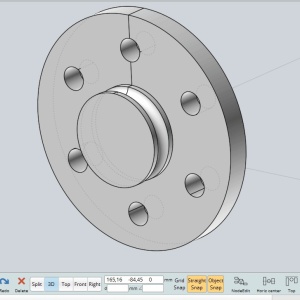
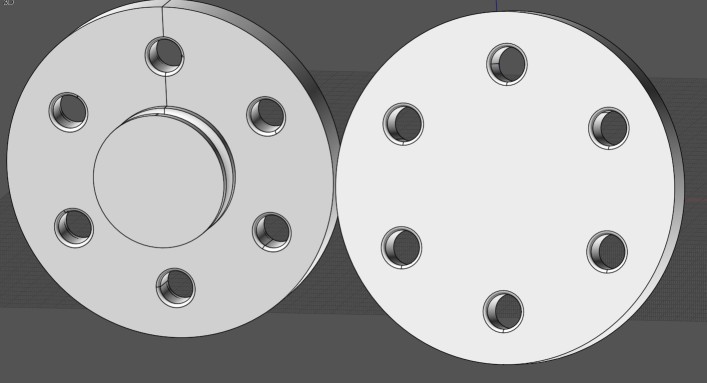
I'm having a problem with filleting the six holes on this part. The flat rear face works OK, but not the front face. The fillet size I'm applying is 1mm.

Thanks.
Martin.
Attachments:

  Reply Reply More Options
Post Options
Reply as PM Reply as PM
Print Print
Mark as unread Mark as unread
Relationship Relationship
IP Logged

Previous
Next
 From:  Michael Gibson
11056.68 In reply to 11056.67 
Hi Martin,

re:
> I'm having a problem with filleting the six holes on this part. The flat rear face works OK,
> but not the front face. The fillet size I'm applying is 1mm.

Can you please check which version of Moi you are running?

The front edges are working ok for me in the current Apr-13-2023 v5 beta.

- Michael
  Reply Reply More Options
Post Options
Reply as PM Reply as PM
Print Print
Mark as unread Mark as unread
Relationship Relationship
IP Logged

Previous
Next
 From:  WN
11056.69 In reply to 11056.67 
Hi Martin.

It is necessary to replace the surface, for some reason it prevents rounding.

The same is true for the chamfer.
https://disk.yandex.ru/d/uJfij4c_N_WDug

In version 4 , it can be done this way ...

image host

EDITED: 24 Apr 2023 by WN

  Reply Reply More Options
Post Options
Reply as PM Reply as PM
Print Print
Mark as unread Mark as unread
Relationship Relationship
IP Logged

Previous
Next
 From:  blowlamp
11056.70 In reply to 11056.68 
Hi Michael.
It might have helped my query if I'd used the right word... It is actually a 1mm chamfer that I can not get to work on these six holes, so please accept my apologies for sending you off in the wrong direction. I'm using the V5 beta Apr-13-2023.

Martin.
  Reply Reply More Options
Post Options
Reply as PM Reply as PM
Print Print
Mark as unread Mark as unread
Relationship Relationship
IP Logged

Previous
Next
 From:  christian (CHRI)
11056.71 In reply to 11056.70 
HI blowlamp

You can't do the chamfer because forms are not circles and not cylinder
.
Please take a look on the next files and try to make the chamfer

Chri
Attachments:

Image Attachments:
Size: 73 KB, Downloaded: 83 times, Dimensions: 571x475px
  Reply Reply More Options
Post Options
Reply as PM Reply as PM
Print Print
Mark as unread Mark as unread
Relationship Relationship
IP Logged

Previous
Next
 From:  blowlamp
11056.72 In reply to 11056.71 
Hi Christian.
Whatever you did made it possible for me to chamfer those holes, so thank you for looking into this for me.
It still leaves a mystery though, as the holes were created from circles generated by MoI.
I positioned the first circle at 12 O'Clock on the front face and Circular Arrayed the other 5. I then did a Boolean Merge to cut the holes from those 6 circles.

I just tried remaking the solid from the Revolve curves and then using 6 fresh circles from an Array. The result is still the same for me. :-(


Thanks again.
Martin.
  Reply Reply More Options
Post Options
Reply as PM Reply as PM
Print Print
Mark as unread Mark as unread
Relationship Relationship
IP Logged

Previous
Next
 From:  Frenchy Pilou (PILOU)
11056.73 
With the file of the Start...thread
https://moi3d.com/forum/index.php?webtag=MOI&msg=11056.67
I select all the perimeters then Fillet (1mm)
Fails with the Solid++
No problem with the Ascis ! ;)

EDITED: 24 Apr 2023 by PILOU

  Reply Reply More Options
Post Options
Reply as PM Reply as PM
Print Print
Mark as unread Mark as unread
Relationship Relationship
IP Logged

Previous
Next
 From:  blowlamp
11056.74 In reply to 11056.73 
Hi Pilou.

Try it with a Chamfer instead of a Fillet.

Martin.
  Reply Reply More Options
Post Options
Reply as PM Reply as PM
Print Print
Mark as unread Mark as unread
Relationship Relationship
IP Logged

Previous
Next
 From:  blowlamp
11056.75 In reply to 11056.69 
Hi WN.

Thanks for trying to solve this for me.
It seems like there might be a problem with where the holes are positioned on the front face. If I redo the layout, so that one hole in the group of holes is positioned at 3 O'Clock, rather than at 12 O'Clock, then the Chamfer works OK.


Martin.
  Reply Reply More Options
Post Options
Reply as PM Reply as PM
Print Print
Mark as unread Mark as unread
Relationship Relationship
IP Logged

Previous
Next
 From:  Michael Gibson
11056.76 In reply to 11056.75 
Hi Martin, the problem kind of originates from the Revolve, because the plane that you're drilling holes into is being created as a surface of revolution that is flat rather than as an analytic plane surface.

There is a mechanism in Revolve that is supposed to replace those surfaces with a trimmed plane surface but it does not appear to be working here, I am investigating it.

Thanks, - Michael
  Reply Reply More Options
Post Options
Reply as PM Reply as PM
Print Print
Mark as unread Mark as unread
Relationship Relationship
IP Logged

Previous
Next
 From:  Frenchy Pilou (PILOU)
11056.77 In reply to 11056.74 
Indeed that fails with Chamfer!

EDITED: 24 Apr 2023 by PILOU

  Reply Reply More Options
Post Options
Reply as PM Reply as PM
Print Print
Mark as unread Mark as unread
Relationship Relationship
IP Logged

Previous
Next
 From:  Frenchy Pilou (PILOU)
11056.78 
I redraw from 0 the disc /cylinders... not on the generator curve (maybe not the root problem but more prudent! :)
(not the groove piece you can copy it if necessary...
like this all perimeters are plenty and not trimmed! ;)
So
No problem! :)
https://moiscript.weebly.com/uploads/3/9/3/8/3938813/flange1.3dm
there are 2 models for make yours tests!
Solid ++ or Acis
Chamfer or Fillets 1 mm

EDITED: 24 Apr 2023 by PILOU

  Reply Reply More Options
Post Options
Reply as PM Reply as PM
Print Print
Mark as unread Mark as unread
Relationship Relationship
IP Logged

Previous
Next
 From:  Robert (ROBERT_S)
11056.79 
Hello, any idea when will be full release available? Thank you.
  Reply Reply More Options
Post Options
Reply as PM Reply as PM
Print Print
Mark as unread Mark as unread
Relationship Relationship
IP Logged

Previous
Next
 From:  Michael Gibson
11056.80 In reply to 11056.79 
Hi Robert,

re:
> Hello, any idea when will be full release available? Thank you.

Sorry no I don't have a specific release date set yet.

- Michael
  Reply Reply More Options
Post Options
Reply as PM Reply as PM
Print Print
Mark as unread Mark as unread
Relationship Relationship
IP Logged

Previous
Next
 From:  crackajack (AKSUV)
11056.81 
Apologies if this has been brought up previously. All V5 beta Mac downloads that I've installed don't have functioning midpoint or center snaps. I've tried the last two betas but had to roll back to V4 since this is a function I use constantly. Am I missing a snap setting somewhere? Both center and midpoint are checked under the object snap list. This issue has been occurring on an M1Pro and M2Max Macbooks.
  Reply Reply More Options
Post Options
Reply as PM Reply as PM
Print Print
Mark as unread Mark as unread
Relationship Relationship
IP Logged

Previous
Next
 From:  Larry Fahnoe (FAHNOE)
11056.82 In reply to 11056.81 
> All V5 beta Mac downloads that I've installed don't have functioning midpoint or center snaps.

Hmm, that's very different than my experience. I use midpoint and center snaps a lot and have no problems with them on any of the V5 betas. For what it's worth, I'm running Big Sur on an M1 MacBook Pro.

--Larry
  Reply Reply More Options
Post Options
Reply as PM Reply as PM
Print Print
Mark as unread Mark as unread
Relationship Relationship
IP Logged

Previous
Next
 From:  Michael Gibson
11056.83 In reply to 11056.81 
Hi crackajack,

re:
> Apologies if this has been brought up previously. All V5 beta Mac downloads that I've
> installed don't have functioning midpoint or center snaps. I've tried the last two betas
> but had to roll back to V4 since this is a function I use constantly.

Hmmm, this is the first I've heard of this behavior and the v5 betas have been out for quite a while.

Do the snaps not work with specific files you're working on? What happens if you create just one rectangle after starting up?

Any difference if you switch View > "Display hidden lines" checkbox?

Thanks, - Michael
  Reply Reply More Options
Post Options
Reply as PM Reply as PM
Print Print
Mark as unread Mark as unread
Relationship Relationship
IP Logged

Previous
Next
 From:  crackajack (AKSUV)
11056.84 In reply to 11056.83 
OK, there it is... Everything works normal with display hidden lines checked. With it unchecked it isn't picking up midpoint, center, or end point of line snaps.
  Reply Reply More Options
Post Options
Reply as PM Reply as PM
Print Print
Mark as unread Mark as unread
Relationship Relationship
IP Logged

Previous
Next
 From:  Michael Gibson
11056.85 In reply to 11056.84 
Hi crackajack, so the way it is supposed to work is that if "Display hidden lines" is turned off then snaps that are occluded (because something else is displaying in front of them) should not get targeted.

But if they are not behind other objects then it's not supposed to make any difference.

If things are not working right with one particular file you are working on can you please e-mail it to me at moi@moi3d.com ?

Thanks, - Michael
  Reply Reply More Options
Post Options
Reply as PM Reply as PM
Print Print
Mark as unread Mark as unread
Relationship Relationship
IP Logged
 

Reply to All Reply to All


Show messages:  1-5  6-25  26-45  46-65  66-85  86-105  106-125  126-145  …  206-223