V5 beta Apr-13-2023 available now
 1-12  13-32  33-52  53-72  73-92  93-112  …  213-223

Previous
Next
 From:  Michael Gibson
11056.53 In reply to 11056.51 
Hi blackboard,

re:
> Add one more parameter to trim "Trim from surfaces\solids"

The Edit > Trim command already supports trimming using surfaces or solid as the cutting objects.
'
You don't need to set any parameter to do it, when the Trim command asks you to select cutting objects just select your solid or surface then.

- Michael
  Reply Reply More Options
Post Options
Reply as PM Reply as PM
Print Print
Mark as unread Mark as unread
Relationship Relationship
IP Logged

Previous
Next
 From:  blackboard
11056.54 In reply to 11056.53 
Thanks Michael, i'm not full moi3d user,sometimes I don't have a complete list of information
  Reply Reply More Options
Post Options
Reply as PM Reply as PM
Print Print
Mark as unread Mark as unread
Relationship Relationship
IP Logged

Previous
Next
 From:  Psygorn (DRILLBIT)
11056.55 
Hi Michael,

I hope you are doing well.

Just a quick question:
Could you inform me what is the best method in current MOI version to check out tangency of two adjacent surfaces? (I know in some softwares they use Zebra lines for that matter and some folks already asked you here: http://moi3d.com/forum/messages.php?webtag=MOI&msg=2764. years ago)

Currently I use lighting facilities inside of MOI or displaying edges to check tangency of two adjacent surfaces but I wanted to know if there is a better way. Thanks.

-Psygorn
  Reply Reply More Options
Post Options
Reply as PM Reply as PM
Print Print
Mark as unread Mark as unread
Relationship Relationship
IP Logged

Previous
Next
 From:  Michael Gibson
11056.56 In reply to 11056.55 
Hi Psygorn, setting the "Metallic lighting" option under Options > View > Lighting options can help for doing that.

Also it can be good to set up a shortcut key that will save to a mesh format like:

SaveAs c:\test.obj

Then in the meshing options dialog make a high density mesh and set Display: Shaded and examine patch boundary areas. Press escape or cancel when done so you don't actually generate a file.

- Michael
  Reply Reply More Options
Post Options
Reply as PM Reply as PM
Print Print
Mark as unread Mark as unread
Relationship Relationship
IP Logged

Previous
Next
 From:  Michael Gibson
11056.57 
A version of this beta for Octane subscribers is targeted for release on next Monday June 1st.

- Michael
  Reply Reply More Options
Post Options
Reply as PM Reply as PM
Print Print
Mark as unread Mark as unread
Relationship Relationship
IP Logged

Message 11056.58 deleted 20 Apr 2023 by MARZRX

Previous
Next
 From:  blackboard
11056.59 In reply to 11056.57 
Nice
the next iteration will also be fixes. Or will there be direct modeling? And when will it be?
  Reply Reply More Options
Post Options
Reply as PM Reply as PM
Print Print
Mark as unread Mark as unread
Relationship Relationship
IP Logged

Previous
Next
 From:  Michael Gibson
11056.60 In reply to 11056.59 
Hi blackboard,

re:
> the next iteration will also be fixes. Or will there be direct modeling? And when will it be?

Probably mostly fixes as well for the next couple of betas.

I don't know precisely when they will be released.

- Michael
  Reply Reply More Options
Post Options
Reply as PM Reply as PM
Print Print
Mark as unread Mark as unread
Relationship Relationship
IP Logged

Previous
Next
 From:  val2
11056.61 
not sure if the counts as a bug. i created a sphere, cut a section off, copied it, fillet the new edges, one as acis one as solid. the solid works well, the acis is lumpy on the not filleted section. when i mesh both of them the acis is not smooth whereas the solid is perfect.


Val

EDITED: 11 Jan 2024 by VAL2

  Reply Reply More Options
Post Options
Reply as PM Reply as PM
Print Print
Mark as unread Mark as unread
Relationship Relationship
IP Logged

Previous
Next
 From:  Frenchy Pilou (PILOU)
11056.62 In reply to 11056.61 
Try to rotate the curve generator! ;)

---
Pilou
Is beautiful that please without concept!
My Moi French Site My Gallery My MagicaVoxel Gallery
  Reply Reply More Options
Post Options
Reply as PM Reply as PM
Print Print
Mark as unread Mark as unread
Relationship Relationship
IP Logged

Previous
Next
 From:  val2
11056.63 In reply to 11056.62 
It's on purpose not on the curve generator.

EDITED: 11 Jan 2024 by VAL2

  Reply Reply More Options
Post Options
Reply as PM Reply as PM
Print Print
Mark as unread Mark as unread
Relationship Relationship
IP Logged

Previous
Next
 From:  Michael Gibson
11056.64 In reply to 11056.61 
Hi Val, this is probably a bug in ACIS filleting, in the conversion from ACIS geometry back to Solids++ geometry.

Do you have a version of this file before doing the fillet?

- Michael
  Reply Reply More Options
Post Options
Reply as PM Reply as PM
Print Print
Mark as unread Mark as unread
Relationship Relationship
IP Logged

Previous
Next
 From:  val2
11056.65 In reply to 11056.64 
No, but it's easily replicated. if you look at the file you can see where I cut the sphere with a line. I have done it a number of times, always with the same result on the bigger section.
  Reply Reply More Options
Post Options
Reply as PM Reply as PM
Print Print
Mark as unread Mark as unread
Relationship Relationship
IP Logged

Previous
Next
 From:  Michael Gibson
11056.66 In reply to 11056.65 
Hi Val, thanks - I can repeat it over here although it's not quite as messy as your version. It should be good enough for me to debug it though.

Thanks,
- Michael
  Reply Reply More Options
Post Options
Reply as PM Reply as PM
Print Print
Mark as unread Mark as unread
Relationship Relationship
IP Logged

Previous
Next
 From:  blowlamp
11056.67 
Hi Michael.
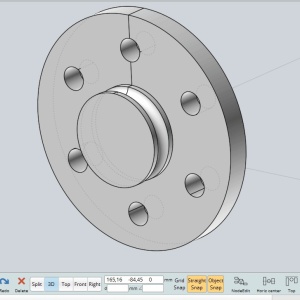
I'm having a problem with filleting the six holes on this part. The flat rear face works OK, but not the front face. The fillet size I'm applying is 1mm.

Thanks.
Martin.
Attachments:

  Reply Reply More Options
Post Options
Reply as PM Reply as PM
Print Print
Mark as unread Mark as unread
Relationship Relationship
IP Logged

Previous
Next
 From:  Michael Gibson
11056.68 In reply to 11056.67 
Hi Martin,

re:
> I'm having a problem with filleting the six holes on this part. The flat rear face works OK,
> but not the front face. The fillet size I'm applying is 1mm.

Can you please check which version of Moi you are running?

The front edges are working ok for me in the current Apr-13-2023 v5 beta.

- Michael
  Reply Reply More Options
Post Options
Reply as PM Reply as PM
Print Print
Mark as unread Mark as unread
Relationship Relationship
IP Logged

Previous
Next
 From:  WN
11056.69 In reply to 11056.67 
Hi Martin.

It is necessary to replace the surface, for some reason it prevents rounding.

The same is true for the chamfer.
https://disk.yandex.ru/d/uJfij4c_N_WDug

In version 4 , it can be done this way ...

image host

EDITED: 24 Apr 2023 by WN

  Reply Reply More Options
Post Options
Reply as PM Reply as PM
Print Print
Mark as unread Mark as unread
Relationship Relationship
IP Logged

Previous
Next
 From:  blowlamp
11056.70 In reply to 11056.68 
Hi Michael.
It might have helped my query if I'd used the right word... It is actually a 1mm chamfer that I can not get to work on these six holes, so please accept my apologies for sending you off in the wrong direction. I'm using the V5 beta Apr-13-2023.

Martin.
  Reply Reply More Options
Post Options
Reply as PM Reply as PM
Print Print
Mark as unread Mark as unread
Relationship Relationship
IP Logged

Previous
Next
 From:  christian (CHRI)
11056.71 In reply to 11056.70 
HI blowlamp

You can't do the chamfer because forms are not circles and not cylinder
.
Please take a look on the next files and try to make the chamfer

Chri
Attachments:

Image Attachments:
Size: 73 KB, Downloaded: 83 times, Dimensions: 571x475px
  Reply Reply More Options
Post Options
Reply as PM Reply as PM
Print Print
Mark as unread Mark as unread
Relationship Relationship
IP Logged

Previous
Next
 From:  blowlamp
11056.72 In reply to 11056.71 
Hi Christian.
Whatever you did made it possible for me to chamfer those holes, so thank you for looking into this for me.
It still leaves a mystery though, as the holes were created from circles generated by MoI.
I positioned the first circle at 12 O'Clock on the front face and Circular Arrayed the other 5. I then did a Boolean Merge to cut the holes from those 6 circles.

I just tried remaking the solid from the Revolve curves and then using 6 fresh circles from an Array. The result is still the same for me. :-(


Thanks again.
Martin.
  Reply Reply More Options
Post Options
Reply as PM Reply as PM
Print Print
Mark as unread Mark as unread
Relationship Relationship
IP Logged
 

Reply to All Reply to All


Show messages:  1-12  13-32  33-52  53-72  73-92  93-112  113-132  …  213-223