V5 beta Apr-13-2023 available now
 1-9  10-29  30-49  50-69  70-89  …  210-223

Previous
Next
 From:  blackboard
11056.30 
Maybe should create discrod channel for moi?
I know somone alredy create fan channel
Michael maybe should made official?
For new users It will be easier to join a discord group than to use the forum
I think people will support that
It is possible not to create a new group, but for you to become an admin in that moi fan group that already exists
  Reply Reply More Options
Post Options
Reply as PM Reply as PM
Print Print
Mark as unread Mark as unread
Relationship Relationship
IP Logged

Previous
Next
 From:  Frenchy Pilou (PILOU)
11056.31 In reply to 11056.30 
---
Pilou
Is beautiful that please without concept!
My Moi French Site My Gallery My MagicaVoxel Gallery
  Reply Reply More Options
Post Options
Reply as PM Reply as PM
Print Print
Mark as unread Mark as unread
Relationship Relationship
IP Logged

Previous
Next
 From:  Michael Gibson
11056.32 In reply to 11056.30 
Hi blackboard,

re:
> Maybe should create discrod channel for moi?

No I prefer this forum.

- Michael
  Reply Reply More Options
Post Options
Reply as PM Reply as PM
Print Print
Mark as unread Mark as unread
Relationship Relationship
IP Logged

Previous
Next
 From:  Michael Gibson
11056.33 In reply to 11056.29 
Hi blackboard

> >Is this curved edge the initial seed?
> Yes

What is the purpose of that? I mean using the curved edge as a seed and getting some but not all horizontal edges selected from it?

What does that help you accomplish?


It seems like maybe it should work only on lines and select all lines in the same object with the same direction as the seed line?


- Michael
  Reply Reply More Options
Post Options
Reply as PM Reply as PM
Print Print
Mark as unread Mark as unread
Relationship Relationship
IP Logged

Previous
Next
 From:  Larry Fahnoe (FAHNOE)
11056.34 In reply to 11056.26 
Hi Michael,

Your animated examples for Martin on how to use the snaps and construction lines for positioning a line at the tangent and perpendicular points, particularly this last one, is SO subtle and helpful!! I run into the challenge that Martin described and your solution is perfect, many thanks as always! Now, I just have to commit it to memory... ;-}

--Larry

(& PS: thanks for all the new features in the recent V5 betas, it's like Christmas every week now!!)
  Reply Reply More Options
Post Options
Reply as PM Reply as PM
Print Print
Mark as unread Mark as unread
Relationship Relationship
IP Logged

Previous
Next
 From:  blackboard
11056.35 In reply to 11056.33 
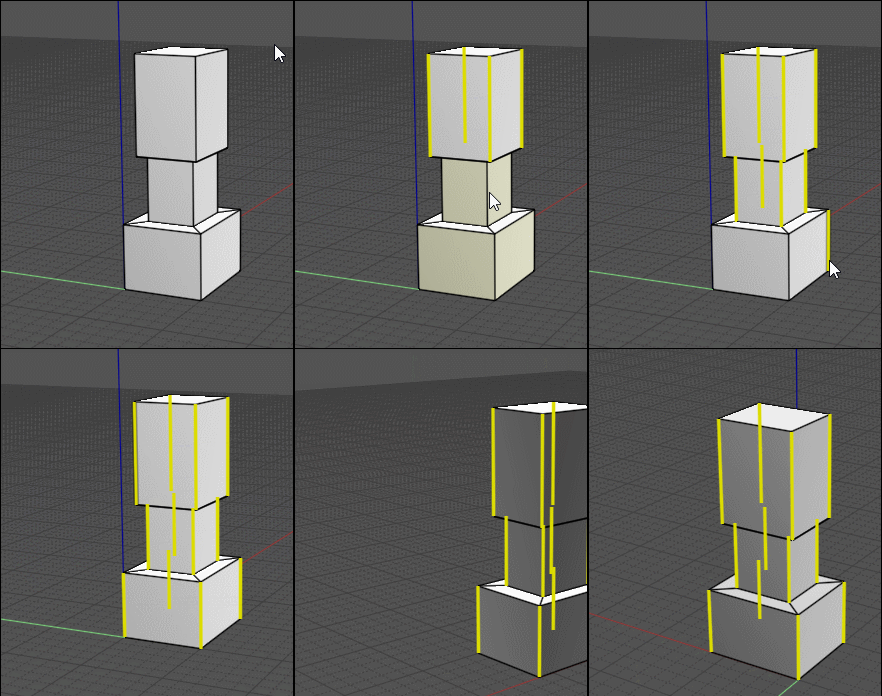
No.no,no.I not clearly explained
I want ring selection like on example like a polygonal
In Plasticity its realeased with curve edges depending on which side you clicked on it from horizontal or vertical
Attachments:

Image Attachments:
Size: 147.4 KB, Downloaded: 50 times, Dimensions: 474x913px
  Reply Reply More Options
Post Options
Reply as PM Reply as PM
Print Print
Mark as unread Mark as unread
Relationship Relationship
IP Logged

Previous
Next
 From:  blowlamp
11056.36 In reply to 11056.26 
Thanks for those videos, Michael, they were most helpful.
I should have suspected you would have had this covered. :)


Martin.
  Reply Reply More Options
Post Options
Reply as PM Reply as PM
Print Print
Mark as unread Mark as unread
Relationship Relationship
IP Logged

Previous
Next
 From:  Frenchy Pilou (PILOU)
11056.37 In reply to 11056.35 
Maybe like this ? ;)
Selection Right to Left... vertically or horizontally depending of what do you want...
if you want Points ...just select a Point before
If you want Edges...just select one Edge before
If you want Faces...just select one Face before...

EDITED: 15 Apr 2023 by PILOU

  Reply Reply More Options
Post Options
Reply as PM Reply as PM
Print Print
Mark as unread Mark as unread
Relationship Relationship
IP Logged

Previous
Next
 From:  blackboard
11056.38 In reply to 11056.37 
In this example its create easy
But i showed logic for that not for true example
  Reply Reply More Options
Post Options
Reply as PM Reply as PM
Print Print
Mark as unread Mark as unread
Relationship Relationship
IP Logged

Previous
Next
 From:  Michael Gibson
11056.39 In reply to 11056.38 
Hi blackboard, I could cook up a script to do that, the conditions that it would target would be that the edges are lines and the surfaces are 4 sided.

Would that do what you need?

- Michael
  Reply Reply More Options
Post Options
Reply as PM Reply as PM
Print Print
Mark as unread Mark as unread
Relationship Relationship
IP Logged

Previous
Next
 From:  moritzbock (MORITZ)
11056.40 In reply to 11056.1 
Hello Michael,
something is wrong with the Fillet function with ACIS. The Dimension and the Leader Text Tool does not show anything with ACIS. With SOLIDS ++ it works without any problems.
(MoI V5 beta Apr-13-2023)
-moritz


  Reply Reply More Options
Post Options
Reply as PM Reply as PM
Print Print
Mark as unread Mark as unread
Relationship Relationship
IP Logged

Previous
Next
 From:  pressure (PEER)
11056.41 In reply to 11056.38 
Hi blackboard,

Is this the kind of thing that you want?

- Peer

EDIT: new version at http://moi3d.com/forum/index.php?webtag=MOI&msg=11063.1

EDITED: 16 Apr 2023 by PEER

  Reply Reply More Options
Post Options
Reply as PM Reply as PM
Print Print
Mark as unread Mark as unread
Relationship Relationship
IP Logged

Previous
Next
 From:  Michael Gibson
11056.42 In reply to 11056.40 
Hi moritz,

re:
> something is wrong with the Fillet function with ACIS. The Dimension and the Leader Text
> Tool does not show anything with ACIS. With SOLIDS ++ it works without any problems.

Thanks for reporting this, I'm not sure yet why ACIS makes a rather loose approximation for cylinders here. I may need to ask their tech support about it.

- Michael
  Reply Reply More Options
Post Options
Reply as PM Reply as PM
Print Print
Mark as unread Mark as unread
Relationship Relationship
IP Logged

Previous
Next
 From:  blackboard
11056.43 In reply to 11056.41 
https://youtu.be/wZrE2hP4oUk

Almost,i mean to select first edge like direction for ring.and with depending on direction select all possible edges

the script that you wrote only works on one face. and does not add a selection as in the video at the end
  Reply Reply More Options
Post Options
Reply as PM Reply as PM
Print Print
Mark as unread Mark as unread
Relationship Relationship
IP Logged

Previous
Next
 From:  blackboard
11056.44 
Maybe you can add this function?select all edge chain by one button?
Attachments:

  Reply Reply More Options
Post Options
Reply as PM Reply as PM
Print Print
Mark as unread Mark as unread
Relationship Relationship
IP Logged

Previous
Next
 From:  moritzbock (MORITZ)
11056.45 In reply to 11056.42 
Hi Michael,
Thank you for your support. I would be happy if there was a solution for this.
-moritz
  Reply Reply More Options
Post Options
Reply as PM Reply as PM
Print Print
Mark as unread Mark as unread
Relationship Relationship
IP Logged

Previous
Next
 From:  pressure (PEER)
11056.46 In reply to 11056.44 
Hi blackboard,

I've posted an updated version with a few improvements http://moi3d.com/forum/index.php?webtag=MOI&msg=11063.1
  1. adds to existing selection
  2. compatible with a wide variety of faces
  3. can be run in the middle of the Fillet command without cancelling Fillet
  4. selection is undoable when using v5

Re:
> Maybe you can add this function?select all edge chain by one button?

There are already commands that do tangent propagation http://moi3d.com/forum/lmessages.php?webtag=MOI&msg=8665.195

Also, ACIS in v5 does some automatic tangent propagation http://moi3d.com/forum/index.php?webtag=MOI&msg=11043.4

- Peer
  Reply Reply More Options
Post Options
Reply as PM Reply as PM
Print Print
Mark as unread Mark as unread
Relationship Relationship
IP Logged

Previous
Next
 From:  blackboard
11056.47 In reply to 11056.42 
Hi,Michae I'm sorry that I'm writing about this for the third time, but OTOY users still cannot download the beta
  Reply Reply More Options
Post Options
Reply as PM Reply as PM
Print Print
Mark as unread Mark as unread
Relationship Relationship
IP Logged

Previous
Next
 From:  Michael Gibson
11056.48 In reply to 11056.47 
Hi Blackboard, hopefully they should put it up soon, I sent to them last Thursday evening.

Please let me know if you still don't see it in the next couple of days.

- Michael
  Reply Reply More Options
Post Options
Reply as PM Reply as PM
Print Print
Mark as unread Mark as unread
Relationship Relationship
IP Logged

Previous
Next
 From:  blackboard
11056.49 In reply to 11056.28 
>For object placement including scaling, those are here:
http://moi3d.com/forum/index.php?webtag=MOI&msg=10011.90

I'm sorry because i didn't check right away.
This works only for imported files,I mean for those solids that are already in the scene
  Reply Reply More Options
Post Options
Reply as PM Reply as PM
Print Print
Mark as unread Mark as unread
Relationship Relationship
IP Logged
 

Reply to All Reply to All


Show messages:  1-9  10-29  30-49  50-69  70-89  90-109  …  210-223