V5 beta Apr-13-2023 available now
 1-17  …  98-117  118-137  138-157  158-177  178-197  …  218-223

Previous
Next
 From:  Michael Gibson
11056.138 In reply to 11056.137 
Hi blackboard,

> Hello Michael,how development going?

It's been slow recently, I've been working on some tricky bugs.


> We can see full v5 version of moi in 2023?

I hope so but I don't know for sure.

- Michael
  Reply Reply More Options
Post Options
Reply as PM Reply as PM
Print Print
Mark as unread Mark as unread
Relationship Relationship
IP Logged

Previous
Next
 From:  blackboard
11056.139 In reply to 11056.138 
Ok,thanks for answer we will wait
  Reply Reply More Options
Post Options
Reply as PM Reply as PM
Print Print
Mark as unread Mark as unread
Relationship Relationship
IP Logged

Previous
Next
 From:  Pit (PIETER)
11056.140 In reply to 11056.138 
Hi Michael,

Since my Trial v4 version has expired for some time, the question is when can we expect a 5 full version and at what price.
I don't want to buy the 4 version first to try the updates because I only use Moi for my hobby and for fun (I'm retired).

Greetings from Hamburg
Pieter

EDITED: 4 Aug 2023 by PIETER

  Reply Reply More Options
Post Options
Reply as PM Reply as PM
Print Print
Mark as unread Mark as unread
Relationship Relationship
IP Logged

Previous
Next
 From:  Michael Gibson
11056.141 In reply to 11056.140 
Hi Pieter, I'm expecting the price for v5 will remain the same as v4. I'm not sure yet when v5 will be released, I hope sometime before the end of the year though.

- Michael
  Reply Reply More Options
Post Options
Reply as PM Reply as PM
Print Print
Mark as unread Mark as unread
Relationship Relationship
IP Logged

Previous
Next
 From:  christian (CHRI)
11056.142 
Hi Michael

is it possible to select a point, a line or a surface when extruding ?
( it works with origin point )

Thanks

EDITED: 9 Aug 2023 by CHRI

Image Attachments:
Size: 126.9 KB, Downloaded: 62 times, Dimensions: 294x273px
Size: 59.6 KB, Downloaded: 79 times, Dimensions: 490x306px
  Reply Reply More Options
Post Options
Reply as PM Reply as PM
Print Print
Mark as unread Mark as unread
Relationship Relationship
IP Logged

Previous
Next
 From:  Michael Gibson
11056.143 In reply to 11056.142 
Hi christian, currently there are not snaps available on the same object that is itself being manipulated. That's because of some problems that can happen with things kind of getting stuck on themselves.

I'd like to revisit that, but for now you can place a point object (Draw curve > More > Point) where you want to snap before doing the extrude.

- Michael
  Reply Reply More Options
Post Options
Reply as PM Reply as PM
Print Print
Mark as unread Mark as unread
Relationship Relationship
IP Logged

Previous
Next
 From:  christian (CHRI)
11056.144 In reply to 11056.143 
Very clear Michael
Thanks for your quick response.

Christian
  Reply Reply More Options
Post Options
Reply as PM Reply as PM
Print Print
Mark as unread Mark as unread
Relationship Relationship
IP Logged

Previous
Next
 From:  wayne hill (WAYNEHILL5202)
11056.145 
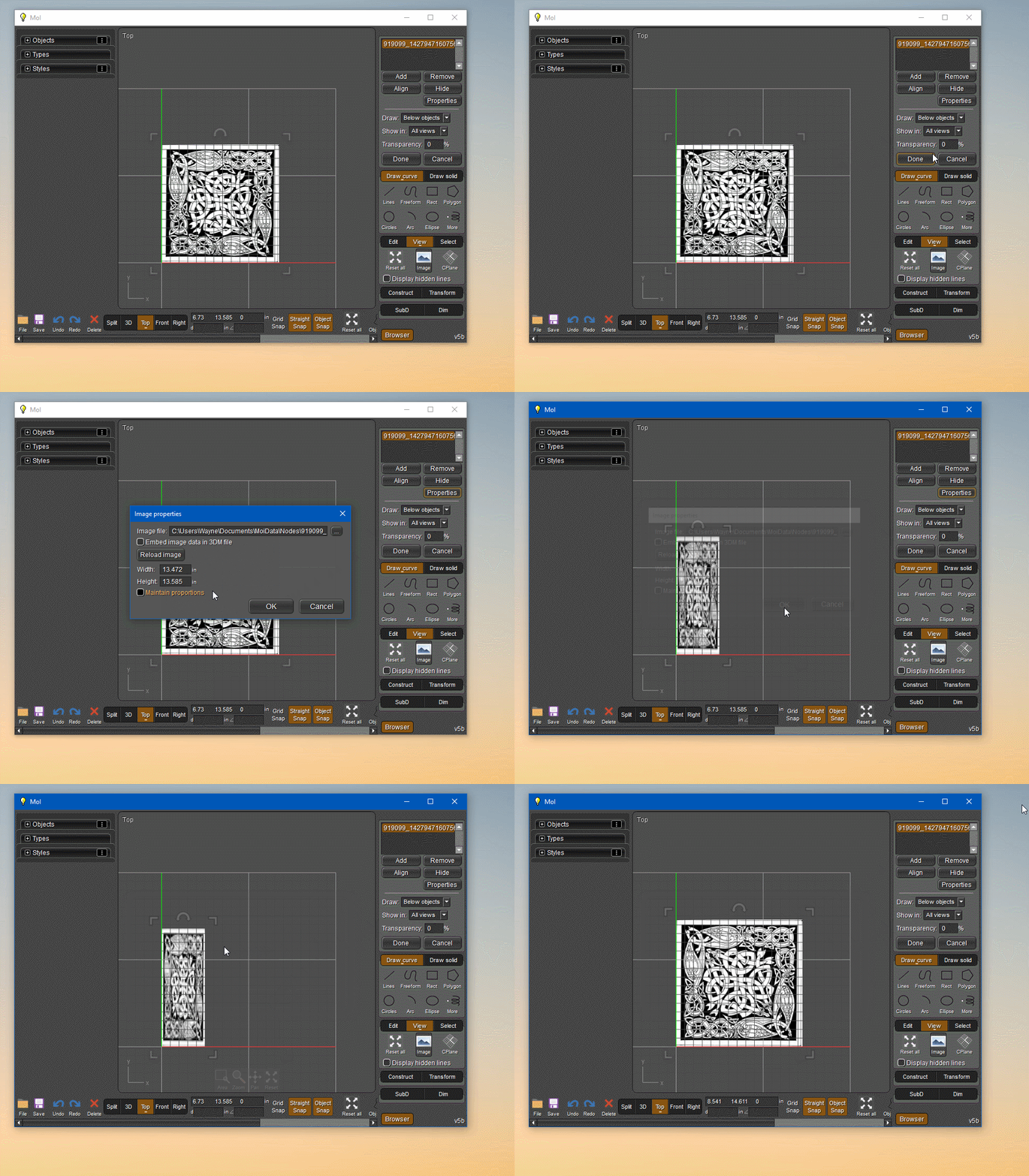
Not sure if this event has been reviewed:

Changing image properties with proportions sizes off, the image will revert back to original ratio when dragging the anchor size.


imgbox
  Reply Reply More Options
Post Options
Reply as PM Reply as PM
Print Print
Mark as unread Mark as unread
Relationship Relationship
IP Logged

Previous
Next
 From:  Michael Gibson
11056.146 In reply to 11056.145 
Hi wayne,

re:
> Not sure if this event has been reviewed:
>
> Changing image properties with proportions sizes off, the image will revert back to original ratio when dragging the anchor size.

Yes, dragging always uses the image's inherent aspect ratio. If you want to change the aspect ratio permanently you can edit the image in an image processing program to your desired new size.

- Michael
  Reply Reply More Options
Post Options
Reply as PM Reply as PM
Print Print
Mark as unread Mark as unread
Relationship Relationship
IP Logged

Previous
Next
 From:  wayne hill (WAYNEHILL5202)
11056.147 In reply to 11056.146 
Thank you!
Wayne
  Reply Reply More Options
Post Options
Reply as PM Reply as PM
Print Print
Mark as unread Mark as unread
Relationship Relationship
IP Logged

Previous
Next
 From:  cyanayc
11056.148 In reply to 11056.141 
Hi, does this mean that if I buy version 4 now, I will also get the update to version 5 for free? Or is it not clear, and would it be better to wait and buy it when version 5 is released?
  Reply Reply More Options
Post Options
Reply as PM Reply as PM
Print Print
Mark as unread Mark as unread
Relationship Relationship
IP Logged

Previous
Next
 From:  Michael Gibson
11056.149 In reply to 11056.148 
Hi cyanayc,

re:
> Hi, does this mean that if I buy version 4 now, I will also get the update to version 5 for free?

Possibly but I'm not certain. It depends on when the final v5 release is out which I don't have a specific target date for yet.

I would like to wrap up the v5 release by the end of this year but I can't promise that will happen.

- Michael
  Reply Reply More Options
Post Options
Reply as PM Reply as PM
Print Print
Mark as unread Mark as unread
Relationship Relationship
IP Logged

Previous
Next
 From:  Lewis3D
11056.150 
Hi Michael,

Is there a way to add "live" checkmark on to Export mesh option (OBJ in my case).

I have some big models (STEP/IGES) and when tweaking export settings for export to OBJ MOI 3D takes very long time (takes about 2 minutes for this mesh) to display 6-7 million polys mesh in OpenGL (part by part slowly appears) and settings GUI is very sluggish/unresponsive when OBJ settings start to punch in.
I'd like the option to STOP live instant meshing until I edit all numbers (By now I know settings i usually want) without MOI starting to generate polygons as soon as the panel pops up.
So if there would be live/proceed or some sort of button on that panel which then start process instead starting as soon as it's opened ?

Thanks

EDITED: 13 Sep 2023 by LEWIS3D

  Reply Reply More Options
Post Options
Reply as PM Reply as PM
Print Print
Mark as unread Mark as unread
Relationship Relationship
IP Logged

Previous
Next
 From:  Michael Gibson
11056.151 In reply to 11056.150 
Hi Lewis,

re:
> So if there would be live/proceed or some sort of button on that panel which then start process
> instead starting as soon as it's opened ?

Sorry, no MoI's UI is specifically designed to not need an update button like that, it just automatically cancels the current calculation and starts an updated one whenever any meshing parameters are modified.

One thing you could do is to select just one object and do File > Export, that will pop up the meshing options dialog on a low computation load and once you have the settings how you want cancel that export and the same settings will be used on your next full export.

- MIchael
  Reply Reply More Options
Post Options
Reply as PM Reply as PM
Print Print
Mark as unread Mark as unread
Relationship Relationship
IP Logged

Previous
Next
 From:  Lewis3D
11056.152 In reply to 11056.151 
Yeah, I've tried doing that too, but GUI feedback is still very, very slow, it takes like 15-20 seconds to TAB to another filed with this mesh :(.
So that's why i hoped i could "tune in settings on just one piece" and then "live" all other layers and hit export, but it always meshes firs tin GUI = 5 minutes wait for it to finish, and then it saves file (Exported OBJ was 12 GB ).

Thanks anyway.

Lewis
www.ram-studio.hr
Skype - lewis3d

  Reply Reply More Options
Post Options
Reply as PM Reply as PM
Print Print
Mark as unread Mark as unread
Relationship Relationship
IP Logged

Previous
Next
 From:  Michael Gibson
11056.153 In reply to 11056.152 
Hi Lewis, what are your machine specs?


> Yeah, I've tried doing that too, but GUI feedback is still very, very slow, it takes like
> 15-20 seconds to TAB to another filed with this mesh :(.

You mean exporting just one single object is taking that long?

If this particular model is made up only of one individual extremely complex object then draw in a sphere or a box and select it and use File > Export on that to alter settings.


> So that's why i hoped i could "tune in settings on just one piece" and then "live" all other layers and hit export,

Yes you can do that, select the just one piece and use File > Export, not File > "Save As".

Export will mesh only the selected objects while Save As does everything regardless of selection.


- Michael

EDITED: 14 Sep 2023 by MICHAEL GIBSON

  Reply Reply More Options
Post Options
Reply as PM Reply as PM
Print Print
Mark as unread Mark as unread
Relationship Relationship
IP Logged

Previous
Next
 From:  Lewis3D
11056.154 In reply to 11056.153 
My machine is Win10 64bit, AMD Threadripper PRO 3955WX, 256GB RAM, 2*RTX 4090 + RTX 3090, NVMe 1GB drive.

As for GUI slownnes, when GUI export popup window show up and then i try do drag slider it's sluggish, even typing the value is so slow that here is 15-20 sec pause between going to next input field.
I know it's because of big model but yeah that's why i hoped there could be "delayed" update button or so for those cases.
When model is not so big it's fine, GUI is responsive in those situations..

chers

Lewis
www.ram-studio.hr
Skype - lewis3d

  Reply Reply More Options
Post Options
Reply as PM Reply as PM
Print Print
Mark as unread Mark as unread
Relationship Relationship
IP Logged

Previous
Next
 From:  Michael Gibson
11056.155 In reply to 11056.154 
Hi Lewis, what happens if you go into moi.ini (Options > General > "Edit .ini file" button) and change:

[Mesh Export]
<....>
ThreadLimit=8

Is the GUI on a heavy export less hiccupy then?

If yes then that probably indicates that I can do some (tricky) work to improve the GUI response when a whole lot of calculation threads are being used.

- Michael
  Reply Reply More Options
Post Options
Reply as PM Reply as PM
Print Print
Mark as unread Mark as unread
Relationship Relationship
IP Logged

Previous
Next
 From:  Lewis3D
11056.156 In reply to 11056.155 
Hmm i tried that and yes maybe GUI is a bit more responsive (nothing major) now but now overall exporting process is slower now since it uses only 30-31% of my CPU strenght/cores (my CPU is 16c/32t).
It wasn't hitting 100% before either but it was 50-70% so faster export overall :).

thanks for idea.

Lewis
www.ram-studio.hr
Skype - lewis3d

  Reply Reply More Options
Post Options
Reply as PM Reply as PM
Print Print
Mark as unread Mark as unread
Relationship Relationship
IP Logged

Previous
Next
 From:  Michael Gibson
11056.157 In reply to 11056.156 
Hi Lewis, thanks for testing that. Does your model happen to have some large individual surfaces in it?

I think the GUI stutters are probably when it's blocking waiting for the current in progress meshing to finish being canceled. I think I should be able to improve this, I will try.

- Michael
  Reply Reply More Options
Post Options
Reply as PM Reply as PM
Print Print
Mark as unread Mark as unread
Relationship Relationship
IP Logged
 

Reply to All Reply to All


Show messages:  1-17  …  78-97  98-117  118-137  138-157  158-177  178-197  198-217  218-223