V5 beta Apr-13-2023 available now
 1-10  …  91-110  111-130  131-150  151-170  171-190  …  211-223

Previous
Next
 From:  Michael Gibson
11056.131 In reply to 11056.130 
Hi Marco,

re:
> Very interesting the specific build for Apple Silicon. So, in the V5 build, are you directly calling Metal APIs?

Using Metal APIs is a separate thing from arm64/Apple Silicon. But Moi v5 will also support rendering using the Metal API, it should be fully functional with the next v5 beta release.


> I would like to know if now I can set the viewport display angle to 5 instead of the standard 10,
> without getting slowdowns, thanks to Metal API and M1/M2 GPUs.

In general I've found that the Metal API is somewhat slower than OpenGL so I don't expect that you would see any improvement in that area.

Despite its name and marketing Metal is a more "managed" display pipeline, there isn't any way set up to use the CPU and GPU in parallel for constructing a single frame in Metal unlike OpenGL. Basically it lacks any mechanism for dynamic vertex buffers.

- Michael
  Reply Reply More Options
Post Options
Reply as PM Reply as PM
Print Print
Mark as unread Mark as unread
Relationship Relationship
IP Logged

Previous
Next
 From:  mkdm
11056.132 In reply to 11056.131 
Thanks for these info :)

But...this sounds me a bit strange.
As far as I know, OpenGL hasn't been supported (natively) on Apple computers, for years now.
All the GOU development has shifted to Apple Silicon and Metal API.
How is it possible that Metal can't deliver as much, if not more, as power compared to the OLD OpenGL?

This sounds really strange...
  Reply Reply More Options
Post Options
Reply as PM Reply as PM
Print Print
Mark as unread Mark as unread
Relationship Relationship
IP Logged

Previous
Next
 From:  Michael Gibson
11056.133 In reply to 11056.132 
Hi Marco,

re:
> As far as I know, OpenGL hasn't been supported (natively) on Apple computers, for years now.

That's incorrect. OpenGL.framework is implemented in native arm64 code on all Apple Silicon operating systems so far at least.


> How is it possible that Metal can't deliver as much, if not more, as power
> compared to the OLD OpenGL?

It's because in kind of typical Apple fashion they've prioritized API "elegance" over functionality.

The way the Metal API is designed, you assemble a full list of instructions and then submit that entire instruction set to the GPU which then executes it on the GPU.

To get CPU/GPU parallel processing they advocate using a triple buffering mechanism which works fine for a game that is constantly animating in a render loop but MoI is rather different than a game. Instead of trying to have a constant FPS on a preplanned scene MoI is more focused on generating just the current frame using both the CPU and GPU in parallel. Metal is not able to use both CPU and GPU in parallel within the scope of a single frame unlike OpenGL or Direct3D using dynamic vertex buffers.

Basically there is a thing in OpenGL and Direct3D called "dynamic vertex buffers" which allows data to be streamed from the CPU to the GPU while the current frame is being generated. Metal does not have this function.

- Michael
  Reply Reply More Options
Post Options
Reply as PM Reply as PM
Print Print
Mark as unread Mark as unread
Relationship Relationship
IP Logged

Previous
Next
 From:  mkdm
11056.134 In reply to 11056.133 
Thanks for this detailed explanation :)
OK. Got it.
Have a nice day.
  Reply Reply More Options
Post Options
Reply as PM Reply as PM
Print Print
Mark as unread Mark as unread
Relationship Relationship
IP Logged

Previous
Next
 From:  mkdm
11056.135 In reply to 11056.129 
Hello Michael.

Where I can read something about the new (or improved) "Groups" functionality of the V5 beta?

Thanks :)
  Reply Reply More Options
Post Options
Reply as PM Reply as PM
Print Print
Mark as unread Mark as unread
Relationship Relationship
IP Logged

Previous
Next
 From:  Michael Gibson
11056.136 In reply to 11056.135 
Hi Marco,

re:
> Where I can read something about the new (or improved) "Groups" functionality of the V5 beta?

There is some information in the v5 beta release notes which are gathered here:
https://moi3d.com/wiki/V5Beta

- Michael
  Reply Reply More Options
Post Options
Reply as PM Reply as PM
Print Print
Mark as unread Mark as unread
Relationship Relationship
IP Logged

Previous
Next
 From:  blackboard
11056.137 
Hello Michael,how development going?We can see full v5 version of moi in 2023?
  Reply Reply More Options
Post Options
Reply as PM Reply as PM
Print Print
Mark as unread Mark as unread
Relationship Relationship
IP Logged

Previous
Next
 From:  Michael Gibson
11056.138 In reply to 11056.137 
Hi blackboard,

> Hello Michael,how development going?

It's been slow recently, I've been working on some tricky bugs.


> We can see full v5 version of moi in 2023?

I hope so but I don't know for sure.

- Michael
  Reply Reply More Options
Post Options
Reply as PM Reply as PM
Print Print
Mark as unread Mark as unread
Relationship Relationship
IP Logged

Previous
Next
 From:  blackboard
11056.139 In reply to 11056.138 
Ok,thanks for answer we will wait
  Reply Reply More Options
Post Options
Reply as PM Reply as PM
Print Print
Mark as unread Mark as unread
Relationship Relationship
IP Logged

Previous
Next
 From:  Pit (PIETER)
11056.140 In reply to 11056.138 
Hi Michael,

Since my Trial v4 version has expired for some time, the question is when can we expect a 5 full version and at what price.
I don't want to buy the 4 version first to try the updates because I only use Moi for my hobby and for fun (I'm retired).

Greetings from Hamburg
Pieter

EDITED: 4 Aug 2023 by PIETER

  Reply Reply More Options
Post Options
Reply as PM Reply as PM
Print Print
Mark as unread Mark as unread
Relationship Relationship
IP Logged

Previous
Next
 From:  Michael Gibson
11056.141 In reply to 11056.140 
Hi Pieter, I'm expecting the price for v5 will remain the same as v4. I'm not sure yet when v5 will be released, I hope sometime before the end of the year though.

- Michael
  Reply Reply More Options
Post Options
Reply as PM Reply as PM
Print Print
Mark as unread Mark as unread
Relationship Relationship
IP Logged

Previous
Next
 From:  christian (CHRI)
11056.142 
Hi Michael

is it possible to select a point, a line or a surface when extruding ?
( it works with origin point )

Thanks

EDITED: 9 Aug 2023 by CHRI

Image Attachments:
Size: 126.9 KB, Downloaded: 62 times, Dimensions: 294x273px
Size: 59.6 KB, Downloaded: 79 times, Dimensions: 490x306px
  Reply Reply More Options
Post Options
Reply as PM Reply as PM
Print Print
Mark as unread Mark as unread
Relationship Relationship
IP Logged

Previous
Next
 From:  Michael Gibson
11056.143 In reply to 11056.142 
Hi christian, currently there are not snaps available on the same object that is itself being manipulated. That's because of some problems that can happen with things kind of getting stuck on themselves.

I'd like to revisit that, but for now you can place a point object (Draw curve > More > Point) where you want to snap before doing the extrude.

- Michael
  Reply Reply More Options
Post Options
Reply as PM Reply as PM
Print Print
Mark as unread Mark as unread
Relationship Relationship
IP Logged

Previous
Next
 From:  christian (CHRI)
11056.144 In reply to 11056.143 
Very clear Michael
Thanks for your quick response.

Christian
  Reply Reply More Options
Post Options
Reply as PM Reply as PM
Print Print
Mark as unread Mark as unread
Relationship Relationship
IP Logged

Previous
Next
 From:  wayne hill (WAYNEHILL5202)
11056.145 
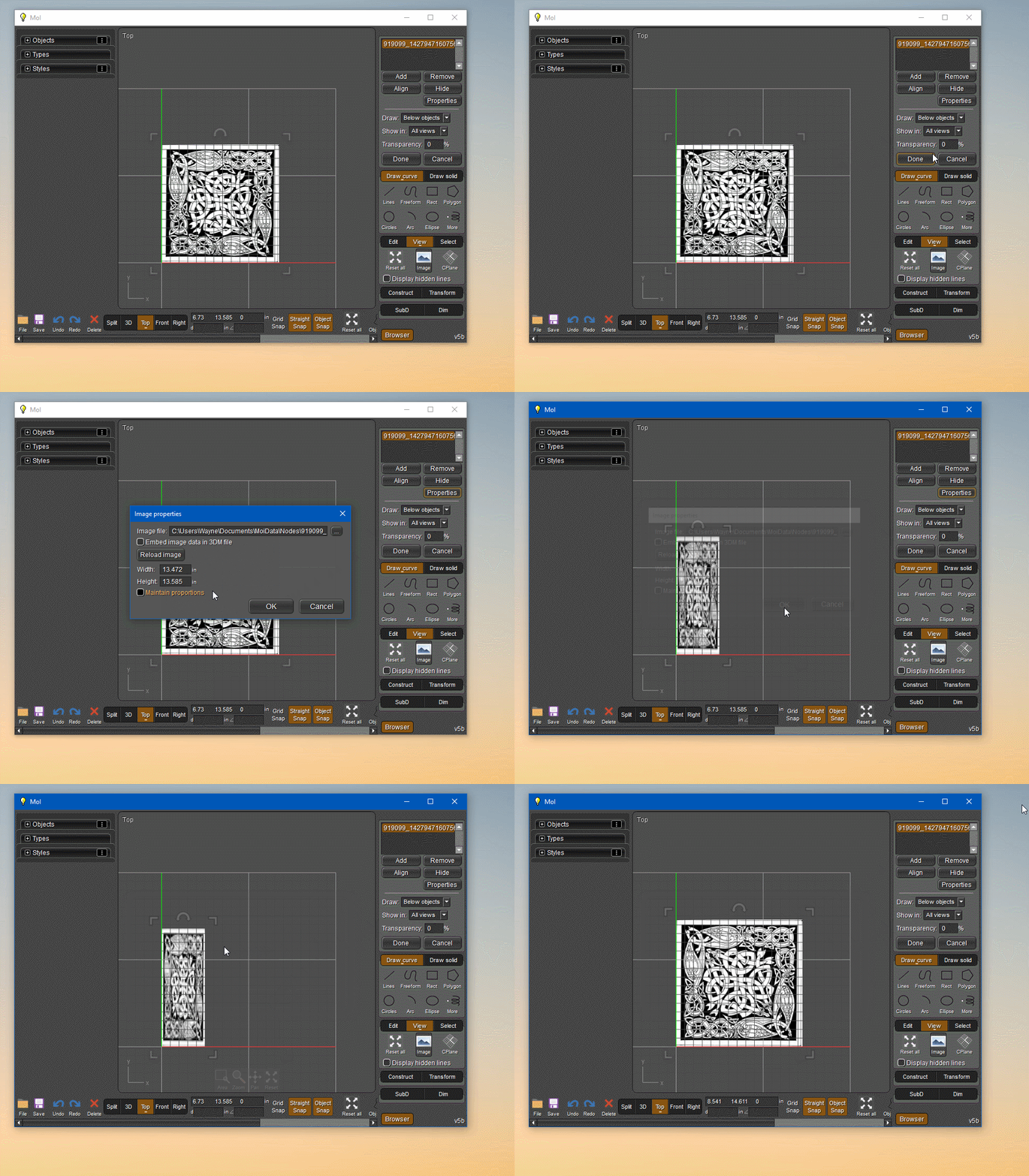
Not sure if this event has been reviewed:

Changing image properties with proportions sizes off, the image will revert back to original ratio when dragging the anchor size.


imgbox
  Reply Reply More Options
Post Options
Reply as PM Reply as PM
Print Print
Mark as unread Mark as unread
Relationship Relationship
IP Logged

Previous
Next
 From:  Michael Gibson
11056.146 In reply to 11056.145 
Hi wayne,

re:
> Not sure if this event has been reviewed:
>
> Changing image properties with proportions sizes off, the image will revert back to original ratio when dragging the anchor size.

Yes, dragging always uses the image's inherent aspect ratio. If you want to change the aspect ratio permanently you can edit the image in an image processing program to your desired new size.

- Michael
  Reply Reply More Options
Post Options
Reply as PM Reply as PM
Print Print
Mark as unread Mark as unread
Relationship Relationship
IP Logged

Previous
Next
 From:  wayne hill (WAYNEHILL5202)
11056.147 In reply to 11056.146 
Thank you!
Wayne
  Reply Reply More Options
Post Options
Reply as PM Reply as PM
Print Print
Mark as unread Mark as unread
Relationship Relationship
IP Logged

Previous
Next
 From:  cyanayc
11056.148 In reply to 11056.141 
Hi, does this mean that if I buy version 4 now, I will also get the update to version 5 for free? Or is it not clear, and would it be better to wait and buy it when version 5 is released?
  Reply Reply More Options
Post Options
Reply as PM Reply as PM
Print Print
Mark as unread Mark as unread
Relationship Relationship
IP Logged

Previous
Next
 From:  Michael Gibson
11056.149 In reply to 11056.148 
Hi cyanayc,

re:
> Hi, does this mean that if I buy version 4 now, I will also get the update to version 5 for free?

Possibly but I'm not certain. It depends on when the final v5 release is out which I don't have a specific target date for yet.

I would like to wrap up the v5 release by the end of this year but I can't promise that will happen.

- Michael
  Reply Reply More Options
Post Options
Reply as PM Reply as PM
Print Print
Mark as unread Mark as unread
Relationship Relationship
IP Logged

Previous
Next
 From:  Lewis3D
11056.150 
Hi Michael,

Is there a way to add "live" checkmark on to Export mesh option (OBJ in my case).

I have some big models (STEP/IGES) and when tweaking export settings for export to OBJ MOI 3D takes very long time (takes about 2 minutes for this mesh) to display 6-7 million polys mesh in OpenGL (part by part slowly appears) and settings GUI is very sluggish/unresponsive when OBJ settings start to punch in.
I'd like the option to STOP live instant meshing until I edit all numbers (By now I know settings i usually want) without MOI starting to generate polygons as soon as the panel pops up.
So if there would be live/proceed or some sort of button on that panel which then start process instead starting as soon as it's opened ?

Thanks

EDITED: 13 Sep 2023 by LEWIS3D

  Reply Reply More Options
Post Options
Reply as PM Reply as PM
Print Print
Mark as unread Mark as unread
Relationship Relationship
IP Logged
 

Reply to All Reply to All


Show messages:  1-10  …  71-90  91-110  111-130  131-150  151-170  171-190  191-210  211-223