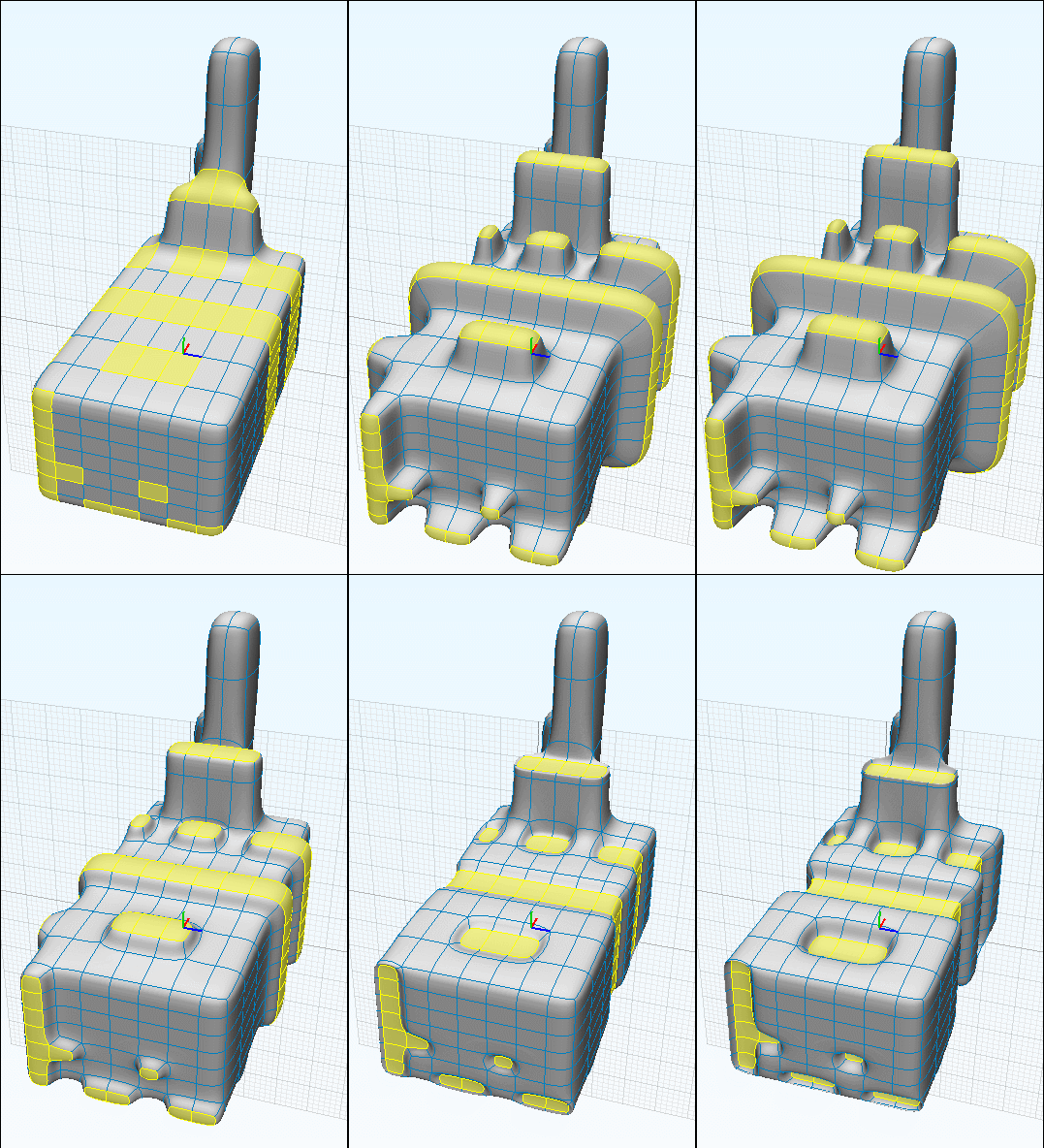
Blend possible here?
 1-6  7-26  27-30

Previous
Next
 From:  Phiro
10883.7 
As Michael said, subd is a better solution.

But if you still want use a blend in Moi, you could study the principle using a trimming of edges.
The result is perhaps near of what you want and you could improve it.

Here a rapid test.


  Reply Reply More Options
Post Options
Reply as PM Reply as PM
Print Print
Mark as unread Mark as unread
Relationship Relationship
IP Logged

Previous
Next
 From:  Frenchy Pilou (PILOU)
10883.8 
And don't forget you can make some rustic but efficient SUD Modeling fully inside Moi !
With the Max functions! ;)
Ssplit, SsBridge, Sscale, SubDivbeta9

EDITED: 24 Oct 2022 by PILOU

  Reply Reply More Options
Post Options
Reply as PM Reply as PM
Print Print
Mark as unread Mark as unread
Relationship Relationship
IP Logged

Previous
Next
 From:  pafurijaz
10883.9 
Hi here, my attempt with Blender and the Sub-Modeling approach, using your basic shape in the final model, but I don't know for sure is what you want.
However as already told with the use of Sub-D Mesh modelers like Blender you could get better results in a simple way for this type of 3D models.

hand-subd
Attachments:

  Reply Reply More Options
Post Options
Reply as PM Reply as PM
Print Print
Mark as unread Mark as unread
Relationship Relationship
IP Logged

Previous
Next
 From:  Lara (MALA)
10883.10 
Hello to All here in this thread,
thx a lot for your tipps and experiences!!!
Phiros version comes pretty near to my suggestions. Thx. very much, Phiro!!!

If I can make it in MoI I prefer it instead of subD-Modelling.

Best regards...
  Reply Reply More Options
Post Options
Reply as PM Reply as PM
Print Print
Mark as unread Mark as unread
Relationship Relationship
IP Logged

Previous
Next
 From:  Lara (MALA)
10883.11 
...ok, made´ some progress.
The shape has to to be made in CNC. I fear there are to much mistakes in the surface. What can I do better?
Best, Mala


  Reply Reply More Options
Post Options
Reply as PM Reply as PM
Print Print
Mark as unread Mark as unread
Relationship Relationship
IP Logged

Previous
Next
 From:  Lara (MALA)
10883.12 
That is the goal: an attached hand on a ring.
But...it is not modeled properly. And this is why I cannot do a fitfillet between the ring and the hand.
Do you got a simpler idea bringing the hand similar onto the ring? Or is the answer just to learn model better...
Image Attachments:
Size: 77.1 KB, Downloaded: 31 times, Dimensions: 1177x684px
Size: 109.3 KB, Downloaded: 24 times, Dimensions: 1036x685px
  Reply Reply More Options
Post Options
Reply as PM Reply as PM
Print Print
Mark as unread Mark as unread
Relationship Relationship
IP Logged

Previous
Next
 From:  Lara (MALA)
10883.13 
Hmmm´...I just thought about SubD-Model the hand in c4d. But I fear I cannot combine and reimport the c4d polygonmodel to attach it onto the ring in MoI...
  Reply Reply More Options
Post Options
Reply as PM Reply as PM
Print Print
Mark as unread Mark as unread
Relationship Relationship
IP Logged

Previous
Next
 From:  Lara (MALA)
10883.14 In reply to 10883.8 
...I try that out!
Means...Pilous suggestion of modeling with subDs.

EDITED: 25 Oct 2022 by MALA

  Reply Reply More Options
Post Options
Reply as PM Reply as PM
Print Print
Mark as unread Mark as unread
Relationship Relationship
IP Logged

Previous
Next
 From:  Lara (MALA)
10883.15 
OK - question before starting into a new adventure - subD in MoI:
Is it possible to give out a .stl file for a CNC machine?
I fear: No - because polygons shouldn´t work as .stl., isn´t it?
  Reply Reply More Options
Post Options
Reply as PM Reply as PM
Print Print
Mark as unread Mark as unread
Relationship Relationship
IP Logged

Previous
Next
 From:  Frenchy Pilou (PILOU)
10883.16 In reply to 10883.15 
your subD model inside Moi is in fact a nurbs model so can be exported as usual as STL format! ;)

Or any other formats available!

The thread about Sub Modeling inside Moi!
https://moi3d.com/forum/index.php?webtag=MOI&msg=9689.1

EDITED: 25 Oct 2022 by PILOU

  Reply Reply More Options
Post Options
Reply as PM Reply as PM
Print Print
Mark as unread Mark as unread
Relationship Relationship
IP Logged

Previous
Next
 From:  Lara (MALA)
10883.17 In reply to 10883.16 
Thx Pilou for the info! And the link...
Still unsure about the workflow without an GUI of the SudD-Modelling.
Only using the command tabs seems to me a little bit strange


Attachments:

  Reply Reply More Options
Post Options
Reply as PM Reply as PM
Print Print
Mark as unread Mark as unread
Relationship Relationship
IP Logged

Previous
Next
 From:  Lara (MALA)
10883.18 
Where is the mistake?


Attachments:

  Reply Reply More Options
Post Options
Reply as PM Reply as PM
Print Print
Mark as unread Mark as unread
Relationship Relationship
IP Logged

Previous
Next
 From:  Phiro
10883.19 In reply to 10883.18 
I think the mistake is an internal face.

Much easy to help you if you post the model with the mistake to find it.


If it could help you I made in Moi a Subd with your first hand.
Moi is not the easiest tool for subd, but it's the only one I use now.
I takes much time but patience gives pretty good model.
As last one, you could improve it, because I'm not a specialist in subd.

Have fun...
Attachments:

  Reply Reply More Options
Post Options
Reply as PM Reply as PM
Print Print
Mark as unread Mark as unread
Relationship Relationship
IP Logged

Previous
Next
 From:  Michael Gibson
10883.20 In reply to 10883.13 
Hi Mala,

re:
> Hmmm´...I just thought about SubD-Model the hand in c4d. But I fear I cannot combine and
> reimport the c4d polygonmodel to attach it onto the ring in MoI...

Starting with moi version 4 there is a sub-d converter that will allow you to bring a sub-d model created in a poly modeler into MoI as a CAD surface that can be booleaned and trimmed in Moi same as other surfaces.

That's available in the SubD palette on the side Pane.

Export out the SubD control cage from Cinema4D to an .obj file, then in MoI use SubD > Create > From file:


- Michael
Attachments:

  Reply Reply More Options
Post Options
Reply as PM Reply as PM
Print Print
Mark as unread Mark as unread
Relationship Relationship
IP Logged

Previous
Next
 From:  Michael Gibson
10883.21 In reply to 10883.18 
Hi Mala,

re:
> Where is the mistake?

Hard to tell without being able to examine the model.

But probably an n-gon face somewhere instead of all quads.

I'd recommend to do the sub-d modeling in Cinema4D instead, where you can find documentation and tutorials to help you. Then if you need to do some work combining it with other elements inside MoI use SubD > Create > From file in Moi to bring the subd surface into MoI.

- Michael
  Reply Reply More Options
Post Options
Reply as PM Reply as PM
Print Print
Mark as unread Mark as unread
Relationship Relationship
IP Logged

Previous
Next
 From:  Frenchy Pilou (PILOU)
10883.22 
My little advice for SubD sculpt modeling in Moi :)
Rustic but like this you will not have problem and possibilities to sculpt many things inside MOi Itself!

When a face don't want SUbDivided; the face(s) is enlighted so SsPlit them (P = SsPlit )
Just copy Move a face (Select "Only one" face + Ctrl + Move) then Bridge it ( B = SsBridge)
(you can select many faces and Copy Move them but after you are obliged to Select only 2 faces for Bridge them!!!

Verify if solid object is subdivisible with K (K = _Subdiv_beta9 ) then Undo and continue to Modelize!

here the polygon has 7 edges! (that works ! :) (Don't forget the bottom face! )


Last function is SsScale for Move Size Rotate selected Points' Face(s)
(not Shown above )

EDITED: 25 Oct 2022 by PILOU

  Reply Reply More Options
Post Options
Reply as PM Reply as PM
Print Print
Mark as unread Mark as unread
Relationship Relationship
IP Logged

Previous
Next
 From:  Frenchy Pilou (PILOU)
10883.23 
And if you want a free Polygon modeler entierely interfaced with Moi and same Style Interface!
you have the true free gem : Rocket3F !
Moi3D <--> Rocket 3F
https://rocket3f.com

The only 3 limitations are
* Windows System
* 10 seconds waiting at the launch
* renew register each month (takes 5 seconds)


EDITED: 26 Oct 2022 by PILOU

  Reply Reply More Options
Post Options
Reply as PM Reply as PM
Print Print
Mark as unread Mark as unread
Relationship Relationship
IP Logged

Previous
Next
 From:  Lara (MALA)
10883.24 
Hello Michael and Pilou,
thank you both for your comments and advices!
I have to make headpingpong first how to progress...
Warmest regards, Mala
  Reply Reply More Options
Post Options
Reply as PM Reply as PM
Print Print
Mark as unread Mark as unread
Relationship Relationship
IP Logged

Previous
Next
 From:  VG (VEGASGUITARS)
10883.25 In reply to 10883.9 
Fantastic.
  Reply Reply More Options
Post Options
Reply as PM Reply as PM
Print Print
Mark as unread Mark as unread
Relationship Relationship
IP Logged

Previous
Next
 From:  Lara (MALA)
10883.26 In reply to 10883.25 
?
  Reply Reply More Options
Post Options
Reply as PM Reply as PM
Print Print
Mark as unread Mark as unread
Relationship Relationship
IP Logged
 

Reply to All Reply to All


Show messages:  1-6  7-26  27-30