How to shrink or resize multiple lines
All  1-5  6-13

Previous
Next
 From:  Frenchy Pilou (PILOU)
10882.6 In reply to 10882.5 
Thx for the infos!
---
Pilou
Is beautiful that please without concept!
My Moi French Site My Gallery My MagicaVoxel Gallery
  Reply Reply More Options
Post Options
Reply as PM Reply as PM
Print Print
Mark as unread Mark as unread
Relationship Relationship
IP Logged

Previous
Next
 From:  Frenchy Pilou (PILOU)
10882.7 
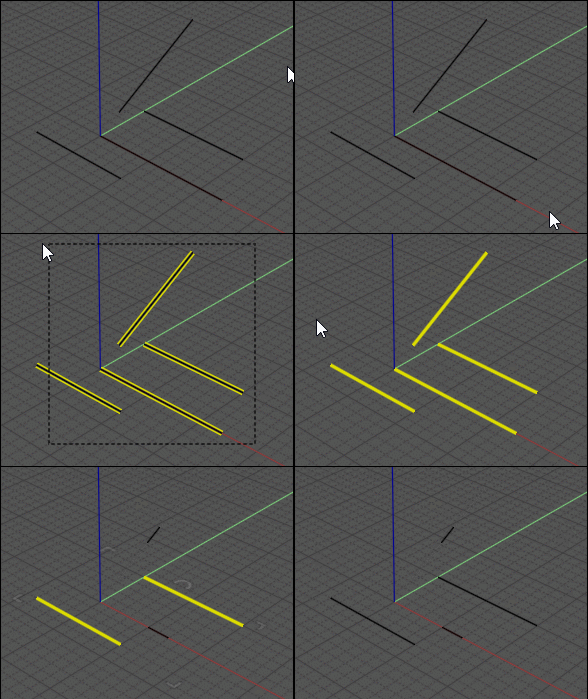
Seems if the lines are 5 unities or less nothing is done for these lines!

Does this normal ?
---
Pilou
Is beautiful that please without concept!
My Moi French Site My Gallery My MagicaVoxel Gallery
  Reply Reply More Options
Post Options
Reply as PM Reply as PM
Print Print
Mark as unread Mark as unread
Relationship Relationship
IP Logged

Previous
Next
 From:  Michael Gibson
10882.8 In reply to 10882.7 
Hi Pilou,

re:
> Seems if the lines are 5 unities or less nothing is done for these lines!
>
> Does this normal ?

Well the request was to chop off 5 units off the ends of each line.

If you do that to a line that is 10 units or shorter in size then there would be nothing left.

So yes that's normal for this particular use case for those lines to not be processed.

- Michael
  Reply Reply More Options
Post Options
Reply as PM Reply as PM
Print Print
Mark as unread Mark as unread
Relationship Relationship
IP Logged

Previous
Next
 From:  Frenchy Pilou (PILOU)
10882.9 In reply to 10882.8 
OK all is clear now! :)

  Reply Reply More Options
Post Options
Reply as PM Reply as PM
Print Print
Mark as unread Mark as unread
Relationship Relationship
IP Logged

Previous
Next
 From:  Matadem
10882.10 
Great!

Thank you!
  Reply Reply More Options
Post Options
Reply as PM Reply as PM
Print Print
Mark as unread Mark as unread
Relationship Relationship
IP Logged

Previous
Next
 From:  Elang
10882.11 
How about creating circles with 5 mm radius to the endpoints of each line, then use these circles to cut the lines? This should too works for arcs, no?
  Reply Reply More Options
Post Options
Reply as PM Reply as PM
Print Print
Mark as unread Mark as unread
Relationship Relationship
IP Logged

Previous
Next
 From:  Frenchy Pilou (PILOU)
10882.12 In reply to 10882.11 
<< 5 mm radius to the endpoints of each line, then use these circles to cut the lines? This should too works for arcs

Vclone by Max can help you for this!

Work for only one extremity of something selected: Lines , arcs; curves etc...
So apply one time then select all lines Press Tab and write Flip
re-apply Vclone so all extremities will have their "circles" ;) (not shown here)

EDITED: 4 Nov 2022 by PILOU

  Reply Reply More Options
Post Options
Reply as PM Reply as PM
Print Print
Mark as unread Mark as unread
Relationship Relationship
IP Logged

Previous
 From:  Michael Gibson
10882.13 In reply to 10882.11 
Hi Elang,

re:
> How about creating circles with 5 mm radius to the endpoints of each line, then
> use these circles to cut the lines? This should too works for arcs, no?

Well whether it works for arcs or not depends on what result you need.

If you need to cut 5mm of "arc length" (distance as traveled like an ant walking along the curved arc), then no that wouldn't work.

If you wanted a result that placed the new arc's endpoint at 5mm "point to point" distance instead of arc length distance then yes that would work.

- Michael
  Reply Reply More Options
Post Options
Reply as PM Reply as PM
Print Print
Mark as unread Mark as unread
Relationship Relationship
IP Logged
 

Reply to All Reply to All


Show messages: All  1-5  6-13