re:
> But how can I move a newly drawn object into an existing group?
Select the object, then click on the name label of the group (the text where it will say "Group01" for example) and it will assign the object to that group.
If you click on the name label of a named object it will assign that name to your current selection and if you click on the name label of a group it will put it into that group.
re:
> This DXF file is imported.
>
> The 'ReconstructCurve' script is run and the V5 beta program closes without warning.
Thanks for reporting this - it's an object refcount bug in some new group processing code in the array curve factory. It doesn't get triggered with the regular use of array curve, the circumstances to trigger it are when a script is using it, when there are "loose" objects used in intermediate stages of geometry processing that are not in the geometry database.
I've got it fixed up for the next release. I'll collect up a few more bugs to fix before putting out a new release.
re:
> The following scripts do not work in v5. v5 closes.
> RadialPattern
> Gear
> Gear2
> SpurGearProfile
> Cloth
> BlendCap (For a simple extruded circle (cylinder).
It's probably from the same array bug that's messing up ReconstructCurve too.
Can you please .zip up these scripts and e-mail them to me at moi@moi3d.com ? It would be good if I could make sure I'm using the exact same versions to test.
re: Ctrl+A / select all not highlighting group - I just rolled out a new Apr-10 version and I think this should be fixed now. Please let me know if it works ok for you now.
The 8 scripts are working in Apr-10 beta.
(Cloth was 2014 version, and did not work in V4 either)
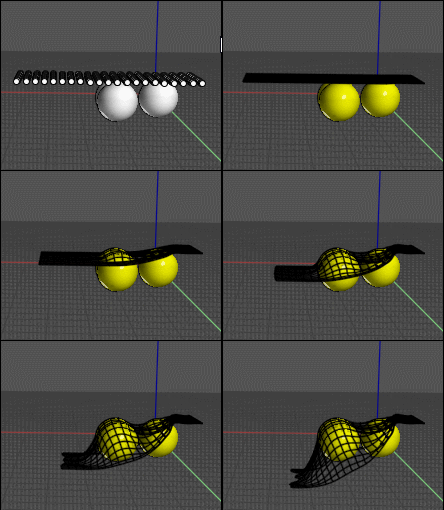
Max's Cloth 2017 appears to be working in V4 and V5, but sphere drape did not work in either V4 or new V5. Maybe I did not set up correctly...
Edit: Drape does work, with proper usage. Thankyou Pilou.
- Brian
Just select for example a line(s) of points then click the Sphere(s) then Done, Done...!
Don't take "small" spheres!
Take Wind 90,90,0 Physics 5,1,20,10 Constraints 14,1,1,8
Here with the V5 beta
Not sure if this is a bug, or if I'm just missing the logic here:
Create 3 boxes - boxes 1, 2, and 3.
Select them and Group.
Click on box 1 to select that individual box
Drag copy or use the copy tool to create a copy of box 1 = box 4.
Deselect
Selecting in the Objects browser now shows:
The first group I created - originally containing boxes 1, 2 & 3 - now contain boxes 2, 3 & 4.
A new group containing just box 3.