V5 Beta test
 1-17  18-37  38-57  58-77  78-84

Previous
Next
 From:  Michael Gibson
10653.18 In reply to 10653.1 
Hi Phiro,

re: Ctrl+A / select all not highlighting group - I just rolled out a new Apr-10 version and I think this should be fixed now. Please let me know if it works ok for you now.

Thanks, - Michael
  Reply Reply More Options
Post Options
Reply as PM Reply as PM
Print Print
Mark as unread Mark as unread
Relationship Relationship
IP Logged

Previous
Next
 From:  Michael Gibson
10653.19 In reply to 10653.11 
@ Wayne,

re:
> The 'ReconstructCurve' script is run and the V5 beta program closes without warning.

I just rolled out a new Apr-10 version and I think this should be fixed now, can you please let me know if it works ok now?

Thanks, - Michael
  Reply Reply More Options
Post Options
Reply as PM Reply as PM
Print Print
Mark as unread Mark as unread
Relationship Relationship
IP Logged

Previous
Next
 From:  Michael Gibson
10653.20 In reply to 10653.12 
@ Brian,

re:
> The following scripts do not work in v5. v5 closes.

Should hopefully be fixed in new Apr-10 version I just put up.

Thanks, - Michael
  Reply Reply More Options
Post Options
Reply as PM Reply as PM
Print Print
Mark as unread Mark as unread
Relationship Relationship
IP Logged

Previous
Next
 From:  Michael Gibson
10653.21 In reply to 10653.16 
@Marco,

re:
> groups gone mental..

Should be fixed in new Apr-10 version I just put up.

The bug was when trying to assign a group to be a child of itself. That case should just do nothing now.

Thanks, - Michael
  Reply Reply More Options
Post Options
Reply as PM Reply as PM
Print Print
Mark as unread Mark as unread
Relationship Relationship
IP Logged

Previous
Next
 From:  wayne hill (WAYNEHILL5202)
10653.22 In reply to 10653.19 
Hi Michael,

The V5 Beta Apr-10-2022 fixed the issue with the 'ReconstructCurve' script error.

Thank you,
Wayne
  Reply Reply More Options
Post Options
Reply as PM Reply as PM
Print Print
Mark as unread Mark as unread
Relationship Relationship
IP Logged

Previous
Next
 From:  bemfarmer
10653.23 In reply to 10653.20 
The 8 scripts are working in Apr-10 beta.
(Cloth was 2014 version, and did not work in V4 either)
Max's Cloth 2017 appears to be working in V4 and V5, but sphere drape did not work in either V4 or new V5. Maybe I did not set up correctly...
Edit: Drape does work, with proper usage. Thankyou Pilou.
- Brian

EDITED: 11 Apr 2022 by BEMFARMER

  Reply Reply More Options
Post Options
Reply as PM Reply as PM
Print Print
Mark as unread Mark as unread
Relationship Relationship
IP Logged

Previous
Next
 From:  Frenchy Pilou (PILOU)
10653.24 In reply to 10653.23 
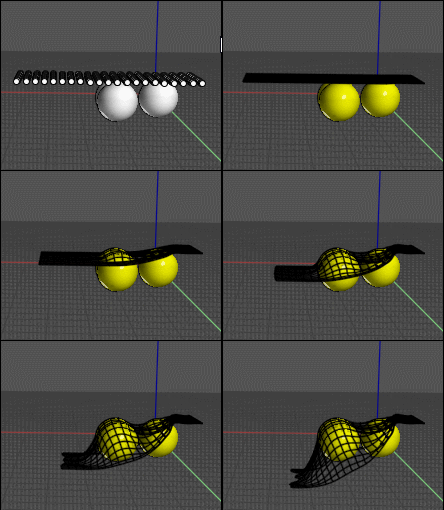
Cloth works fine!V3, V4, V5 ;)

Just select for example a line(s) of points then click the Sphere(s) then Done, Done...!
Don't take "small" spheres!
Take Wind 90,90,0 Physics 5,1,20,10 Constraints 14,1,1,8
Here with the V5 beta


EDITED: 11 Apr 2022 by PILOU

  Reply Reply More Options
Post Options
Reply as PM Reply as PM
Print Print
Mark as unread Mark as unread
Relationship Relationship
IP Logged

Previous
Next
 From:  Viewbyte
10653.25 
Not sure if this is a bug, or if I'm just missing the logic here:

Create 3 boxes - boxes 1, 2, and 3.
Select them and Group.
Click on box 1 to select that individual box
Drag copy or use the copy tool to create a copy of box 1 = box 4.
Deselect

Selecting in the Objects browser now shows:

The first group I created - originally containing boxes 1, 2 & 3 - now contain boxes 2, 3 & 4.
A new group containing just box 3.
  Reply Reply More Options
Post Options
Reply as PM Reply as PM
Print Print
Mark as unread Mark as unread
Relationship Relationship
IP Logged

Previous
Next
 From:  bemfarmer
10653.26 In reply to 10653.24 
Thank you Pilou.
Drape does work, with proper usage.
- Brian
  Reply Reply More Options
Post Options
Reply as PM Reply as PM
Print Print
Mark as unread Mark as unread
Relationship Relationship
IP Logged

Previous
Next
 From:  Phiro
10653.27 In reply to 10653.10 
My settings (Options > General > Unit system)


Attachments:

  Reply Reply More Options
Post Options
Reply as PM Reply as PM
Print Print
Mark as unread Mark as unread
Relationship Relationship
IP Logged

Previous
Next
 From:  Phiro
10653.28 In reply to 10653.18 
Hi Michael


>> re: Ctrl+A / select all not highlighting group - I just rolled out a new Apr-10 version and I think this should be fixed now. Please let me know if it works ok for you now.

Fixed !
Perfect !

Thanks,
  Reply Reply More Options
Post Options
Reply as PM Reply as PM
Print Print
Mark as unread Mark as unread
Relationship Relationship
IP Logged

Previous
Next
 From:  Death
10653.29 In reply to 10653.20 
April 10th release:


Groups and locked objects don't play well with each other:

Make some objects, group 2 of them, then select one of the group objects and lock it. Deselect all, select the one in the group that wasn't locked, click and drag. The other locked group member moves with it....
  Reply Reply More Options
Post Options
Reply as PM Reply as PM
Print Print
Mark as unread Mark as unread
Relationship Relationship
IP Logged

Previous
Next
 From:  Michael Gibson
10653.30 In reply to 10653.29 
Hi Death,

re:
> Groups and locked objects don't play well with each other:
>
> Make some objects, group 2 of them, then select one of the group objects and lock
> it. Deselect all, select the one in the group that wasn't locked, click and drag. The
> other locked group member moves with it....

This current behavior is correct. In your step where you click and drag, it's the group that is being selected and dragged and if the group is selected then that means that the entire group object will be dragged.

That's one of the main things that Groups is for, to make a set of objects all transform together as one unit.

If you want to move only the one object you'll need to do a "drill in" selection clicking on it so just that sub-object is selected and not the entire group.

It's similar behavior as with BRep sub objects. In v4 if you draw a box and select an edge of the box and lock it, if you then drag the box the locked edge is not left behind, it goes along with the box.

Locking a sub-object prevents it from being targeted individually for selection, it does not stop it from being transformed if its parent object is being transformed.

- Michael
  Reply Reply More Options
Post Options
Reply as PM Reply as PM
Print Print
Mark as unread Mark as unread
Relationship Relationship
IP Logged

Previous
Next
 From:  Michael Gibson
10653.31 In reply to 10653.27 
@ Phiro,

re: SVG units problems -

> My settings (Options > General > Unit system)

I'm still not able to reproduce the problem.

I'll make a separate discussion thread for this SVG units issue so we can continue discussing it without being mixed in with other messages here.

- Michael
  Reply Reply More Options
Post Options
Reply as PM Reply as PM
Print Print
Mark as unread Mark as unread
Relationship Relationship
IP Logged

Previous
Next
 From:  Michael Gibson
10653.32 In reply to 10653.25 
Hi Viewbyte,

re: copy sub object out of a group

> Not sure if this is a bug, or if I'm just missing the logic here:

Looks like a bug, it looks like copying sub objects out of the group is messed up right now. I'm pretty sure I had it working ok at one point but it probably got messed up when tuning groups processing in some other command.

I'll dig in to it and see where it got messed up.

Thanks, - Michael
  Reply Reply More Options
Post Options
Reply as PM Reply as PM
Print Print
Mark as unread Mark as unread
Relationship Relationship
IP Logged

Previous
Next
 From:  Death
10653.33 In reply to 10653.30 
I wasn't sure that this was the intended behavior, but yes, that makes sense and will work well either way.

Maybe a button: "Exclude locked objects" would be fine to select the group and NOT move the locked ones. That way one doesn't have to select all the non locked ones manually.
  Reply Reply More Options
Post Options
Reply as PM Reply as PM
Print Print
Mark as unread Mark as unread
Relationship Relationship
IP Logged

Previous
Next
 From:  Michael Gibson
10653.34 In reply to 10653.33 
Hi Death, I guess the question I have is if you want the locked objects to not move with the rest of the group, then why is it that you want them to be in the same group as the other objects?

If they are not meant to move together then they probably shouldn't be in the same group object since moving things together is one of the main things that groups are focused on doing.

There is probably room for an additional type of hierarchical organizing method like "folders" that would be a sort of looser connection between the objects and not make them behave as a single compound object like groups are.

You can get part of that type of behavior currently by the pre-v5 "grouping" mechanism of having a set of objects with the same name.

- Michael
  Reply Reply More Options
Post Options
Reply as PM Reply as PM
Print Print
Mark as unread Mark as unread
Relationship Relationship
IP Logged

Previous
Next
 From:  Death
10653.35 In reply to 10653.34 
Well, sometimes you have group and you want to move everything in it, BUT one or more objects, they might have to stay stationary.

Imagine a hinged joint, where you want to move the group that includes it, around the hinge, but not the hinge, or it's hinge pieces...

There are many more reasons to have a group's objects move without the locked objects in it.

My suggestion would make things easier, that's all.
  Reply Reply More Options
Post Options
Reply as PM Reply as PM
Print Print
Mark as unread Mark as unread
Relationship Relationship
IP Logged

Previous
Next
 From:  Michael Gibson
10653.36 In reply to 10653.35 
Hi Death,

re:
> Well, sometimes you have group and you want to move everything in it,
> BUT one or more objects, they might have to stay stationary.
>
> Imagine a hinged joint, where you want to move the group that includes it, around the hinge,
> but not the hinge, or it's hinge pieces...

You should probably set this up as having sub groups - have the pieces you want
to move in a sub group that's a child of the main group. When you want to move them and
leave other pieces stationary select the sub group and not the whole parent group.

Locking has to do with selection, not for marking things as stationary.

- Michael
  Reply Reply More Options
Post Options
Reply as PM Reply as PM
Print Print
Mark as unread Mark as unread
Relationship Relationship
IP Logged

Previous
Next
 From:  Death
10653.37 In reply to 10653.36 
That would work.

I am thinking of a messy layout of groups and subgroups though.

A robotic hand with joints and wrist on an arm on a body etc. etc.

I'd rather lock on an element and rotate for ex. the rest about it without having to select a ton of objects to do it.

Just my 5 cents worth. Either way it is a great thing to have grouping, very exiting. All the latest additions (like dimension, themes etc.) made me love Moi even more.

Keep up the good work, can't wait to see what other goodies you are going to come up with. (better fillets maybe?)

Thanx!
  Reply Reply More Options
Post Options
Reply as PM Reply as PM
Print Print
Mark as unread Mark as unread
Relationship Relationship
IP Logged
 

Reply to All Reply to All


Show messages:  1-17  18-37  38-57  58-77  78-84