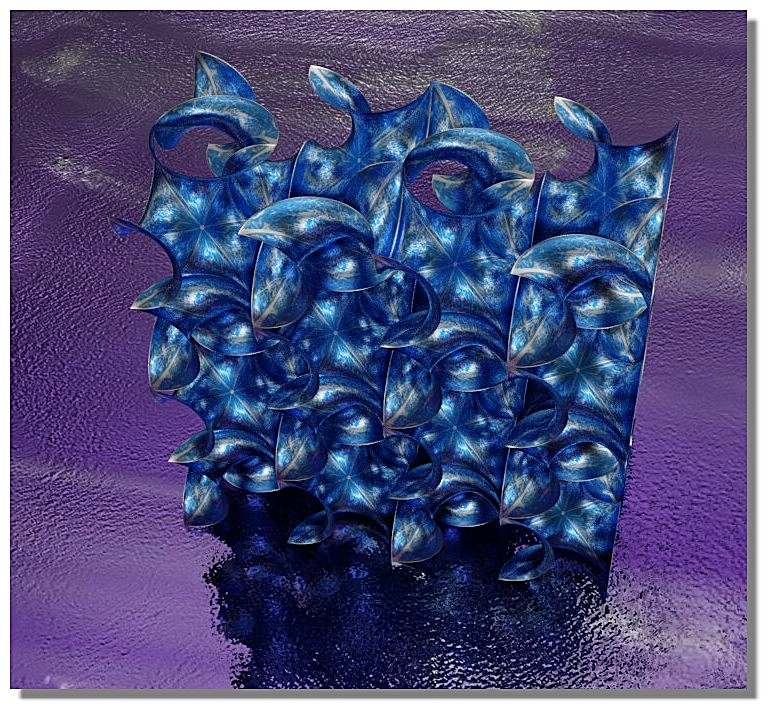
Gyroid attempts
 1-5  6-22

Previous
Next
 From:  Michael Gibson
10386.6 In reply to 10386.5 
Hi pafurijaz, it's difficult to thicken an open surface that is not all smooth because the offsets of each surface do not naturally touch each other and need to be extended and intersected with each other. The geometry library that MoI currently uses is not good at handling this.

if you use Edit > Separate to break it into individual surfaces then each of those can be thickened using the Offset command. They won't form a seamless result though.

Probably your best bet for making a thickened result would be to model the offset of the Gyroid using the same kind of technique you used for constructing the first surface.

Otherwise to get it to offset in MoI would require the surfaces to be smooth to each other instead of having creases.

- Michael
  Reply Reply More Options
Post Options
Reply as PM Reply as PM
Print Print
Mark as unread Mark as unread
Relationship Relationship
IP Logged

Previous
Next
 From:  pafurijaz
10386.7 In reply to 10386.6 
Ok thanks Micheal. :)
  Reply Reply More Options
Post Options
Reply as PM Reply as PM
Print Print
Mark as unread Mark as unread
Relationship Relationship
IP Logged

Previous
Next
 From:  pafurijaz
10386.8 
Hi, today I found the way to do it with NSided command, and I had no problems, it is not perfect in the edges, but it no longer has sharp edges in the center, I will try with other curves to eliminate even the corners that still have some problems.


  Reply Reply More Options
Post Options
Reply as PM Reply as PM
Print Print
Mark as unread Mark as unread
Relationship Relationship
IP Logged

Previous
Next
 From:  Ken (OKURO)
10386.9 
One way to to get a smooth surface is to make use of the Soap Skin & Bubble Plugin (SketchUp). It generates a very good minimal surface approximation within a given boundary. More info: https://extensions.sketchup.com/extension/c8d49537-51db-40a7-ac0e-474a244eb525/soap-skin-bubble

regards
Ken
  Reply Reply More Options
Post Options
Reply as PM Reply as PM
Print Print
Mark as unread Mark as unread
Relationship Relationship
IP Logged

Previous
Next
 From:  pafurijaz
10386.10 In reply to 10386.9 
Thanks for this link, but sketchup is a polygon mesh modeler, and what it does I can also do in Blender, and besides, I'm not going to buy the program for it and besides it doesn't work with Linux. 
My intent is to do it with nurbs surfaces, and furthermore these surfaces that are shown in the examples are also very simple to do with Moi3D. Thanks anyway
  Reply Reply More Options
Post Options
Reply as PM Reply as PM
Print Print
Mark as unread Mark as unread
Relationship Relationship
IP Logged

Previous
Next
 From:  Frenchy Pilou (PILOU)
10386.11 
For info there is better than Soap Skin Bubble for sketchup ;)
Try the free Ferrari Tensile structure (always for Sketchup)
http://www.sketchando.net/descargas/plugins/FerrariSketch1.1v2015.rar


What is bad in your Gyroid method with Nside ?

Seems perfect!
https://moiscript.weebly.com/uploads/3/9/3/8/3938813/gyroid.3dm


EDITED: 6 Jul 2021 by PILOU

  Reply Reply More Options
Post Options
Reply as PM Reply as PM
Print Print
Mark as unread Mark as unread
Relationship Relationship
IP Logged

Previous
Next
 From:  pafurijaz
10386.12 In reply to 10386.11 
Nothing with that done NSide, but it has a deformation that I would like to correct, and also find a way to make the various patches continuous between them, congratulations for the result Pilou you have done a nice Rendering.
  Reply Reply More Options
Post Options
Reply as PM Reply as PM
Print Print
Mark as unread Mark as unread
Relationship Relationship
IP Logged

Previous
Next
 From:  Ken (OKURO)
10386.13 In reply to 10386.11 
Many thanks for your Ferrari Test ! Great !!! But I could not install the plugin, I think development was stopped with
SketchUp v8, which version did you use ?
Regards
Ken
p.s.: https://forums.sketchup.com/t/a-problem-installing-ferrarisketch-plugin/40171
  Reply Reply More Options
Post Options
Reply as PM Reply as PM
Print Print
Mark as unread Mark as unread
Relationship Relationship
IP Logged

Previous
Next
 From:  Frenchy Pilou (PILOU)
10386.14 In reply to 10386.13 
Mine works fine in the free SketchUp 2017 Make :)
I don't know for upper versions...


Curves must be "closed"

PS I have seen the link above works for 2021! :)
for convert a file to "rbz" just zip your folders/files say ferrari.zip and rename it ferrari.rbz
for more easy install!

So put the folder FerrariSketch and file Ferrari.rb inside a folder Ferrari
Zip it, rename it Ferrari.rbz

EDITED: 7 Jul 2021 by PILOU

  Reply Reply More Options
Post Options
Reply as PM Reply as PM
Print Print
Mark as unread Mark as unread
Relationship Relationship
IP Logged

Previous
Next
 From:  Ken (OKURO)
10386.15 In reply to 10386.14 
1000 x very many thanks ! I will go ahead along your lines.....Great info !!!
Best regards
Ken
  Reply Reply More Options
Post Options
Reply as PM Reply as PM
Print Print
Mark as unread Mark as unread
Relationship Relationship
IP Logged

Previous
Next
 From:  BurrMan
10386.16 In reply to 10386.12 

""""find a way to make the various patches continuous between them"""""

Thats the kicker. Thats why that guys nx model said it "wasnt perfect"....

I created the patch in fusion 360 (autodesk gobbled up tools that could do it), but any of the tangency and curvature options would crash the program on the second or third edge pick. The only result was to choose "connected", which is the same as MoI's nsided patch....

The "not perfect" from nx is because the entire surface has to be changed and restructured to achieve the tangency in all directions... forgetting about that bounds center point...

You could do it with alias! Surely they haven't removed the functionality from there...

  Reply Reply More Options
Post Options
Reply as PM Reply as PM
Print Print
Mark as unread Mark as unread
Relationship Relationship
IP Logged

Previous
Next
 From:  pafurijaz
10386.17 In reply to 10386.16 
It will never be perfect, in my opinion not even with Alias, also I have seen them that many go crazy to get surface tangent to an other and sometimes for a simple bevel they take half an hour or more, and they are professionals users, however I found a way to do it with FreeCAD and uses only one nurbs patch, a totally different method from Moi3D but I am already satisfied because I managed to do it with a decent transition now, with the NSIDE command, before it could not execute the command without surfaces.
Below the try with FreeCAD and the control point in Moi3D it's a bit messy


  Reply Reply More Options
Post Options
Reply as PM Reply as PM
Print Print
Mark as unread Mark as unread
Relationship Relationship
IP Logged

Previous
Next
 From:  Ken (OKURO)
10386.18 In reply to 10386.14 
Many thanks Pilou for your input. I was able to install FerrariSketch on WIN 10 - SketchUp 2021
but did not yet succeed to generate the gyroid surface. I think it would help a lot if you could advise me on your
input data with your set up, namely for:
Installing pressure/Warp/Weft tension ratio/Warp orientation/Default edgecable tension/Subdivisions/Accuracy level ???
I assume that the closed boundary has to be treated as rigid ?
By the way this link helped me a great deal to overcome the installation problems !:
https://sketchucation.com/forums/viewtopic.php?f=323&t=32380&p=286311

big thanks for your helping hand
regards
Ken
  Reply Reply More Options
Post Options
Reply as PM Reply as PM
Print Print
Mark as unread Mark as unread
Relationship Relationship
IP Logged

Previous
Next
 From:  Frenchy Pilou (PILOU)
10386.19 In reply to 10386.18 
Yes seems the Ferrari has some little difficulties with this circonvoluted Gyroïd! :)
---
Pilou
Is beautiful that please without concept!
My Moi French Site My Gallery My MagicaVoxel Gallery
  Reply Reply More Options
Post Options
Reply as PM Reply as PM
Print Print
Mark as unread Mark as unread
Relationship Relationship
IP Logged

Previous
Next
 From:  Ken (OKURO)
10386.20 In reply to 10386.19 
Many thanks Pilou: would you like to post your gyroid solution ?
Regards
Ken
  Reply Reply More Options
Post Options
Reply as PM Reply as PM
Print Print
Mark as unread Mark as unread
Relationship Relationship
IP Logged

Previous
Next
 From:  Frenchy Pilou (PILOU)
10386.21 In reply to 10386.20 
Little difficulties = no success! (with some number of trys, change parameters etc...

Even with only 2 arcs... :)

EDITED: 11 Jul 2021 by PILOU

  Reply Reply More Options
Post Options
Reply as PM Reply as PM
Print Print
Mark as unread Mark as unread
Relationship Relationship
IP Logged

Previous
 From:  Ken (OKURO)
10386.22 In reply to 10386.21 
Many thanks Pilou, I didn't succeed either with FerrariSketch but the Soap Bubble plugin
worked perfectly, imho...
attached a screenshot + dxf-file of the closed boundary for further testing

regards
Ken


  Reply Reply More Options
Post Options
Reply as PM Reply as PM
Print Print
Mark as unread Mark as unread
Relationship Relationship
IP Logged
 

Reply to All Reply to All


Show messages:  1-5  6-22