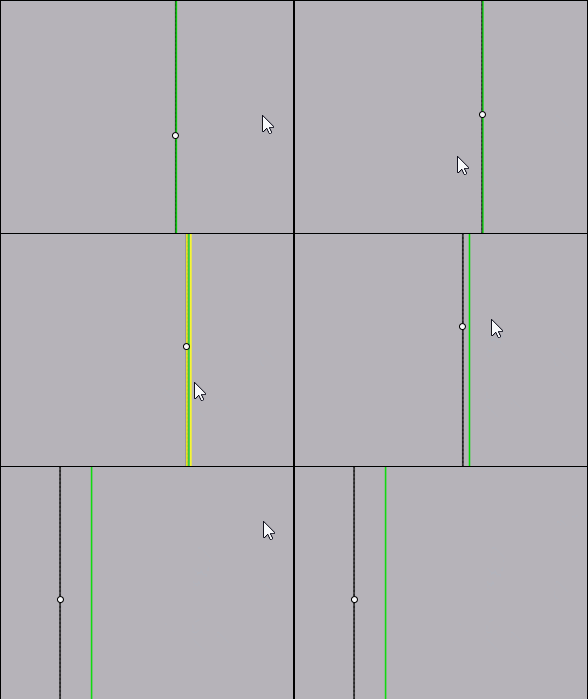
Does Curve 3 points show Tangent mode?
 1-2  3-22  23-42  43-62

Previous
Next
 From:  Frenchy Pilou (PILOU)
10300.43 
Seems if i try to put a point on a "tangency"

point choices the vertical line and there is no real contact tangency?
Does this normal ?
it's a mega super ultra zoom :)
The green arc never touch the black vertical... and don't overpass it, (that is good :)

https://moiscript.weebly.com/uploads/3/9/3/8/3938813/arc_tangency.3dm

EDITED: 5 May 2021 by PILOU

  Reply Reply More Options
Post Options
Reply as PM Reply as PM
Print Print
Mark as unread Mark as unread
Relationship Relationship
IP Logged

Previous
Next
 From:  BurrMan
10300.44 In reply to 10300.43 
Hi Frenchy,
I think that is just display, or even an accuracy setting, that is way beyond normal.... So MoI is giving the snap/pick as the same.

Try draw a line, then measure it... It is still beyond the decimal precision selectable in Moi.

Hand Drawn and snapped objects equal the same size.

So My Conclusion is just some abnormally unrealistic Zoom will produce odd things to look at..... :o
  Reply Reply More Options
Post Options
Reply as PM Reply as PM
Print Print
Mark as unread Mark as unread
Relationship Relationship
IP Logged

Previous
Next
 From:  ed (EDDYF)
10300.45 In reply to 10300.44 
Agree - Most likely a math precision issue or artifact of the graphics engine.

Draw a square, copy it and assign a unique color to each. Use the alignment tool to left align one square against the other.

Zoom in to the sub-atomic level. There is a gap between the lines. Good enough for me :)

Ed Ferguson
  Reply Reply More Options
Post Options
Reply as PM Reply as PM
Print Print
Mark as unread Mark as unread
Relationship Relationship
IP Logged

Previous
Next
 From:  BurrMan
10300.46 In reply to 10300.45 
This is a nice read. You can skip down to the "position" bullet...

https://www.rhino3d.com/features/accuracy/
  Reply Reply More Options
Post Options
Reply as PM Reply as PM
Print Print
Mark as unread Mark as unread
Relationship Relationship
IP Logged

Previous
Next
 From:  Michael Gibson
10300.47 In reply to 10300.44 
Yes at extreme zoom you'll start to see visible evidence of how floating point numbers work. Basically there are little teeny tiny jumps between representable numbers.

- Michael
  Reply Reply More Options
Post Options
Reply as PM Reply as PM
Print Print
Mark as unread Mark as unread
Relationship Relationship
IP Logged

Previous
Next
 From:  BurrMan
10300.48 In reply to 10300.47 
So MoI needs a sub-atomic, Nano button, so i can draw fingers on amoeba!!!

(Please read as a joke)
  Reply Reply More Options
Post Options
Reply as PM Reply as PM
Print Print
Mark as unread Mark as unread
Relationship Relationship
IP Logged

Previous
Next
 From:  Psygorn (DRILLBIT)
10300.49 In reply to 10300.32 
Hello folks :)

Any Simple Solution to this problem?
  Reply Reply More Options
Post Options
Reply as PM Reply as PM
Print Print
Mark as unread Mark as unread
Relationship Relationship
IP Logged

Previous
Next
 From:  BurrMan
10300.50 In reply to 10300.49 
Hi Drillbit,

""""""Any Simple Solution to this problem?

Are you referring to this display thing we've been discussing?

If so, the answer is "dont zoom in to

.0000000000000000000000000314

And expect good results...."

We haven't really been discussing a "problem" but more of an artifact of a particular unusual use....
  Reply Reply More Options
Post Options
Reply as PM Reply as PM
Print Print
Mark as unread Mark as unread
Relationship Relationship
IP Logged

Previous
Next
 From:  Psygorn (DRILLBIT)
10300.51 In reply to 10300.50 
Hi :)

No, I am referring to a new problem! see the message I replied to! (message 10300.32 )

And yes! I understand ultra zoom may not be reliable. However I interpret the tiny gap between two tangent lines/curves as a sign of having tangent - in ultra zooms-
  Reply Reply More Options
Post Options
Reply as PM Reply as PM
Print Print
Mark as unread Mark as unread
Relationship Relationship
IP Logged

Previous
Next
 From:  BurrMan
10300.52 In reply to 10300.51 
""""""No, I am referring to a new problem! see the message I replied to! (message 10300.32 )"""""

Hi Drillbit,
I understand. Sorry about the distraction....
  Reply Reply More Options
Post Options
Reply as PM Reply as PM
Print Print
Mark as unread Mark as unread
Relationship Relationship
IP Logged

Previous
Next
 From:  Michael Gibson
10300.53 In reply to 10300.32 
Hi Psygorn,

re:
> Hello guys, I have crossed upon new problem! You might be able to help :)
>
> I tried to create Tangent curve to red line at Point_1 and the green circle.

How about this - mirror green circle around magenta line, you can then use Circle or Arc tangent command, with the 2 green curves as the first tangent objects and third pick either snapping to Point_1 or getting a third tangent to the red line will work like this:


- Michael
  Reply Reply More Options
Post Options
Reply as PM Reply as PM
Print Print
Mark as unread Mark as unread
Relationship Relationship
IP Logged

Previous
Next
 From:  Psygorn (DRILLBIT)
10300.54 In reply to 10300.53 
Oh wooow! Love that Genius method of yours :)

Again I would be happy to see it built in, is it possible? (No need to say I love your Genius method! :)
  Reply Reply More Options
Post Options
Reply as PM Reply as PM
Print Print
Mark as unread Mark as unread
Relationship Relationship
IP Logged

Previous
Next
 From:  Psygorn (DRILLBIT)
10300.55 In reply to 10300.52 
Hi, and tanx :)

But Michael already solved the problem! :)
  Reply Reply More Options
Post Options
Reply as PM Reply as PM
Print Print
Mark as unread Mark as unread
Relationship Relationship
IP Logged

Previous
Next
 From:  Michael Gibson
10300.56 In reply to 10300.54 
Hi Psygorn, I'm glad that method works for you!

How would you be expecting this one to work as a "built in" option?

- Michael
  Reply Reply More Options
Post Options
Reply as PM Reply as PM
Print Print
Mark as unread Mark as unread
Relationship Relationship
IP Logged

Previous
Next
 From:  Frenchy Pilou (PILOU)
10300.57 
<<< .0000000000000000000000000314

seems number of Pi! :)
---
Pilou
Is beautiful that please without concept!
My Moi French Site My Gallery My MagicaVoxel Gallery
  Reply Reply More Options
Post Options
Reply as PM Reply as PM
Print Print
Mark as unread Mark as unread
Relationship Relationship
IP Logged

Previous
Next
 From:  Psygorn (DRILLBIT)
10300.58 In reply to 10300.56 
Hi and thank you.

I meant it would be good if I could draw a curve and then have it tangent to both the desired point of the line and the circle.

I love those tricks- mirroring the circle and then draw the Circle Tan- however, I think if there was a method with which user/s could create such curve without applying those tricks that would be awesome. :)
  Reply Reply More Options
Post Options
Reply as PM Reply as PM
Print Print
Mark as unread Mark as unread
Relationship Relationship
IP Logged

Previous
Next
 From:  Psygorn (DRILLBIT)
10300.59 In reply to 10300.57 
Yes! I would like to know from where BurrMan took that number?

suspiciously resembling Pi!
  Reply Reply More Options
Post Options
Reply as PM Reply as PM
Print Print
Mark as unread Mark as unread
Relationship Relationship
IP Logged

Previous
Next
 From:  BurrMan
10300.60 In reply to 10300.59 

περιϕέρεια (peripheral)

We've been drawing circles!

  Reply Reply More Options
Post Options
Reply as PM Reply as PM
Print Print
Mark as unread Mark as unread
Relationship Relationship
IP Logged

Previous
Next
 From:  Larry Fahnoe (FAHNOE)
10300.61 In reply to 10300.60 
Well, better than walking in circles! ;-}

--Larry
  Reply Reply More Options
Post Options
Reply as PM Reply as PM
Print Print
Mark as unread Mark as unread
Relationship Relationship
IP Logged

Previous
 From:  Michael Gibson
10300.62 In reply to 10300.58 
hi Psygorn,

re:
> I meant it would be good if I could draw a curve and then have it tangent to
> both the desired point of the line and the circle.

It's not really good for something that is used very rarely to have a special command for it because that's how the UI gets very bloated and unwieldy over time.

So it would need to fit in to an existing command. Currently I think it might be problematic to try and fit this into the regular circle/arc tangent command because there isn't currently a way in the command to specify tangent to a curve and also through a point on the same curve.

- Michael
  Reply Reply More Options
Post Options
Reply as PM Reply as PM
Print Print
Mark as unread Mark as unread
Relationship Relationship
IP Logged
 

Reply to All Reply to All


Show messages:  1-2  3-22  23-42  43-62