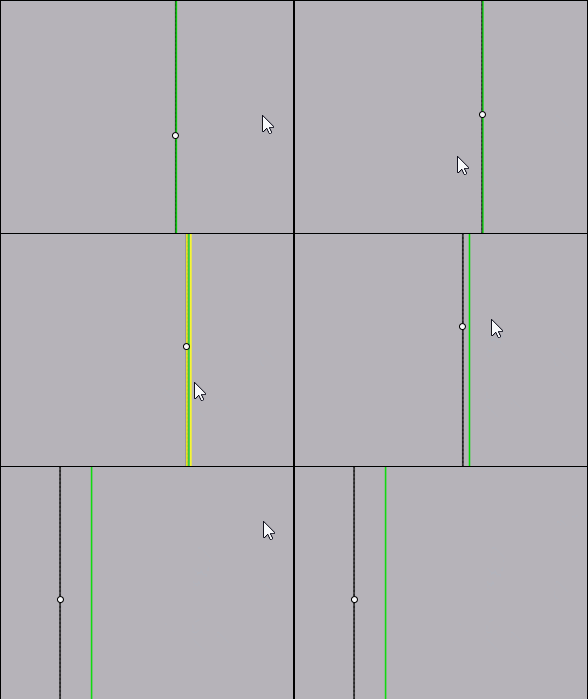
Does Curve 3 points show Tangent mode?
 1-6  7-26  27-46  47-62

Previous
Next
 From:  ed (EDDYF)
10300.27 In reply to 10300.26 
Nice solution Martin!
  Reply Reply More Options
Post Options
Reply as PM Reply as PM
Print Print
Mark as unread Mark as unread
Relationship Relationship
IP Logged

Previous
Next
 From:  christian (CHRI)
10300.28 In reply to 10300.26 
hi Martin

Nice vidéo; Very Clever !

EDITED: 5 May 2021 by CHRI

Image Attachments:
Size: 76 KB, Downloaded: 47 times, Dimensions: 1418x789px
  Reply Reply More Options
Post Options
Reply as PM Reply as PM
Print Print
Mark as unread Mark as unread
Relationship Relationship
IP Logged

Previous
Next
 From:  Psygorn (DRILLBIT)
10300.29 In reply to 10300.24 
Hi Ed,

I was suspicious about your solution. and yes I think PAQUICINNO's method works better maybe! ( yet it needs to be proved mathematically)

And I checked something when there is a line tangent to a circle and when you zoom in on atomic scale you see that there is a tiny gap between tangent line and the circle - which I believe it is normal to see such thing at such microscopic zooms - but there are no several crossings!

And feel free to check what I said in the attached file.
Attachments:

  Reply Reply More Options
Post Options
Reply as PM Reply as PM
Print Print
Mark as unread Mark as unread
Relationship Relationship
IP Logged

Previous
Next
 From:  Psygorn (DRILLBIT)
10300.30 In reply to 10300.26 
Thanks Martin :)

Your trick was genius!
  Reply Reply More Options
Post Options
Reply as PM Reply as PM
Print Print
Mark as unread Mark as unread
Relationship Relationship
IP Logged

Previous
Next
 From:  Psygorn (DRILLBIT)
10300.31 In reply to 10300.14 
Hi Michael,

Could we expect to have such feature in Moi? Should I make a request for it in the wish list?

Note: Martin provided a simple trick which works! I know that. However, I still believe a built in feature would be nice!
  Reply Reply More Options
Post Options
Reply as PM Reply as PM
Print Print
Mark as unread Mark as unread
Relationship Relationship
IP Logged

Previous
Next
 From:  Psygorn (DRILLBIT)
10300.32 
Hello guys, I have crossed upon new problem! You might be able to help :)

I tried to create Tangent curve to red line at Point_1 and the green circle.

( I know the center of the circle which is tangent to red line at Point_1 would fall on the Magenta line)

I was able to draw Blue curve using "Arc Tan" but it was by try and error method I have also tried to use Martin's method but in this problem because the blue curve should be tangent to red line at Point_1 I faced difficulties using Martin's method.

I'd appreciate any help :)

  Reply Reply More Options
Post Options
Reply as PM Reply as PM
Print Print
Mark as unread Mark as unread
Relationship Relationship
IP Logged

Previous
Next
 From:  Michael Gibson
10300.33 In reply to 10300.31 
Hi Psygorn,

re:
> Could we expect to have such feature in Moi? Should I make a request for it in the wish list?

I'll see about adding it into the circle and arc tangent commands.

- Michael
  Reply Reply More Options
Post Options
Reply as PM Reply as PM
Print Print
Mark as unread Mark as unread
Relationship Relationship
IP Logged

Previous
Next
 From:  Psygorn (DRILLBIT)
10300.34 In reply to 10300.33 
Tanx. :)
  Reply Reply More Options
Post Options
Reply as PM Reply as PM
Print Print
Mark as unread Mark as unread
Relationship Relationship
IP Logged

Previous
Next
 From:  BurrMan
10300.35 In reply to 10300.33 
So I have a problem with Martins video. Looking for some help.

I must be misinterpreting a click or a drag.

I make the line and 2 circles. Then offset the line the distance of circles.

Start the tangent circle command and select on first circle.

Second click on line ends command for me. It seems Martins video gets a second point click there, then third pick on second circle is a diameter pick for the tan snap...

What have I missed?
  Reply Reply More Options
Post Options
Reply as PM Reply as PM
Print Print
Mark as unread Mark as unread
Relationship Relationship
IP Logged

Previous
Next
 From:  Michael Gibson
10300.36 In reply to 10300.35 
Hi Burr, can you please post a .3dm file with your curves set up that isn't working as expected?

- Michael
  Reply Reply More Options
Post Options
Reply as PM Reply as PM
Print Print
Mark as unread Mark as unread
Relationship Relationship
IP Logged

Previous
Next
 From:  BurrMan
10300.37 In reply to 10300.36 
Here's the file
Attachments:

  Reply Reply More Options
Post Options
Reply as PM Reply as PM
Print Print
Mark as unread Mark as unread
Relationship Relationship
IP Logged

Previous
Next
 From:  BurrMan
10300.38 In reply to 10300.37 
I must be doing something wrong here...

  Reply Reply More Options
Post Options
Reply as PM Reply as PM
Print Print
Mark as unread Mark as unread
Relationship Relationship
IP Logged

Previous
Next
 From:  Michael Gibson
10300.39 In reply to 10300.37 
Hi Burr, it's because everything isn't on the same plane, if you go to the Top view and get them all placed on the same plane then you should be ok.

- Michael
  Reply Reply More Options
Post Options
Reply as PM Reply as PM
Print Print
Mark as unread Mark as unread
Relationship Relationship
IP Logged

Previous
Next
 From:  BurrMan
10300.40 In reply to 10300.39 
Ooooofff.

Thanks Michael..
  Reply Reply More Options
Post Options
Reply as PM Reply as PM
Print Print
Mark as unread Mark as unread
Relationship Relationship
IP Logged

Previous
Next
 From:  Frenchy Pilou (PILOU)
10300.41 
If I have good understood the trick of Martin is brilliant of simplicity! Bravo!
LIttle variation

Same start with the Tangent circle...
I just made an Offset of the circle :)
(seems this time at any zoom there is no overpass of the arc! :)

EDITED: 5 May 2021 by PILOU

  Reply Reply More Options
Post Options
Reply as PM Reply as PM
Print Print
Mark as unread Mark as unread
Relationship Relationship
IP Logged

Previous
Next
 From:  Psygorn (DRILLBIT)
10300.42 In reply to 10300.41 
Yes! There is no overpass of the arc! :)
  Reply Reply More Options
Post Options
Reply as PM Reply as PM
Print Print
Mark as unread Mark as unread
Relationship Relationship
IP Logged

Previous
Next
 From:  Frenchy Pilou (PILOU)
10300.43 
Seems if i try to put a point on a "tangency"

point choices the vertical line and there is no real contact tangency?
Does this normal ?
it's a mega super ultra zoom :)
The green arc never touch the black vertical... and don't overpass it, (that is good :)

https://moiscript.weebly.com/uploads/3/9/3/8/3938813/arc_tangency.3dm

EDITED: 5 May 2021 by PILOU

  Reply Reply More Options
Post Options
Reply as PM Reply as PM
Print Print
Mark as unread Mark as unread
Relationship Relationship
IP Logged

Previous
Next
 From:  BurrMan
10300.44 In reply to 10300.43 
Hi Frenchy,
I think that is just display, or even an accuracy setting, that is way beyond normal.... So MoI is giving the snap/pick as the same.

Try draw a line, then measure it... It is still beyond the decimal precision selectable in Moi.

Hand Drawn and snapped objects equal the same size.

So My Conclusion is just some abnormally unrealistic Zoom will produce odd things to look at..... :o
  Reply Reply More Options
Post Options
Reply as PM Reply as PM
Print Print
Mark as unread Mark as unread
Relationship Relationship
IP Logged

Previous
Next
 From:  ed (EDDYF)
10300.45 In reply to 10300.44 
Agree - Most likely a math precision issue or artifact of the graphics engine.

Draw a square, copy it and assign a unique color to each. Use the alignment tool to left align one square against the other.

Zoom in to the sub-atomic level. There is a gap between the lines. Good enough for me :)

Ed Ferguson
  Reply Reply More Options
Post Options
Reply as PM Reply as PM
Print Print
Mark as unread Mark as unread
Relationship Relationship
IP Logged

Previous
Next
 From:  BurrMan
10300.46 In reply to 10300.45 
This is a nice read. You can skip down to the "position" bullet...

https://www.rhino3d.com/features/accuracy/
  Reply Reply More Options
Post Options
Reply as PM Reply as PM
Print Print
Mark as unread Mark as unread
Relationship Relationship
IP Logged
 

Reply to All Reply to All


Show messages:  1-6  7-26  27-46  47-62