MOI5 Wish list
 1-9  10-29  30-49

Previous
Next
 From:  Michael Gibson
10289.30 In reply to 10289.29 
Hi moritz,

re:
> Hi Michael, would it be possible to include resizing for background images based on values to
> be entered (see example photo)? Scaling with the mouse is too inaccurate.

Please try updating the ImagePropertiesDialog.htm file (in the ui subfolder in the install) with the new version attached here. That should then give width and height controls on the image properties dialog:


- Michael

  Reply Reply More Options
Post Options
Reply as PM Reply as PM
Print Print
Mark as unread Mark as unread
Relationship Relationship
IP Logged

Previous
Next
 From:  MajorGrubert (CARLOSFERREIRAPINTO)
10289.31 
Yes, that's ist quite usefull! Thanks Michael and Moritz.
  Reply Reply More Options
Post Options
Reply as PM Reply as PM
Print Print
Mark as unread Mark as unread
Relationship Relationship
IP Logged

Previous
Next
 From:  moritzbock (MORITZ)
10289.32 In reply to 10289.30 
Hello Michael, this file helped. As always, fast and competent "customer service". Many thanks for this.
-moritz
  Reply Reply More Options
Post Options
Reply as PM Reply as PM
Print Print
Mark as unread Mark as unread
Relationship Relationship
IP Logged

Previous
Next
 From:  aphaits
10289.33 
Not sure is this is a discussion I can add topic for more feature but here's my wish list entry.

https://www.youtube.com/watch?v=t0A0poACpfw
bevel/fillet feature like this video would be awesome for v5
watch from minute 16 on the video for the capability I mentioned.
  Reply Reply More Options
Post Options
Reply as PM Reply as PM
Print Print
Mark as unread Mark as unread
Relationship Relationship
IP Logged

Previous
Next
 From:  Michael Gibson
10289.34 In reply to 10289.33 
Hi aphaits, unfortunately fillets like that take something like 50 man years of development time to implement.

So it's not something that is easy for me to add directly on my own, it needs to come from a licensed library. There is a library that I've had my eye on that seems promising, but I'm not sure yet how difficult it will be to integrate it into MoI.

I've already worked on attempting similar integration with 2 other libraries so far without success yet.

Maybe the third time will be the charm though...

- Michael
  Reply Reply More Options
Post Options
Reply as PM Reply as PM
Print Print
Mark as unread Mark as unread
Relationship Relationship
IP Logged

Previous
Next
 From:  Frenchy Pilou (PILOU)
10289.35 
You can yet use the free 123D Design, or the free online Onshape for the problematic fillets! ;)
  Reply Reply More Options
Post Options
Reply as PM Reply as PM
Print Print
Mark as unread Mark as unread
Relationship Relationship
IP Logged

Previous
Next
 From:  aphaits
10289.36 In reply to 10289.34 
Here's hoping! :D
  Reply Reply More Options
Post Options
Reply as PM Reply as PM
Print Print
Mark as unread Mark as unread
Relationship Relationship
IP Logged

Previous
Next
 From:  3image
10289.37 
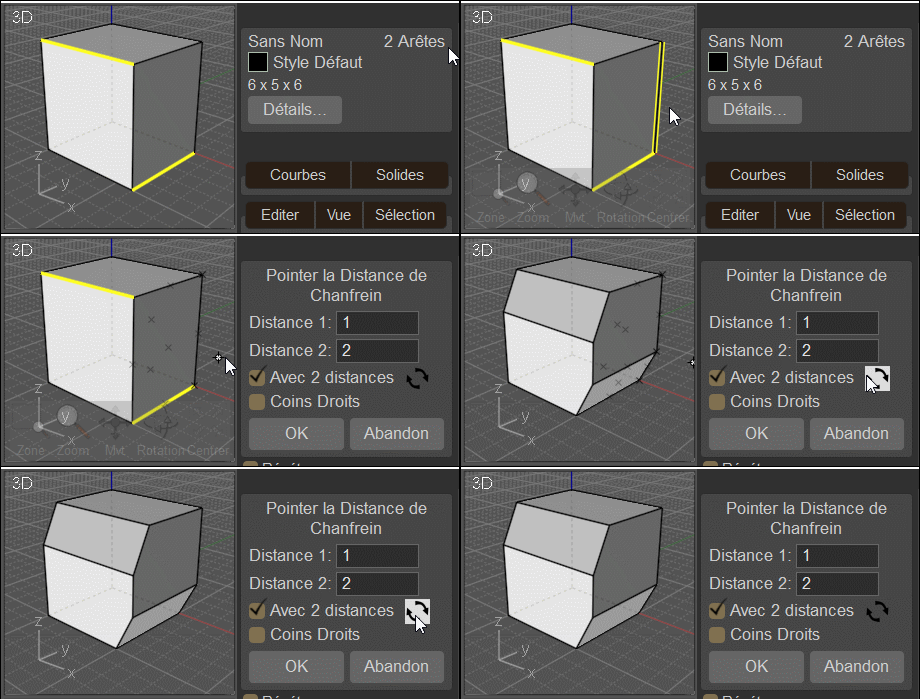
Can we have something like this, please. A quick way to exchange the two values when using the chamfer tool.

Attachments:

  Reply Reply More Options
Post Options
Reply as PM Reply as PM
Print Print
Mark as unread Mark as unread
Relationship Relationship
IP Logged

Previous
Next
 From:  Michael Gibson
10289.38 In reply to 10289.37 
Hi 3image,

re:
> Can we have something like this, please. A quick way to exchange the two values when
> using the chamfer tool.

Update the MoI v4 Chamfer.htm and Chamfer.js (in the install's commands folder) with the attached versions and also put the attached Swap.png inside the install's ui folder.

That should then give you a swap button like this:


- Michael

  Reply Reply More Options
Post Options
Reply as PM Reply as PM
Print Print
Mark as unread Mark as unread
Relationship Relationship
IP Logged

Previous
Next
 From:  Frenchy Pilou (PILOU)
10289.39 In reply to 10289.38 
Very cool! :)
---
Pilou
Is beautiful that please without concept!
My Moi French Site My Gallery My MagicaVoxel Gallery
  Reply Reply More Options
Post Options
Reply as PM Reply as PM
Print Print
Mark as unread Mark as unread
Relationship Relationship
IP Logged

Previous
Next
 From:  3image
10289.40 In reply to 10289.38 
That is so cool, Michael, thank you very much. I've missed something like this for years and finally decided to write a proposal in the forums.
  Reply Reply More Options
Post Options
Reply as PM Reply as PM
Print Print
Mark as unread Mark as unread
Relationship Relationship
IP Logged

Previous
Next
 From:  Frenchy Pilou (PILOU)
10289.41 
Seems very cool indeed! ;)
---
Pilou
Is beautiful that please without concept!
My Moi French Site My Gallery My MagicaVoxel Gallery
  Reply Reply More Options
Post Options
Reply as PM Reply as PM
Print Print
Mark as unread Mark as unread
Relationship Relationship
IP Logged

Previous
Next
 From:  Rich (-RB-)
10289.42 In reply to 10289.25 
'Quite often after creating the object from curves I want to do some operations using edges. And as I have curves in the same area I have to hide curves first. This quickly gets annoying.
In Rhino we get a little pop-up when there are multiple objects in the same place so the user can pick the desired one. That, or some setting which would allow you to define priority (for example edges over curves) would be great.'

Revit has a function where you just hit 'tab' and it cycles through the objects the mouse is hovering over. I miss it in other softwares...Very very handy, quick, and yes far less intrusive than the Rhino pop-up...

- Rich
  Reply Reply More Options
Post Options
Reply as PM Reply as PM
Print Print
Mark as unread Mark as unread
Relationship Relationship
IP Logged

Previous
Next
 From:  Mindset (IGNITER)
10289.43 In reply to 10289.21 
How can I setup Screenshot upon Save, in the meantime?
  Reply Reply More Options
Post Options
Reply as PM Reply as PM
Print Print
Mark as unread Mark as unread
Relationship Relationship
IP Logged

Previous
Next
 From:  Michael Gibson
10289.44 In reply to 10289.43 
Hi Mindset,

re:
> How can I setup Screenshot upon Save, in the meantime?

I've got filesystem plugins for showing .3dm thumbnails implemented for the next v5 beta, I'll try to get it wrapped up soon.

- Michael
  Reply Reply More Options
Post Options
Reply as PM Reply as PM
Print Print
Mark as unread Mark as unread
Relationship Relationship
IP Logged

Previous
Next
 From:  Mindset (IGNITER)
10289.45 In reply to 10289.44 
WOW❗
  Reply Reply More Options
Post Options
Reply as PM Reply as PM
Print Print
Mark as unread Mark as unread
Relationship Relationship
IP Logged

Previous
Next
 From:  feirui445
10289.46 In reply to 10289.45 
The menu bar can be customized to add plug-in functions?


Attachments:

  Reply Reply More Options
Post Options
Reply as PM Reply as PM
Print Print
Mark as unread Mark as unread
Relationship Relationship
IP Logged

Previous
Next
 From:  Michael Gibson
10289.47 In reply to 10289.46 
  Reply Reply More Options
Post Options
Reply as PM Reply as PM
Print Print
Mark as unread Mark as unread
Relationship Relationship
IP Logged

Previous
Next
 From:  feirui445
10289.48 In reply to 10289.47 
you can click an Add button, the commands folder will be displayed. If you select a plug-in, it will be displayed on the menu
  Reply Reply More Options
Post Options
Reply as PM Reply as PM
Print Print
Mark as unread Mark as unread
Relationship Relationship
IP Logged

Previous
 From:  BurrMan
10289.49 
Would love to see MoI get MDI tabs….
  Reply Reply More Options
Post Options
Reply as PM Reply as PM
Print Print
Mark as unread Mark as unread
Relationship Relationship
IP Logged
 

Reply to All Reply to All


Show messages:  1-9  10-29  30-49