MOI5 Wish list
 1-17  18-37  38-49

Previous
Next
 From:  Michael Gibson
10289.18 In reply to 10289.17 
Hi Salvatore,

re:
> So actually in that example the best would be more centre-left rather than
> bottom-left... Does it makes sense to you?

For that case I would recommend turning off "Center on page", that will make MoI use 0,0,0 as the page origin and you can move your objects to position them where you want to control where they will be printed at.

You can draw a rectangle starting at 0,0 and with your page width and height if you want a visual guide to see what area in model space is going to map to the output page.

- Michael
  Reply Reply More Options
Post Options
Reply as PM Reply as PM
Print Print
Mark as unread Mark as unread
Relationship Relationship
IP Logged

Previous
Next
 From:  Mr. Yuri (MR_JURAJ)
10289.19 
Hi All,
I would definitely welcome feature that would allow me to see cut object.

Meaning If I have a object, I would insert a plane and would be able to view from that plane so I know what is inside and how it looks if I cut along that plane.

Now I have to hide faces to get something similar.

This is very useful for multiple objects that have to fit together.

Illustration on picture.

Thanks a lot.
Juraj
Image Attachments:
Size: 87 KB, Downloaded: 52 times, Dimensions: 456x1279px
  Reply Reply More Options
Post Options
Reply as PM Reply as PM
Print Print
Mark as unread Mark as unread
Relationship Relationship
IP Logged

Previous
Next
 From:  Mindset (IGNITER)
10289.20 
Hello Michael,

I know that it's been discussed, well, so...
Just wondering, might a file system preview (thumbnail) be plausible for V5?

Big fan; Love your work,
MindSet
  Reply Reply More Options
Post Options
Reply as PM Reply as PM
Print Print
Mark as unread Mark as unread
Relationship Relationship
IP Logged

Previous
Next
 From:  Michael Gibson
10289.21 In reply to 10289.20 
Hi MindSet,

re:
> Just wondering, might a file system preview (thumbnail) be plausible for V5?

There's a decent possibility for that. The main pieces to make it work are implementing system plugins for Windows and Mac file managers.

- Michael
  Reply Reply More Options
Post Options
Reply as PM Reply as PM
Print Print
Mark as unread Mark as unread
Relationship Relationship
IP Logged

Previous
Next
 From:  Mindset (IGNITER)
10289.22 
Maybe? ....

Have a "Like Button" for discussion posts.

TNX
MindSet
  Reply Reply More Options
Post Options
Reply as PM Reply as PM
Print Print
Mark as unread Mark as unread
Relationship Relationship
IP Logged

Previous
Next
 From:  Phiro
10289.23 
Hi Michael,

I don't know if this request has been already done.
Is it possible to have the number of points of a curve in the curve properties of the Object properties when you show the details.

It is possible to have this informations with a sequence : - Show Points - Selection of the points of the curves - Details
But perhaps could you add this information in details of the Curve object.

Thanks
  Reply Reply More Options
Post Options
Reply as PM Reply as PM
Print Print
Mark as unread Mark as unread
Relationship Relationship
IP Logged

Previous
Next
 From:  Death
10289.24 In reply to 10289.19 
Regarding the print out questions:

There is so much software out there for printing, why turn MOI into a version of PrintShop?

Try this search on google: poster printing software, PrintShop, printing programs, etc...

That should do it.
  Reply Reply More Options
Post Options
Reply as PM Reply as PM
Print Print
Mark as unread Mark as unread
Relationship Relationship
IP Logged

Previous
Next
 From:  Przemas
10289.25 
Selection priority setting would be welcome or a pop-up asking which object should be selected (aka Rhino).

Quite often after creating the object from curves I want to do some operations using edges. And as I have curves in the same area I have to hide curves first. This quickly gets annoying.
In Rhino we get a little pop-up when there are multiple objects in the same place so the user can pick the desired one. That, or some setting which would allow you to define priority (for example edges over curves) would be great.
  Reply Reply More Options
Post Options
Reply as PM Reply as PM
Print Print
Mark as unread Mark as unread
Relationship Relationship
IP Logged

Previous
Next
 From:  Michael Gibson
10289.26 In reply to 10289.25 
Hi Przemas, it was actually a high priority during Moi's initial design phase to not have the object selection popup that I set up in Rhino, because it is so distracting popping up in your face all the time.

Moi does basically the opposite of that by showing you selection feedback while you are moving your mouse around so you can see what is going to be selected when you click. But the main area where this falls short is when there are curves right over top of edges like you mention. I would like to figure out some kind of pop up for this particular situation but I have not been able to come up with a good design for it as of yet.

- Michael
  Reply Reply More Options
Post Options
Reply as PM Reply as PM
Print Print
Mark as unread Mark as unread
Relationship Relationship
IP Logged

Previous
Next
 From:  Frenchy Pilou (PILOU)
10289.27 
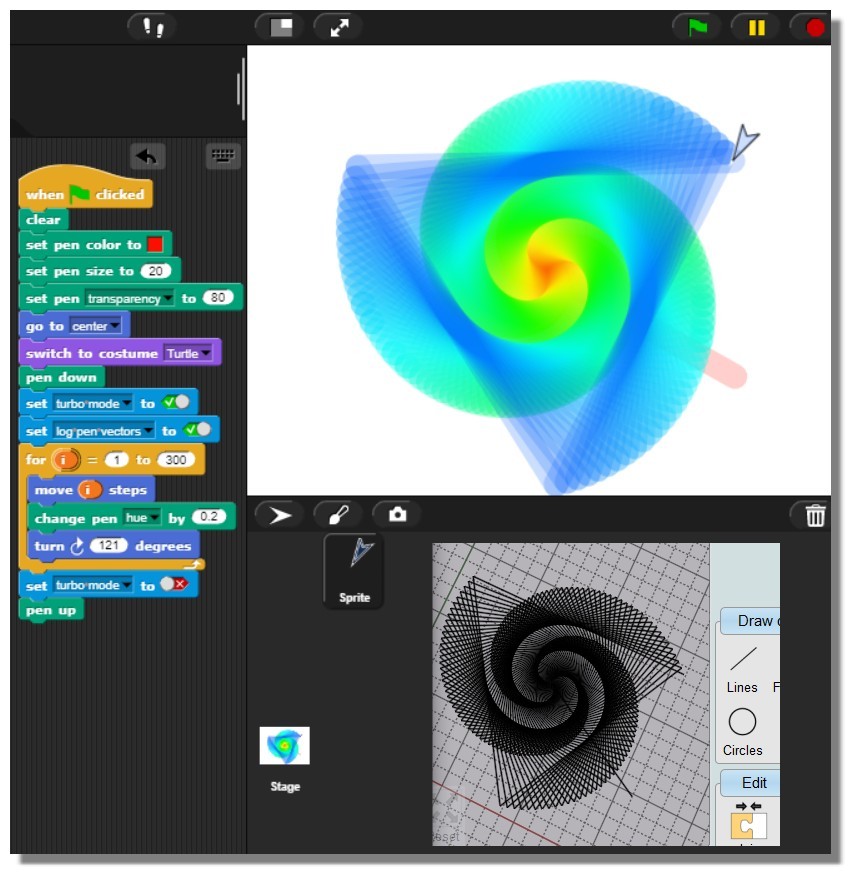
SVG format ? For this fun free Snap online from Berkeley! https://snap.berkeley.edu/snap
Works like a charm but here i must convert it! :)
(ps Jens Mönig is the creator of Snap)


EDITED: 29 Sep 2021 by PILOU

  Reply Reply More Options
Post Options
Reply as PM Reply as PM
Print Print
Mark as unread Mark as unread
Relationship Relationship
IP Logged

Previous
Next
 From:  Przemas
10289.28 In reply to 10289.26 
@Michael: For me a simple setting where you would be able to set a selection priority would suffice. As you already noticed it becomes a hassle only in a certain type of scenarios, for example when extruding.
  Reply Reply More Options
Post Options
Reply as PM Reply as PM
Print Print
Mark as unread Mark as unread
Relationship Relationship
IP Logged

Previous
Next
 From:  moritzbock (MORITZ)
10289.29 
Image size adjustment with values

Hi Michael, would it be possible to include resizing for background images based on values to be entered (see example photo)? Scaling with the mouse is too inaccurate.
-moritz

Attachments:

  Reply Reply More Options
Post Options
Reply as PM Reply as PM
Print Print
Mark as unread Mark as unread
Relationship Relationship
IP Logged

Previous
Next
 From:  Michael Gibson
10289.30 In reply to 10289.29 
Hi moritz,

re:
> Hi Michael, would it be possible to include resizing for background images based on values to
> be entered (see example photo)? Scaling with the mouse is too inaccurate.

Please try updating the ImagePropertiesDialog.htm file (in the ui subfolder in the install) with the new version attached here. That should then give width and height controls on the image properties dialog:


- Michael

  Reply Reply More Options
Post Options
Reply as PM Reply as PM
Print Print
Mark as unread Mark as unread
Relationship Relationship
IP Logged

Previous
Next
 From:  MajorGrubert (CARLOSFERREIRAPINTO)
10289.31 
Yes, that's ist quite usefull! Thanks Michael and Moritz.
  Reply Reply More Options
Post Options
Reply as PM Reply as PM
Print Print
Mark as unread Mark as unread
Relationship Relationship
IP Logged

Previous
Next
 From:  moritzbock (MORITZ)
10289.32 In reply to 10289.30 
Hello Michael, this file helped. As always, fast and competent "customer service". Many thanks for this.
-moritz
  Reply Reply More Options
Post Options
Reply as PM Reply as PM
Print Print
Mark as unread Mark as unread
Relationship Relationship
IP Logged

Previous
Next
 From:  aphaits
10289.33 
Not sure is this is a discussion I can add topic for more feature but here's my wish list entry.

https://www.youtube.com/watch?v=t0A0poACpfw
bevel/fillet feature like this video would be awesome for v5
watch from minute 16 on the video for the capability I mentioned.
  Reply Reply More Options
Post Options
Reply as PM Reply as PM
Print Print
Mark as unread Mark as unread
Relationship Relationship
IP Logged

Previous
Next
 From:  Michael Gibson
10289.34 In reply to 10289.33 
Hi aphaits, unfortunately fillets like that take something like 50 man years of development time to implement.

So it's not something that is easy for me to add directly on my own, it needs to come from a licensed library. There is a library that I've had my eye on that seems promising, but I'm not sure yet how difficult it will be to integrate it into MoI.

I've already worked on attempting similar integration with 2 other libraries so far without success yet.

Maybe the third time will be the charm though...

- Michael
  Reply Reply More Options
Post Options
Reply as PM Reply as PM
Print Print
Mark as unread Mark as unread
Relationship Relationship
IP Logged

Previous
Next
 From:  Frenchy Pilou (PILOU)
10289.35 
You can yet use the free 123D Design, or the free online Onshape for the problematic fillets! ;)
  Reply Reply More Options
Post Options
Reply as PM Reply as PM
Print Print
Mark as unread Mark as unread
Relationship Relationship
IP Logged

Previous
Next
 From:  aphaits
10289.36 In reply to 10289.34 
Here's hoping! :D
  Reply Reply More Options
Post Options
Reply as PM Reply as PM
Print Print
Mark as unread Mark as unread
Relationship Relationship
IP Logged

Previous
Next
 From:  3image
10289.37 
Can we have something like this, please. A quick way to exchange the two values when using the chamfer tool.

Attachments:

  Reply Reply More Options
Post Options
Reply as PM Reply as PM
Print Print
Mark as unread Mark as unread
Relationship Relationship
IP Logged
 

Reply to All Reply to All


Show messages:  1-17  18-37  38-49